Introduction
In our last lesson, you learned to play the role of a code auditor, spotting the exact lines where an application insecurely mixes user input with SQL commands. We identified that the core vulnerability is string concatenation, where raw user data becomes part of the executable query.
Today, we switch perspectives. You will now act as the vulnerable application itself. Your goal is to actively construct these dynamic SQL query strings from simulated user inputs. By manually piecing these queries together, you will gain a visceral understanding of how an attacker's crafted input fundamentally alters the command sent to the database. This is the final conceptual step before we begin launching our own attacks in the next module.
What is Dynamic SQL?
At its simplest, "dynamic SQL" refers to any SQL statement that is constructed and executed by an application at runtime. This is a common practice, allowing developers to build flexible queries based on user choices, such as search filters or sorting options.
The vulnerability arises not from dynamic SQL itself, but from how it's constructed. When user input is directly concatenated into the query string, the application is essentially letting the user write fragments of its code.
Let's see this process in action from a developer's point of view.
Prevent sql injection with dynamic sql
The video "Prevent sql injection with dynamic sql" provides an excellent demonstration of a developer intentionally building a dynamic query using string concatenation.
First, watch from this segment where the presenter builds a dynamic SQL statement in C# by appending values from text boxes. Notice the explicit string-building for the firstname, lastname, and other fields. Then, watch the devastating result of this approach from this attack demonstration. The key is to observe the final SQL string captured by the profiler when the malicious input is provided. You will see two distinct commands concatenated into one executable block.
The video shows how a simple search functionality can be turned into a tool for database destruction. The attacker's input wasn't just data; it contained SQL syntax (', ;, --) that was interpreted as code because of insecure concatenation.
Constructing an Authentication Bypass
Now that you've seen the mechanics, let's construct one of the most classic SQL injection attacks: bypassing a login form. We will use the common OR 1=1 tautology.
Imagine a login form that takes a username and password and builds a query like this in its backend code:query = f"SELECT * FROM users WHERE username = '{username}' AND password = '{password}'"
The application expects to find exactly one user that matches both the username and password.
Now, let's see what happens when an attacker provides malicious input.
The Attack:
- Username input:
admin'-- - Password input: (anything, it won't matter)
The Construction Process:
The backend application takes the username input and concatenates it into the query string:SELECT * FROM users WHERE username = ' + admin'-- + ' AND password = 'password123'
Let's clean this up to see what the database actually receives:SELECT * FROM users WHERE username = 'admin'--' AND password = 'password123'
Analysis:
- The query starts by looking for
username = 'admin'. - The
--that follows is the SQL comment operator. It tells the database to ignore everything else on that line. - The final, effective query executed by the database is simply:
SELECT * FROM users WHERE username = 'admin'
The entire password check (AND password = '...') is treated as a comment and ignored. If a user named admin exists, the application will grant access without a valid password.
The following video provides a fantastic, hacker-centric walkthrough of this process.
SQL Injections are scary!! (hacking tutorial for beginners)
In "SQL Injections are scary!!", NetworkChuck demonstrates how to think like an attacker to build these malicious query strings.
First, watch how an attacker probes for a vulnerability using a single quote. The resulting syntax error confirms that the input is being processed as part of the query. Next, observe the construction of an 'OR 1=1' payload from this section. Pay close attention to how the presenter analyzes the generated query to understand why 1=1 will always evaluate to true, bypassing the original logic. The presenter then fixes the syntax of the payload, which is a crucial step in a real attack. Finally, watch the walkthrough of the comment injection from this segment. This demonstrates the exact attack we just analyzed, showing visually how the -- operator neutralizes the password check.
Constructing a Stacked Query
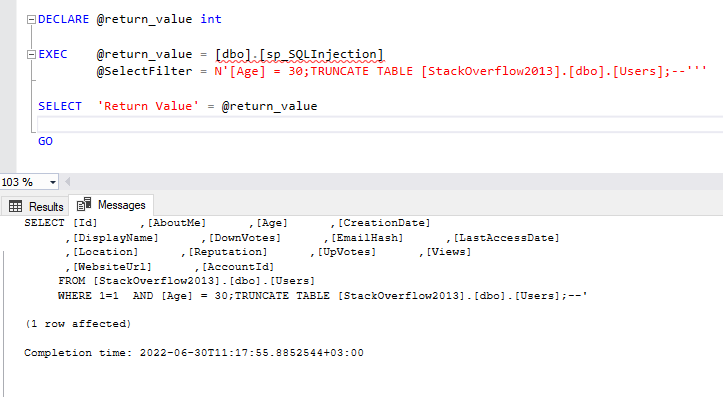
Let's examine another powerful technique: stacked queries. This involves using a semicolon (;) to terminate the original, legitimate query and start a new, malicious one.
In the previous lesson, you reviewed a vulnerable Python function, is_admin(). Now, let's see exactly how an attacker's input constructs a malicious command string using that function.
Preventing SQL Injection Attacks With Python
This section from the Real Python article "Preventing SQL Injection Attacks With Python" gives a crystal-clear example of constructing a malicious query string in Python.
Please read the section titled Exploiting Query Parameters. Focus on the two attack strings and the resulting queries they construct: Input: '; select true; -- Constructed Query: select admin from users where username = ''; select true; --' Here, the attacker injects a completely separate query (select true;) that guarantees a True return value, potentially tricking the application into granting admin privileges. Input: '; update users set admin = 'true' where username = 'haki'; select true; -- Constructed Query: The article shows how this input constructs a query that first terminates the SELECT statement, then runs a malicious UPDATE statement to permanently elevate a user's privileges.
This demonstrates that with the right syntax, the attacker's input doesn't just alter the WHERE clause—it can add entirely new, destructive commands to the execution batch.
Your Turn: Construct the Query
Let's test your understanding. Look at the following PHP code snippet, which is vulnerable to SQL injection.

If an attacker enters the following string into the input field for the id:1' OR '1'='1
What will be the exact, final SQL query string that is constructed by the PHP script and sent to the database?
Click to reveal the answer
The resulting query would be:SELECT first_name, last_name FROM users WHERE user_id = '1' OR '1'='1';
The WHERE clause is now user_id = '1' OR '1'='1'. Since '1'='1' is always true, the OR condition ensures the entire expression is true for every single row in the users table, likely returning all users instead of just one.
Conclusion
In this lesson, you have moved from passively identifying vulnerabilities to actively constructing the malicious queries that exploit them. You have seen firsthand how an application's backend code can be tricked into combining legitimate SQL with an attacker's payload, creating a single, dangerous command.
Key Takeaways:
- Dynamic SQL queries are constructed at runtime, and insecure concatenation is the root cause of SQL injection.
- Special characters like
',;, and--are the attacker's tools for manipulating query logic when they are treated as code instead of data. - By constructing these strings, we've seen how to perform authentication bypass, data destruction (
TRUNCATE TABLE), and privilege escalation (UPDATE).
You now have a complete picture of how a vulnerable query is born. In our final lesson of this module, we will contrast this insecure method with the correct, safe alternative: parameterized queries, which create a strict separation between code and data, rendering these attacks impossible.