Introduction
In our last lesson, we traced the high-level journey of user data from a web form to the database, establishing that the critical point of failure occurs when a backend script insecurely constructs a SQL query. You now understand the path of a potential attack. Today, we shift our focus from the path to the "crime scene" itself: the specific lines of code where the vulnerability is born.
Our objective is to train your eye to spot the exact coding patterns that lead to SQL injection. We will focus on identifying where unsanitized user input is concatenated into SQL queries. Mastering this code-review skill is fundamental for any security analyst, as it allows you to find the root cause of the vulnerability before an attacker does.
The Anatomy of a Vulnerable Query
At its heart, SQL injection is a problem of blurred boundaries. It happens when the application fails to distinguish between the SQL code written by the developer and the data provided by the user. The vulnerability is created at the moment these two are mixed together in a process called string concatenation.
Unsanitized input is any data that comes from a user (or any external source) that has not been validated, cleaned, or properly handled to remove potentially malicious characters. When this raw input is directly joined, or concatenated, with a static SQL query string, the application effectively lets the user co-author the command sent to the database.
The video below provides a succinct explanation of this core problem.
SQL Injection Prevention: Security Simplified
This video, "SQL Injection Prevention: Security Simplified" by Vickie Li Dev, clearly explains why mixing code and data is the fundamental issue.
Please watch the segments from the introduction and the explanation of query execution. The key insight is that when you insert user input into a query string, you are "rewriting your program dynamically using user input."
This dynamic rewriting is precisely what we need to learn to spot.
Spotting Insecure Concatenation in Code
Let's move from theory to practice. As a security analyst, you'll spend a lot of time reviewing code. Your task is to find the exact line where user input is embedded into a query string. Python is a common language for web backends, and its various string formatting methods are frequent culprits.
A Live Demonstration
The following video walks through a simple but dangerously vulnerable Python Flask application. It provides a perfect visual of how user input is taken from a web request and fed directly into a SQL query.
[#E02] Secure Code Review for Beginners: SQL Injection
In "[#E02] Secure Code Review for Beginners: SQL Injection," the presenter from Muqsit Baig | Cyber Security clearly highlights the vulnerable code.
First, watch the brief segment from this timestamp, where the presenter states, "we are directly feeding those variables inside the select query." Next, watch the detailed explanation from the code analysis. The presenter zooms in on line 20 and shows exactly how the username variable, containing raw user input, is placed into the query string. This is the moment of concatenation.
A Text-Based Code Review
Now, let's analyze a code snippet from a detailed tutorial. This example uses an older style of string formatting in Python, but the principle is identical.
Preventing SQL Injection Attacks With Python
This article from Real Python provides excellent "bad examples" that clearly illustrate vulnerable code patterns.
Please read the section titled "Using Query Parameters in SQL". Focus on the implementation of the is_admin function. The critical line is: cursor.execute("""... WHERE username = '%s'""" % username) This code uses the % operator to format the string, replacing %s with the content of the username variable. The database receives a single, fully formed string with the user's input already embedded. This is a classic, textbook example of insecure string concatenation.
This pattern is so dangerous because any special characters in the username variable become part of the SQL command itself. The next section of that same article demonstrates the exploit, showing how an input like '; select true; -- breaks the original query and injects a new one.

A Rogues' Gallery of Insecure Patterns
The specific syntax for string concatenation varies, but the flawed logic is always the same. As you review code, you must be vigilant for any method that builds a SQL query by mixing it with raw user input. Here are some of the most common insecure patterns you will encounter in Python:
- Classic Concatenation (
+):
query = "SELECT ... WHERE username = '" + username + "'" - Old-Style Formatting (
%):
query = "SELECT ... WHERE username = '%s'" % username - Modern Formatting (
.format()):
query = "SELECT ... WHERE username = '{}'".format(username) - F-Strings (Python 3.6+):
query = f"SELECT ... WHERE username = '{username}'"
The CodeSignal resource below provides another excellent example, this time using f-strings, which are very common in modern Python code.
Query Parameter Injection | CodeSignal Learn
This lesson from CodeSignal directly addresses the danger of using f-strings for SQL queries.
Read the sections "The Vulnerable Code". The article explicitly points out the line query = text(f"SELECT * FROM snippets WHERE title LIKE '%{term}%'") as the vulnerability. It correctly states that this method "mixes the static SQL command with dynamic, user-controlled data."
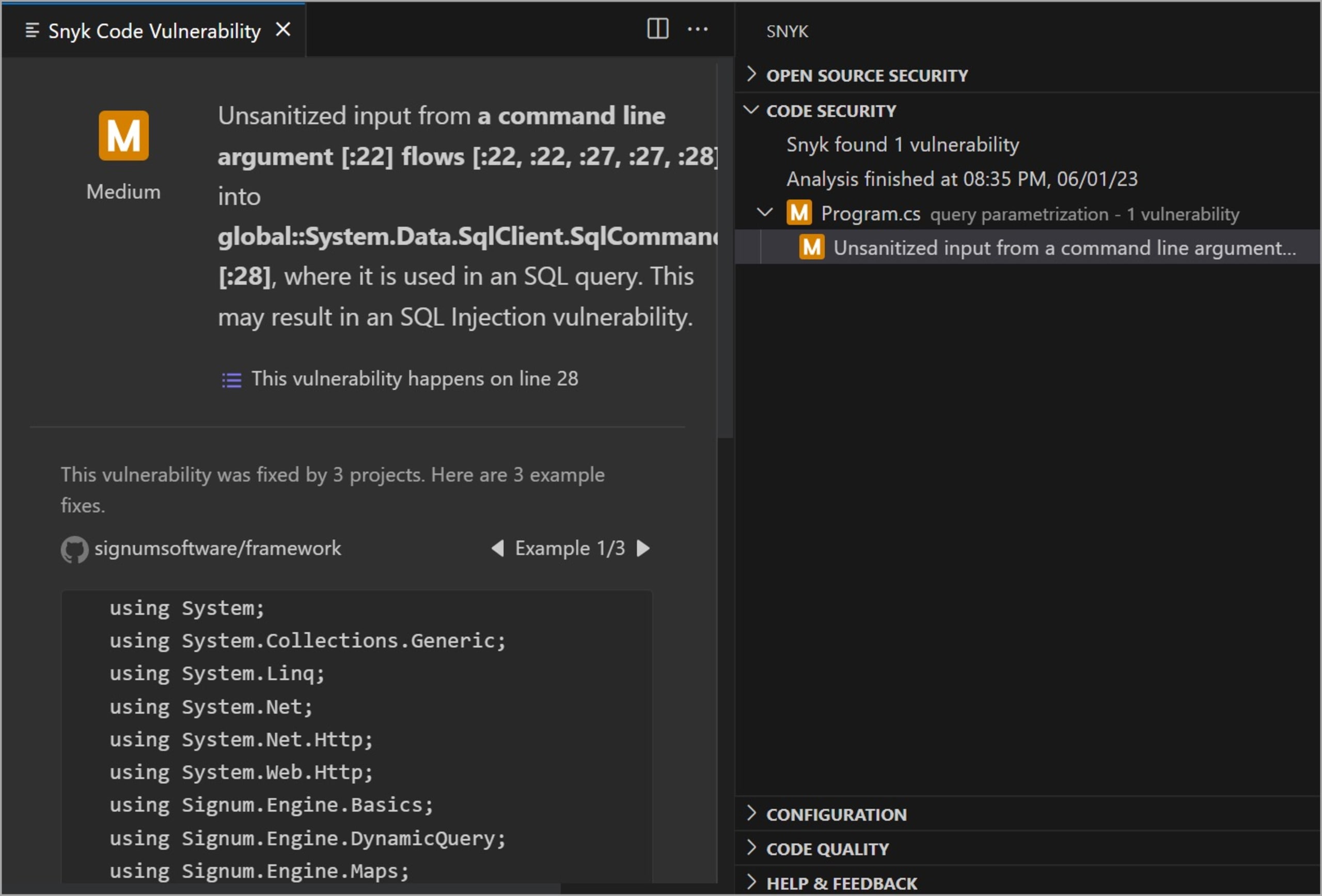
Regardless of the syntax, if you see a pattern like those above, you have likely found an SQL injection vulnerability. Automated Static Application Security Testing (SAST) tools are designed to find exactly these patterns by tracing the flow of data from an untrusted source (like a web request) to a sensitive "sink" (like a database query execution function).
Conclusion
In this lesson, we have moved from the abstract data flow to the concrete reality of vulnerable code. You have learned to identify the precise moment a web application makes the critical error of mixing user data with SQL commands through string concatenation.
Key Takeaways:
- The root cause of SQL injection is the concatenation of unsanitized user input with a SQL query string.
- This insecure mixing of code and data allows an attacker to alter the logic of the query.
- Be vigilant for common string-building patterns like using
+,%,.format(), or f-strings to construct SQL queries. These are red flags during a code review. - Automated security tools are trained to detect these data flow patterns, from an untrusted "source" to a database "sink."
You can now spot the "crime scene" in the code. In our next lesson, you will get hands-on experience with this concept by actively constructing your own dynamic SQL query strings from user input. This exercise will solidify your understanding of how these vulnerable queries are built, preparing you to exploit them in the following module.