Introduction
In our last lesson, you acted as a database security auditor, meticulously examining configurations from the inside to find permissions-related weaknesses. We established how to secure the database itself. Now, we will pivot to view the system from an attacker's perspective, focusing on the primary channel through which databases are compromised: the web application.
Today's lesson is the crucial bridge between the database and the outside world. Our objective is to trace the complete journey of user input—from the moment a user types into a web form to the instant a SQL query is executed by the database. Understanding this data flow is the anatomical basis for SQL injection. You will learn to map this path, which is the first and most critical step before you can learn to exploit the vulnerabilities that lie along it.
The Journey of Data: From Browser to Database
Every interaction with a data-driven website follows a predictable path. Let's break this down into four distinct steps.
1. The Frontend: The HTML Form
The journey begins in the user's browser with an HTML form. This is the user interface for data collection.
How to Insert Form Data into Database using PHP ?
This article from GeeksForGeeks provides a clear, foundational example of how a web form is structured and how it sends data to a server.
First, read the brief overview of HTML forms. Then, examine the full HTML code block provided. Pay close attention to two key attributes in the <form> tag: action="insert.php" which tells the browser where to send the data, and method="POST", which specifies how to send it.
The method can be GET (data is appended to the URL) or POST (data is sent in the body of the HTTP request). From a security perspective, understanding which method is used is important, as GET requests place the data directly in the browser history and server logs, making it more visible.
2. The Transmission: The HTTP Request
Once the user clicks "Submit," the browser packages the form data into an HTTP request and sends it to the server specified in the action attribute. As a security analyst, you are likely familiar with intercepting and analyzing these requests using tools like Burp Suite or OWASP ZAP.

3. The Backend: Server-Side Processing
The web server receives the HTTP request and passes it to a server-side script (e.g., written in PHP, Python, Java, or Node.js). This script is responsible for processing the data.
This is the most critical stage in our analysis. The script extracts the user's data from the request and uses it to perform some action. In our case, it will construct a SQL query. The fundamental flaw that enables SQL injection is dynamically constructing a SQL query string by concatenating it with untrusted user input.
Let's examine the PHP code that receives the data from the form we looked at earlier.
How to Insert Form Data into Database using PHP ?
Now, let's look at the insert.php file that handles the form submission.
Focus on the PHP code block. Notice how the script retrieves the submitted data using the $_POST superglobal array, for example, $_POST['first_name']. Then, observe how these variables are directly embedded (concatenated) into the $sql string: VALUES ('$first_name', '$last_name', ...). This is the exact pattern of insecure coding we are looking for.
4. The Execution: The Database Server
Finally, the web application sends the fully constructed SQL query string to the database server. The database has no concept of what was user input and what was intended code; it simply receives a string and executes the command. If an attacker successfully manipulates the query string in the previous step, the database will dutifully execute the malicious command.
This entire flow is what an attacker seeks to subvert.
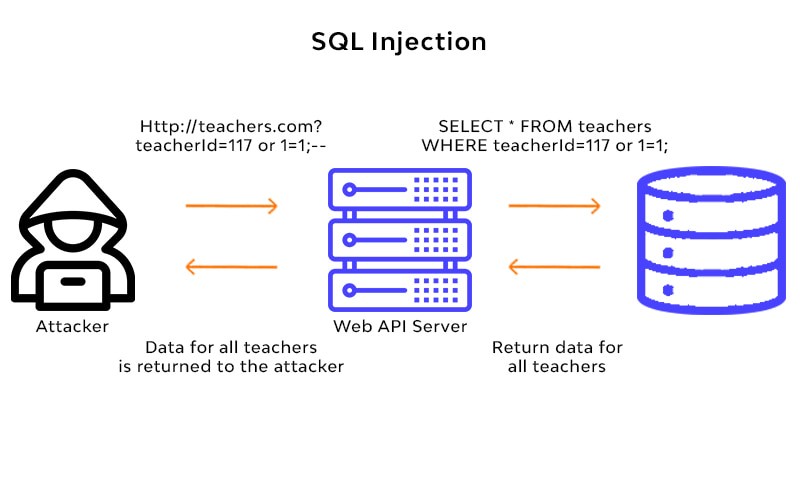
Visualizing the Vulnerability in Action
Let's see how this theoretical flow translates into a practical exploit. The videos below demonstrate how an attacker manipulates the input in step 1 to corrupt the query generated in step 3.
Never Trust User Input. A look at how to prevent SQL Injection Attacks
This short video from the channel quidsup shows a classic tautology-based injection.
Watch the demonstration from this section. The attacker enters ' or 1=1 into a search field. Pay close attention when the video shows the resulting SQL query: ...WHERE surname = '' OR 1=1. Because 1=1 is always true, the WHERE clause evaluates to true for every single row in the table, causing the database to return all records.
The next video provides a slightly different but equally common technique: using a comment character to nullify the rest of the original query.
How Hackers Use SQL Injection to Get Into Websites
This video from Neurix explains how an attacker can bypass a login form by commenting out the password check.
First, watch the explanation of the normal login query. The backend is expecting to build a query like: SELECT * FROM users WHERE username = '...' AND password = '...'. Next, see how the attacker's input of sally_admin'# transforms this query during construction. The # character is a comment in MySQL. The resulting query becomes ...WHERE username = 'sally_admin', and the entire password check is ignored by the database. Finally, see the attacker perform the attack and successfully log in.
Tracing the Flaw in a Vulnerable Application
To solidify your understanding, let's trace this flow within the context of a well-known vulnerable application, Damn Vulnerable Web Application (DVWA). The following resource analyzes the application's source code. Your task is to read the analysis and connect the pieces: the user interface, the vulnerable code, and the resulting query.
Data Pirates' Toolkit - Whitepaper Name Goes Here
This whitepaper provides a detailed analysis of the low-security SQL injection challenge in DVWA. It's a perfect case study for tracing the flow of user input.
First, read the section "User Interface Review". This describes the front-end input field and notes that the data is submitted via a GET request, making the parameter visible in the URL. Next, and most importantly, read the "PHP Code Review". This section is the core of our lesson. Pay close attention to: Line 4, where user input is pulled from $_REQUEST without any validation. Line 7, where the $id variable containing that raw user input is directly concatenated into the SELECT statement. The text explicitly explains how an input like 1' OR '1'='1 transforms the query, bypassing the intended logic.
By completing this reading, you have successfully traced user input from a form, through an insecure backend script, and observed how it results in a vulnerable SQL query.
Conclusion
In this lesson, you have mapped the critical path that data takes from a web browser to a database. This is the playing field for some of the most common and impactful web application attacks.
Key Takeaways:
- The data journey follows four main steps: Frontend Form -> HTTP Request -> Backend Processing -> Database Execution.
- The root cause of classic SQL injection is the concatenation of untrusted user input directly into a SQL query string.
- The database cannot distinguish between the developer's intended code and the attacker's injected code; it executes the final string it receives.
- Simple inputs like
' OR '1'='1'or'--can fundamentally alter a query's logic, leading to data leaks or authentication bypass.
You now understand how and where a query is constructed. In our next lesson, we will build directly on this foundation. You will learn to spot these unsafe concatenation patterns in different code examples, honing your ability to identify SQL injection vulnerabilities through code review—a skill highly valued in your field of security analysis.