In our last lesson, we focused on aggregate functions, which are excellent for creating high-level summaries of your data. We concluded by previewing that our next step would be to zoom in on the data itself, specifically on manipulating text. This lesson delivers on that promise by introducing SQL's powerful string functions.
Today, you will learn to use CONCAT, LENGTH, and SUBSTRING. These functions are fundamental for cleaning and formatting data for analysis. More critically for your goals, they are the essential building blocks for data exfiltration in many SQL injection attacks. Understanding how to use them is the first step toward understanding how an attacker can use them against a vulnerable system to steal information piece by piece.
Concatenating Strings with CONCAT
The first function, CONCAT, is straightforward: it joins two or more strings together into a single string. This is frequently used to combine columns like a first and last name into a full name, or to construct more readable log entries from different data points.
The video below gives a quick and clear demonstration of how CONCAT works.
String Functions in MySQL | Intermediate MySQL Series
Watch this short segment from the "String Functions in MySQL" video by Alex The Analyst. It provides a simple, practical example of creating a full_name column.
Focus on the demonstration of the CONCAT function, which starts at this timestamp. Notice how a literal space character, ' ', is included as an argument to properly separate the names.
As you saw, the basic syntax is CONCAT(string1, string2, ...). For example, in a security context, you might combine a username and their source IP address for a log summary:
SELECT CONCAT(username, ' connected from ', source_ip) AS connection_log
FROM access_logs
LIMIT 5;
Measuring Strings with LENGTH
Next is the LENGTH function. As its name implies, it returns the number of characters in a string. While simple, this function is surprisingly useful for data quality and validation checks—a common task for a security analyst. For instance, you could quickly find records where a supposedly fixed-length identifier, like a credit card number or a state code, has an incorrect length, indicating a data corruption or entry issue.
This next video highlights this practical use case for data quality.
The Only SQL String Functions Video You Need - SUBSTR, CONCAT, TRIM, LENGTH & More!
Now, watch a segment from Sumit Mittal's video "The Only SQL String Functions Video You Need". Pay close attention to his explanation of using LENGTH to perform data quality checks.
Watch the section from this timestamp, where the instructor demonstrates how to find records where the state code is not two characters or the zip code is not five characters long.
This is a powerful concept for security. In log analysis, you might use LENGTH to flag suspiciously short or long log entries that deviate from the norm, which could indicate a malformed request or an attempt to trigger a buffer overflow.
Extracting Substrings with SUBSTRING
The SUBSTRING function (sometimes aliased as SUBSTR) is arguably the most powerful and versatile of the three. It allows you to extract a portion of a string. The syntax is SUBSTRING(string, start_position, length).
string: The source string.start_position: The character position to start extracting from (note: SQL string indexing starts at 1, not 0).length: The number of characters to extract.
The following image shows a simple query using SUBSTR (an alternative name for SUBSTRING in MySQL and other databases) to get the first three letters of a concatenated full name.
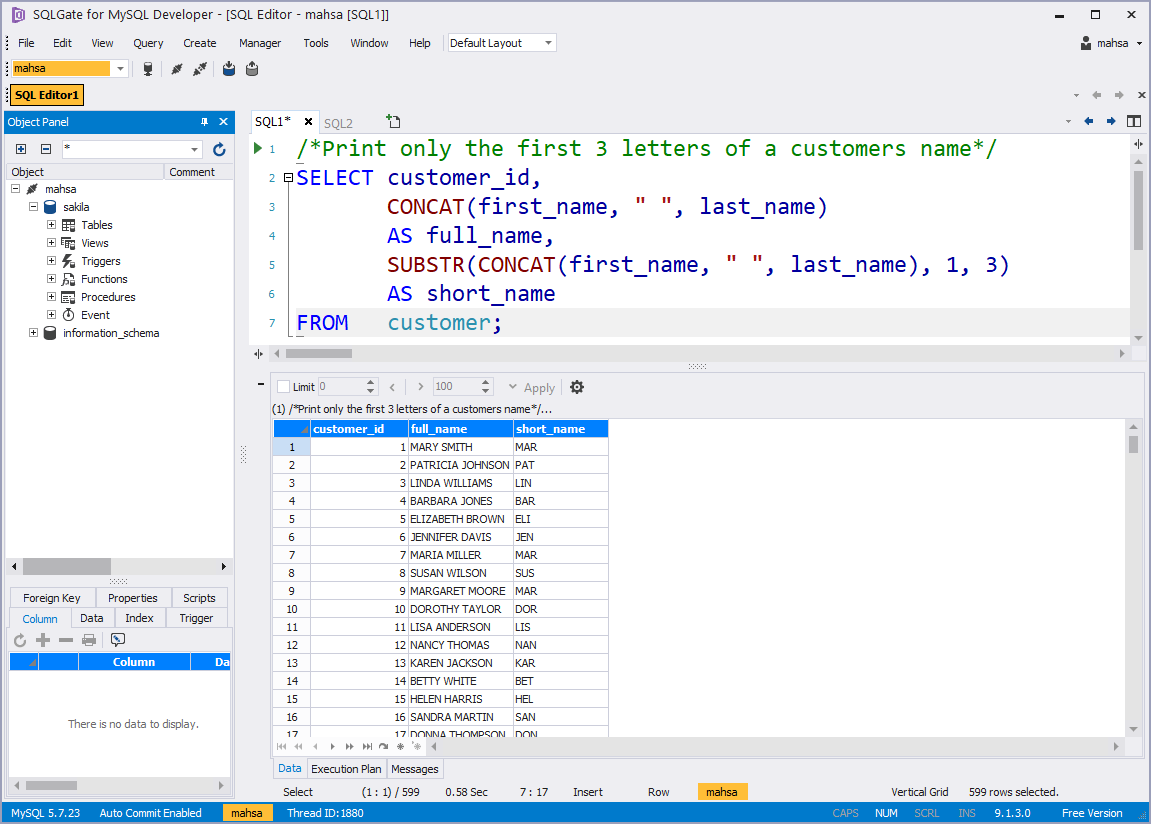
SUBSTRING becomes truly powerful when its arguments are dynamic, not fixed numbers. This is where we begin to see the direct link to SQL injection.
Combining Functions for Advanced Extraction
To perform sophisticated data manipulation, you will often nest functions inside each other. A common pattern is to use one function to find a position within a string, and then feed that position into SUBSTRING to extract text relative to that point.
To do this, we need a function to find the position of a character or substring. In MySQL, this is LOCATE(substring, string) or INSTR(string, substring). In SQL Server, it's CHARINDEX(substring, string). They all return the starting numerical position of the first occurrence of the substring.
Let's see an excellent practical example of this.
The Only SQL String Functions Video You Need - SUBSTR, CONCAT, TRIM, LENGTH & More!
Watch this segment from Sumit Mittal's video again. Here, he demonstrates a more complex task: extracting the street number from a full address.
Watch how he combines SUBSTRING with LOCATE to dynamically find the end of the number. The explanation starts at this timestamp. Notice how he uses LOCATE(' ', customer_street) to find the position of the first space, and then - 1 to get the length of the characters before it.
This technique is extremely common. For instance, to extract the domain name from an email address, you would LOCATE the '@' symbol and then use SUBSTRING to grab everything after it.

The Bridge to SQL Injection
Now, let's connect these functions directly to your goal of learning SQL for ethical hacking. In a blind SQL injection attack, the attacker doesn't get direct error messages or query results. Instead, they must infer information based on whether a query returns TRUE or FALSE (e.g., does the page load or not?).
String functions are the key to this. The attacker constructs queries to ask one true/false question at a time to exfiltrate data character-by-character.
-
First, find the length of the target data. An attacker might start by asking, "Is the length of the administrator's password 1 character? 2? 3?..."
-- Is the length of the 'admin' user's password greater than 10?
... WHERE user_id = '1' AND (SELECT LENGTH(password) FROM users WHERE username = 'admin') > 10
By observing the application's response, they can zero in on the exact length.
-
Second, extract each character. Once the length is known, the attacker extracts each character by asking, "Is the first character of the password 'a'? 'b'? 'c'?... Is the second character 'a'? 'b'?...". The
SUBSTRINGfunction is perfect for this.-- Is the first character of the admin's password 'a'? ... WHERE user_id = '1' AND (SELECT SUBSTRING(password, 1, 1) FROM users WHERE username = 'admin') = 'a'
The following article gives a real-world walkthrough of this exact process using Burp Suite to automate the attack. This is a crucial piece to understand.
Blind SQL Injection Exploitation With Burp Suite I Predatech
This article from Predatech demonstrates a complete blind SQL injection attack. Focus on the SQL payloads being used.
Read the section "Identify the Number of Characters in the Current Database Name". See how the LENGTH(database()) function is used to determine the length of the database name. Next, read the following section. Pay close attention to the payload: ... and ascii(substr(database(),1,1))=1. This payload uses SUBSTR to select one character at a time (substr(database(),1,1) selects the first character, substr(database(),2,1) selects the second, and so on) and compares its ASCII value to guess the character. This is the core technique for exfiltrating data when you can't see the output directly.
By iterating through character positions and possible character values, an attacker can reconstruct entire passwords, user data, or table contents, all without ever seeing a direct query result.
Conclusion
In this lesson, you've learned to manipulate text using CONCAT, LENGTH, and SUBSTRING. While useful for legitimate data formatting, their true power in a cybersecurity context lies in their ability to deconstruct and exfiltrate data one piece at a time.
Key Takeaways:
CONCATjoins multiple strings into one.LENGTHmeasures the number of characters in a string.SUBSTRINGextracts a specific portion of a string.- The combination of
LENGTHandSUBSTRINGis the fundamental mechanism behind data exfiltration in blind SQL injection attacks.
We've now covered summarizing data with aggregate functions and manipulating text with string functions. In the next lesson, we will combine these ideas. You'll learn to use the GROUP BY clause, which allows you to run aggregate functions on subsets of your data. This is how you move from asking "How many failed logins were there in total?" to "How many failed logins were there for each user?", a much more powerful query for detecting targeted attacks.