Welcome to the second module of our course. In the previous module, you mastered the art of retrieving specific, individual rows from a database using foundational commands like SELECT, WHERE, and ORDER BY. You practiced this by acting as a security analyst querying a user database.
Today, we shift our perspective from looking at individual trees to seeing the entire forest. This lesson introduces aggregate functions, a set of powerful tools in SQL that allow you to summarize large amounts of data into single, meaningful values. We will cover the five most common aggregate functions: COUNT, SUM, AVG, MIN, and MAX. For a security analyst, this is a critical skill for tasks like threat hunting and log analysis, where you need to quickly identify anomalies and trends from millions of records.
What are Aggregate Functions?
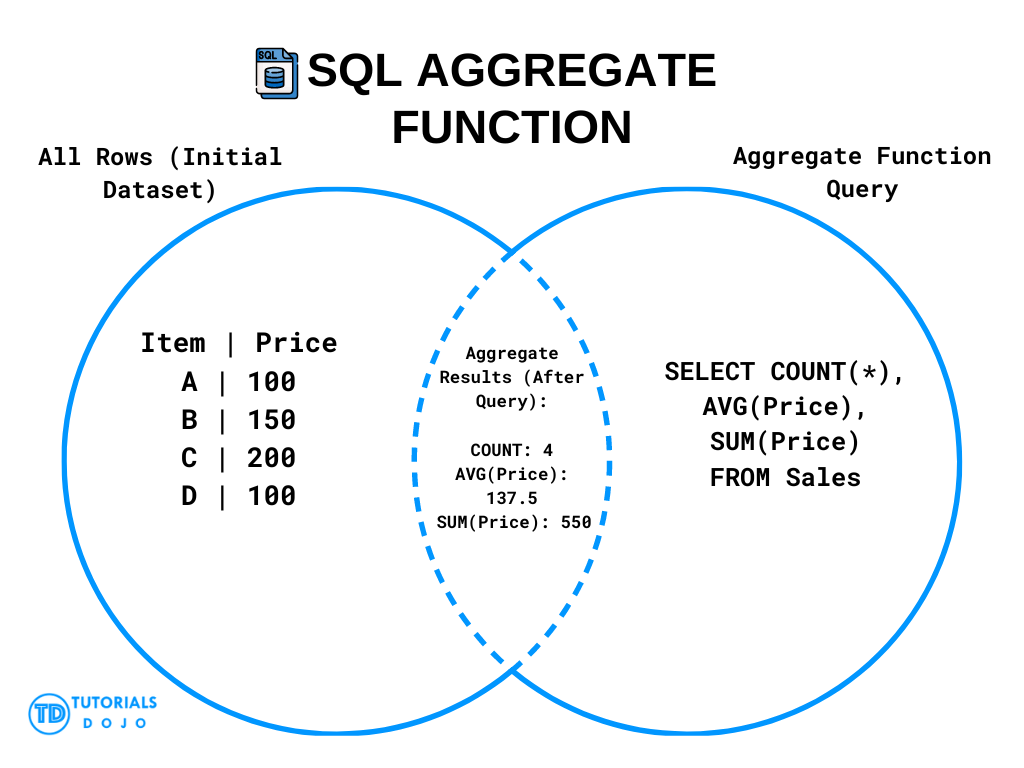
Aggregate functions operate on a set of rows and return a single, calculated value. Imagine you have a table with thousands of login attempt records. Instead of viewing each record one by one, you might want to ask:
- How many total attempts were there? (
COUNT) - What was the highest number of failed attempts for a single user? (
MAX) - What was the average number of attempts before a successful login? (
AVG)
These functions distill large datasets into concise, actionable intelligence.
The Five Core Aggregate Functions
We'll now explore the five essential aggregate functions. The following video provides a clear and concise introduction to each one, first explaining the concept and then demonstrating it with a practical query.
SQL Aggregate Functions | COUNT, SUM, AVG, MAX, MIN | #SQL Course 21
Watch this video from Data with Baraa to get a solid overview of the basic aggregate functions. It's broken down into short, easy-to-digest segments.
Please watch the following segments in order: Introduction (the concept): A quick overview of what aggregate functions do. COUNT (the concept and the query): Learn how to count rows. SUM (the concept and the query): Learn how to calculate the total of a numeric column. AVG (the concept and the query): Learn how to find the average of a numeric column. MAX (the concept and the query): Learn how to find the highest value. MIN (the concept and the query): Learn how to find the lowest value.
Let's briefly summarize what you just saw:
COUNT(): Counts the number of rows.COUNT(*)counts all rows in the selection, whileCOUNT(column_name)counts all rows wherecolumn_nameis notNULL.SUM(): Calculates the sum of all values in a numeric column. It ignoresNULLvalues.AVG(): Calculates the average of all values in a numeric column. It also ignoresNULLvalues.MAX()andMIN(): Return the maximum and minimum values in a column, respectively. These can be used on numeric, text, or date columns.
Aggregation in a Security Context
Now, let's see how these functions are used in a real-world security operations (SecOps) context. The following article provides examples of using SQL for exploratory data analysis on security-related data.
Introductory SQL for SecOps: Exploratory Data Analysis ...
This article from query.ai demonstrates how SQL is used to analyze security data. Pay close attention to how they use aggregate functions to derive insights from the data.
First, read the section on the COUNT() function to see how it's used for basic dataset sizing. Start reading from this paragraph. Then, skip down to the section on other statistical functions. Read the part that introduces AVG(), MAX(), and MIN() and shows them being used to analyze risk and severity levels. Start reading from this section and examine the final query example.
As you can see, these functions are invaluable for getting a quick summary of risk levels, event severity, or the frequency of specific indicators within a large dataset.
Hands-On Practice with the users Table
Let's apply these functions to the users table from our previous lesson. This will help connect the new concepts to the data you're already familiar with. If you are using an online tool like DB Fiddle, make sure the users table schema from the last lesson is still loaded.
1. Count High-Risk Accounts
In an audit, you might need to know how many accounts are in a risky state. Let's count the number of 'locked' accounts.
SELECT COUNT(*)
FROM users
WHERE account_status = 'locked';
This query first filters the table to include only rows where account_status is 'locked', and then COUNT(*) counts how many such rows exist.
2. Analyze Failed Login Attempts
Understanding failed login patterns is key to detecting brute-force attacks.
- What is the highest number of failed attempts against any single account?
- What is the average number of failed attempts across all accounts?
SELECT
    MAX(failed_login_attempts) AS highest_single_attempt_count,
    AVG(failed_login_attempts) AS average_attempt_count
FROM users;
Here, we use MAX() to find the peak value and AVG() to get a baseline. The AS keyword, which we'll cover formally later, simply renames the output columns for better readability. A high MAX value with a low AVG value could indicate a targeted attack on one account.
3. Find the Earliest Created Account
To understand the history of the system, you might want to find the very first user account.
SELECT MIN(created_at) AS first_account_created
FROM users;
The MIN() function works on dates just as it does on numbers, returning the earliest timestamp.
As another practical example from the world of security logging, consider analyzing network traffic data. The article "Sample SQL queries" from Google Cloud shows how you can calculate the average latency of HTTP requests, which can be useful for identifying performance issues that might signal a denial-of-service attack. A query for that might look something like this:
-- Conceptual Example
SELECT AVG(http_request.latency.seconds)
FROM 'cloud_log_data'
WHERE http_request.request_method = 'GET';
This demonstrates how AVG() can be used to monitor the health and performance of a system, a common task in security monitoring.
Conclusion
In this lesson, you've added a crucial set of tools to your SQL arsenal. Aggregate functions shift your focus from individual records to high-level summaries, enabling you to analyze large volumes of data efficiently.
Key Takeaways:
- Aggregate functions (
COUNT,SUM,AVG,MIN,MAX) perform a calculation on a set of rows and return a single summary value. - They are essential for summarizing data, identifying trends, and finding outliers in large datasets like security logs.
- These functions can be combined with the
WHEREclause to compute summaries on filtered subsets of your data.
You've learned how to summarize numerical and date-based data. In our next lesson, we will turn our attention to text. You'll learn about string functions like CONCAT and SUBSTRING. These are not only useful for formatting output but are the absolute cornerstone of data exfiltration techniques used in many SQL injection attacks, allowing an attacker to extract sensitive information from a database one character at a time.