Welcome to the final lesson of our first module! Over the past few lessons, you've built a solid foundation by learning the essential components of a SQL query: SELECT, FROM, WHERE, ORDER BY, and LIMIT. You've also learned how to use various operators to filter data with precision.
Today, we'll put all those pieces together. This lesson is a hands-on practice session where you'll act as a security analyst querying a sample user accounts database. Your goal is to use the skills you've acquired to extract security-relevant information, just as you would during an audit, investigation, or initial reconnaissance phase of a penetration test. This will cement your understanding of foundational queries and prepare you for the more advanced topics ahead.
The Scenario and Your Environment
You have been given access to a database containing a users table for a web application. Your task is to perform a series of checks to identify potential security issues.
To get started, you'll need an environment to run SQL queries. For a quick and easy setup, I recommend using an online SQL editor like DB Fiddle.
- Open the link.
- On the left panel, make sure MySQL 8.0 is selected.
- You will paste the table creation code into the "Schema Panel" on the left and the practice queries into the "Query Panel" on the right.
This method avoids any local installation and lets you focus entirely on the queries.
Creating and Populating the users Table
First, let's create our sample users table and populate it with data. This table is designed to mimic a real-world user accounts table, containing information a security analyst would find valuable.
Copy the entire SQL block below and paste it into the Schema Panel on the left side of DB Fiddle. After pasting it, click the "Run" button at the top. The "Schema built" message will appear, and you'll be ready to start querying.
CREATE TABLE users (
    user_id INT AUTO_INCREMENT PRIMARY KEY,
    username VARCHAR(50) UNIQUE NOT NULL,
    email VARCHAR(100) UNIQUE NOT NULL,
    password_hash VARCHAR(255) NOT NULL,
    account_status ENUM('active', 'locked', 'disabled') NOT NULL DEFAULT 'active',
    failed_login_attempts INT NOT NULL DEFAULT 0,
    last_login_timestamp TIMESTAMP NULL,
    last_login_ip VARCHAR(45) NULL,
    created_at TIMESTAMP DEFAULT CURRENT_TIMESTAMP
);

INSERT INTO users (username, email, password_hash, account_status, failed_login_attempts, last_login_timestamp, last_login_ip, created_at) VALUES
('admin', 'admin@example.com', '098f6bcd4621d373cade4e832627b4f6', 'active', 0, '2023-10-26 10:00:00', '192.168.1.1', '2022-01-01 12:00:00'),
('j.doe', 'j.doe@example.com', 'a3dcb4d229de6fde0db5686dee47145d', 'active', 2, '2023-10-25 14:30:00', '10.0.0.5', '2022-03-15 09:30:00'),
('m.smith', 'm.smith@example.com', '21232f297a57a5a743894a0e4a801fc3', 'locked', 5, '2023-10-24 09:15:00', '172.16.0.10', '2022-05-20 18:00:00'),
('s.jones', 's.jones@example.com', 'efd71ea42f47055f15e5c1539a2428f5', 'active', 0, '2023-10-26 11:00:00', '192.168.1.20', '2022-08-10 11:45:00'),
('temp_user', 'temp@example.com', 'b6741b71485651cb9cb497672dc6454d', 'disabled', 0, NULL, NULL, '2023-09-01 14:00:00'),
('test_acct', 'test@example.com', 'e1e8f906fde15a975d49b28a2789134b', 'active', 8, '2023-10-22 18:00:00', '203.0.113.55', '2023-09-05 16:20:00'),
('service_api', 'api@example.com', 'd41d8cd98f00b204e9800998ecf8427e', 'active', 0, NULL, NULL, '2023-01-20 00:00:00'),
('r.williams', 'r.williams@example.com', 'c93a0907d7265f8f0808a0494491b2b8', 'locked', 12, '2023-10-20 05:45:00', '198.51.100.3', '2023-02-28 21:00:00');
Now you're ready to start your investigation. For each task below, write a query in the Query Panel on the right and click "Run".
Hands-On Practice Problems
Task 1: Basic Reconnaissance
Objective: Get a quick overview of the users in the system. List the username, email, and account_status for all users.
Solution
SELECT username, email, account_status
FROM users;
Explanation: This is a basic SELECT statement that specifies the exact columns you want to see (username, email, account_status) from the users table. This is fundamental for getting a high-level view of the data.
Task 2: Identify Potentially Compromised Accounts
Objective: An automated system has flagged an account for review after too many failed logins. Find all information about accounts that have been locked.
Solution
SELECT *
FROM users
WHERE account_status = 'locked';
Explanation: The * selects all columns. The WHERE clause filters the rows, returning only those where the account_status column has the exact value 'locked'. The = operator is used for this direct comparison.
Task 3: Find Dormant or Unused Accounts
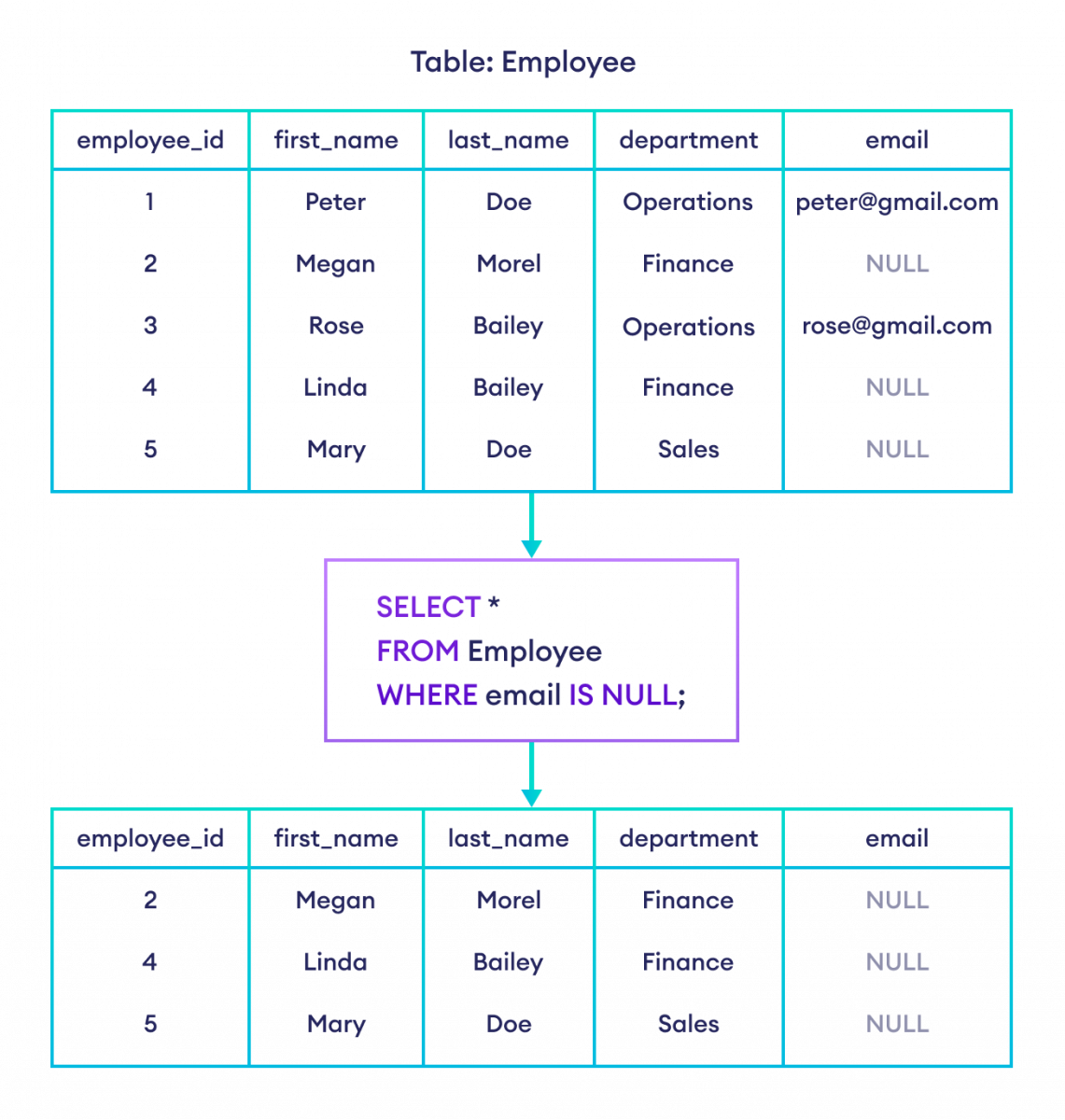
Objective: Accounts that have never been used can pose a risk. Find all users who have never logged in.
Hint: An account that has never logged in will have no value for its last_login_timestamp.
Solution
SELECT username, email, created_at
FROM users
WHERE last_login_timestamp IS NULL;
Explanation: The IS NULL operator is used to find rows where a column contains no value. You cannot use = NULL; the correct syntax is always IS NULL or IS NOT NULL.
Task 4: Search for Internal Network Activity
Objective: As part of an internal threat assessment, you want to identify users who have recently logged in from the internal network, which uses the 192.168.1.x IP address range.
Solution
SELECT username, last_login_ip, last_login_timestamp
FROM users
WHERE last_login_ip LIKE '192.168.1.%';
Explanation: The LIKE operator is used for pattern matching in strings. The % is a wildcard character that matches any sequence of characters. So, '192.168.1.%' finds any IP address that starts with that prefix.
Task 5: Review Disabled and Locked Accounts
Objective: Create a consolidated list of all high-risk accounts, which are defined as those that are either 'locked' or 'disabled'.
Solution
-- Using IN (recommended)
SELECT username, account_status
FROM users
WHERE account_status IN ('locked', 'disabled');

-- Using OR (also correct)
SELECT username, account_status
FROM users
WHERE account_status = 'locked' OR account_status = 'disabled';
Explanation: The IN operator is a clean and efficient way to check if a value matches any value in a list. It's generally more readable than a long chain of OR conditions.
Task 6: Prioritize Most Recently Created Accounts
Objective: New accounts are often a target for attackers. List all user accounts, ordering them by their creation date from the newest to the oldest.
Solution
SELECT username, created_at, account_status
FROM users
ORDER BY created_at DESC;
Explanation: The ORDER BY clause sorts the results. By default, it sorts in ascending order (ASC). To sort from newest to oldest (largest to smallest date/time), you must specify DESC (descending).
Task 7: Identify Top Targets for Brute-Force Attacks
Objective: A brute-force attack is underway. You need to quickly identify the 3 user accounts with the highest number of failed login attempts to monitor or lock them.
Solution
SELECT username, failed_login_attempts, account_status
FROM users
ORDER BY failed_login_attempts DESC
LIMIT 3;
Explanation: This query combines ORDER BY and LIMIT to perform a "Top-N" analysis. First, it sorts all users by failed_login_attempts in descending order, putting those with the most attempts at the top. Then, LIMIT 3 restricts the output to only the top 3 rows from that sorted list.
Conclusion
Congratulations on completing the first module! You have successfully practiced using all the fundamental building blocks of an SQL query to retrieve and analyze data from a sample database. You've seen how these simple commands, when combined, can answer important security questions.
Key Takeaways from this Module:
- The standard query structure is
SELECT ... FROM ... WHERE ... ORDER BY ... LIMIT .... SELECTspecifies the columns you want.FROMspecifies the table to query.WHEREfilters rows based on conditions using comparison (=,>,LIKE) and logical (AND,OR) operators.ORDER BYsorts your results.LIMITrestricts the number of rows returned, which is critical for performance and for finding "Top-N" records.
In the next module, "Manipulating Data with Functions," we will build on this foundation. You'll learn to use aggregate functions like COUNT() and SUM() to summarize data, and string functions like SUBSTRING() to dissect text. These functions are not only useful for analysis but are also essential tools used in many SQL injection techniques to enumerate database structures and exfiltrate data.