Hello! In our last session, we focused on sorting data using the ORDER BY clause, which is crucial for organizing results chronologically or by importance. You learned to use ASC and DESC to control the sort direction across one or more columns.
This lesson introduces the final core component of a basic SELECT query: limiting the number of results. We'll cover the LIMIT and TOP clauses. When combined with ORDER BY, these clauses become exceptionally powerful for security analysis. You'll be able to ask precise questions like, "Show me the 10 most recent failed login attempts" or "Which single IP address has the most connections?" This is a fundamental technique used in threat hunting, log analysis, and database reconnaissance.
Why Limit Results?
When working with production databases, tables can contain millions or even billions of rows. Querying all of them is slow, resource-intensive, and often unnecessary. For example, in a penetration test, you might only need a few sample records to understand a table's structure, not the entire dataset. Limiting the result set is essential for both performance and targeted analysis.
LIMIT, TOP, FETCH FIRST: One Goal, Different Names
A key point to understand from the outset is that different database systems use different keywords to accomplish the same goal. This is critical for you as a security analyst, as you will encounter various database technologies in the field.
SQL SELECT LIMIT, TOP, FETCH FIRST (With Examples) - Programiz
This article from Programiz clearly outlines the different keywords used to limit rows.
Read the first part of the article up to the section "SQL TOP Clause". Pay close attention to the table that maps the keywords (TOP, LIMIT, FETCH FIRST) to their respective database systems (SQL Server, MySQL, Oracle, etc.).
To summarize the key differences:
- MySQL, PostgreSQL, SQLite: Use the
LIMITclause at the end of the query. - SQL Server, MS Access: Use the
TOPclause right afterSELECT. - Oracle, IBM DB2: Use the
FETCH FIRST n ROWS ONLYclause at the end.
For this course, we will primarily use the LIMIT syntax as it's common in open-source databases often used in web applications (like MySQL), but we'll show TOP examples as well.
The Power of ORDER BY with LIMIT
Using LIMIT by itself will return an arbitrary set of rows. The database just gives you the first "N" rows it finds, which might not be consistent or meaningful. The true power comes from first sorting the data and then taking the top few results.
This video provides an excellent visual explanation of how TOP/LIMIT works and why it's so effective when combined with ORDER BY.
SQL SELECT Queries (Visually Explained) for Beginners | All Essential Clauses | #SQL Course 4
The video "SQL SELECT Queries (Visually Explained) for Beginners" by Data with Baraa breaks down how these clauses work together.
Please watch the following two segments: The core concept: This explains what TOP/LIMIT does—it's a filter based on row number, not row content. Combining with ORDER BY: This is the most important part. See how TOP is used with ORDER BY to perform "Top N" analysis, like finding customers with the highest scores or the most recent orders.
As you saw, the query is first sorted, and then the LIMIT is applied to the sorted result. Let's look at the syntax for a common security task.
Security Scenario: Finding the most recent failed logins
Imagine an auth_events table. To find the 10 most recent failed login attempts:
MySQL/PostgreSQL (LIMIT):
SELECT username, source_ip, event_timestamp
FROM auth_events
WHERE status = 'FAILURE'
ORDER BY event_timestamp DESC
LIMIT 10;
SQL Server (TOP):
SELECT TOP 10 username, source_ip, event_timestamp
FROM auth_events
WHERE status = 'FAILURE'
ORDER BY event_timestamp DESC;
Notice the placement: LIMIT is last, while TOP is part of the SELECT list. Both queries achieve the same result: they first sort all failed logins by timestamp from newest to oldest, and then return only the top 10 from that sorted list.
Paginating Results with OFFSET
What if you don't want the first 10 results, but the next 10 (e.g., results 11-20)? This is common in web applications that display data in pages. The OFFSET clause, used with LIMIT, lets you skip a specified number of rows before the LIMIT is applied.
This is a concept you can exploit during a penetration test. If a web UI only shows you the first page of results, you might be able to manually change the LIMIT and OFFSET parameters in the HTTP request to dump the entire table's contents, page by page.
SQL SELECT LIMIT, TOP, FETCH FIRST (With Examples) - Programiz
Let's return to the Programiz article to understand the OFFSET clause.
Read the section titled "SQL LIMIT With OFFSET Clause". It provides a clear syntax and visual explanation.
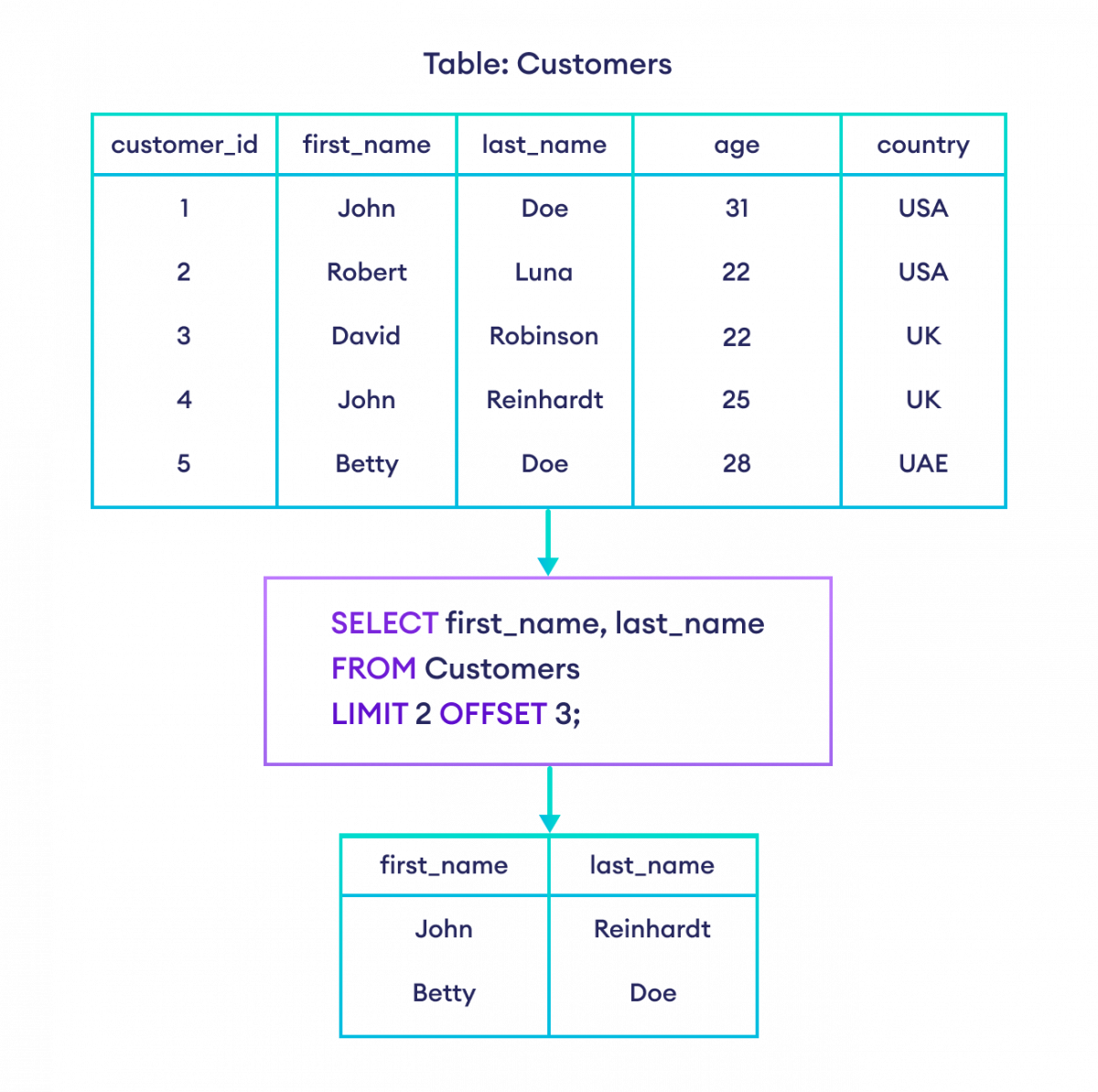
For example, to get the third page of login events, assuming 20 events per page:
SELECT event_id, username, source_ip, event_timestamp
FROM auth_events
ORDER BY event_timestamp DESC
LIMIT 20 OFFSET 40; -- Skip the first 40 (2 pages * 20 rows/page), then take the next 20
Hands-On Practice
Let's use the same hypothetical auth_events table from the previous lesson. It has the columns: event_id, username, source_ip, event_timestamp, and status.
Task 1: Top 5 Oldest Successful Logins
- Objective: As part of a user account audit, you want to find the 5 oldest recorded successful logins to check if very old accounts are still active.
- Hint: You'll need to filter by
status,ORDER BYthe timestampASC, andLIMITthe result.
Solution
SELECT *
FROM auth_events
WHERE status = 'SUCCESS'
ORDER BY event_timestamp ASC
LIMIT 5;
Task 2: Finding a Single Suspicious Event
- Objective: You are investigating a user, 'j.doe', and want to see their single most recent login attempt, regardless of whether it was successful or not.
- Hint: Filter by
username, sort by timestamp, and limit the result to 1.
Solution
SELECT *
FROM auth_events
WHERE username = 'j.doe'
ORDER BY event_timestamp DESC
LIMIT 1;
Task 3: Paginating Through High-Risk Events
- Objective: You are reviewing all failed login attempts, but want to view them in "pages" of 10. Write a query to retrieve the second page of failed logins (events 11-20), ordered from most recent to oldest.
- Hint: This requires combining
WHERE,ORDER BY,LIMIT, andOFFSET.
Solution
SELECT *
FROM auth_events
WHERE status = 'FAILURE'
ORDER BY event_timestamp DESC
LIMIT 10 OFFSET 10; -- Skip the first 10, then take the next 10.
Conclusion
You have now learned the final essential clause for retrieving data. Limiting results is a fundamental practice for performance and is the key to executing "Top-N" style analysis, which is a cornerstone of security monitoring and reporting.
Key Takeaways:
LIMIT(MySQL/PostgreSQL) andTOP(SQL Server) are used to restrict the number of rows in your result set.- Using these clauses without
ORDER BYreturns an arbitrary, non-deterministic set of rows. - The combination of
ORDER BY ... DESC LIMIT Nis the standard pattern for finding the "top N" or "most recent N" items. - The
OFFSETclause is used withLIMITto skip rows, enabling pagination, a feature that can sometimes be exploited to enumerate data.
This lesson completes the "Foundational SQL Queries" module. You now have all the tools—SELECT, FROM, WHERE, ORDER BY, and LIMIT—to construct powerful queries for data retrieval. In the next lesson, you will get a chance to put all these skills together in a practical exercise that simulates querying a user accounts database.