Welcome to your next lesson! In our previous session, we covered how to use IS NULL and IS NOT NULL to filter for records where data is either missing or present. This is a vital skill for auditing data integrity and finding anomalies.
Now that you can select and filter data, the next logical step is to organize it. By default, a database doesn't guarantee the order of the results you get back. In this lesson, we will focus on the ORDER BY clause, which gives you complete control over how your query results are sorted. You'll learn how to sort data in both ascending and descending order, which is fundamental for tasks like reviewing security logs chronologically or identifying the most frequent events.
The Purpose and Placement of ORDER BY
The ORDER BY clause is used to sort the result set of a SELECT statement. It's one of the last clauses to be processed in a query, meaning it sorts the final rows just before they are returned to you.
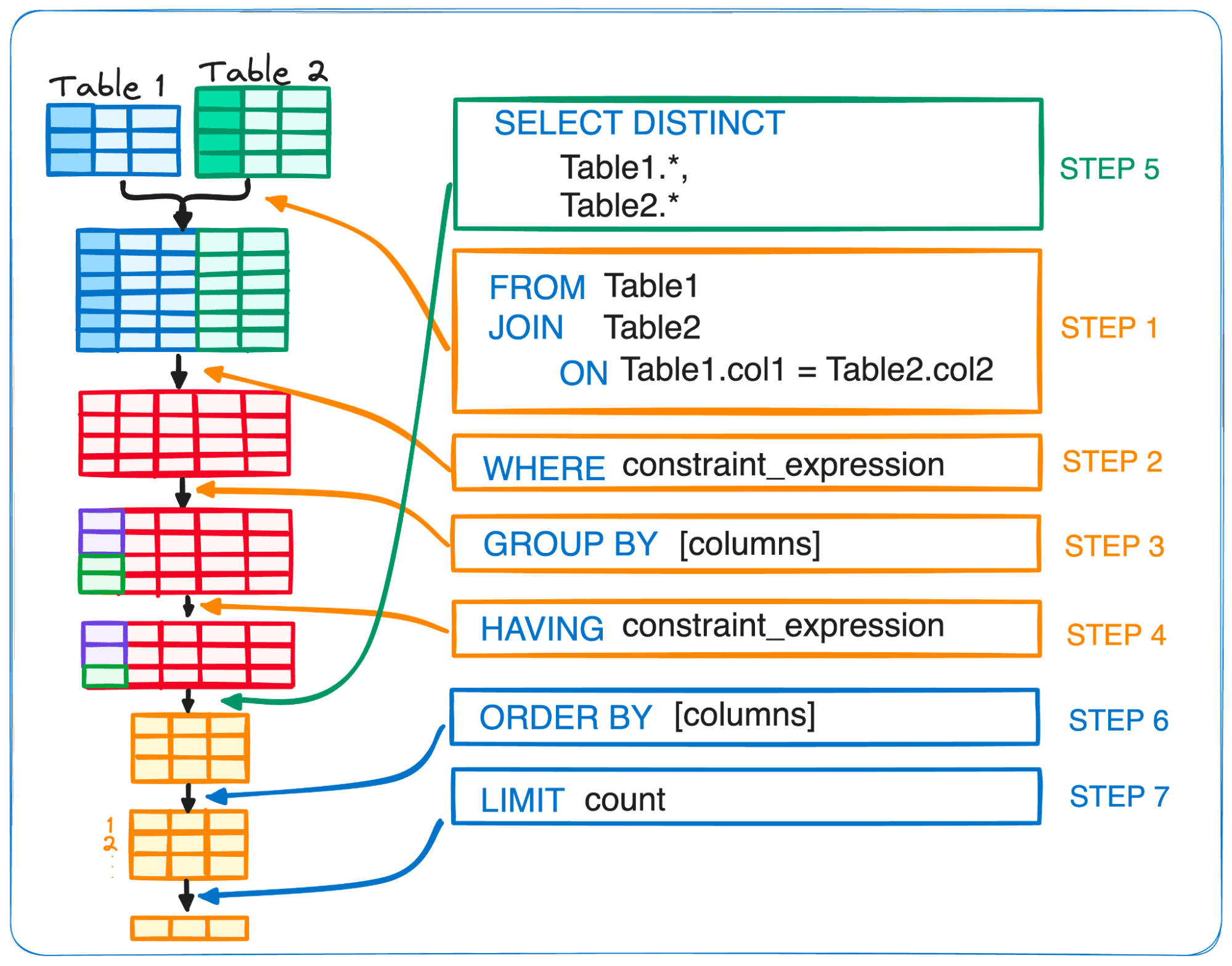
This placement is logical: the database first figures out which rows to return (FROM, WHERE, GROUP BY, HAVING) and what columns to show (SELECT), and only then does it worry about sorting them.
Sorting by a Single Column: ASC and DESC
You can sort data based on any column. The two keywords that control the sort direction are:
ASC: Ascending order (A to Z, 0 to 9). This is the default behavior, so you don't always have to write it.DESC: Descending order (Z to A, 9 to 0).
The following short video from Bro Code provides a quick and clear introduction to the ORDER BY clause and these two keywords.
This video, "MySQL ORDER BY clause is easy," offers a concise, no-frills explanation of the fundamental syntax.
Watch these segments to grasp the core concepts: Default sorting: See how to sort by a column in ascending order, the default behavior. Descending order: Learn how to use the DESC keyword to reverse the sort. Sorting by date: This shows sorting applied to a date column.
To reinforce this, the following reading provides more examples and context.
SQL ORDER BY: Complete Guide with Interactive Examples ...
This guide from Beekeeper Studio offers clear examples and explanations for single-column sorting. The page also includes interactive exercises, which align with your preference for hands-on practice.
Please read the following sections: "Sorting by a Single Column": This section provides syntax and examples for basic sorting. "Ascending vs Descending Order": This part explicitly contrasts ASC and DESC with further examples. You can try the interactive exercises on the page to test your understanding.
Security Context:
Imagine you are analyzing an access_logs table.
- To see the earliest recorded activities, you would use:
SELECT * FROM access_logs ORDER BY event_timestamp ASC; - To see the most recent activities first (which is common during an active investigation), you would use:
SELECT * FROM access_logs ORDER BY event_timestamp DESC;
Sorting by Multiple Columns
Real-world analysis often requires more complex sorting. For instance, you might want to see logs sorted by username, and then for each user, see their actions in chronological order. ORDER BY handles this by allowing you to specify a comma-separated list of columns. The sorting is applied in the order you list the columns.
The next part of the Bro Code video introduces this concept well.
Let's continue with the same "MySQL ORDER BY clause is easy" video to see how multi-column sorting works.
Watch the segment on multi-column sorting. Notice how it resolves ties in the first sort column by using the second one.
Here's a visual example of a query that sorts by two columns, using different sort directions for each.

Practical Application: Solving a Challenge
Now, let's see how ORDER BY is used in a practical, ethical hacking context. The following video is a walkthrough of a SQL challenge on TryHackMe. The presenter uses ORDER BY to find specific pieces of information needed to complete the task.
SQL Fundamentals | TryHackMe Walkthrough
This clip from "SQL Fundamentals | TryHackMe Walkthrough" by The Helpful Hacker demonstrates a real-world application of sorting.
Watch the section from solving the challenge. Observe how the presenter uses ORDER BY name ASC to find the first tool alphabetically, and ORDER BY name DESC to find the last one. This is a common technique in enumeration phases of a penetration test, especially when dealing with long lists of items.
Hands-On Practice
Let's apply these sorting techniques to a security analysis scenario. Imagine you have a table named auth_events with the following columns: event_id, username, source_ip, event_timestamp, and status (e.g., 'SUCCESS', 'FAILURE').
Task 1: Recent Activity First
- Objective: To get a quick overview of the latest authentication activity on a system, list all events, starting with the most recent.
- Hint: You need to sort by the
event_timestampcolumn.
Solution
SELECT *
FROM auth_events
ORDER BY event_timestamp DESC;
Task 2: Analyze User Behavior
- Objective: You want to analyze the activity of each user chronologically. Write a query to list all authentication events, ordered first by
usernamealphabetically, and then by theevent_timestampfrom oldest to newest for each user. - Hint: This requires sorting by two columns.
Solution
SELECT *
FROM auth_events
ORDER BY username ASC, event_timestamp ASC;
Since ASC is the default, you could also write this as ORDER BY username, event_timestamp;.
Task 3: Investigate Failed Logins
- Objective: You are investigating a series of failed login attempts. Retrieve all events with the status 'FAILURE', and order them by
source_ipfirst, and then by theevent_timestamp(most recent first) to see if multiple failed attempts are coming from the same IP in a short period. - Hint: This combines a
WHEREclause with a multi-columnORDER BY.
Solution
SELECT *
FROM auth_events
WHERE status = 'FAILURE'
ORDER BY source_ip ASC, event_timestamp DESC;
Conclusion
In this lesson, you've learned how to bring order to your query results, a fundamental skill for any data analysis.
Key Takeaways:
- The
ORDER BYclause sorts your query results and is one of the last clauses to be executed. ASCsorts in ascending order (A-Z, 0-9) and is the default.DESCsorts in descending order (Z-A, 9-0) and must be specified explicitly.- You can sort by multiple columns to handle ties in the data, creating more refined and organized reports.
In our next lesson, we will look at the LIMIT (or TOP in some SQL dialects) clause. You'll see how powerful it becomes when combined with ORDER BY, allowing you to ask for things like "the 10 most recent failed login attempts," a query that is central to security monitoring and incident response.