Hello! In our last session, we focused on combining multiple conditions using logical operators like AND, OR, and NOT, which is essential for crafting precise queries. This allows you to ask complex questions of your data, such as finding log entries that meet several criteria simultaneously.
So far, we've only filtered based on data that exists. In this lesson, we'll address a different but equally important question: how do you find records where data is missing? This brings us to the concept of NULL values. Today, you will learn how to use the IS NULL and IS NOT NULL operators to filter for the presence or absence of data. For a security analyst, this is a key skill for identifying incomplete records, spotting potential data integrity issues, or finding accounts that have never been used.
What is a NULL Value?
In SQL, a NULL value represents missing or unknown data. It's a placeholder, not a value itself. It is crucial to understand that NULL is different from a zero (0) or an empty text string ('').
- A
0in afailed_loginscolumn means there have been zero failed logins. - A
NULLin the same column means the number of failed logins is unknown or was never recorded.
To get a clear understanding of this concept, a short video provides a helpful analogy.
SQL NULL Functions | COALESCE, ISNULL, NULLIF, IS (NOT) NULL | #SQL Course 18
The video "SQL NULL Functions" from the channel Data with Baraa offers a great explanation of what NULL represents in a database.
Please watch the first part of this video, from the introduction. The speaker uses the analogy of filling out an optional field on a form, which clearly illustrates why NULL values exist.
The Correct Way to Test for NULL
Here is the most important rule about NULL: you cannot test for NULL values with standard comparison operators like = or <>. A condition like WHERE column_name = NULL will not work the way you might expect, because NULL is not considered equal to anything, not even another NULL.
Instead, SQL provides two specific operators for this purpose:
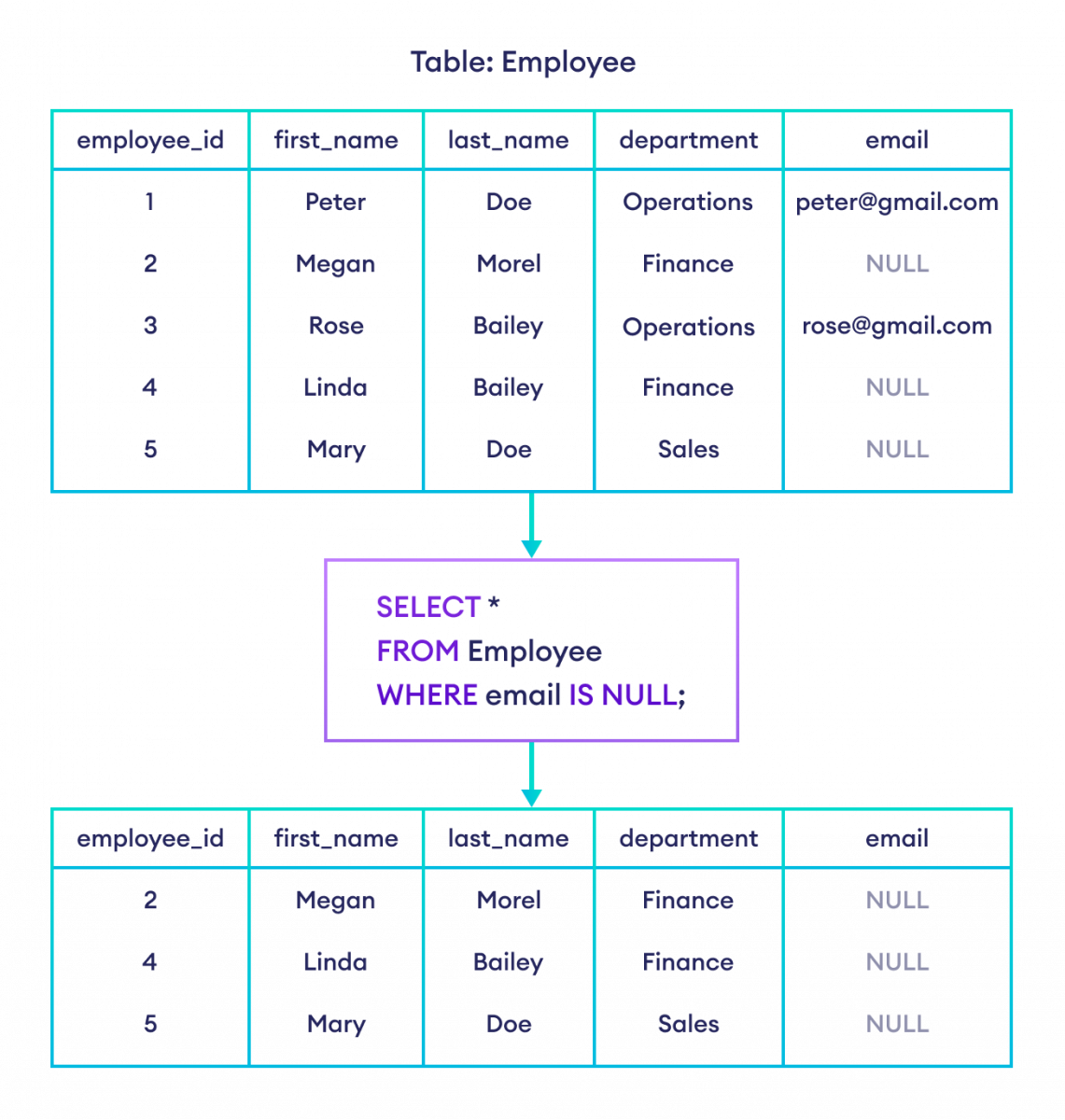
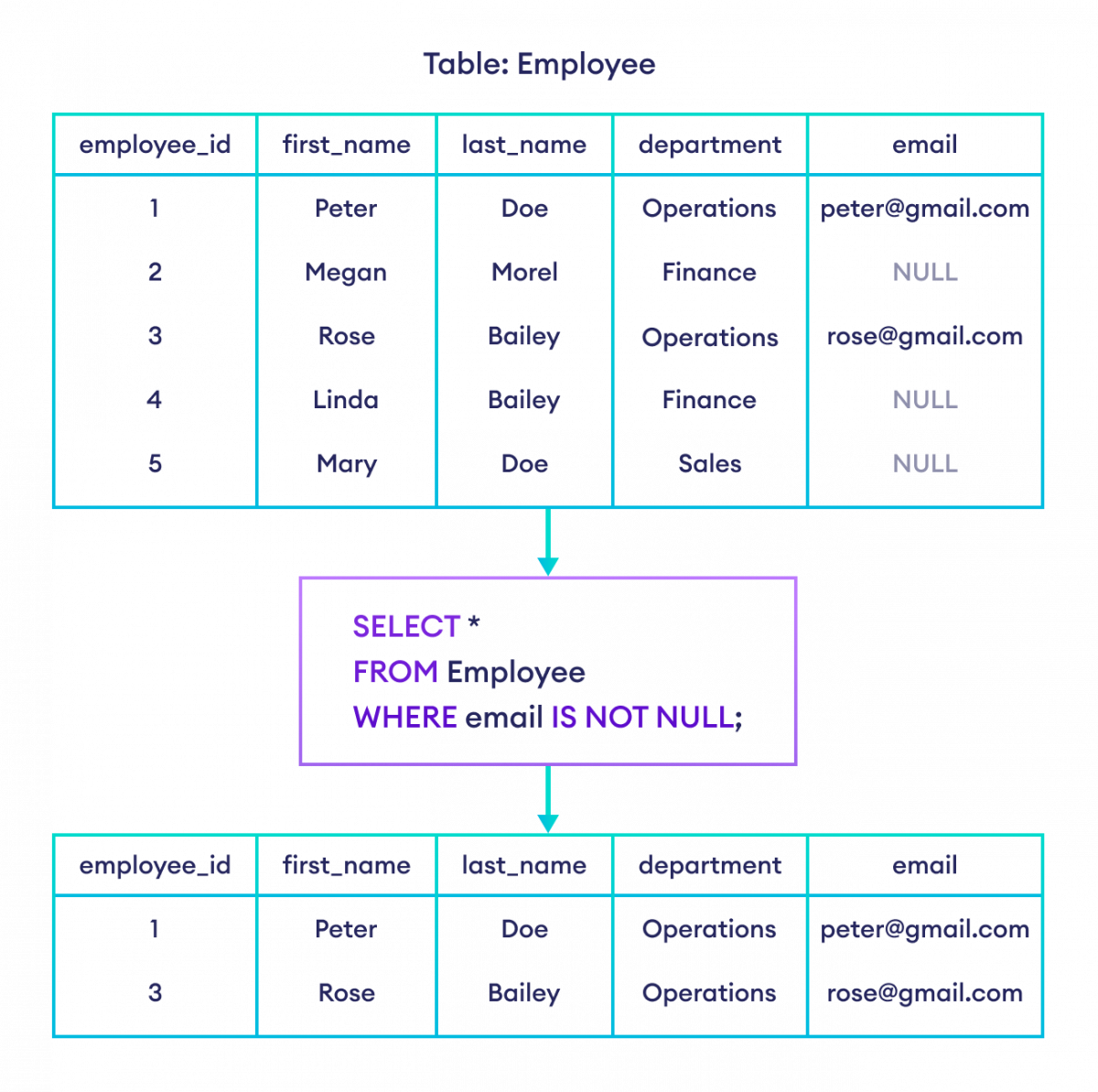
IS NULLto find rows where a value is absent.IS NOT NULLto find rows where a value is present.
The following resource provides a concise summary of this rule and the syntax.
SQL NULL Values - IS NULL and IS NOT NULL
This W3Schools article is a standard reference for SQL fundamentals. It gets straight to the point about how to work with NULLs.
Read the sections titled: "How to Test for NULL Values?" to understand why you can't use the = operator. "The IS NULL Operator" for the syntax and an example of finding missing data. "The IS NOT NULL Operator" for an example of finding existing data. Feel free to use the "Try it Yourself" buttons in the article to experiment with the queries directly in your browser. This aligns well with your preference for hands-on practice.
Practical Demonstration
Now let's see these operators in a live-coding context. The same video from earlier has excellent practical demonstrations that show IS NULL and IS NOT NULL being used in a WHERE clause.
SQL NULL Functions | COALESCE, ISNULL, NULLIF, IS (NOT) NULL | #SQL Course 18
Continuing with the "SQL NULL Functions" video, we'll now watch the practical examples.
Watch these two segments showing the operators in action: Using IS NULL: This part demonstrates how to identify customers who have no recorded scores. Using IS NOT NULL: Here, the query is reversed to find all customers who do have a score.
To summarize, here are two visual examples.
Combining with Logical Operators
Just like the other conditions you've learned, IS NULL and IS NOT NULL can be combined with AND, OR, and NOT to build even more specific filters. This connects directly to what we covered in the last lesson.
Security Scenario: Imagine an accounts table. You might need to find all accounts that are currently marked as locked AND for which a last_login date has never been recorded. Such accounts might be targets for cleanup or investigation.
The query would look like this:
SELECT *
FROM accounts
WHERE account_status = 'locked' AND last_login IS NULL;
This is a powerful way to cross-reference different pieces of information to identify specific states or anomalies in your data.
Hands-On Practice
Let's apply these concepts to a few security-oriented tasks. For these exercises, assume we have an employee table with columns like name, salary, bonus, position, department_id, and manager_id.
Task 1: Identify Top-Level Accounts
- Objective: In many systems, top-level administrative or executive accounts do not report to anyone. Their
manager_idwould therefore beNULL. Write a query to find all employees who do not have a manager. - Hint: You are looking for the absence of a value in the
manager_idcolumn.
Solution
SELECT *
FROM employee
WHERE manager_id IS NULL;
Task 2: Find Incomplete HR Records
- Objective: From a data integrity perspective, it's important to know which employee records are missing key information. Find all employees whose
bonusamount has not been recorded (NULL) OR who have a recordedsalaryof less than3000. - Hint: This requires combining
IS NULLwith a standard comparison operator usingOR. Remember the rules about parentheses from our last lesson if the logic gets more complex.
Solution
SELECT *
FROM employee
WHERE bonus IS NULL OR salary < 3000;
This query is useful for finding records that need review, either because data is missing or because it falls below a certain threshold.
For more practice, the article "10 NULL Exercises for Beginners" on LearnSQL.com (resource LINK) provides several relevant problems (Exercises 1, 2, and 4 are particularly applicable to what we've covered).
Conclusion
In this lesson, you've added a crucial tool to your SQL toolkit for handling real-world data, which is often incomplete.
Key Takeaways:
NULLrepresents the absence of data; it is not zero or an empty string.- You must use
IS NULLorIS NOT NULLto filter forNULLvalues. Standard operators like=will not work. - These operators can be combined with
AND,OR, andNOTto create powerful, specific queries for auditing and analysis.
In the next lesson, we will explore how to sort your query results using ORDER BY. You will also see that NULL values have a specific behavior during sorting, and you'll learn how to control where they appear in your output.