Hello! Let's dive into the next step of building powerful SQL queries. In the last lesson, you mastered the use of various comparison operators like =, LIKE, and BETWEEN to filter data based on a single condition. This was a great foundation.
Today, we'll build on that by learning how to combine multiple conditions in a single query using the logical operators AND, OR, and NOT. This is where SQL's filtering capabilities truly shine. For a security analyst, this is a daily requirement—you're rarely looking for just one thing. You might need to find all failed login attempts (condition 1) that occurred outside of business hours (condition 2) from a non-company IP address (condition 3). Mastering these operators is the key to asking such complex questions of your data.
The Core Logical Operators: AND, OR, NOT
Logical operators are used within the WHERE clause to connect multiple filtering expressions. A great way to get a quick, clear introduction to these three operators is by watching the following video.
MySQL logical operators are easy
The "MySQL logical operators are easy" video from the Bro Code channel offers a direct and clear demonstration of how AND, OR, and NOT work.
Please watch these three short segments: The AND operator: Notice how both conditions must be true for a record to be selected. The OR operator: Observe that a record is included if at least one of the conditions is met. The NOT operator: See how this operator reverses the logic, selecting records that don't match the condition.
Let's break down each operator with a security context in mind.
The AND Operator
The AND operator is used to retrieve records only when all specified conditions are true.
Syntax:
SELECT column1, column2, ...
FROM table_name
WHERE condition1 AND condition2 AND condition3;
Security Example: Imagine you are analyzing web server logs and want to find requests that might indicate a vulnerability scan. You could look for requests that used the GET method AND had a 404 Not Found status code, as scanners often probe for non-existent files.
SELECT *
FROM web_access_logs
WHERE http_method = 'GET' AND status_code = 404;
The OR Operator
The OR operator retrieves records if any of the specified conditions are true.
Syntax:
SELECT column1, column2, ...
FROM table_name
WHERE condition1 OR condition2;
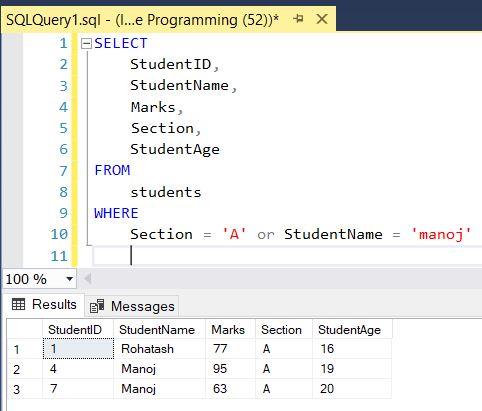
Security Example: You're monitoring for suspicious user account creation. You might want to find any new user accounts where the username is 'admin' OR the email address is suspicious, like 'test@test.com'.
SELECT *
FROM users
WHERE username = 'admin' OR email = 'test@test.com';
This operator is particularly interesting because it forms the basis of a classic SQL injection attack. An attacker might inject a condition like OR '1'='1'. Since '1'='1' is always true, the WHERE clause evaluates to true for every single row, potentially bypassing authentication or dumping the entire contents of a table. We will explore this in-depth in Module 8.
The NOT Operator
The NOT operator is used to retrieve records where the condition is false. It essentially inverts the result of the condition it precedes.
Syntax:
SELECT column1, column2, ...
FROM table_name
WHERE NOT condition;
Security Example: As part of a user access review, you want to find all enabled user accounts that are NOT part of the users group, as they may have incorrect permissions.
SELECT *
FROM user_accounts
WHERE status = 'enabled' AND NOT user_group = 'users';
Order of Operations: Combining AND and OR
This is a critical concept. When you use both AND and OR in the same WHERE clause, SQL processes AND operators before OR operators. This can lead to unexpected results if you're not careful.
For example, consider this query:WHERE country = 'USA' AND status = 'active' OR status = 'pending'
You might intend to find all users in the USA who are either active or pending. However, SQL will interpret it as:(WHERE country = 'USA' AND status = 'active') OR status = 'pending'
This would return all active users from the USA, plus all pending users from any country, which is likely not what you wanted.
To control the order of evaluation and ensure your logic is correct, you must use parentheses ().
The correct query would be:WHERE country = 'USA' AND (status = 'active' OR status = 'pending')
This forces the OR condition to be evaluated first, finding all users who are either active or pending, and then the AND condition filters that result set to only include users from the USA.
The following resource clearly explains this common pitfall and how to avoid it.
SQL WHERE Clause - Overview, Examples & Usecases
This article from Intellipaat provides excellent examples of the logical operators and directly addresses the importance of using parentheses.
Please read the following sections: Start at "Using Logical Operators with SQL WHERE Clause". Review the examples for the AND, OR, and NOT operators. Now, find the section "Common Mistakes to Avoid When Using the WHERE Clause". Focus specifically on item #4, "Combining AND/OR Without Parentheses". This part is crucial as it highlights exactly why and how to use parentheses to enforce the correct logic in your queries.
Hands-On Practice
Your preference is for hands-on application, so let's put this into practice. Write the SQL queries for the following security scenarios.
Scenario 1: Investigating a brute-force attempt
- Table:
auth_logs - Columns:
log_id,timestamp,source_ip,username,event_type - Task: You need to find all failed login attempts (
event_type = 'LOGIN_FAILURE') originating from the IP address192.168.1.101for the useradmin. Write a query to find these specific log entries.
Solution
SELECT *
FROM auth_logs
WHERE event_type = 'LOGIN_FAILURE'
  AND source_ip = '192.168.1.101'
  AND username = 'admin';
Scenario 2: Searching for multiple error types
- Table:
system_events - Columns:
event_id,timestamp,level,message - Task: You are investigating a system malfunction and want to see all events that are either a
'warning'or an'error'. Write a query to retrieve these events.
Solution
SELECT *
FROM system_events
WHERE level = 'warning' OR level = 'error';
Note: You could also use WHERE level IN ('warning', 'error'), which you learned in the previous lesson. This is often cleaner for checking against a list of values.
Scenario 3: A precise access audit
- Table:
file_access - Columns:
access_id,user_id,file_path,access_time,action - Task: As part of an audit, you must identify any time the user
rootaccessed files in either the/etc/directory or the/var/log/directory. The file paths will start with these strings. You need a query that finds records where the user isrootAND the file path matches one of those two locations.
Solution
SELECT *
FROM file_access
WHERE user_id = 'root'
  AND (file_path LIKE '/etc/%' OR file_path LIKE '/var/log/%');
Pay close attention to the parentheses. Without them, the query would incorrectly return all accesses by root to /etc/ files, plus all accesses by any user to /var/log/ files.
Conclusion
You have now learned how to create sophisticated, multi-layered filters in your SQL queries. This is a significant step forward in your ability to perform targeted data analysis.
Key Takeaways:
ANDrequires all conditions to be true.ORrequires at least one condition to be true.NOTinverts the result of a condition.ANDis evaluated beforeOR. Use parentheses()to explicitly control the order of operations and ensure your query's logic is correct.
In our previous lessons, we've dealt with records that have data. But what about records where data is missing? In the next lesson, we will cover IS NULL and IS NOT NULL, operators designed specifically to filter for the presence or absence of data. This is vital for data integrity checks and can sometimes reveal misconfigurations or incomplete data trails during an investigation.