Welcome to your next lesson on foundational SQL queries. In our previous session, you learned how to use the WHERE clause to perform basic filtering on a single condition. This is the first step in moving from retrieving all data to targeting just the information you need.
Today, we will significantly expand your filtering capabilities. The goal is to master a full range of comparison operators: =, <>, <, >, LIKE, IN, and BETWEEN. These operators are the fundamental tools for constructing precise and powerful queries. For your goal of using SQL in cybersecurity, this is essential. Whether you're searching for usernames that match a specific pattern, filtering logs within a critical time window, or checking against a list of known malicious indicators, these operators are what make it possible.
Standard Comparison Operators: Beyond Equality
In the last lesson, you used = for exact matches and < for "less than". Now let's complete the set of standard comparison operators for working with numbers, text, and dates.
These operators are:
=: Equal to<>or!=: Not equal to<: Less than>: Greater than<=: Less than or equal to>=: Greater than or equal to
The following video provides a clear, step-by-step demonstration of these operators.
Where Clause in MySQL | Beginner MySQL Series
This video from the "Alex The Analyst" channel provides excellent, easy-to-follow examples for each of the standard comparison operators.
Watch the following segments to see how each operator works in practice: Equals (=): A quick review of filtering for an exact match. Greater than (>) and Greater than or equal to (>=): Pay attention to the distinction between these two—it's a common source of bugs. Less than (<) and Less than or equal to (<=): This works just like the "greater than" operators, but in the opposite direction. Not equal to (<>): The presenter uses !=, which is common in many SQL dialects. The standard SQL operator is <>. Both usually work, but it's good to know the standard. Filtering on dates: This shows that these same operators apply seamlessly to date values, which is extremely useful for timeline analysis in security investigations.
Pattern Matching with LIKE
What if you don't know the exact value you're looking for, but you know a pattern? For example, searching for all log entries related to a specific file type (.config) or finding all users from a particular domain ('@company.com'). This is where the LIKE operator, combined with wildcards, becomes incredibly powerful.
The two main wildcards are:
%(percent sign): Represents zero, one, or multiple characters._(underscore): Represents a single character.
Let's continue with the same video, which has an excellent section on LIKE.
Where Clause in MySQL | Beginner MySQL Series
This segment of the "Alex The Analyst" video clearly explains how to use LIKE with both the % and _ wildcards for flexible pattern matching.
Watch the section on the LIKE statement. Focus on how different combinations of wildcards achieve different results: 'a%': Starts with 'a'. '%a': Ends with 'a'. '%a%': Contains 'a' anywhere. '_a%': Has 'a' as the second character. 'a_%': Starts with 'a' and is at least two characters long.
From a security standpoint, LIKE is invaluable. You can use it to find SQL injection payloads that contain specific keywords like UNION or SELECT, or to search for filenames matching a pattern like '%password%' or '%.bak'.
Filtering by Ranges and Lists with BETWEEN and IN
Two other highly useful operators are BETWEEN and IN.
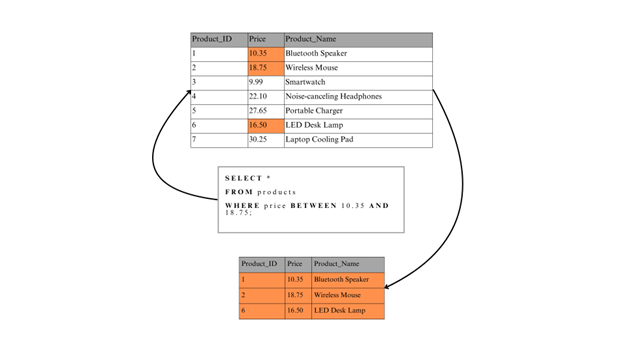
BETWEEN: Checks if a value is within a specified range (inclusive). This is perfect for filtering by a range of dates, times, or IDs.IN: Checks if a value matches any value in a list. This is a concise alternative to using multipleORconditions.
The next video gives a quick and clear overview of these two operators.
Learn Basic SQL in 15 Minutes Business Intelligence For Beginners SQL Tutorial For Beginners 13
This video by Adam Finer provides simple, effective demonstrations of the IN and BETWEEN operators.
Watch the segment from the IN and BETWEEN operators. Notice how IN simplifies checking against a list of names and BETWEEN easily filters a numeric range. The BETWEEN operator is inclusive, meaning it includes the start and end values of the range.
The IN operator is a security analyst's favorite. You can use it to query logs for a list of known malicious IP addresses, or find all users with specific, high-privilege roles like ('admin', 'superuser', 'db_owner').

Consolidating Your Knowledge
To see all these operators presented together with clear examples, the following reading is an excellent reference. It reinforces what you've seen in the videos and provides the query syntax in an easy-to-read format.
How To Use WHERE Clauses in SQL
This DigitalOcean tutorial provides a structured overview of the most common predicates used in WHERE clauses.
Please read the following sections: Start with Comparison. This will reinforce your understanding of =, <>, <, >, <=, and >=. Review the examples for each. Skip down to Range. This section shows a clear example of the BETWEEN operator. Next, read Membership, which covers the IN operator. Finally, review the Pattern Match section, which explains the LIKE operator.
Hands-On Practice
Your preference is for hands-on work, so let's apply these new operators to some practical cybersecurity scenarios. For each problem, write the SQL query you would use to find the answer. Assume you are working with the tables and columns described.
Scenario 1: Finding suspicious user accounts
- Table:
users - Columns:
user_id,username,email,creation_date,status - Task: You suspect that a number of temporary test accounts were not cleaned up. These accounts often have usernames that start with
test_. Write a query to find all users whose username begins with the stringtest_.
Solution
SELECT *
FROM users
WHERE username LIKE 'test_%';
Scenario 2: Correlating with threat intelligence
- Table:
firewall_logs - Columns:
log_id,timestamp,source_ip,destination_ip,action - Task: A threat intelligence report has identified three IP addresses as malicious:
104.28.2.95,188.114.96.2, and198.41.214.162. Write a query to find all log entries where thesource_ipis one of these three addresses.
Solution
SELECT *
FROM firewall_logs
WHERE source_ip IN ('104.28.2.95', '188.114.96.2', '198.41.214.162');
Scenario 3: Investigating a security incident
- Table:
web_access_logs - Columns:
request_id,timestamp,ip_address,http_method,url,status_code - Task: Your intrusion detection system flagged suspicious activity between status codes 500 and 504 (inclusive), which indicate server-side errors. Write a query to retrieve all log entries with a
status_codein this range.
Solution
SELECT *
FROM web_access_logs
WHERE status_code BETWEEN 500 AND 504;
Conclusion
In this lesson, you have significantly expanded your ability to filter data precisely. By mastering this suite of comparison operators, you can move beyond simple equality checks to perform complex pattern matching, range filtering, and list-based lookups.
Key Takeaways:
- Standard comparison operators (
=,<>,>,<,>=,<=) work on numbers, text, and dates. - The
LIKEoperator uses wildcards (%and_) to find data that matches a specific pattern. BETWEENis an inclusive operator used to filter for values within a specific range.INprovides a clean and efficient way to check if a value exists within a given list.
These operators are the building blocks of almost every query you will write. So far, we've only used one condition at a time. In the next lesson, we will learn how to combine multiple conditions using the logical operators AND, OR, and NOT, allowing you to build even more sophisticated and targeted queries for your security analyses.