Hello! In our previous lesson, we explored how to use aggregate functions to get high-level summaries of your data, like the total number of records, and how to manipulate text with string functions for data extraction. We concluded by noting that the real power comes from combining these concepts.
This lesson builds directly on that foundation. You'll learn how to use the GROUP BY clause, a cornerstone of SQL analysis. While aggregate functions give you a single summary for an entire table (e.g., "total failed logins"), GROUP BY allows you to create summaries for distinct categories within your data (e.g., "failed logins per user"). For a security analyst, this is the difference between seeing noise and detecting a targeted attack pattern.
The Core Idea: From a Flat List to Summarized Groups
At its heart, the GROUP BY clause takes all the rows that share the same value in a specified column and collapses them into a single summary row. An aggregate function is then applied to this group to produce a summary value.
Consider the following image. On the left is a simple table of details. The query in the middle uses GROUP BY Location to bundle rows with the same location together. It then applies the COUNT(*) function to each of these groups to find out how many people are in each location, producing the summarized table on the right.
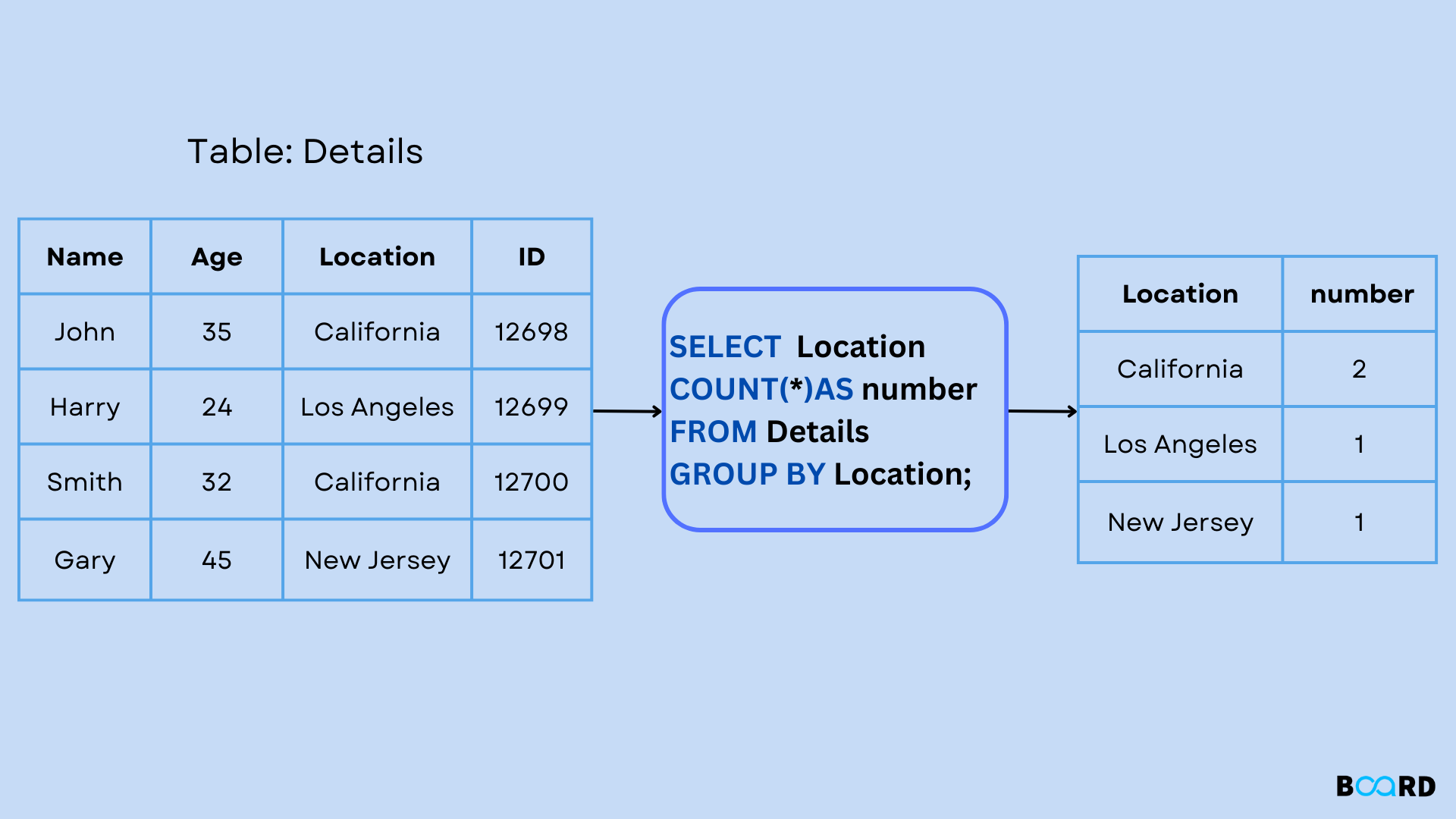
This is the fundamental operation we'll be exploring. Instead of just counting locations, we can count failed login attempts, average response sizes, or find the total data exfiltrated, all grouped by a meaningful category like an IP address, username, or session ID.
Using GROUP BY with Aggregate Functions
The most common use of GROUP BY is with an aggregate function. The general structure of such a query is:
SELECT
    column_to_group_on,
    AGGREGATE_FUNCTION(column_to_calculate)
FROM
    your_table
GROUP BY
    column_to_group_on;
The following video provides an excellent, clear explanation of this syntax and, more importantly, the fundamental rule that governs GROUP BY queries.
SQL Group By: An Explanation and How To Use It
This video from Database Star demonstrates how to construct a GROUP BY query with COUNT and explains the crucial rule about which columns can appear in your SELECT list.
First, watch the section demonstrating a practical example of finding the number of orders per product. This segment covers the basic query construction. Next, watch the explanation of why the GROUP BY clause is mandatory when you mix regular columns and aggregate functions in your SELECT statement. This is a critical concept and is covered from this timestamp.
As the video highlighted, the cardinal rule of GROUP BY is: Any column in the SELECT list that is not enclosed in an aggregate function must be included in the GROUP BY clause.
The database enforces this rule because of ambiguity. If you ask for SELECT department, employee_name, COUNT(*) FROM employees GROUP BY department, which employee_name should the database display for the 'Sales' department group that contains 50 employees? It's an impossible question to answer, so the query is invalid. You can select the grouping column (department) and aggregated values (COUNT(*)) but not other, non-aggregated columns.
A Practical Security Analysis Scenario
Let's apply this to a typical task for a security analyst: hunting for malicious activity in web server logs. Imagine you have a table access_logs with columns like ip_address, request_timestamp, http_method, request_path, and status_code.
A common reconnaissance technique for attackers is "forced browsing" or "directory fuzzing," where they rapidly request hundreds or thousands of non-existent paths to map out the web application. This generates a high volume of 404 Not Found errors from a single IP. GROUP BY is the perfect tool to detect this.
You could write the following query:
SELECT
    ip_address,
    COUNT(*) AS not_found_count
FROM
    access_logs
WHERE
    status_code = 404
GROUP BY
    ip_address
ORDER BY
    not_found_count DESC
LIMIT 20;
Let's break down what this query does:
FROM access_logs WHERE status_code = 404: It first filters the millions of log entries down to only those that represent a404 Not Founderror.GROUP BY ip_address: It then takes this subset of rows and groups them by the sourceip_address. All the 404 errors from192.0.2.55go into one bucket, all the ones from203.0.113.12into another, and so on.SELECT ip_address, COUNT(*) AS not_found_count: For each group (each unique IP), it selects the IP address itself and counts how many rows are in that group.ORDER BY not_found_count DESC LIMIT 20: Finally, it sorts the results to show the IP addresses with the highest error counts at the top, giving you an immediate list of top offenders to investigate.
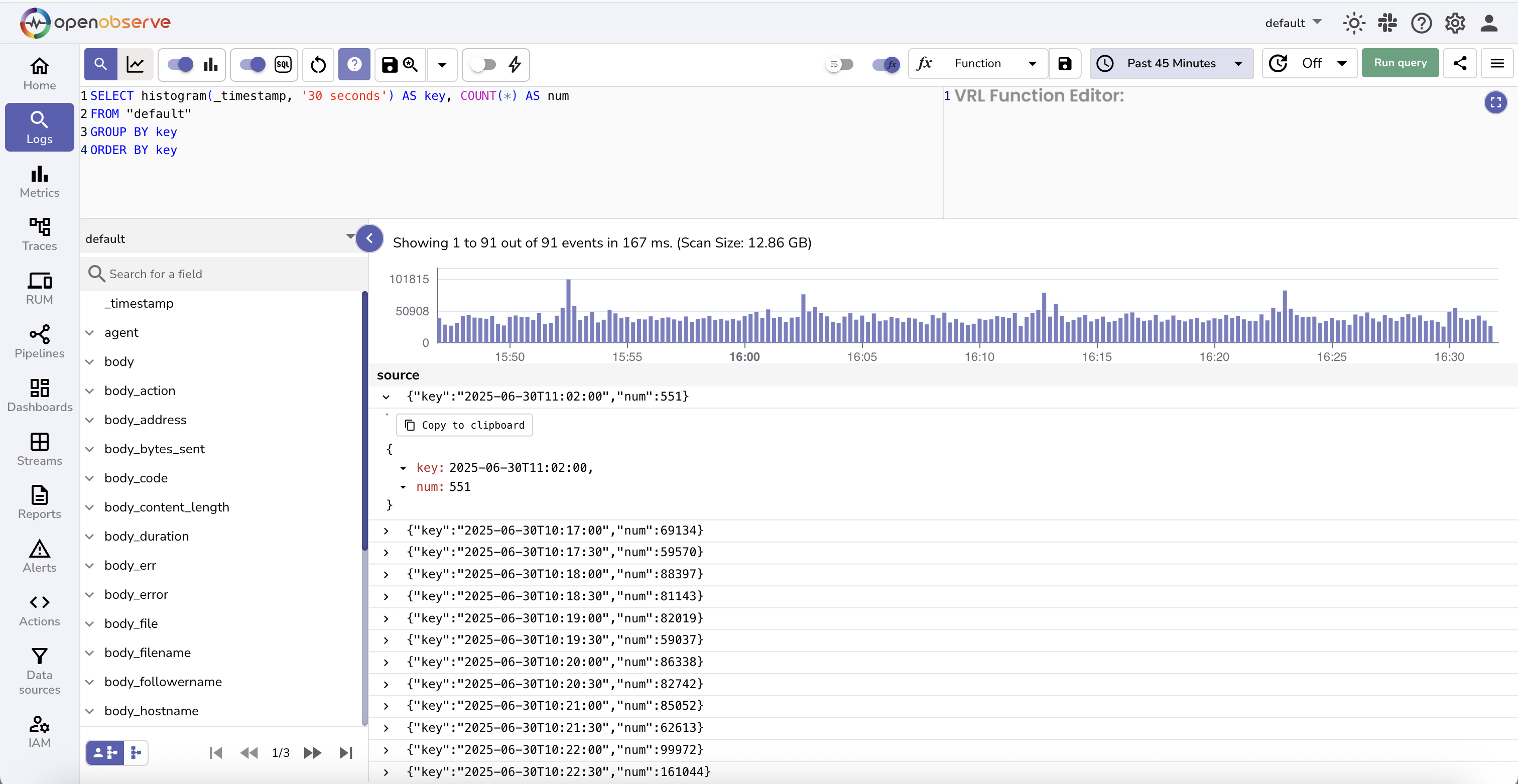
The visual output of such queries in modern log analysis or SIEM (Security Information and Event Management) platforms is often a bar chart, just like the one below. This dashboard is essentially running a GROUP BY query under the hood to count events over time intervals.
Expanding Your Toolbox: More Aggregate Functions and Multi-Column Grouping
GROUP BY isn't limited to COUNT. You can use it with any aggregate function to get deeper insights. The following video demonstrates this by calculating sums, averages, maximums, and minimums for different groups.
This video from Bro Code provides several examples of using GROUP BY with a variety of aggregate functions like SUM, MAX, MIN, AVG, and COUNT.
Watch the segment from the beginning of the example where transactions are grouped by date. Then, continue through the next example where they are grouped by customer ID, until this point. This will show you the versatility of the clause. You can ignore the mention of the HAVING clause for now; we'll cover that in our next lesson.
For more granular analysis, you can group by multiple columns. This creates groups based on the unique combination of values in those columns.
SQL GROUP BY Tutorial With Examples & Practice Exercises
This tutorial from DataLemur provides a concise text-based explanation of grouping by multiple columns and clarifies the difference between GROUP BY and ORDER BY.
First, read the section on grouping by two columns. This demonstrates the syntax and the resulting output. Next, read the section that clarifies the important distinction between GROUP BY and ORDER BY, which are often used together but serve very different purposes.
Let's build a multi-column query for our security context. A credential stuffing attack involves an attacker trying many different usernames with a few common passwords, often from a single IP. A simple brute force attack might be one username with many passwords. We can craft a query to help spot both.
SELECT
    username,
    ip_address,
    COUNT(*) AS failed_attempts
FROM
    login_logs
WHERE
    login_status = 'failure'
GROUP BY
    username, ip_address
ORDER BY
    failed_attempts DESC;
This query groups rows by the unique combination of username and ip_address. The results would immediately highlight suspicious activity:
- A single
ip_addressappearing in many rows with differentusernames: This could indicate a credential stuffing attack from that IP. - A single
usernameappearing in many rows with the sameip_address: This suggests a targeted brute-force attack against a specific user account.
Conclusion
In this lesson, you've learned how to harness the GROUP BY clause to transform raw data into powerful, categorized summaries. This skill is fundamental for moving beyond simple data retrieval and into true analysis.
Key Takeaways:
- The
GROUP BYclause collapses multiple rows into summary rows based on distinct values in one or more columns. - It is almost always used with aggregate functions (
COUNT,SUM,AVG, etc.) to calculate a metric for each group. - The Golden Rule: Any column in the
SELECTlist that isn't an aggregate function must be in theGROUP BYclause. - You can group by multiple columns to create more granular summary categories.
- For security analysis,
GROUP BYis essential for identifying patterns like brute-force attacks, directory scanning, and other anomalous behavior by summarizing log data by user, IP address, or other key identifiers.
So far, we have filtered rows with WHERE and then grouped them. But what if we want to filter the groups themselves? For instance, how do we modify our earlier query to show only the IP addresses with more than 100 failed login attempts? The WHERE clause can't do this, as it acts before the grouping happens. For this, we need a new clause, HAVING, which is the focus of our very next lesson.