Welcome back. In our last session, you successfully moved from heuristic checks to definitive proof, using sqlmap to confirm an SQL injection vulnerability. This is the critical entry point for an attacker. Now that the door is open, the next step is to map out what's inside.
This lesson focuses on the reconnaissance phase that follows a successful injection discovery. You will learn to use sqlmap's powerful enumeration features to systematically chart the database's internal structure. We'll cover how to list all available databases, then drill down to inspect the tables within a specific database, and finally, identify the columns within a target table. For a security analyst, this process is about understanding the "blast radius" of a vulnerability—what sensitive data is potentially exposed.
By the end of this lesson, you will be able to methodically enumerate a target's database schema, laying the groundwork for data exfiltration.
The Enumeration Funnel: From Databases to Columns
Once you've confirmed an injection point, the goal shifts from detection to exploration. This process is best thought of as a funnel, where you start with a broad view and progressively narrow your focus until you pinpoint the exact location of valuable data. The primary sqlmap flags for this are:
--dbs: Enumerate database management system databases.--tables: Enumerate tables of a specific database.--columns: Enumerate columns of a specific table.
This structured approach is fundamental to penetration testing, ensuring a thorough and efficient post-exploitation phase.
Step 1: Discovering Databases with --dbs
The first action after confirming a vulnerability is to get a lay of the land. You want to know which databases exist on the server. Some will be system-related (like information_schema in MySQL), while others will be specific to the web application you're targeting. The --dbs flag instructs sqlmap to retrieve a list of all databases that the current user context has permission to see.
The following short video clip demonstrates this first step.
How Hackers Exploit SQL Injections And Use SQLmap
This clip from Infosec Mastery's channel shows the use of the --dbs flag to perform the initial database enumeration.
Watch from the demonstration of the --dbs parameter. Notice how the command is a simple addition to the base command you've already learned, and the output clearly lists the available databases, dvwa and information_schema.
Step 2: Listing Tables with -D and --tables
Once you have the list of databases, you'll select the one that seems most likely to contain application data (in the video's case, dvwa is the obvious choice). The next step is to list all the tables within that database.
To do this, you combine two flags:
-D <database_name>: Specifies the target database you want to investigate.--tables: Instructssqlmapto enumerate the tables within the specified database.
This step often reveals table names like users, products, or orders, which are immediate red flags indicating the presence of sensitive information.
Beginner's Guide to sqlmap - Full Course
The "Beginner's Guide to sqlmap" by Cybr provides an excellent, detailed walkthrough of enumerating tables, including the necessary authentication cookies from the previous lesson.
Watch the segment from the beginning of the demo. Pay close attention to how the command is constructed. It includes the -u for the URL, --cookie for the session, and finally --tables to perform the enumeration. The output then clearly shows the tables guestbook and users within the dvwa database.
Step 3: Pinpointing Columns with -T and --columns
You've identified a promising table, such as users. The final step in your reconnaissance is to find out what information it holds. Does it contain usernames? Passwords? Email addresses? The --columns flag reveals the table's structure.
You'll use this combination of flags:
-D <database_name>: Specifies the database (as before).-T <table_name>: Narrows the focus to a single table.--columns: Instructssqlmapto enumerate the columns for the specified table.
The output from this command gives you the exact blueprint of the data you can potentially access.
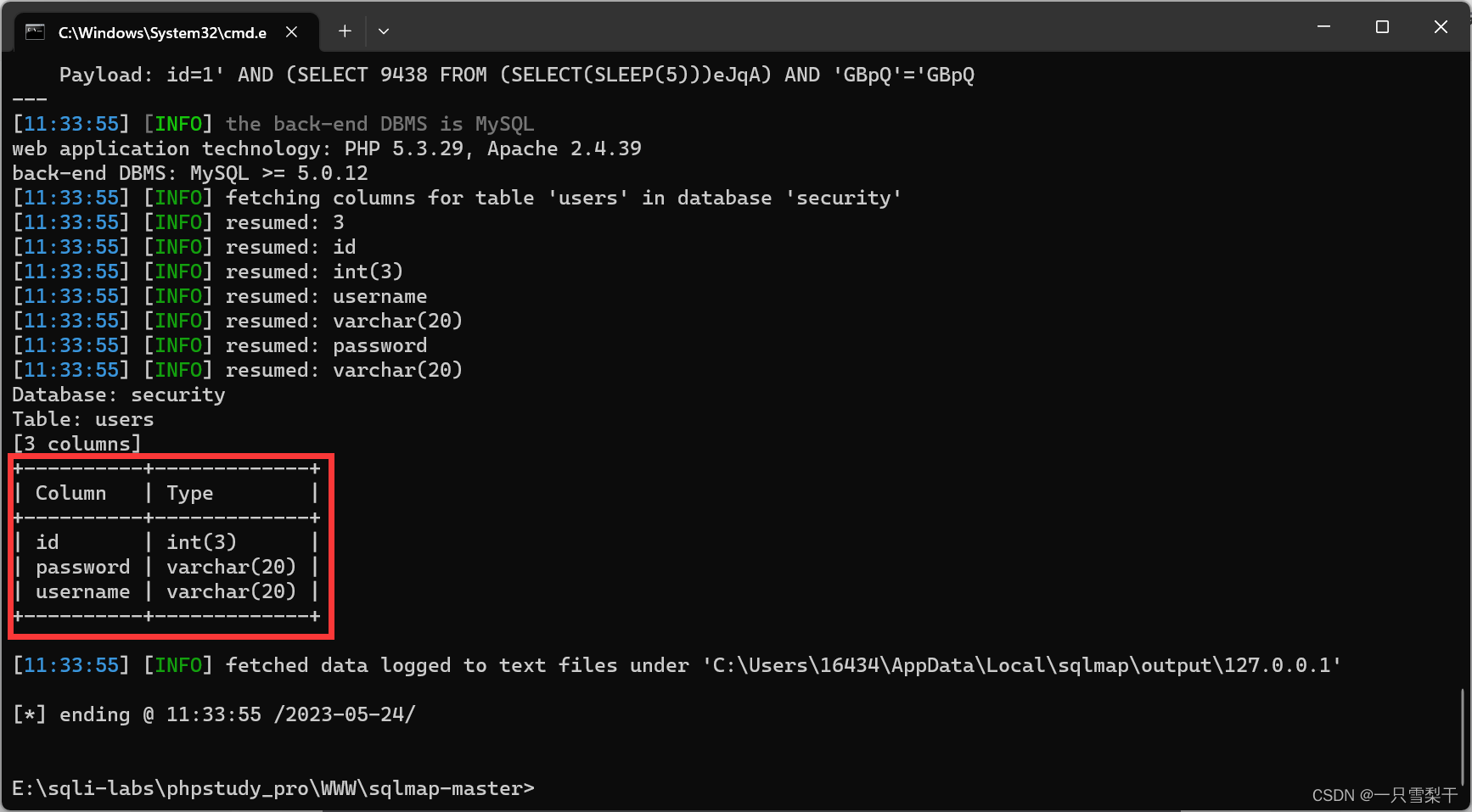
The text-based guide below provides another clear, step-by-step example of this entire funnel process from start to finish.
SQLmap Tutorial for Beginners 2025 (+Free PDF)
This tutorial from StationX walks through the enumeration process against a publicly available vulnerable website. It reinforces the funnel methodology.
Please read the entire section titled "Database Fingerprinting and Data Retrieval with SQLmap." Follow the five numbered steps, paying attention to the commands used and the resulting output at each stage: Identify the target URL: The starting point. Initiate database fingerprinting: Using the --dbs flag. Explore database contents: Using -D and --tables. Extract table data: This step uses --dump, which we will cover in the next lesson, but it shows the logical outcome of your enumeration. Extract column data: Using -C and --dump to target a specific column. Note that our lesson focuses on using --columns to list all columns first.
Hands-On Practice: Mapping the DVWA Database
Now it's time to apply this systematic process in your own lab. You will use the request.txt file you created in the previous lesson to perform a full enumeration of the DVWA database.
Execute these commands sequentially in your Kali terminal. Use the --batch flag to accept default behaviors and streamline the process.
-
Enumerate Databases:
sqlmap -r ~/Desktop/request.txt --dbs --batchExamine the output. You should see
dvwaandinformation_schemalisted among the available databases. -
Enumerate Tables in
dvwa:sqlmap -r ~/Desktop/request.txt -D dvwa --tables --batchNow,
sqlmapwill focus on thedvwadatabase. The output should list theguestbookanduserstables. Theuserstable is our clear target of interest. -
Enumerate Columns in the
usersTable:sqlmap -r ~/Desktop/request.txt -D dvwa -T users --columns --batchThis final command reveals the structure of the
userstable. You should see columns likeuser_id,first_name,last_name, and, most critically,password.
You have now successfully mapped a path directly to the stored password hashes in the application.
Conclusion
In this lesson, you learned the methodical process of database enumeration using sqlmap. By employing a funneling strategy, you can efficiently move from a high-level overview to pinpointing specific columns containing sensitive data. This reconnaissance is a non-negotiable step in any professional penetration test.
Key Takeaways:
- Database enumeration follows a logical funnel: Databases -> Tables -> Columns.
- The
--dbsflag provides the initial list of databases. - The
-Dand--tablesflags are used together to list tables within a specific database. - The
-D,-T, and--columnsflags are used to see the structure of a specific table. - This process allows you to map out the target database and identify where valuable information is stored.
You have now found the vulnerability and mapped the location of the treasure. In our next lesson, we will focus on the final step: exfiltrating the data itself using sqlmap's dumping capabilities.