Welcome back. In our previous lesson, you successfully mapped the target database, moving from a broad overview of existing databases down to the specific columns within the users table. You've identified the path to the sensitive data. Now, it's time to walk that path and exfiltrate the data.
This lesson is the culmination of your SQL injection attack chain using sqlmap. You will learn how to use sqlmap's powerful dumping capabilities to extract the contents of database tables. We'll start by dumping an entire table, then see how to target specific columns for a more focused exfiltration, and finally discuss the implications of dumping all data from all tables. This is the step where an attacker gains access to the prize: user credentials, personal information, or other confidential data.
By the end of this lesson, you will be able to use sqlmap to retrieve the actual data from a vulnerable database, completing the core objective of an automated SQL injection attack.
The Payoff: Dumping Data with --dump
After meticulous enumeration, you know exactly where the valuable data resides. The final step is to retrieve it. In sqlmap, the primary flag for this operation is --dump. This command, when combined with the database and table specifiers you learned previously, instructs sqlmap to exfiltrate and display the contents of the target table.
Let's look at the fundamental process of dumping a specific table.
Automated SQL Injection: How to Use Sqlmap like a PRO
This clip from the "Automated SQL Injection: How to Use Sqlmap like a PRO" video by Kyser Clark provides a concise demonstration of dumping a single table.
Please watch the segment from this demonstration. The presenter builds upon the previous enumeration steps, adding the --dump flag to the command to extract the contents of the user table. Notice the syntax: -D for the database, -T for the table, and finally --dump.
The result is a clean, formatted table showing all the data sqlmap could retrieve. In a real-world scenario, this is where you would see usernames, email addresses, and often, password hashes, just like in the image below.
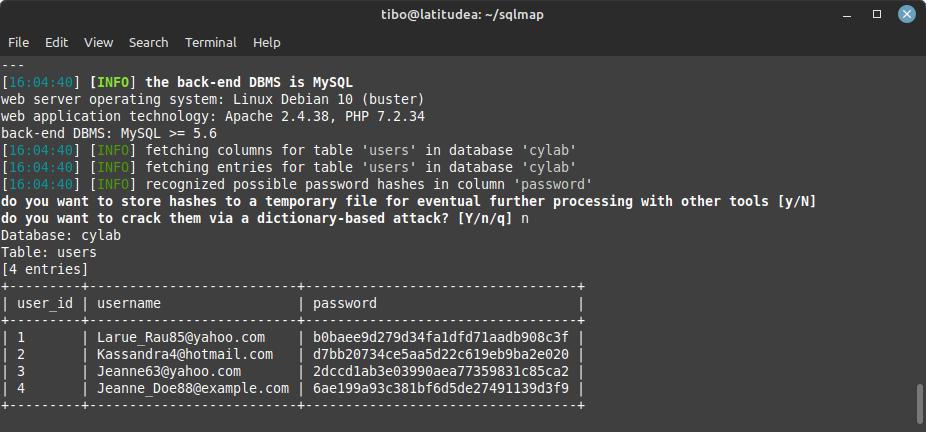
This output confirms that the vulnerability provides access to highly sensitive user credentials. sqlmap even helpfully identifies the password column as containing hashes and offers to assist with cracking them, which is a powerful follow-on action for a penetration tester.
Refining the Attack: Dumping Specific Columns
Sometimes, a table contains many columns, and you're only interested in a few, such as username and password. Dumping the entire table can be slow and generate unnecessary network traffic. A more surgical approach is to specify the exact columns you want to exfiltrate using the -C flag.
The article from Vaadata provides a clear walkthrough of this more targeted approach.
Sqlmap, the Tool for Detecting and Exploiting SQL Injections
This section of the Vaadata blog post demonstrates the final steps of data exfiltration, focusing on how to dump specific columns.
Read the short section titled Listing the table data. Pay close attention to the command structure. It uses -C username,password to instruct sqlmap to only retrieve data from those two columns, in combination with the --dump flag.
Using -C is efficient and demonstrates a more refined technique, allowing you to quickly extract the most valuable information without the noise of irrelevant data.
For another perspective, the following video also covers how to list columns first and then select specific ones for dumping.
#2.2 Dumping The Data (in an Error-based Scenario) via SQLMap
The video "#2.2 Dumping The Data" by Techno Science walks through both dumping a full table and then refining the dump to specific columns.
First, watch the segment on dumping the user table, which reinforces the basic D, T, and --dump command structure. Then, continue to the next section from dumping specific columns, which demonstrates using --columns to see the structure, followed by -C to extract only the username and password columns.
The "All or Nothing" Approach: --dump-all
In some situations, you may want to exfiltrate every piece of data you can access without manually enumerating each table. For this, sqlmap provides the --dump-all flag. This command attempts to dump the contents of every table in every non-system database.
While powerful, this approach has significant downsides:
- Time: It can be extremely time-consuming on large databases.
- Noise: It generates a massive amount of network traffic and database activity, which is highly likely to be detected by monitoring systems or a SOC analyst.
- Instability: On resource-constrained or poorly configured systems, a massive dump operation could potentially impact the application's performance or stability.
As a security analyst, you must weigh the goal against the operational risk. The --dump-all command is a sledgehammer, whereas targeted dumping with -D, -T, and -C is a scalpel.
The video below briefly discusses this option and the associated caveats.
#2.2 Dumping The Data (in an Error-based Scenario) via SQLMap
This final clip from the "Dumping The Data" video provides a warning about using --dump-all.
Watch the short segment from discussing the dump-all option. Note the emphasis on the time it takes and the general recommendation against using it unless necessary.
Hands-On Practice: Exfiltrating the DVWA User Data
You've done the reconnaissance; now it's time to capture the flag. Using the same request.txt file from your previous sessions, you will now dump the contents of the users table from the DVWA database.
-
Dump the Entire
usersTable:
Execute this command in your Kali terminal. We'll use the-Dand-Tflags to specify our target and--dumpto get the data. The--batchflag will accept defaults for you.sqlmap -r ~/Desktop/request.txt -D dvwa -T users --dump --batchExamine the output. You should see a table containing all columns (
user_id,first_name,last_name,user,avatar,last_login,failed_login, andpassword).sqlmapwill likely retrieve the password hashes for all users in the table. -
Dump Specific Columns:
Now, let's perform a more targeted extraction, grabbing only the username and password hash.sqlmap -r ~/Desktop/request.txt -D dvwa -T users -C user,password --dump --batchThe output should now be a much smaller table, containing only the
userandpasswordcolumns. This demonstrates the efficiency of a targeted dump.
You have successfully exploited the SQL injection vulnerability to exfiltrate sensitive user credentials.
Conclusion
In this lesson, you mastered the final and most critical phase of an automated SQL injection attack: data exfiltration. You learned to use sqlmap's dumping features to move from knowing where data is to having it in your possession.
Key Takeaways:
- The
--dumpflag is the primary command for exfiltrating data from a table. - For targeted attacks, combine
--dumpwith-D <database>and-T <table>. - To increase efficiency and reduce noise, use the
-C <col1,col2>flag to dump only specific columns. - The
--dump-allcommand is a powerful but noisy and potentially disruptive option for exfiltrating all accessible data. - Successful data exfiltration is the ultimate goal of most SQL injection attacks.
You have now completed the attack lifecycle: discovery, enumeration, and exfiltration. However, in the real world, defenders don't make it this easy. Web Application Firewalls (WAFs) and other filters are often in place to block these attacks. Our next lesson will explore how to use sqlmap's tamper scripts to evade these defenses.