In our previous lesson, you mastered the most critical defense against SQL injection: prepared statements. By separating SQL logic from user data, this technique fundamentally closes the door on attackers' ability to alter query structures. Now, we will add another essential tool to your defensive arsenal: input validation. This practice serves as a vital second line of defense, ensuring that even if other protections were to fail, malicious or malformed data is stopped at the gate.
This lesson focuses on applying a specific and highly effective validation strategy called whitelisting. You will learn not only what it is and why it's superior to other approaches, but also how to apply it to a web application form field to mitigate injection risks. This moves us further into the "remediation" phase of a security analyst's work, building on your extensive knowledge of exploitation.
Defense-in-Depth: Why Validation Still Matters
Prepared statements are your primary defense, but a robust security posture relies on a "defense-in-depth" strategy. Input validation is a key layer in this strategy. Its purpose is to enforce rules on the data your application accepts before it's ever used. While prepared statements ensure data is treated as data, input validation ensures the data conforms to expected formats, types, and values.
This is more than just a security measure; it's also about data integrity. You wouldn't want a user's age to be "blue," or a zip code to contain a novel. Validation rejects such nonsensical input early.
Crucially, there are scenarios where prepared statements cannot be used, making input validation the primary defense. The following video explains one such common case.
SQL Injection Prevention: Security Simplified
This clip from Vickie Li Dev's "SQL Injection Prevention: Security Simplified" highlights a situation where prepared statements fall short and another technique is required.
Please watch the section from When Prepared Statements Aren't Enough. Notice how user input intended to specify a column name for an ORDER BY clause cannot be parameterized. This is a perfect example of where validation becomes essential.
As you saw, when parts of the SQL query itself need to be dynamic (like column or table names), you cannot use parameters. In these cases, you must validate the user's input against a strict list of allowed values. This technique is called whitelisting.
The Core Strategy: Whitelisting vs. Blacklisting
When it comes to validating input, there are two opposing philosophies:
- Blacklisting (or Denylisting): This involves creating a list of known "bad" inputs and rejecting them. For example, you might try to block inputs containing
',--, orUNION. - Whitelisting (or Allowlisting): This involves creating a list of known "good" inputs and rejecting everything else. For example, if a user is choosing a sort order, you allow only "ASC" and "DESC".
As a security analyst, you must understand why blacklisting is a fundamentally flawed approach. Attackers are endlessly creative; they will always find new ways to encode or obscure their payloads to bypass a blacklist. It is an unwinnable game of cat-and-mouse.
Whitelisting, by contrast, is a secure-by-default approach. You define what is permissible, and the door is closed to any novel attack vector.
The OWASP Cheat Sheet Series is an authoritative resource for security professionals. The following reading explains this critical distinction.
This section from the OWASP cheat sheet explains why allowlisting is the only reliable validation strategy.
Read the section titled Allowlist vs Denylist. Pay close attention to the argument against denylisting—that it's "trivial for an attacker to bypass such filters."
Server-Side vs. Client-Side Validation
You have likely encountered web forms that give you immediate feedback, highlighting a field in red if you enter an invalid email address or use disallowed characters.
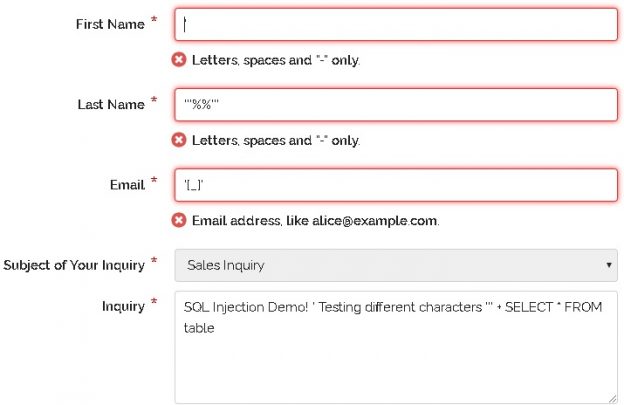
This is client-side validation, and it is performed by JavaScript running in your browser. Its purpose is to improve the user experience (UX) by catching errors quickly without a round-trip to the server.
Client-side validation offers zero security.
An attacker can easily disable JavaScript or use a proxy tool like Burp Suite to intercept and modify the request after it leaves the browser, completely bypassing any client-side checks. Therefore, for security purposes, all validation must be performed on the server. The server must never trust that input arriving from a client has been validated.
The following resource explains this critical point and introduces practical ways to implement server-side whitelisting.
SQL Injection Prevention: Input Validation Tips
This article from Reform provides a clear explanation of why server-side validation is mandatory and directly contrasts whitelisting with blacklisting.
First, read the section on server-side validation. This reinforces why client-side checks are insufficient for security. Next, jump to the FAQ at the end and read the answer here. This provides a concise, powerful summary of the core concept of this lesson.
Applying Whitelisting: A Practical Guide
Now let's translate theory into practice. Applying a whitelist means enforcing rules on the server before using the input. The nature of the rule depends on the type of input you expect.
Here are a few common scenarios:
- A set of fixed options: For a dropdown menu or a sorting parameter (
ASC/DESC), the input must exactly match one of the predefined values. - A specific data type: If you expect a numeric ID, the input must be an integer. Any non-numeric characters should cause the input to be rejected.
- A strict format: For inputs like email addresses, phone numbers, or dates, you can enforce a structural pattern using regular expressions.
- A character set: For a username, you might allow only alphanumeric characters and underscores.
The following reading provides concrete PHP code examples for implementing these whitelisting strategies. Even if you are not a PHP developer, the logic is clear and applicable to any language.
SQL Injection Prevention: Input Validation Tips
This resource provides practical code examples for implementing server-side whitelisting.
Focus on the section How to Implement Whitelisting. Study the four examples provided: Dynamic column names: This directly solves the ORDER BY problem discussed earlier. Data type validation: Shows how to enforce that an input is an integer. Fixed-option inputs: Similar to the first example, perfect for ASC/DESC. Mapping names: An elegant way to use user-friendly terms that map to secure, predefined database column names.
By implementing these server-side checks, you build a powerful defensive layer that complements prepared statements. Any input that doesn't fit the strict "good" criteria is discarded long before it has a chance to reach the database engine.
Conclusion
In this lesson, you've added a crucial layer to your defensive capabilities. While prepared statements are the bedrock of SQL injection prevention, robust input validation is an indispensable part of a defense-in-depth strategy.
Key Takeaways:
- Input validation acts as a gatekeeper, filtering data before it's processed, and is essential for data integrity and security.
- It is the primary defense in situations where prepared statements cannot be used, such as with dynamic column names in an
ORDER BYclause. - Whitelisting (allowing only known good input) is the only secure validation strategy. Blacklisting (blocking known bad input) is fundamentally flawed and easily bypassed.
- Validation for security purposes must be performed on the server-side, as client-side checks are trivial for an attacker to circumvent.
- Whitelisting can be applied by checking against fixed options, data types, formats (with regular expressions), and allowed character sets.
In our next lesson, we will zoom out to look at another layer of defense that operates outside the application itself: the Web Application Firewall (WAF). You will learn how a WAF can detect and block common attack patterns, including SQL injection, providing a broad shield for your web applications.