Welcome to the final module of our course, where we pivot from offense to defense. Over the last several modules, you have mastered the art of discovering and exploiting SQL injection vulnerabilities, culminating in the automated takeover of a database with sqlmap. Now, equipped with a deep understanding of how applications are broken, you are in the perfect position to learn how to secure them.
In your role as a Security Analyst, identifying vulnerabilities is only half the battle. Providing clear, effective, and correct remediation advice is what separates a good analyst from a great one. This lesson addresses the single most important technique for preventing SQL injection. We will focus on remediating vulnerable code by implementing parameterized queries, also known as prepared statements.
By the end of this lesson, you will be able to take a vulnerable code snippet, identify the flaw, and rewrite it using secure coding practices that fundamentally eliminate the risk of SQL injection.
The Root of the Problem: Mixing Code and Data
Let's briefly revisit the core principle that makes SQL injection possible. The vulnerability arises when an application constructs SQL queries by directly concatenating unvalidated user input into the query string. When this happens, the database server has no reliable way to distinguish between the developer's intended SQL command and the data supplied by a user. An attacker can then provide specially crafted input that is interpreted by the database as part of the SQL command itself, altering the query's logic.
Consider this classic vulnerable PHP snippet:
// User input from a form
$username = $_POST['username'];
$password = $_POST['password'];

// Insecure query construction
$query = "SELECT * FROM users WHERE user = '$username' AND password = '$password'";
$result = mysql_query($query);
If an attacker enters admin' -- as the username, the resulting query becomes:
SELECT * FROM users WHERE user = 'admin' -- ' AND password = 'some_password'
The -- sequence starts a comment in SQL, effectively nullifying the rest of the query, including the password check. The application has been tricked into executing a query the developer never intended.
The Solution: Separating Code from Data with Prepared Statements
The most robust defense against SQL injection is to ensure that user-supplied data is never treated as executable code. This is achieved using prepared statements, or parameterized queries.
The core idea is simple but powerful:
- Prepare: You first define the SQL query's structure, using placeholders (like
?or:name) for any user-provided values. This query template is sent to the database server. - Compile: The database server receives this template, parses it, checks its syntax, and compiles it, creating an execution plan. It understands the logic of the query before seeing any user data.
- Execute: You then send the user's data to the database separately. The database engine binds this data to the placeholders in the pre-compiled query and executes it.
Because the query's logic is already compiled, the user-supplied values are treated strictly as data. An input of admin' -- is not interpreted as code; it is treated as the literal string value to be searched for in the username column. The malicious input can no longer alter the query's structure.
The following video provides an excellent overview of this concept.
SQL Injection Prevention: Security Simplified
Watch this video from Vickie Li Dev, "SQL Injection Prevention: Security Simplified," to understand the fundamental difference between insecure dynamic queries and secure prepared statements.
Focus on these two parts: How Prepared Statements Work: This section explains the process of parsing, compiling, and executing a query, and how prepared statements ensure the database can distinguish between code and data. PHP/MySQL Example: This provides a clear, practical demonstration of converting a vulnerable PHP query into a secure one using prepared statements.
Remediating Vulnerable Code: Practical Examples
Now, let's apply this concept to fix vulnerable code. As a Security Analyst, you'll encounter various programming languages and database connectors. The syntax may differ, but the principle of parameterization remains the same.
The OWASP Cheat Sheet Series is an authoritative resource for security professionals. The following reading provides a concise, expert explanation of prepared statements and offers clear examples.
SQL Injection Prevention - OWASP Cheat Sheet Series
This OWASP guide is the industry standard for SQL injection prevention. It explains why prepared statements are the primary defense and shows how to implement them.
Please read the following sections: Start with Defense Option 1, which introduces the concept. Then, carefully study the Safe Java Example to see how a PreparedStatement is used. Finally, review the Safe C# .NET Example to see how the same principle applies in a different ecosystem.
Let's look at some code transformations.
Example 1: PHP (with PDO)
Here is a common scenario in a PHP application.
Vulnerable Code:
$username = $_POST['username'];
$sql = "SELECT * FROM users WHERE username = '$username'";
// The $username variable is directly concatenated into the query.
$result = $pdo->query($sql);
Secure Remediation:
To fix this, we use placeholders and the prepare() and execute() methods.

The secure code would look like this:
$username = $_POST['username'];

// 1. Prepare the statement with a placeholder
$stmt = $pdo->prepare("SELECT * FROM users WHERE username = ?");

// 2. Execute the statement, passing user input as a parameter
$stmt->execute([$username]);

// The database handles the safe substitution.
$user = $stmt->fetch();
Example 2: Java (with JDBC)
Java's JDBC API provides the PreparedStatement class for this exact purpose.
Vulnerable Code:
String username = request.getParameter("username");
String query = "SELECT * FROM users WHERE username = '" + username + "'";
Statement stmt = connection.createStatement();
ResultSet rs = stmt.executeQuery(query);
Secure Remediation:
We replace Statement with PreparedStatement.
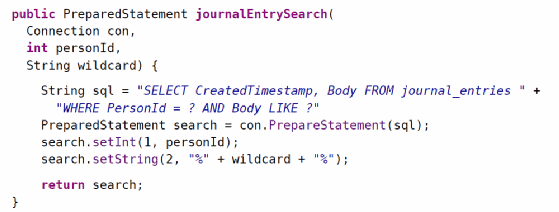
The secure version is:
String username = request.getParameter("username");
String query = "SELECT * FROM users WHERE username = ?";

// 1. Create a PreparedStatement
PreparedStatement pstmt = connection.prepareStatement(query);

// 2. Bind the value to the placeholder (index 1 for the first '?')
pstmt.setString(1, username);

// 3. Execute the pre-compiled query
ResultSet rs = pstmt.executeQuery();
This next video demonstrates fixing a vulnerable Python application, reinforcing the pattern in yet another language.
[#E02] Secure Code Review for Beginners: SQL Injection
This video, "Secure Code Review for Beginners: SQL Injection", demonstrates exactly how to remediate a vulnerable Python script.
First, watch the segment from introducing parameterized queries. The presenter shows the "before" and "after" code, highlighting the change from string formatting to using ? placeholders. Then, see the result from testing the fix, where the old SQL injection payload fails against the secured code, proving the remediation was successful.
A Critical Pitfall: Incorrect Usage
A word of caution: simply using a "prepare" function is not enough. The vulnerability is only eliminated if you use parameter binding correctly. It is a common mistake to see code that uses the prepare API but still concatenates user data, completely defeating the purpose of the defense.
As a security analyst performing a code review, you must be vigilant for this anti-pattern:
INCORRECT AND STILL VULNERABLE:
// This is WRONG! Do not do this.
$stmt = $pdo->prepare("SELECT * FROM users WHERE username = '" . $_POST['username'] . "'");
$stmt->execute();
Even though this code uses prepare(), it builds the full SQL string before sending it to the database. The vulnerability remains. The key is to use placeholders and send the data separately via the execute() method or a bind function.
The video from Vickie Li Dev that you watched earlier also points out this critical mistake.
SQL Injection Prevention: Security Simplified
Revisit the video "SQL Injection Prevention: Security Simplified" for a reminder of this common error.
Pay close attention to the short segment from explaining incorrect usage. The presenter explicitly warns that concatenating user input within the prepare function still leaves the application vulnerable.
Conclusion
You have now learned the single most effective and universally recommended method for preventing SQL injection. By ensuring a strict separation between SQL code and user-supplied data, prepared statements eliminate this vulnerability class at its root.
Key Takeaways:
- SQL injection happens when user data is mixed with SQL code, altering query logic.
- Prepared statements (parameterized queries) are the primary defense.
- The process involves sending a query template with placeholders to the database first, which is then compiled. User data is sent separately and bound to the template, ensuring it is always treated as data, not code.
- Virtually all modern programming languages provide a mechanism for prepared statements (e.g.,
PreparedStatementin Java, PDO in PHP,executewith parameters in Python'ssqlite3orpsycopg2). - A common pitfall is to use the
preparefunction while still concatenating user input into the query string. This is incorrect and provides no security benefit.
In our next lesson, we will build on this defensive mindset by looking at another important layer of security: input validation. While prepared statements are your primary defense, validating what users can enter in the first place provides a valuable defense-in-depth strategy.