Introduction
Welcome to a new phase of your learning journey! In our previous modules, we focused intensely on what it takes to build and train Large Language Models, culminating in our last lesson on the complex distributed systems required for training at scale. Now, we pivot from being the model architect to being the model commander. Our focus shifts to effectively using these powerful, pre-trained models to solve real-world problems.
This begins with the art and science of prompt engineering. A prompt is simply the instruction you give to an LLM. Today, you will learn how to design effective zero-shot prompts. This technique allows you to ask a model to perform a task it has never been explicitly trained for, without providing any examples in your prompt. Mastering this is the first step toward unlocking the vast capabilities of modern LLMs for classification, information extraction, and content generation.
1. What is Zero-Shot Prompting?
At its core, zero-shot prompting is the ability to instruct a large language model to perform a novel task on the fly. You've learned about the transformer architecture and how models are pre-trained on immense text corpora. This pre-training imbues them with a general understanding of language, facts, and reasoning patterns. Zero-shot prompting leverages this built-in "knowledge" to get the model to generalize to your specific task.
For a conceptual overview, let's start with a foundational article.
Zero-shot Classification Tutorial with Granite
This article from IBM provides a clear definition of zero-shot classification and explains the underlying mechanics that make it possible.
Read the sections 'Overview of zero-shot classification' and 'How foundation models perform zero-shot classification'. Focus on how the transformer's self-attention mechanism and the model's pre-training enable it to understand tasks from instructions alone.
The key idea is that instead of training a model with thousands of labeled examples for a task like sentiment analysis, you can simply tell a large pre-trained model what sentiment analysis is and ask it to perform the task.
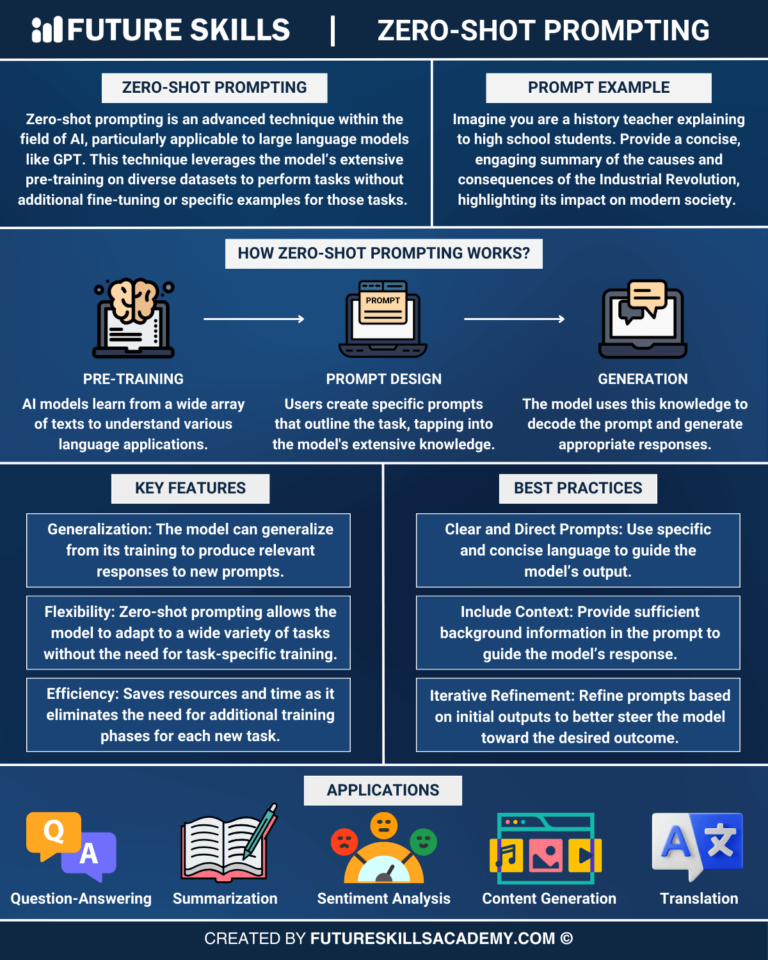
The infographic below gives a great visual summary of the concept, its features, and applications.
2. The Anatomy of an Effective Prompt
While a simple question can be a prompt, crafting a high-quality prompt is a deliberate process. A well-structured prompt dramatically increases the chances of getting a precise, useful, and reliable output. Different experts propose slightly different frameworks, but they all converge on a similar set of core components.
To get a practical sense of these components, please watch the following video.
Master the Perfect ChatGPT Prompt Formula (in just 8 minutes)!
This video by Jeff Su provides a concise and powerful framework, breaking down a perfect prompt into six key building blocks. It's an excellent mental model for constructing your own prompts.
Watch from 00:29 to 02:58 and from 04:22 to 07:06. Pay close attention to the six components: Task, Context, Persona, Format, and Tone (we will cover Exemplars in the next lesson). Notice the hierarchy he proposes, with Task being mandatory.
Synthesizing from this and other frameworks, a robust zero-shot prompt generally includes these key elements:
- Role (or Persona): Instruct the model on who it should be. "You are an expert copywriter," "Act as a senior software developer," or "You are a helpful assistant for classifying documents." This primes the model to adopt the appropriate style, vocabulary, and knowledge base.
- Task: State the primary objective clearly and directly. Always start with an action verb. "Summarize the following text," "Classify this email," "Extract the key financial figures," "Write a Python function."
- Context: Provide the necessary background information or constraints the model needs to perform the task successfully. This could include the target audience, the definition of success, or surrounding circumstances.
- Input Data: The specific piece of information you want the model to work on. This is often separated from the instructions using delimiters like
"""or---for clarity. - Format: Specify the exact structure of the desired output. Do you want a JSON object, a Markdown table, a bulleted list, or a simple paragraph? Being explicit here is crucial for building reliable systems.
- Tone: Define the stylistic quality of the response (e.g., "formal," "enthusiastic," "concise," "technical").
Think of these components as a checklist to run through when designing a prompt. You won't always need every single one, but considering them will consistently improve your results.
3. Designing Prompts for Core Tasks
Now, let's apply this framework to the three key tasks mentioned in our learning outcome: classification, extraction, and generation.
A. Classification
Goal: To assign an input to one of a predefined set of categories. This is a classic machine learning task, but with LLMs, we don't need a dedicated classifier model.
Prompt Design Strategy:
- Task: Clearly state the classification task.
- Context: Define the categories very clearly. This is the most important part.
- Input Data: Provide the text to be classified.
- Format: Instruct the model to output only the category name for easy parsing.
Example: IT Ticket Prioritization
Imagine you want to automate the prioritization of incoming IT support tickets. Your categories are High, Medium, and Low.
A simple prompt would be:
Classify the following IT ticket as High, Medium, or Low. Ticket: "Users are reporting that they are unable to upload files."
This leverages the model's general knowledge that being unable to upload files is a critical issue. The IBM tutorial you read earlier provides this exact example.
Test your understanding!
You are building a system to sort customer feedback from an e-commerce website into three categories: Shipping Issue, Product Quality, and Website Bug.
Design a zero-shot prompt to classify the following piece of feedback:"I tried to add the blue shirt to my cart, but every time I click the button, the page just reloads and nothing happens."
Show answer
Here's one effective prompt design:
Prompt:
You are an expert customer support assistant. Your task is to classify customer feedback into one of the following categories: Shipping Issue, Product Quality, or Website Bug.

Provide only the category name as your answer.

Feedback to classify:
"""
I tried to add the blue shirt to my cart, but every time I click the button, the page just reloads and nothing happens.
"""
Expected Output:
Website Bug
This prompt clearly defines the role, task, categories (context), and output format, making it robust.
B. Extraction
Goal: To pull specific, structured information from an unstructured block of text. This is incredibly useful for turning documents into structured data.
Prompt Design Strategy:
- Task: State that the goal is to extract specific information.
- Context: List the exact entities you want to pull out.
- Input Data: Provide the source text.
- Format: This is critical for extraction. JSON is an excellent choice as it's machine-readable and can handle nested data. Specify the keys you want in the JSON object.
Example: Extracting Invoice Details
Prompt:
Extract the following information from the invoice text below:
- Invoice Number
- Customer Name
- Total Amount Due

Provide the output as a JSON object with the keys "invoice_id", "customer_name", and "total_due".

Invoice Text:
---
INVOICE #10-234
To: John Doe
Date: 2024-10-26
...
...
Total: $145.50
---
Expected Output:
{
  "invoice_id": "10-234",
  "customer_name": "John Doe",
  "total_due": 145.50
}
For more examples, the Prompt Engineering Guide is an invaluable resource.
dair-ai/Prompt-Engineering-Guide
The dair-ai Prompt Engineering Guide is a comprehensive open-source resource. Let's look at its section on information extraction to see more advanced examples.
Navigate to the link provided in the 'Prompt Hub' section for 'Information Extraction' (https://www.promptingguide.ai/prompts/information-extraction). Review the examples to see different ways of structuring extraction prompts.
C. Generation
Goal: To create new text (e.g., an email, a summary, a creative story, or code). This is where all the prompt components can be used to their fullest extent.
Prompt Design Strategy:
- Role/Persona: Essential for defining the writing style. "You are a friendly and enthusiastic marketing manager."
- Task: The creative goal. "Write a promotional email."
- Context: Include all key points, the target audience, and any constraints.
- Format/Tone: Specify length, structure (e.g., "start with a catchy subject line"), and the desired tone.
Let's see a practical example of this in action.
Google's 9 Hour AI Prompt Engineering Course In 20 Minutes
This clip, from a video by Tina Huang summarizing a Google course, demonstrates how to build a high-quality prompt for a common generation task: writing a professional email.
Watch the segment from 08:32 to 09:56. Note how the prompt specifies the role (gym manager), context (schedule change), key information to highlight, and the desired tone and length.
Test your understanding!
You need to generate a short, two-paragraph summary of a technical blog post for a non-technical audience (e.g., a project manager).
Design a zero-shot prompt to summarize the following text, keeping the audience in mind.
Text to summarize:"We implemented a novel multi-head attention mechanism with Rotary Positional Embeddings (RoPE) to reduce computational overhead. The architecture leverages tensor parallelism across 8 A100 GPUs, achieving a 30% reduction in training latency compared to models using absolute positional encodings."
Show answer
Here is a well-designed prompt for this task:
Prompt:
Act as an expert technical writer who is skilled at simplifying complex concepts.

Your task is to summarize the following technical update for a non-technical audience, like a project manager. The summary should be two paragraphs long and avoid jargon. Focus on the 'so what' — what was the benefit of this work?

Use a clear and confident tone.

Technical Update:
"""
We implemented a novel multi-head attention mechanism with Rotary Positional Embeddings (RoPE) to reduce computational overhead. The architecture leverages tensor parallelism across 8 A100 GPUs, achieving a 30% reduction in training latency compared to models using absolute positional encodings.
"""
Expected Output:
The model would generate a summary explaining that the team used a new, more efficient method for their AI model. This new method allows the model to process information more effectively.
The key benefit is that this improvement made the model training process 30% faster. This means we can develop and update our AI features more quickly and at a lower cost, speeding up our project timelines.
Conclusion
You've just taken your first and most important step into prompt engineering. You now have a systematic framework for communicating with LLMs to perform tasks without any task-specific data or training.
Key Takeaways:
- Zero-shot prompting leverages a model's vast pre-trained knowledge to perform new tasks based on instructions alone.
- An effective prompt is built from clear components: Role, Task, Context, Input Data, Format, and Tone.
- For classification, clearly define the categories.
- For extraction, specify the desired output format, like JSON, to ensure machine-readability.
- For generation, combine all components to guide the model's creativity, style, and structure.
- Prompting is an iterative process. Your first prompt is rarely your last. The key is to analyze the output and refine your instructions.
What's Next?
Zero-shot prompting is powerful, but it has its limits, especially for complex or nuanced tasks. What if you could give the model a small hint or a couple of examples of what you want? That's exactly what few-shot learning is for. In our next lesson, you will learn how to implement few-shot prompting by providing in-context examples to dramatically improve the model's accuracy and reliability.