Introduction
In our last lesson, we established the foundation of prompt engineering with zero-shot prompting, learning to craft effective instructions using the Role, Task, Context, Format, and Tone framework. You saw how to command a model to perform tasks it wasn't explicitly trained for, just by telling it what to do. However, you might have noticed that for more nuanced or complex tasks, instructions alone can sometimes lead to inconsistent or incorrect results.
Today, we address this limitation by moving from pure instruction to demonstration. This lesson focuses on few-shot learning, also known as in-context learning. You will learn to implement this powerful technique by providing a small number of examples (the "few shots") directly within the prompt. This guides the model toward the desired output format, style, and logic with much greater precision, a critical skill for building reliable LLM applications.
1. From Instruction to Demonstration: The Power of Examples
Zero-shot prompting relies on the model's pre-trained ability to generalize. Few-shot prompting goes a step further by providing a live learning opportunity within the context window. Instead of just telling the model to be a sentiment classifier, you show it a few examples of text being classified correctly.
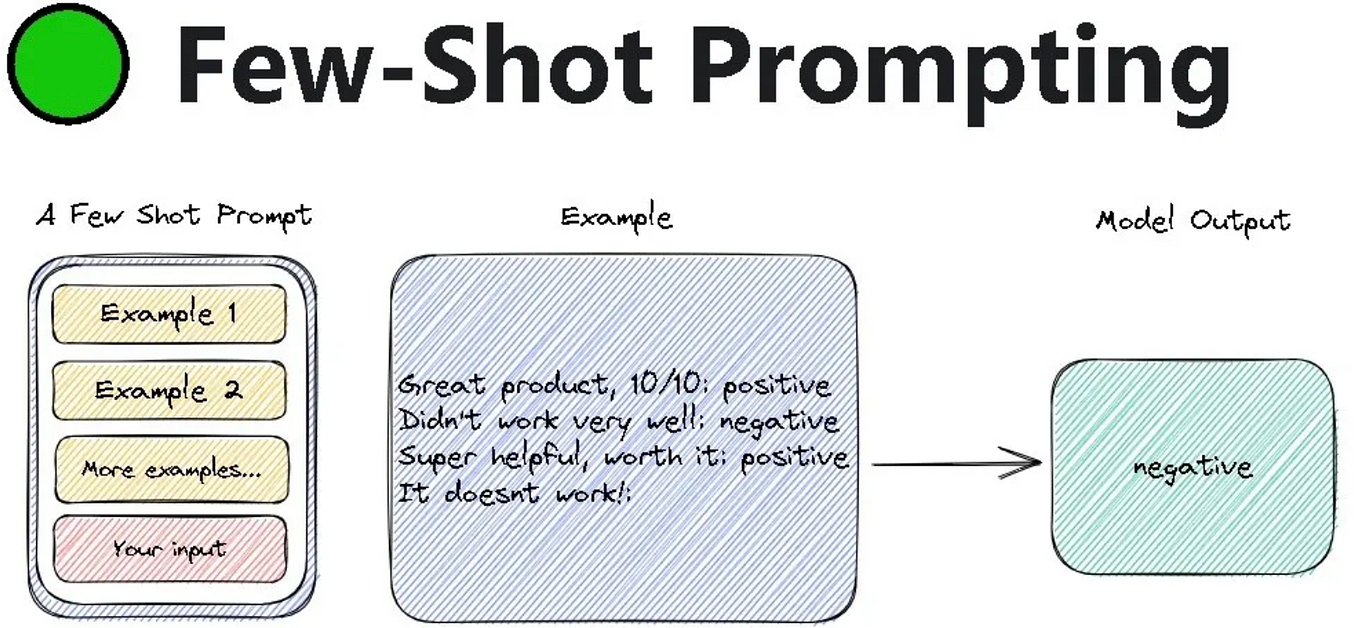
This technique is especially crucial when you move beyond highly-aligned proprietary models (like ChatGPT) to work with open-weight models, which are often more flexible and responsive to in-context learning.
To understand the deeper "why" behind this, let's explore an article that frames this concept perfectly.
Few-Shot Examples Done Properly - by Evan Armstrong
The article 'Few-Shot Examples Done Properly' by Evan Armstrong provides crucial insights into why few-shot prompting is arguably the most powerful technique for controlling many LLMs. It explains the difference in how highly-aligned models and open-source models respond to examples.
Please read the introduction ('Why ChatGPT made people think few-shot examples suck'), 'The fundamental difference between prompting GPT and open-source', and 'Writing few-shot examples: create the perfect pattern'. Focus on these key ideas: the concept of model 'alignment' affecting receptiveness to examples, and the shift in thinking from giving 'instructions' to creating a 'flawless pattern' for the model to complete.
As the article highlights, the goal of few-shot prompting is to create an unmistakable pattern. You are not just giving hints; you are defining a sequence that the model, as a powerful sequence completion engine, can flawlessly continue.
2. Best Practices for Crafting Few-Shot Examples
Creating effective few-shot prompts is an iterative process, but following a few principles will dramatically accelerate your success. The article you just read outlines several, which we can codify into a practical workflow.
- Start with at Least Two Examples: A single example can cause the model to overfit to its specific content. Two examples are the minimum required to establish a clear pattern.
- Iterate by Adding Failures: The fastest way to a robust prompt is to test it, find where it fails, and convert that failure into a new, corrected example in your prompt. This systematically teaches the model how to handle the cases it initially found difficult.
- Order Your Examples Strategically:
- Place common, straightforward cases first to establish the basic pattern.
- Place more complex edge cases or examples of corrected failures towards the end of the example block. Models tend to pay closer attention to the information just before the final task.
- Maintain a Flawless Pattern: Ensure your examples are structured identically. The only things that should change between examples are the specific input and the corresponding output. This consistency makes the pattern you want the model to follow undeniable.
3. Implementing Few-Shot Prompts with LangChain
Now, let's move from theory to practice. LangChain, a popular framework for developing LLM applications, provides excellent tools for managing few-shot prompts. We'll use its FewShotPromptTemplate to structure our examples and integrate them into a final prompt.
This video provides a clear, code-along demonstration of building a prompt from zero-shot up to few-shot.
Zero, One, and Few Shot Prompting with Langchain and OpenAI LLMs
The video 'Zero, One, and Few Shot Prompting with Langchain and OpenAI LLMs' walks through a practical example of classifying baseball player stats. It clearly shows the limitations of zero-shot and the increasing reliability that comes from adding one and then multiple examples.
Watch the following segments to see the implementation: Zero-Shot (03:18 - 05:58): Observe the inconsistent outputs when no examples are given. One-Shot (05:58 - 12:45): Pay attention to how PromptTemplate and FewShotPromptTemplate are used to structure a single example. Few-Shot (12:45 - 17:54): Notice how adding more diverse examples makes the prompt robust enough to handle more complex formatting.
Let's break down the key implementation steps from the video.
Step 1: Define Your Examples
First, you create a list of dictionaries, where each dictionary represents one input-output pair.
# Based on the video's few-shot example
examples = [
    {
        "player": "Sandy Koufax",
        "teams": "Dodgers",
        "stats": "Strikeouts: 2396, Innings Pitched: 2324.1"
    },
    {
        "player": "Nolan Ryan",
        "teams": "Mets, Angels, Astros, Rangers",
        "stats": "Strikeouts: 5714, Innings Pitched: 5386.0"
    },
    {
        "player": "Walter Johnson",
        "teams": "Nationals",
        "stats": "Strikeouts: 3509, Innings Pitched: 5914.1"
    }
]
Notice the diversity: one player with a single team, one with multiple. This helps the model generalize.
Step 2: Create an Example PromptTemplate
Next, you define a template that formats a single example. This tells LangChain how to structure each input/output pair from your list.
from langchain.prompts import PromptTemplate

example_prompt = PromptTemplate(
    input_variables=["player", "teams", "stats"],
    template="Player: {player}\nTeams: {teams}\nStats: {stats}"
)
Step 3: Create the FewShotPromptTemplate
This is the main object. It combines your list of examples, the example formatter, and the final user input.
from langchain.prompts import FewShotPromptTemplate

prompt = FewShotPromptTemplate(
    examples=examples,
    example_prompt=example_prompt,
    prefix="Provide the teams and career stats for the given baseball player.",
    suffix="Player: {input}\nTeams: \nStats: ", # Note the empty lines to guide completion
    input_variables=["input"],
    example_separator="\n\n" # Separator between examples
)
Step 4: Run the Prompt
Finally, you can format the prompt with a new input and pass it to the model.
from langchain_openai import OpenAI

# Assume llm is an initialized OpenAI() object
# llm = OpenAI(temperature=0.6)

final_prompt = prompt.format(input="Lefty Grove")
print(final_prompt) # See what the model will receive
# response = llm.invoke(final_prompt)
# print(response)
The final_prompt variable would contain the prefix, all the formatted examples, and the final suffix with the new player, creating a perfect pattern for the LLM to complete.
Test your understanding!
In the last lesson, you designed a zero-shot prompt for extracting invoice details into JSON. Now, let's make it more robust using few-shot learning.
Your goal is to extract the item, quantity, and unit_price from a line in a messy text block.
Task: Using the LangChain structure above (PromptTemplate, FewShotPromptTemplate), design a few-shot prompt that can extract structured data from the final input_text.
Examples to include:
Input: "3 boxes of #2 pencils at $2.50 each"
Output:{"item": "#2 pencils", "quantity": 3, "unit_price": 2.50}Input: "Invoice for 1 ergonomic chair, price is 350.00"
Output:{"item": "ergonomic chair", "quantity": 1, "unit_price": 350.00}
Final input to test:"Please process the order for two 27-inch monitors, they cost 199.99 per unit."
Show answer
Here's a complete Python implementation:
from langchain.prompts import PromptTemplate, FewShotPromptTemplate
from langchain_openai import OpenAI

# 1. Define examples
examples = [
    {
        "text": "3 boxes of #2 pencils at $2.50 each",
        "json_output": '{"item": "#2 pencils", "quantity": 3, "unit_price": 2.50}'
    },
    {
        "text": "Invoice for 1 ergonomic chair, price is 350.00",
        "json_output": '{"item": "ergonomic chair", "quantity": 1, "unit_price": 350.00}'
    }
]

# 2. Define the example formatter
example_prompt = PromptTemplate(
    input_variables=["text", "json_output"],
    template="Input Text:\n{text}\nJSON Output:\n{json_output}"
)

# 3. Create the FewShotPromptTemplate
few_shot_prompt = FewShotPromptTemplate(
    examples=examples,
    example_prompt=example_prompt,
    prefix="Extract item, quantity, and unit price from the text and provide it as a clean JSON object.",
    suffix="Input Text:\n{input_text}\nJSON Output:",
    input_variables=["input_text"],
    example_separator="\n---\n"
)

# 4. Format the final prompt
final_input = "Please process the order for two 27-inch monitors, they cost 199.99 per unit."
final_prompt_string = few_shot_prompt.format(input_text=final_input)

print("--- FINAL PROMPT SENT TO LLM ---")
print(final_prompt_string)

# To run this, you would need your OpenAI API key set up
# llm = OpenAI(temperature=0)
# response = llm.invoke(final_prompt_string)
# print("\n--- LLM RESPONSE ---")
# print(response)

# Expected response would be:
# '{"item": "27-inch monitors", "quantity": 2, "unit_price": 199.99}'
This prompt provides clear examples of the desired input-to-JSON transformation, making it highly likely the model will correctly parse the new, slightly different sentence structure.
4. Advanced Topic Preview: Dynamic Few-Shot Selection
What if you have hundreds of potential examples, covering many different topics (e.g., math problems, poems, historical facts)? Including them all would create an enormous and expensive prompt.
The solution is dynamic few-shot prompting. Instead of a fixed list, you use a selector that picks the most relevant examples for the current user input, often by using vector embeddings and semantic similarity.
Exploring Few-Shot Prompts with LangChain | by Donato_TH
This article, 'Exploring Few-Shot Prompts with LangChain', briefly demonstrates this advanced concept. You don't need to implement it now, but understanding the idea is valuable.
Read the section 'B. Dynamic Examples'. Notice how it uses an ExampleSelector (specifically SemanticSimilarityExampleSelector) to choose the most relevant examples from a larger pool. When the input is a math question, it selects math examples; when the input is about the moon, it selects poem examples. This is a foundational concept for Retrieval-Augmented Generation (RAG), which we will cover in depth later.
Conclusion
You have now advanced from giving instructions to providing demonstrations. This is a significant step towards mastering prompt engineering and building more sophisticated AI systems.
Key Takeaways:
- Few-shot learning (in-context learning) provides examples within a prompt to guide the model's output, drastically improving reliability for complex or nuanced tasks.
- It is most effective when viewed as creating a flawless pattern for the model to autocomplete, a technique that is especially powerful with flexible open-weight models.
- A robust few-shot prompt engineering workflow is iterative: start with 2-3 examples, test, and add corrected failures as new examples.
- Frameworks like LangChain simplify the implementation with tools like
FewShotPromptTemplate, which programmatically assembles examples into a final prompt.
What's Next?
So far, we have focused on showing the model what we want as an output. But for complex reasoning tasks, showing it how to think step-by-step is even more powerful. In our next lesson, you will learn to implement Chain-of-Thought (CoT) prompting, a technique that guides a model through a multi-step reasoning process before it arrives at a final answer.