Introduction
Welcome back. In our last lesson, you mastered the critical process of preparing and formatting a dataset for supervised instruction fine-tuning (SFT). You now know how to structure data, apply prompt templates, and use loss masking to focus the model's learning on the desired response.
Today, we will connect that prepared data to a model and execute the fine-tuning process. This lesson directly addresses the learning outcome: Implement PEFT (e.g., LoRA) on a pre-trained model using the HuggingFace PEFT library. We will move from theory to practice, writing the code that takes a base model and efficiently adapts it to a new task using Low-Rank Adaptation (LoRA). This is where your skills as an engineer begin to directly shape the behavior of these powerful models.
1. A Practical Refresher on LoRA
In a previous lesson, we conceptually distinguished between full fine-tuning and Parameter-Efficient Fine-Tuning (PEFT). LoRA is the most prominent and widely-used PEFT technique. Its core idea is to freeze the billions of parameters in the base model and inject small, trainable "adapter" layers. During training, we only update the weights of these adapters, which represent the change in the model's weights for the new task.
This approach dramatically reduces the number of trainable parameters (often by >99%), making fine-tuning accessible on consumer-grade GPUs and simplifying the management of specialized models.
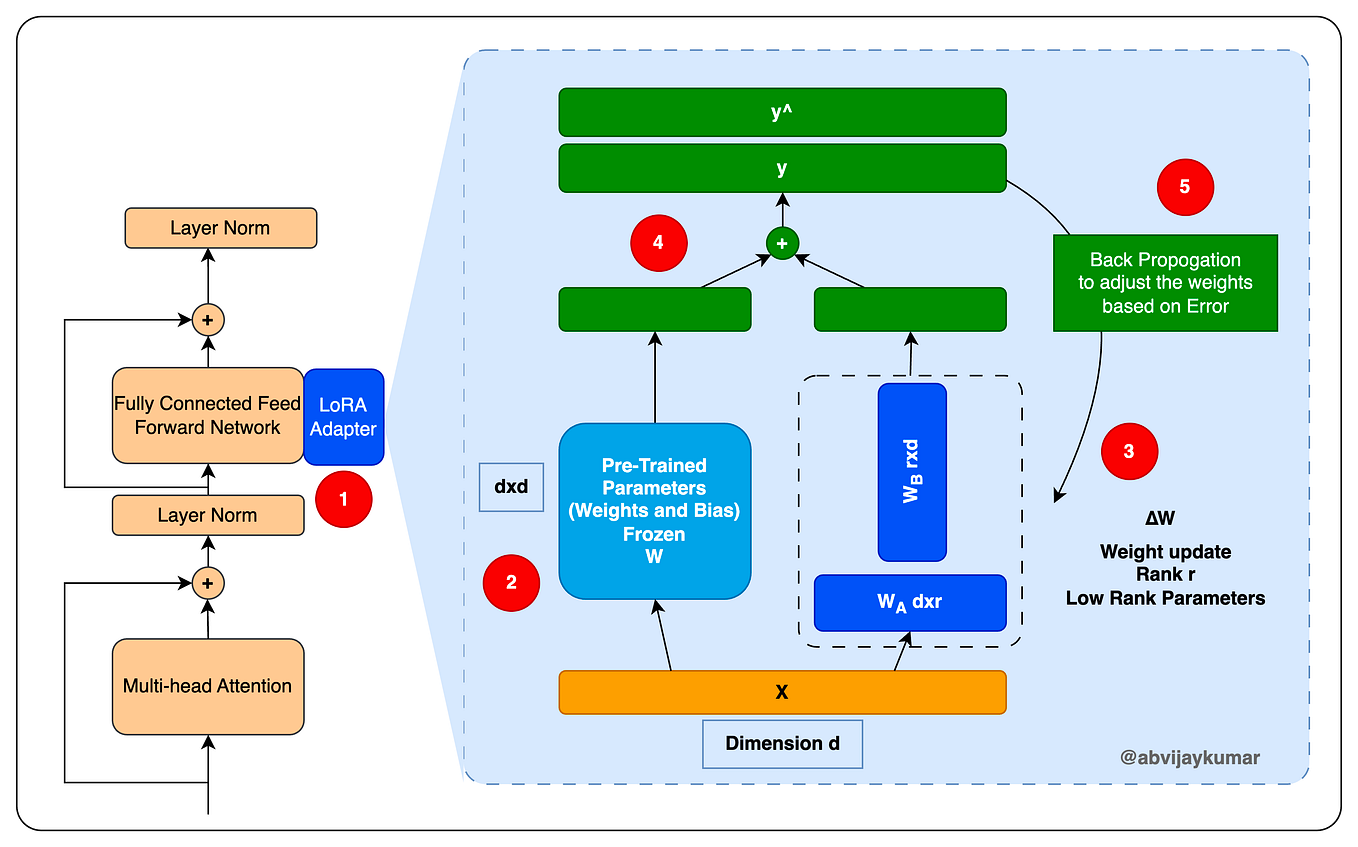
To solidify your intuition for why this low-rank decomposition is effective, let's review a clear explanation of the theory and motivation.
Fine-Tuning Local Models with LoRA in Python (Theory & Code)
The video 'Fine-Tuning Local Models with LoRA in Python' by NeuralNine provides an excellent and accessible explanation of the core idea behind LoRA. It builds the mathematical intuition without getting lost in academic formalism.
Watch from 01:26 to 14:44. Focus on understanding the hypothesis that the 'change' needed to fine-tune a model has a low intrinsic rank, which justifies decomposing the weight update matrix (ΔW) into two smaller, low-rank matrices (A and B).
2. The LoRA Implementation Workflow with Hugging Face
The Hugging Face peft library has become the industry standard for applying PEFT methods. It simplifies the entire process into a few key steps. We will now walk through this workflow, which you will use repeatedly in practice.
Step 1: Load the Base Model and Tokenizer
First, we load the pre-trained model we want to fine-tune. A crucial consideration for running on your own hardware is memory. We can use quantization to load the model with lower precision (e.g., 8-bit or 4-bit), which significantly reduces the GPU memory footprint. The bitsandbytes library integrates seamlessly with transformers for this.
import torch
from transformers import AutoTokenizer, AutoModelForCausalLM, BitsAndBytesConfig

model_id = "meta-llama/Llama-2-7b-chat-hf"

# Configure quantization to load the model in 4-bit precision
quantization_config = BitsAndBytesConfig(
    load_in_4bit=True,
    bnb_4bit_quant_type="nf4",
    bnb_4bit_compute_dtype=torch.bfloat16
)

# Load the model with the specified quantization config
model = AutoModelForCausalLM.from_pretrained(
    model_id,
    quantization_config=quantization_config,
    device_map="auto" # Automatically maps model layers to available devices (GPU/CPU)
)

# Load the tokenizer
tokenizer = AutoTokenizer.from_pretrained(model_id)
# Many models don't have a pad token, so we set it to the EOS token
tokenizer.pad_token = tokenizer.eos_token
This setup loads the massive base model onto the GPU in a memory-efficient way, with all its parameters frozen by default.
Step 2: Define the LoRA Configuration
This is the most critical part of setting up the fine-tuning job. We use the LoraConfig class from the peft library to specify how the LoRA adapters should be configured and where they should be injected into the model architecture.
LoRA (Low-Rank Adaptation) - Hugging Face LLM Course
The Hugging Face LLM Course documentation provides a clear, tabular overview of the most important LoraConfig parameters. This is a great reference to have bookmarked.
Read the section 'LoRA Configuration' and study the table of parameters. Pay close attention to r, lora_alpha, and target_modules, as these are the parameters you will tune most often.
Here's an example of how to define the configuration in code:
from peft import LoraConfig

lora_config = LoraConfig(
    r=16,  # Rank of the update matrices. Lower values = fewer parameters to train.
    lora_alpha=32, # Scaling factor for the LoRA weights; a common practice is to set it to 2*r.
    target_modules=["q_proj", "v_proj"], # Names of the layers to apply LoRA to.
    lora_dropout=0.05, # Dropout probability for the LoRA layers.
    bias="none", # Whether to train bias parameters. 'none' is common for efficiency.
    task_type="CAUSAL_LM" # Specifies the task type.
)
How to find target_modules?
The target_modules parameter is model-specific. A common source of errors is specifying layer names that don't exist in the model. You can inspect the model architecture to find the correct names, which often include q_proj, k_proj, v_proj, and o_proj in the attention blocks.
Here's a handy utility function from the "Practical Guide to Fine-tune LLMs with LoRA" article to print the module names:
def print_module_names(model):
    for name, module in model.named_modules():
        if 'attn' in name or 'attention' in name:
            print(name)

# print_module_names(model)
# This would output the names of attention-related layers, helping you identify targets.
Step 3: Apply LoRA to the Model
With the configuration defined, applying it to the model is a one-liner using get_peft_model. This function wraps the base model and injects the trainable LoRA adapter layers according to your config.
from peft import get_peft_model

model = get_peft_model(model, lora_config)

# You can verify the dramatic reduction in trainable parameters
model.print_trainable_parameters()
# trainable params: 8,388,608 || all params: 3,508,800,256 || trainable%: 0.2390733102434229
Your model is now ready for training. Notice that we are only training a tiny fraction (~0.24%) of the total parameters.
Test your understanding!
You are fine-tuning a model on a highly specialized legal text dataset. After a few epochs, you notice the training loss is still very high and the model isn't learning the legal jargon. This suggests the model is underfitting. Based on the LoraConfig parameters, what are two adjustments you could make to increase the model's learning capacity?
Show answer
To increase the model's capacity and combat underfitting, you could:
- Increase
r(the rank): A higher rank (e.g., going from 8 to 32 or 64) allows the adapter to learn more complex transformations. This gives it more capacity to capture the nuances of the legal domain. - Expand
target_modules: Applying LoRA to more layers (e.g., adding"k_proj"and"o_proj", or even the feed-forward layers like"gate_proj"and"up_proj") gives the model more adaptable components to work with.
3. Training the LoRA Model
Now, we bring everything together. We take the dataset you learned to prepare in the last lesson and feed it to our PEFT-enabled model. The Hugging Face Trainer (or the more specialized SFTTrainer from the trl library) handles the training loop, optimization, and logging.
Finetune LLMs to teach them ANYTHING with Huggingface and Pytorch | Step-by-step tutorial
The video 'Finetune LLMs to teach them ANYTHING' provides a complete, step-by-step walkthrough of the entire process, from setting up LoRA to launching the training. We will focus on the parts that bring together the model config and the training process.
Watch from 00:33:43 to 00:37:00. This section is the payoff. Observe how: The LoraConfig is created. get_peft_model is called to prepare the model. A simple training loop is constructed to calculate loss and update the weights (the Trainer API abstracts this away, but it's the same principle). The model's performance on the target task improves after fine-tuning.
Here's how you would set up the Trainer with your prepared dataset:
import transformers
from trl import SFTTrainer

# Assume `train_dataset` is your formatted and tokenized dataset from the last lesson.
# The `SFTTrainer` is a convenience wrapper around the standard `Trainer`.
trainer = SFTTrainer(
    model=model,
    train_dataset=train_dataset, # Your pre-processed dataset
    peft_config=lora_config,     # The LoRA config we defined
    dataset_text_field="text",   # The name of the column in your dataset that contains the formatted text
    max_seq_length=1024,         # The maximum sequence length
    args=transformers.TrainingArguments(
        per_device_train_batch_size=1,
        gradient_accumulation_steps=4,
        warmup_steps=2,
        max_steps=50, # Set to a small number for a quick test run
        learning_rate=2e-4,
        fp16=True, # Use mixed precision for speed and memory savings
        logging_steps=1,
        output_dir="outputs",
        optim="paged_adamw_8bit" # A memory-efficient optimizer
    ),
)

# Start the training!
trainer.train()
4. Saving and Using the Adapter
After the training completes, you don't save the entire 7B parameter model. You only save the lightweight adapter weights, which are typically just a few megabytes.
# Save the LoRA adapter weights
trainer.save_model("my-llama-lora-adapter")
This creates a directory containing the adapter weights (adapter_model.bin) and its configuration file (adapter_config.json). You can now load the original base model and apply these trained adapter weights for inference, or push this small adapter to the Hugging Face Hub to share. This modularity is a key advantage for production systems, as it allows you to maintain one base model and dynamically load different adapters for various tasks.

Conclusion
Congratulations! You have just walked through the complete, end-to-end workflow for fine-tuning a large language model using LoRA and the Hugging Face ecosystem. This is a powerful, practical skill that forms the core of customizing LLMs for specialized, real-world applications.
Key Takeaways:
- The Workflow: The process is sequential: load a quantized base model, define a
LoraConfig, apply it withget_peft_model, set up aTrainerorSFTTrainerwith your prepared data, and launch the training. LoraConfigis Key: Ther,lora_alpha, andtarget_modulesparameters are your primary levers for controlling the adapter's capacity and performance.peftLibrary: Theget_peft_modelfunction is the magic that injects trainable adapters into a frozen base model.- Adapters are Lightweight: You only train and save the small adapter layers, not the entire model, making storage and deployment highly efficient.
What's Next?
You've now implemented the core mechanics of LoRA fine-tuning. However, running a successful training job involves more than just writing the code. In the next lesson, "Configure and execute a supervised fine-tuning (SFT) job on a domain-specific dataset," we will dive deeper into the operational side of training. You'll learn how to monitor training metrics like loss to diagnose issues, structure a full training script, and manage hyperparameters for a complete, production-style SFT run.