Hello! In our last session, we mastered the application of absolute and mixed cell references, creating formulas that are both robust and easy to copy. We're now ready to add another layer of sophistication to your formula-building skills.
This lesson focuses on a fundamental principle that governs all calculations in Excel: the order of operations. Just as accounting follows established principles like GAAP or IFRS to ensure consistency and prevent ambiguity, Excel follows a strict set of mathematical rules. Understanding and respecting these rules is essential for building accurate financial models. By the end of this lesson, you will be able to predict exactly how Excel will evaluate a formula with multiple operators and identify common pitfalls that can lead to incorrect financial calculations.
Why Rules for Calculation?
Before we dive into Excel's specific rules, let's consider why a standardized order is necessary in the first place. When a formula contains multiple types of operations, like 5 + 2 * 10, the result depends entirely on which operation you perform first. Is it 7 * 10 = 70 or 5 + 20 = 25? Without a shared rule, the result is ambiguous.
The following video from Math Antics provides an excellent, non-technical explanation of why a consistent order of operations is crucial for getting reliable, predictable results every time.
Math Antics - Order Of Operations
This video clearly illustrates the problem that arises when there are no agreed-upon rules for the order of mathematical operations.
Please watch the first two minutes, up to the point where the rules are introduced at the whiteboard. This will set the stage for understanding Excel's specific approach.
Excel's Order of Operations: PEMDAS
Excel resolves this ambiguity by following a universally accepted hierarchy of operations. You may have encountered this in your studies as BIDMAS (Brackets, Indices, Division, Multiplication, Addition, Subtraction) or, as it's more commonly referred to in North American contexts, PEMDAS. The principle is identical.
The order is as follows:
- Parentheses
() - Exponents
^ - Multiplication
*and Division/(evaluated left-to-right) - Addition
+and Subtraction-(evaluated left-to-right)
This means Excel will always perform multiplication or division before it performs addition or subtraction, unless you instruct it otherwise using parentheses.
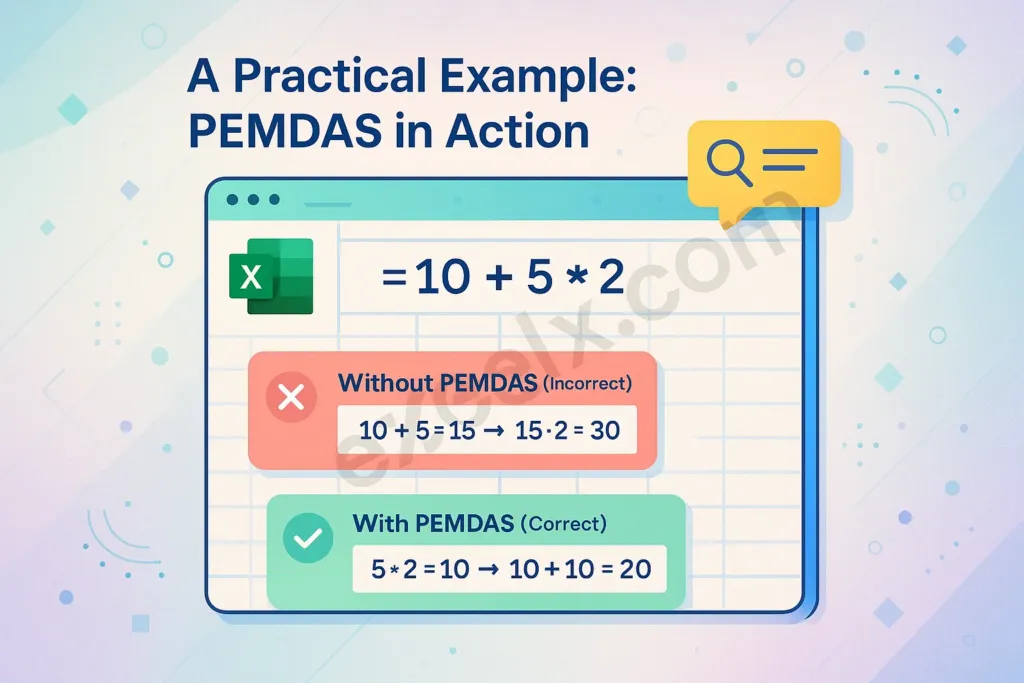
For a concise review of this hierarchy, take a look at the following document.
[PDF] Excel: Introduction to Formulas - shastacoe.org
This PDF provides a clear, tabular explanation of operator precedence in Excel.
Focus on the section titled Operator Precedence. The table and the example formula =5+2*3 are a perfect illustration of the core concept.
An Accounting Pitfall: Calculating Tax on Profit
Now, let's see how this rule applies in a practical accounting scenario. Imagine you need to calculate the tax payable on the profit from a product. Your data is simple:
- Cell B2: Revenue ($10)
- Cell B3: Cost ($4)
- Cell B4: Tax Rate (10%)
Your accounting knowledge tells you the formula is (Revenue - Cost) * Tax Rate, which should be ($10 - $4) * 10% = $0.60.
Let's see what happens when we translate this directly into an Excel formula without considering the order of operations: =B2-B3*B4.
The following video segment from Kevin Stratvert walks through this exact scenario and demonstrates the common error that occurs.
Excel Formulas and Functions | Full Course
This clip provides a perfect, real-world demonstration of how Excel's order of operations can lead to an incorrect result in a simple profit calculation.
Watch the segment from 12:44 to 14:06. Pay close attention to the result he gets initially and his explanation for why it is wrong.
As you saw in the video, Excel returns an answer of $9.60, not $0.60. Why? Because it is strictly following PEMDAS:
- Multiplication First: Excel first evaluates
B3*B4(Cost * Tax Rate), which is$4 * 10% = $0.40. - Subtraction Second: It then evaluates
B2 - 0.40(Revenue - result from step 1), which is$10 - $0.40 = $9.60.
The formula is syntactically correct, but logically and financially incorrect. This is a classic example of why simply knowing the operators isn't enough; you must also respect the order in which they will be processed.
The Solution: Taking Control with Parentheses
The key to solving this problem, as previewed in the video, is to use parentheses () to override Excel's default order. Operations inside parentheses are always performed first.
By changing the formula to =(B2-B3)*B4, we tell Excel:
- Parentheses First: Evaluate everything inside the parentheses:
B2-B3, which is$10 - $4 = $6. - Multiplication Second: Multiply the result from the parentheses by the tax rate:
$6 * 10% = $0.60.
This yields the correct financial result. We are no longer just respecting the order of operations; we are controlling it.
Look at this example of a personal investment tracker. The formula in the formula bar calculates the "Actual Annual Growth Rate."
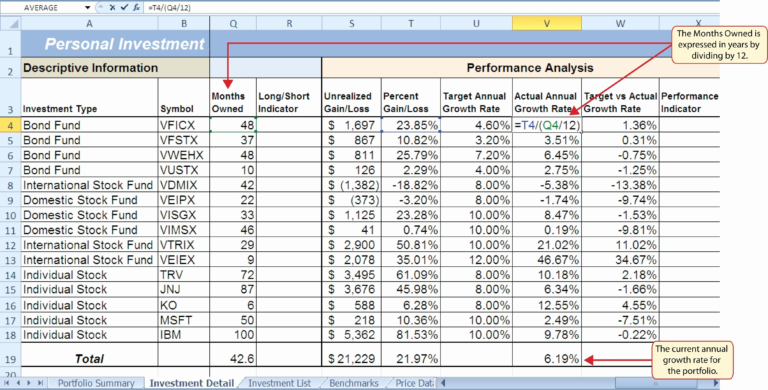
The formula is =T4/(Q4/12). Here, it calculates the number of years by dividing the months owned (Q4) by 12 before dividing the total gain (T4) by that result. Without the parentheses, the formula =T4/Q4/12 would be calculated left-to-right, giving a wildly different and incorrect result. This demonstrates how parentheses are fundamental to constructing meaningful financial formulas.
To solidify your understanding and see how you can step through Excel's logic, it's worth reading about the "Evaluate Formula" tool.
Performing Calculations in Excel - Order of Operations Explained
This article provides another look at the order of operations and introduces a very useful Excel feature for debugging formulas.
Read the main text that explains how multiplication/division is done before addition/subtraction. Then, read about how to use parentheses to change the order. Finally, look at the section on the Evaluate Formula tool. This tool is invaluable for dissecting complex formulas and understanding exactly how Excel arrives at a result.
Conclusion
In this lesson, we've explored the critical concept of the order of operations in Excel. You've learned that Excel has a built-in hierarchy (PEMDAS/BIDMAS) that dictates how formulas with multiple operators are calculated. Failing to account for this is one of the most common sources of errors in spreadsheets, especially in finance and accounting where precision is paramount.
Key Takeaways:
- Excel evaluates formulas according to the PEMDAS hierarchy: Parentheses, Exponents, Multiplication/Division, Addition/Subtraction.
- Multiplication and Division have equal priority and are evaluated from left to right.
- Addition and Subtraction have equal priority and are also evaluated from left to right.
- Understanding this order allows you to "respect" Excel's default behavior and predict the outcome of your formulas.
- The most common error is forgetting that multiplication/division will be performed before addition/subtraction.
You now understand the problem. In our next lesson, we will focus entirely on the solution. We will take a deep dive into using parentheses to control the calculation order in complex formulas, giving you the power to build sophisticated and accurate financial calculations with confidence.