Welcome back! In our previous lesson, we established that Excel follows a strict order of operations (PEMDAS), which can sometimes lead to incorrect results if not managed properly, as we saw with the profit and tax calculation.
Today, we transition from simply respecting these rules to actively controlling them. This lesson is dedicated to the most powerful tool you have for dictating calculation flow: parentheses (). By mastering their use, you ensure your formulas are not just syntactically correct, but logically and financially sound. This skill is the bedrock for building the complex, multi-step financial models you'll encounter throughout this course.
Taking Control of the Calculation
In the PEMDAS/BIDMAS hierarchy, parentheses come first. This means any operation enclosed within parentheses is executed before any other part of the formula. This simple rule gives you complete authority over the calculation order, allowing you to force addition before multiplication, subtraction before division, or any sequence your financial logic requires.
Let's revisit the tax calculation from our last session. Your accounting knowledge dictates the formula should be (Revenue - Cost) * Tax Rate. We saw that =B2-B3*B4 gave the wrong answer because Excel multiplied B3*B4 first.
The video segment below shows the solution in action.
Excel Formulas and Functions | Full Course
This clip from Kevin Stratvert's full course on formulas demonstrates precisely how adding parentheses corrects the calculation we discussed.
Watch from 14:06 to 14:36. Notice how he encloses the subtraction part of the formula in parentheses to force Excel to calculate the profit before applying the tax rate.
As the video demonstrates, by changing the formula to =(B2-B3)*B4, you instruct Excel to first compute the profit (B2-B3) and then multiply that result by the tax rate. This aligns the calculation with the correct accounting procedure and produces the correct result.
A Practical Example: Variance Analysis
Let's apply this to another common accounting task: variance analysis. A fundamental formula here is calculating the percentage change between two periods, such as the current year's spending versus last year's.
The formula is: (Current Spend - Last Year Spend) / Last Year Spend
Look at the following expense plan. The formula in cell F3 calculates the percentage variance between the "Annual Spend" (Column D) and the "LY Spend" (Last Year's Spend, Column E).
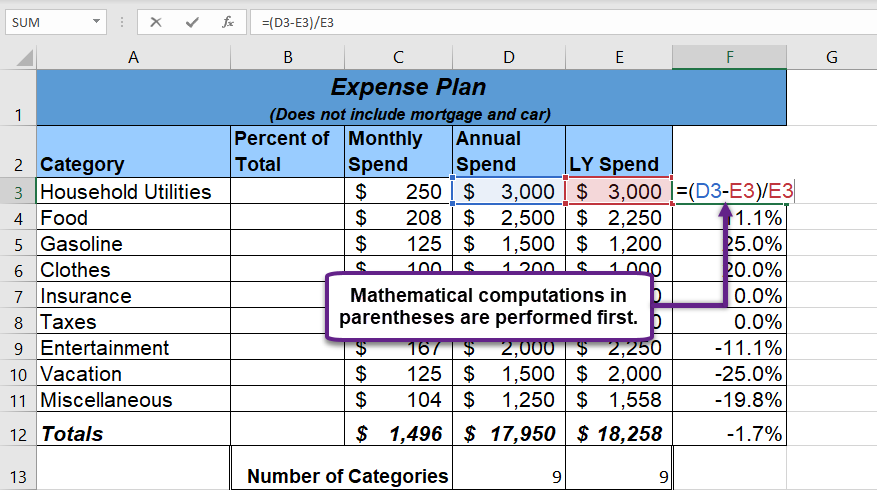
Without parentheses, the formula D3-E3/E3 would be a critical error. Following PEMDAS, Excel would first calculate E3/E3, which is 1. It would then calculate D3 - 1. For "Household Utilities," this would be 3000 - 1 = 2999, a meaningless number. The parentheses force the subtraction (D3-E3) to happen first, yielding the difference in spending, which is then correctly divided by the base amount E3.
The following reading offers more examples of how parentheses are crucial in business calculations, like figuring out sales commissions.
Working with Order of Operations - Learn Excel - Noble Desktop
This article from Noble Desktop provides clear, business-oriented examples of why controlling the order of operations is so important.
First, read the section that explains how parentheses work, starting from the explanation of P. Then, continue through the next section to see the commission examples. Note how adding parentheses completely changes the outcome and leads to the correct commission split.
Deeper Complexity: Nesting Parentheses
Financial formulas can often have several distinct parts. You might need to sum multiple revenue streams, subtract grouped costs, and then divide by a calculated average. To handle this, you can "nest" parentheses inside one another.
When faced with nested parentheses, Excel works from the inside out. It calculates the expression in the innermost pair of parentheses first, then uses that result to calculate the expression in the next level up, and so on.
The W3Schools page on Excel Parentheses uses a helpful analogy.
This guide offers a simple way to think about how Excel processes nested formulas.
Please read the section on Nesting Parentheses and review the step-by-step breakdown of the example formula. The comparison to an onion, where you work from the inner layers outward, is a perfect mental model. Also, review the Chapter Summary at the end.
Let's walk through an example from this table of formulas.

Consider the formula for the second entry: =78 - (5 + 3 * (25 - 2 * 10)). Here is how Excel evaluates it, step-by-step:
- Innermost Parentheses: First, it solves
(25 - 2 * 10). Within this, it still follows PEMDAS, so it does the multiplication first:2 * 10 = 20. Then the subtraction:25 - 20 = 5. - Next Level Parentheses: The formula is now effectively
=78 - (5 + 3 * 5). Again, PEMDAS applies inside the parentheses. Multiplication first:3 * 5 = 15. Then addition:5 + 15 = 20. - Final Operation: The formula is now simplified to
=78 - 20, which gives the final result of58.
This inside-out evaluation is a fundamental principle you will use constantly when building more advanced formulas.
A Practical Tip: Use Excel's Color Coding
As formulas get longer, tracking which closing parenthesis belongs to which opening one can become difficult. A misplaced or missing parenthesis is one of the most common reasons for formula errors.
Fortunately, Excel provides a visual aid. When you are editing a formula, Excel color-codes the pairs of parentheses, making it much easier to spot mistakes. The outermost pair is always black, with subsequent nested pairs taking on different colors (purple, red, green, etc.).
The following video explains this feature perfectly. While the example uses nested functions (our next topic!), the principle for tracking parentheses is exactly the same.
What is a Nested Formula in Excel??? - Tutorial
This tutorial from Excel Tutorials by Y. Acosta gives an excellent demonstration of how to use Excel's parenthesis color-coding to debug complex formulas.
Watch the segment from 2:41 to 4:21. Pay close attention to how the speaker identifies a missing parenthesis by observing that the final parenthesis in the formula is not black. This is an invaluable troubleshooting skill.
Conclusion
In this lesson, you have learned how to move from being a passive observer of Excel's calculation rules to an active controller. Using parentheses is not an advanced trick; it is a fundamental requirement for accuracy in any non-trivial financial or accounting formula.
Key Takeaways:
- Parentheses
()are the first operation in the PEMDAS hierarchy, allowing you to force any part of a formula to be calculated first. - Forgetting to use parentheses in financial formulas, such as variance or profit calculations, is a common and critical source of error.
- You can nest parentheses to handle multi-part calculations. Excel evaluates these from the innermost pair outwards.
- Excel helps you manage complex formulas by color-coding matching pairs of parentheses, with the outermost pair always being black.
You now have a solid grasp of how to structure a single, complex formula. In our next lesson, we will build on this by learning to nest two or more functions within a single formula. The logic of nesting parentheses that you learned today will apply directly to nesting functions, allowing you to build powerful, multi-step calculations in a single cell.