Introduction
Welcome to the next chapter in our journey to mastering Pythonic programming. In the previous module, we explored specialized containers, learning how to use bisect to efficiently maintain sorted lists and heapq to manage priority queues. This demonstrated a core Pythonic principle: using the right "battery" from the standard library for the job.
Now, we shift our focus from data structures to the functions that operate on them. This lesson addresses a fundamental aspect of creating clean, readable, and robust APIs, directly targeting the learning outcome: Design clear function signatures using positional-only, keyword-only, *args, and **kwargs.
Coming from a Java background, you might be accustomed to method overloading, where you define multiple methods with the same name but different parameter lists to handle various calling scenarios. Python takes a different, more flexible approach. A single function definition can be crafted to handle a wide variety of inputs with remarkable precision. Mastering this will allow you to design functions that are both powerful for the user and clear in their intent.
1. A Quick Refresher: Positional and Keyword Arguments
Before we dive into advanced features, let's quickly review the two basic ways to pass arguments to a Python function, which you're likely familiar with. A solid grasp of this distinction is crucial for understanding the features that follow.
Defining Your Own Python Function
The Real Python article 'Defining Your Own Python Function' provides an excellent review of the fundamentals. We'll use it to quickly solidify the concepts of positional and keyword arguments.
Please read the sections titled 'Positional Arguments' and 'Keyword Arguments'. Focus on the rules for each: the order dependency of positional arguments and the flexibility and readability benefits of keyword arguments. Note the syntax error that occurs if you place a positional argument after a keyword argument.
To summarize the key rules:
- Positional arguments are matched to parameters by their order. They are required unless they have a default value.
- Keyword arguments are matched by name (
param_name=value). Their order doesn't matter, but they must come after all positional arguments in a function call. - Using keyword arguments makes function calls self-documenting and more readable, which is a very Pythonic quality.
# A function with two parameters
def create_user(username, is_admin):
    print(f"Creating user '{username}' with admin status: {is_admin}")


# 1. Using only positional arguments
create_user("alex", False)


# 2. Using only keyword arguments (order doesn't matter)
create_user(is_admin=True, username="casey")


# 3. Mixing positional and keyword (positional must come first)
create_user("drew", is_admin=False)


# 4. This is a SyntaxError!
# create_user(username="elliot", True)
2. Flexible Signatures: *args and **kwargs
Now, let's address a common need: writing a function that can accept an unknown number of arguments.
*args(short for "arguments") collects any number of extra positional arguments into a tuple.**kwargs(short for "keyword arguments") collects any number of extra keyword arguments into a dictionary.
These are just conventional names; the real magic is in the * and ** symbols.
Defining Your Own Python Function
Let's return to the Real Python article, which clearly explains this syntax.
Read the three short sections: 'Variable Number of Positional Arguments: *args' 'Variable Number of Keyword Arguments: **kwargs' 'Positional and Keywords Combined: *args and **kwargs' Pay close attention to how the arguments are packed into a tuple and a dictionary, respectively, and the required order when combining them in a function definition.
Here is a practical example demonstrating their use:
def process_data(processor_name, *data_points, **metadata):
    """
    Processes a series of data points with a named processor,
    and includes any provided metadata.
    """
    print(f"--- Processor: {processor_name} ---")

    print(f"Data points (as a tuple): {data_points}")
    for i, point in enumerate(data_points):
        print(f"  Point {i}: {point}")

    print(f"Metadata (as a dict): {metadata}")
    for key, value in metadata.items():
        print(f"  {key.capitalize()}: {value}")


# Call the function
process_data(
    "TemperatureSensor",        # A required positional argument
    25.5, 26.1, 25.9, 26.3,      # These become `*args`
    location="Server Room A",    # These become `**kwargs`
    retries=3
)
Output:
--- Processor: TemperatureSensor ---
Data points (as a tuple): (25.5, 26.1, 25.9, 26.3)
  Point 0: 25.5
  Point 1: 26.1
  Point 2: 25.9
  Point 3: 26.3
Metadata (as a dict): {'location': 'Server Room A', 'retries': 3}
  Location: Server Room A
  Retries: 3
The required order in a function signature is always:
- Standard positional/keyword arguments
*args**kwargs
3. Enforcing Calling Conventions
Flexibility is great, but sometimes you need to be strict to prevent errors and ensure your API is used correctly. Python 3 introduced syntax to enforce that arguments are passed only by position or only by keyword.
This is where you truly leave Java-style thinking behind. Instead of creating multiple overloaded methods, you create one highly descriptive signature.
The following video is an excellent and concise explanation of this modern Python feature.
Positional-only and keyword-only arguments in Python
This mCoding video is a focused tutorial on positional-only and keyword-only arguments. It perfectly explains the 'why' behind the syntax, not just the 'how'.
Watch from the beginning to 07:42. Pay close attention to: The * syntax for defining keyword-only arguments and why it's useful for optional settings. The / syntax for defining positional-only arguments and why it's useful for parameters with non-meaningful names or for API stability.
Keyword-Only Arguments (*)
Arguments that appear after a bare * (or after *args) must be specified by keyword.
Why? This is extremely useful for optional flags or settings. It forces the caller to be explicit, making the code self-documenting and preventing accidental misuse.
# Bad: `to_string` and `pretty` are ambiguous as positional arguments
def serialize(data, to_string, pretty):


    # ... logic ...
    pass


# What does serialize(my_data, True, False) mean? It's unreadable.


# Good: Use keyword-only arguments for clarity
def serialize(data, *, to_string=False, pretty=False):
    print(f"Serializing data. To string: {to_string}, Pretty: {pretty}")


    # ... logic ...
    pass


# This call is perfectly clear and readable
serialize(my_data, to_string=True, pretty=True)


# This call will now raise a TypeError, preventing ambiguity
# serialize(my_data, True, True)
# TypeError: serialize() takes 1 positional argument but 3 were given
Positional-Only Arguments (/)
Arguments that appear before a / must be specified by position.
Why?
- When argument names are implementation details and not part of the public API. For example, in
float(x), the parameter is namedx, but no one ever callsfloat(x=5.0). The name is irrelevant. - It allows you to change the parameter name later without breaking code that calls your function.
# The built-in pow(base, exp, mod=None) function is a great example.
# A more modern signature might look like this:
def power(base, exp, /, *, mod=None):
    """
    `base` and `exp` are logically positional.
    `mod` is an optional setting, so it's keyword-only.
    """
    if mod is None:
        return base ** exp
    else:
        return pow(base, exp, mod) # Using the efficient built-in


# Correct and clear usage
print(power(2, 10))                 # Positional-only args are fine
print(power(2, 10, mod=9))          # Keyword-only arg is fine


# Incorrect usage that raises a TypeError
# print(power(base=2, exp=10))
# TypeError: power() got some positional-only arguments passed as keyword arguments: 'base', 'exp'
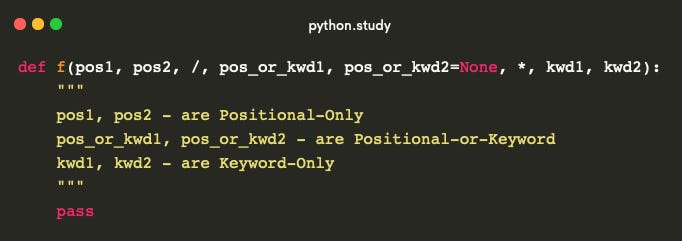
4. The Complete Function Signature
You can combine all these elements into a single, powerful function signature. The canonical order is:
- Positional-only arguments
/- Positional-or-keyword arguments
*args- Keyword-only arguments
**kwargs
Most functions won't use all these at once, but understanding the full syntax is key.
Exercise: Design a Function Signature
You are tasked with creating a function to send notifications. It must adhere to the following rules:
- It must accept a
destination(e.g., an email address or phone number). This argument should be positional-only because its meaning is obvious from context. - It must accept a
messagebody. This can be passed by position or keyword. - It must have two optional boolean flags,
force_deliveryandhigh_priority. These flags should be keyword-only to ensure clarity in function calls. They should both default toFalse. - The function should be able to accept any other arbitrary configuration options as keyword arguments (e.g.,
timeout=30,sender="alerts@system.com").
Define the function signature for send_notification and include a pass statement in the body. Then, write a sample call to the function that uses all its features.
Solution
# Function definition
def send_notification(destination, /, message, *, force_delivery=False, high_priority=False, **config_options):
    """
    Sends a notification with a flexible and robust signature.
    """
    print(f"Destination: {destination}")
    print(f"Message: {message}")
    print(f"Force Delivery: {force_delivery}")
    print(f"High Priority: {high_priority}")
    print(f"Other Config: {config_options}")
    pass


# Sample function call
send_notification(
    "user@example.com",                          # Positional-only `destination`
    "Your system backup is complete.",           # Positional `message`
    high_priority=True,                          # Keyword-only flag
    timeout=60,                                  # Packed into `**config_options`
    sender="backup-service@internal.com"         # Packed into `**config_options`
)


# Example output of the sample call:
# Destination: user@example.com
# Message: Your system backup is complete.
# Force Delivery: False
# High Priority: True
# Other Config: {'timeout': 60, 'sender': 'backup-service@internal.com'}
Conclusion
You now have a complete toolkit for designing Python function signatures that are clear, flexible, and robust. By moving beyond the simple positional and keyword arguments, you can create APIs that guide users toward correct usage and prevent common errors.
Key Takeaways:
*argsand**kwargs: Use them to accept a variable number of positional and keyword arguments, respectively.- Keyword-Only Arguments (
*): Enforce clarity by requiring that optional settings and flags be passed by name. This is a powerful tool for self-documenting code. - Positional-Only Arguments (
/): Use them to decouple your function's internal parameter names from its public API, providing stability and preventing misuse. - The Full Order:
pos_only / pos_or_kw, *args, kw_only, **kwargs. Knowing this order allows you to read and write any Python function signature.
In our next lesson, we will address a notorious "gotcha" that bites many new and experienced Python programmers alike. Building on what we've learned about function definitions, we will explore the mutable default argument anti-pattern and learn how to identify and correct it.