Introduction
In our last lesson, we mastered how to design precise and flexible function signatures using positional-only (/), keyword-only (*), *args, and **kwargs. This gave us fine-grained control over how our functions can be called. Now, we'll delve into one of the most infamous "gotchas" in Python function definitions, a topic that directly builds on our understanding of default values.
This lesson focuses on a single, critical learning outcome: to identify and correct the mutable default argument anti-pattern.
This behavior often surprises programmers, especially those with a background in languages like Java where object instantiation in method signatures can behave differently. Understanding and internalizing the Pythonic way to handle this is a major step in moving from writing Java-style code to idiomatic Python.
1. The Anti-Pattern: An Unexpected Result
Let's start with a simple function that appends a log message to a list. If no list is provided, it should default to a new, empty list.
Here is the "intuitive" but incorrect way to write it, followed by the surprising output.
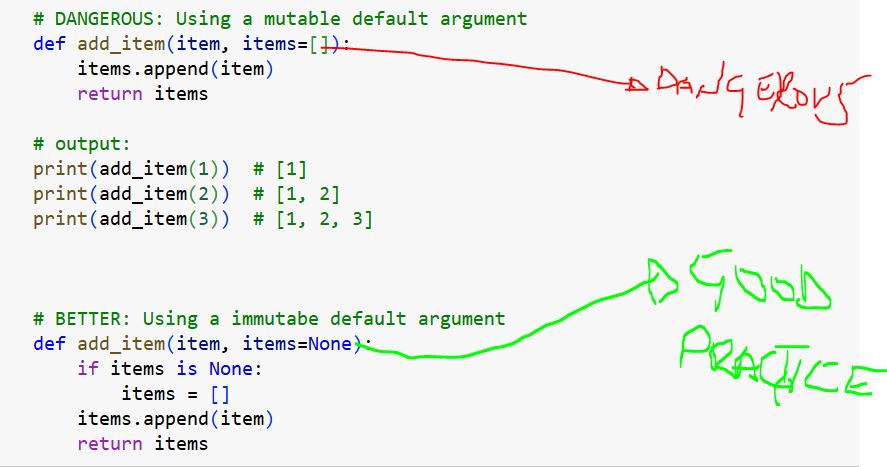
As you can see, instead of creating a new list for each call, the function reuses and modifies the same list object. This is a classic bug that can be difficult to trace.
2. The Root Cause: When Are Defaults Evaluated?
To fix this bug, we must first understand its cause. The core principle is this:
Default argument expressions are evaluated only once, when the function is defined, not every time the function is called.
When Python executes a def statement, it creates a function object. At that moment, it evaluates the default values and stores them as attributes of that function object. If a default value is a mutable object, like a list or dictionary, that single object will be used for all subsequent calls that omit the argument.
This behavior stems from functions being first-class objects in Python. You can think of the default arguments as "member data" of the function object, which persists for the lifetime of the function.
The following video provides an exceptionally clear demonstration of this concept.
Python Tutorial: Clarifying the Issues with Mutable Default Arguments
Corey Schafer's tutorial is one of the best explanations of this issue. He visually demonstrates the problem and then uses Python's internal __defaults__ attribute to prove exactly what is happening under the hood.
Watch from the beginning to 03:18. Pay close attention to: The demonstration of the bug with the add_employee function. The key explanation at 02:50: "default arguments are evaluated once at the time it creates the function."
Introspection: Proving the Behavior
As the video hints, we can prove this behavior using introspection. Every function object has a __defaults__ attribute, which is a tuple containing its default argument values. Let's inspect it.
# The buggy function
def add_item(item, target_list=[]):
    target_list.append(item)
    print(f"List ID: {id(target_list)}, Content: {target_list}")


# Inspect the default before any calls
print(f"Initial default: {add_item.__defaults__}")
print("-" * 20)


# Call the function multiple times
add_item("apple")
add_item("banana")
print("-" * 20)


# Inspect the default after the calls
print(f"Final default: {add_item.__defaults__}")
Output:
Initial default: ([],)
--------------------
List ID: 140243635398208, Content: ['apple']
List ID: 140243635398208, Content: ['apple', 'banana']
--------------------
Final default: (['apple', 'banana'],)
Notice two critical things:
- The
id()of the list remains the same in both calls, confirming it's the exact same object. - The
__defaults__attribute of the function object itself has been mutated.
3. The Pythonic Solution: The None Sentinel
The correct and idiomatic way to handle mutable defaults is to use None as a sentinel value. None is a safe default because it's an immutable singleton. The logic is as follows:
- Set the default argument to
None. - Inside the function, check if the argument is
None. - If it is, create a new instance of the mutable object (e.g.,
[]or{}).
This ensures that a fresh object is created for every function call that relies on the default.
Let's see this correction in action.
Python Tutorial: Clarifying the Issues with Mutable Default Arguments
Now, let's watch the rest of Corey's explanation where he implements the None sentinel fix and uses the __defaults__ attribute to show why it works.
Watch from 03:18 to 10:41. Focus on: How the corrected add_employee_fixed function is structured. The state of __defaults__ for the fixed function and why None isn't mutated.
Here is the corrected version of our add_item function:
# The correct, Pythonic way
def add_item_fixed(item, target_list=None):
    if target_list is None:
        target_list = []  # Create a NEW list inside the function call
    target_list.append(item)
    print(f"List ID: {id(target_list)}, Content: {target_list}")

print("Calling the fixed function:")
add_item_fixed("apple")
add_item_fixed("banana")


# It still works correctly when a list is provided
print("\nCalling with a pre-existing list:")
my_shopping_list = ["milk"]
add_item_fixed("eggs", my_shopping_list)
print(f"Original list is now: {my_shopping_list}")
Output:
Calling the fixed function:
List ID: 140590400032320, Content: ['apple']
List ID: 140590400100416, Content: ['banana']

Calling with a pre-existing list:
List ID: 140590400115072, Content: ['milk', 'eggs']
Original list is now: ['milk', 'eggs']
Notice that the id() is now different for each default call, confirming new lists were created.
4. A Related Pitfall: Time-Dependent Defaults
The "evaluated once" rule isn't limited to mutable objects. It applies to any expression used as a default, including function calls. A common mistake is using datetime.datetime.now() as a default, expecting to get the current time with each call.
Python Tutorial: Clarifying the Issues with Mutable Default Arguments
Corey Schafer's video concludes with a perfect example using datetime, which generalizes the concept beyond mutability.
Watch from 10:41 to 14:40. This section clearly demonstrates why datetime.now() as a default results in a static timestamp and how the None sentinel pattern fixes it.
The Anti-Pattern:
import datetime
import time

def log(message, timestamp=datetime.datetime.now()):
    print(f"{timestamp}: {message}")

log("System start")
time.sleep(2)
log("System check") # Prints the same timestamp!
The Fix:
def log_fixed(message, timestamp=None):
    if timestamp is None:
        timestamp = datetime.datetime.now()
    print(f"{timestamp}: {message}")

log_fixed("System start")
time.sleep(2)
log_fixed("System check") # Prints the current timestamp
5. Production-Ready Code: Type Hinting the Solution
Since you are focused on writing robust, production-ready code, it's essential to know how to correctly type hint this pattern. When a parameter can be a specific type (e.g., list) or None, you use typing.Optional.
python parameter defaults are (mutable) globals (intermediate) anthony explains #364
The anthonywritescode channel provides a concise explanation of the problem that also covers the correct way to type hint the None sentinel pattern.
Watch from 02:45 to 04:36. Focus on: The implementation of the None sentinel fix. The use of Optional[list[int]] (or list[int] | None in modern Python) for the type hint. How static type checkers like mypy can infer that the variable is no longer None after the if block (this is called type narrowing).
Here's how to apply type hints to our fixed function, using modern Python syntax (| for union types, available in Python 3.10+).
from collections.abc import MutableSequence


# In Python 3.10+
def add_item_typed(item: str, target_list: MutableSequence[str] | None = None) -> None:
    if target_list is None:
        target_list = []


    # After the `if` block, a type checker knows target_list is `MutableSequence[str]`
    target_list.append(item)
    print(f"Content: {target_list}")


# For older Python (3.9 and below), you would use `typing.Optional`
# from typing import MutableSequence, Optional
# def add_item_typed(item: str, target_list: Optional[MutableSequence[str]] = None) -> None: ...
Exercise: Refactor a Buggy Class
You have been given a LogAggregator class that collects log entries from different sources. However, multiple instances of the class are interfering with each other.
Your task:
- Run the provided code and observe the bug.
- Identify the mutable default argument causing the issue in the
__init__method. - Refactor the
__init__method using theNonesentinel pattern to fix the bug. - Ensure the
pytesttest case passes after your fix.
Starter Code:
# log_aggregator.py

class LogAggregator:


    # BUGGY version
    def __init__(self, entries=[]):
        self.entries = entries

    def add_entry(self, source, message):
        self.entries.append(f"{source}: {message}")

    def get_entries(self):
        return self.entries


# test_log_aggregator.py
import pytest
from log_aggregator import LogAggregator

def test_log_aggregator_isolation():


    # Create two separate aggregators
    aggregator1 = LogAggregator()
    aggregator2 = LogAggregator()


    # Add an entry to the first one
    aggregator1.add_entry("API", "Request received")


    # The second aggregator should be empty, but it's not!
    assert aggregator2.get_entries() == []
Save these as two separate files and run pytest. The test will fail. Now, fix log_aggregator.py.
Solution
Here is the corrected __init__ method in log_aggregator.py.
# log_aggregator.py (FIXED)

class LogAggregator:
    def __init__(self, entries=None):
        if entries is None:
            self.entries = []
        else:


            # It's good practice to copy incoming lists
            # to prevent external modification, but for this exercise
            # just assigning is fine. We'll cover this nuance later.
            self.entries = entries

    def add_entry(self, source, message):
        self.entries.append(f"{source}: {message}")

    def get_entries(self):
        return self.entries
With this change, aggregator1 and aggregator2 will each get their own separate list when initialized without arguments, and the pytest test case will pass.
Conclusion
You have now learned to identify and correct one of Python's most common pitfalls. This is a significant step toward writing robust, idiomatic Python code.
Key Takeaways:
- Evaluated Once: Default argument values are evaluated a single time, when the function is defined.
- Shared State: Using a mutable object (like a
listordict) as a default creates a single, shared object that persists across calls, leading to unexpected side effects. - The
NoneSentinel: The correct Pythonic pattern is to useNoneas the default argument and then create a new mutable object inside the function if the argument isNone. - General Principle: This rule also applies to non-mutable but dynamic expressions, like
datetime.datetime.now().
In our next lesson, we will explore another powerful aspect of Python's functions: treating them as first-class citizens. We will learn how to pass functions as arguments and return them from other functions, unlocking patterns like callbacks and factories that can dramatically simplify your code.