Introduction
In the previous lesson, we contrasted typing.NamedTuple and @dataclass, focusing on when to use these formal structures for your data. You learned to choose NamedTuple for simple, immutable records and @dataclass for more complex objects requiring methods, mutability, or advanced features.
While structured objects are excellent for well-defined data, much of real-world programming involves working with more dynamic data. This is where Python's dictionaries shine. However, using them effectively requires moving beyond basic bracket notation (my_dict['key']) and adopting more robust, expressive idioms.
This lesson directly addresses the learning outcome: Use modern dictionary idioms: views, .get(), .setdefault(), and merging with | or {**a, **b}. We will replace verbose, error-prone patterns common in other languages with concise and safe Pythonic alternatives. By the end, you'll be able to manipulate dictionaries with the fluency of an experienced Python developer.
Dictionary Views: A Live Window Into Your Data
When you need to iterate over a dictionary's keys, values, or key-value pairs, you might be tempted to create a new list, like list(my_dict.keys()). However, Python offers a more efficient and powerful mechanism: dictionary views.
The methods .keys(), .values(), and .items() do not return lists. Instead, they return view objects that provide a dynamic "window" into the dictionary's entries. This means if the dictionary changes, the view reflects those changes immediately without you needing to create a new object.
.keys(): A view of the dictionary's keys..values(): A view of the dictionary's values..items(): A view of the dictionary's key-value pairs (as tuples).
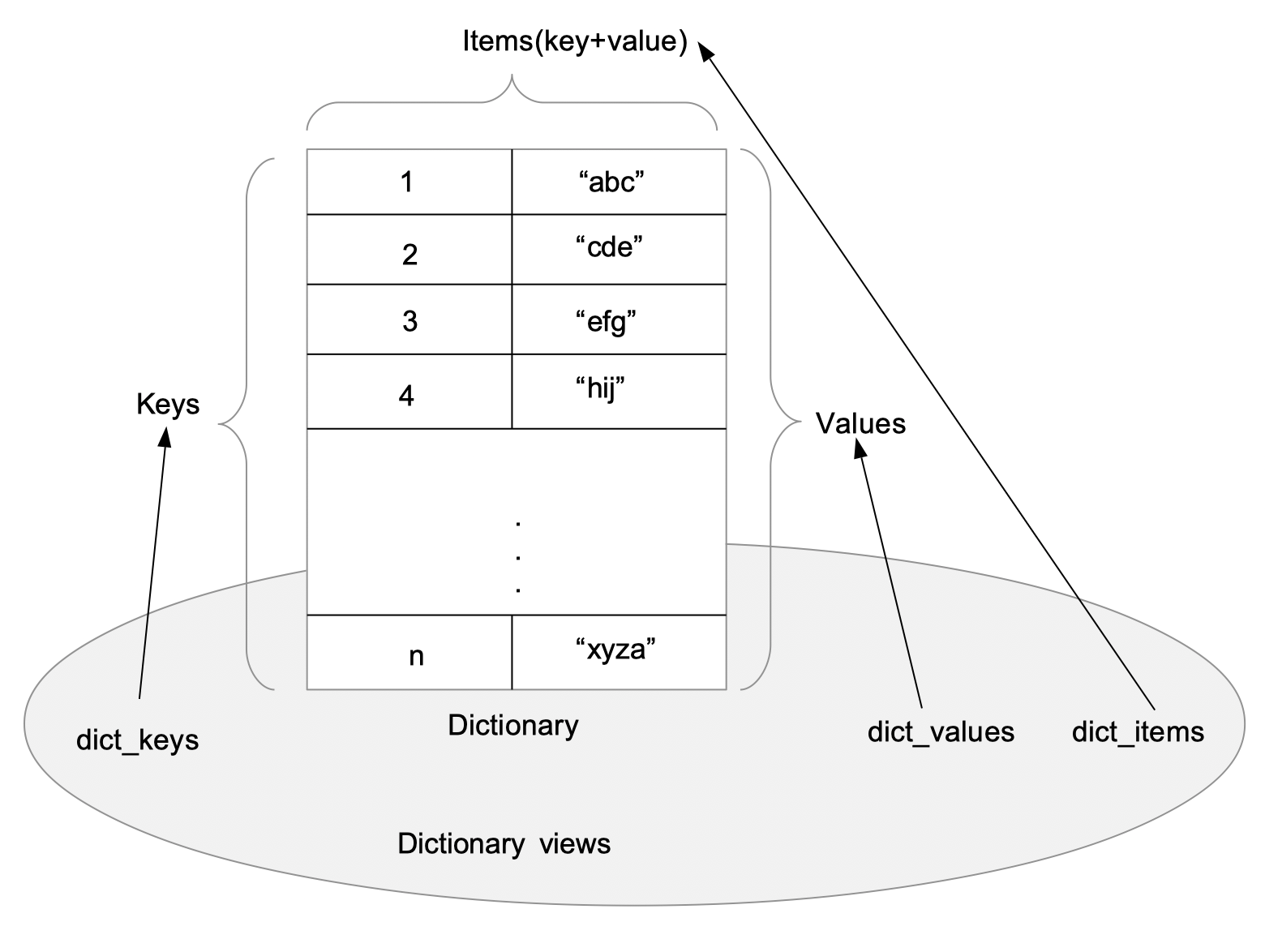
Let's see this in action:
# Create a dictionary of user roles
user_roles = {'alice': 'admin', 'bob': 'editor'}


# Get a view of the keys
keys_view = user_roles.keys()
print(f"Initial keys: {keys_view}")


# Modify the dictionary
user_roles['charlie'] = 'viewer'


# The view automatically reflects the change!
print(f"Updated keys: {keys_view}")


# Output:
# Initial keys: dict_keys(['alice', 'bob'])
# Updated keys: dict_keys(['alice', 'bob', 'charlie'])
This dynamic behavior is memory-efficient and allows you to work with the most current state of the dictionary without creating intermediate copies.
To learn more about views and other dictionary methods, the official documentation is an excellent resource. For a quick but thorough overview, review the following sections from a Real Python article.
The article 'Dictionaries in Python' provides a clear explanation of dictionary views. Please read the sections covering the .values(), .keys(), and .items() methods.
In the article, find and read the three short subsections titled 'Retrieving All the Values: .values()', 'Accessing All the Keys: .keys()', and 'Getting All the Items or Key-Value Pairs: .items()'. Focus on the return type, which is a 'dictionary view object'.
Safe Key Access: .get() to Avoid KeyError
Coming from a language like Java, you might be conditioned to write defensive code to access a map or dictionary, first checking if a key exists before trying to retrieve its value.
The "Look Before You Leap" (LBYL) approach (less Pythonic):
config = {'timeout': 30, 'retries': 3}


# Check if 'port' key exists
if 'port' in config:
    port = config['port']
else:
    port = 8080 # Default value

print(f"Port is: {port}")
This works, but it's verbose. Python encourages a style that is often described as "Easier to Ask for Forgiveness than Permission" (EAFP), but for simple key access, the .get() method provides an even cleaner solution.
The .get(key, default) method retrieves the value for a key. If the key doesn't exist, it returns default instead of raising a KeyError. If you don't provide a default, it returns None.
The idiomatic approach with .get():
config = {'timeout': 30, 'retries': 3}


# Get 'port', providing a default value if it's missing.
port = config.get('port', 8080)
print(f"Port is: {port}")


# Get 'host', which is missing. The default for .get() is None.
host = config.get('host')
print(f"Host is: {host}")
This is more concise, readable, and directly expresses your intent: "get this value, and if it's not there, use this default."
Atomic Get-or-Set: .setdefault()
What if you want to retrieve a value, but if it's missing, you want to add it to the dictionary with a default value and then return it?
The verbose approach:
# Let's group users by their first letter.
users = ['alice', 'adam', 'bob', 'brian']
users_by_letter = {}

for user in users:
    letter = user[0]
    if letter not in users_by_letter:
        users_by_letter[letter] = [] # Initialize with a default value
    users_by_letter[letter].append(user)

print(users_by_letter)


# Output: {'a': ['alice', 'adam'], 'b': ['bob', 'brian']}
This pattern is so common that dictionaries have a built-in method for it: .setdefault(key, default).
- If
keyis in the dictionary, it returns the corresponding value. - If
keyis not in the dictionary, it insertskeywith a value ofdefaultand then returnsdefault.
The idiomatic approach with .setdefault():
users = ['alice', 'adam', 'bob', 'brian']
users_by_letter = {}

for user in users:
    letter = user[0]


    # Get the list for the letter, or set it to an empty list if it's new.
    # This returns the list in either case.
    users_by_letter.setdefault(letter, []).append(user)

print(users_by_letter)
This single line does the work of the entire if/else block. It's atomic, cleaner, and more efficient.
The following video clearly explains the crucial difference between .get() (which never changes the dictionary) and .setdefault() (which might).
PRO TIP For Using Dictionaries In Python (ft. get & setdefault)
This video from Indently provides a practical comparison of .get() and .setdefault(). It will solidify your understanding of when to use each method.
Watch the entire video (it's short). Pay close attention to the final part (from 01:51) where the presenter prints the dictionary after using each method to show how .setdefault() modifies it while .get() does not.
Merging Dictionaries: The Modern Way
Combining two or more dictionaries is a frequent task, for example, when merging default settings with user-provided configurations. Python's idioms for this have evolved over time.
The Classic Way: .update()
The .update() method modifies a dictionary in-place, merging keys and values from another dictionary. If keys overlap, the values from the dictionary being merged in will overwrite the existing ones.
# In-place update
default_config = {'host': 'localhost', 'port': 8080}
user_config = {'port': 9000, 'timeout': 30}

default_config.update(user_config)
print(default_config)


# Output: {'host': 'localhost', 'port': 9000, 'timeout': 30}
To create a new dictionary without modifying the originals, you first had to make a copy:
default_config = {'host': 'localhost', 'port': 8080}
user_config = {'port': 9000, 'timeout': 30}


# The copy-and-update pattern
final_config = default_config.copy()
final_config.update(user_config)
print(final_config) # {'host': 'localhost', 'port': 9000, 'timeout': 30}
print(default_config) # {'host': 'localhost', 'port': 8080} -> unchanged
The Python 3.5+ Idiom: ** Unpacking
PEP 448 introduced a much more expressive syntax for creating a new merged dictionary using dictionary unpacking (**).
default_config = {'host': 'localhost', 'port': 8080}
user_config = {'port': 9000, 'timeout': 30}


# Create a new dictionary by unpacking both into a new literal
final_config = {**default_config, **user_config}
print(final_config)


# Output: {'host': 'localhost', 'port': 9000, 'timeout': 30}
The order matters: keys from later dictionaries in the expression overwrite earlier ones. This syntax is clean, declarative, and became the standard way to merge dictionaries.
The Python 3.9+ Idiom: Union Operators | and |=
Python 3.9 introduced the union operators, providing a syntax that is even more readable and analogous to set operations.
- The merge operator
|creates a new dictionary. - The in-place merge operator
|=updates a dictionary in-place (like.update()).
default_config = {'host': 'localhost', 'port': 8080}
user_config = {'port': 9000, 'timeout': 30}


# Merge with | to create a new dictionary
final_config = default_config | user_config
print(f"New merged dict: {final_config}")


# Merge with |= to update in-place
default_config |= user_config
print(f"Updated in-place: {default_config}")
This is now the recommended approach in modern Python. The following video explains and demonstrates these new operators beautifully.
Merging and Updating Dictionaries With | and |= in Python 3.9
This Real Python video focuses entirely on the new dictionary union operators. It contrasts them with older methods and highlights an important advantage regarding dictionary subtypes.
Watch from 00:29 to 04:00 to see a comparison of the old methods (**, .update()) with the new | and |= operators. Then, watch from 05:46 to 06:36 to understand the 'last-in-wins' rule for overlapping keys.
Summary of Merge Methods
| Method | Python Version | Behavior | Example | Recommended for... |
|---|---|---|---|---|
d1.update(d2) |
All | Updates d1 in-place |
d1.update(d2) |
In-place mutation, compatibility. |
{**d1, **d2} |
3.5+ | Creates a new dict |
d3 = {**d1, **d2} |
Python 3.5-3.8, or if clarity on creating a dict is needed. |
| `d1 | d2` | 3.9+ | Creates a new dictionary | `d3 = d1 |
| `d1 | = d2` | 3.9+ | Updates d1 in-place |
`d1 |
Exercise: Manage Application Configuration
You are writing a script that needs to manage configuration settings. The settings come from three sources with the following priority: Environment Variables > User Config File > Default Config.
Your task is to implement a function that merges these configurations and then uses the result.
# 1. Default settings for the application
default_config = {
    'log_level': 'INFO',
    'retries': 3,
    'theme': 'dark',
    'supported_users': []
}


# 2. Settings from a user's configuration file
user_config = {
    'log_level': 'DEBUG',
    'theme': 'light'
}


# 3. Settings from environment variables (highest priority)
env_config = {
    'retries': 5,
    'api_key': 'abcdef123456'
}
Tasks:
- Merge the configurations: Create a
final_configdictionary by mergingdefault_config,user_config, andenv_config. Use the most modern, idiomatic method (assume you are using Python 3.9+). Remember the priority order! - Safely access data: From
final_config, retrieve the value for the'theme'key. Then, try to retrieve the value for'database_url', providing a default of'postgres://localhost/mydb'if it's not found. Print both values. - Atomically initialize a key: Your script supports a list of special users. The key for this list is
'supported_users'. Usingfinal_config, ensure this key exists (it's present but empty in the defaults) and append the user'admin'to its list. Use the most concise method to do this. Print the final state offinal_config.
Solution
# 1. Default settings for the application
default_config = {
    'log_level': 'INFO',
    'retries': 3,
    'theme': 'dark',
    'supported_users': []
}


# 2. Settings from a user's configuration file
user_config = {
    'log_level': 'DEBUG',
    'theme': 'light'
}


# 3. Settings from environment variables (highest priority)
env_config = {
    'retries': 5,
    'api_key': 'abcdef123456'
}


# Task 1: Merge the configurations using the | operator
# The rightmost dictionary wins, so the order should be defaults -> user -> env
final_config = default_config | user_config | env_config
print("--- Merged Config ---")
print(final_config)


# Expected: {'log_level': 'DEBUG', 'retries': 5, 'theme': 'light',
# 'supported_users': [], 'api_key': 'abcdef123456'}

print("\n--- Safe Access ---")


# Task 2: Safely access data using .get()
theme = final_config.get('theme')
db_url = final_config.get('database_url', 'postgres://localhost/mydb')
print(f"Theme: {theme}")
print(f"Database URL: {db_url}")


# Task 3: Atomically initialize and append using .setdefault()
# .setdefault() returns the list associated with 'supported_users',
# which we can then immediately append to.
final_config.setdefault('supported_users', []).append('admin')

print("\n--- Final Config State ---")
print(final_config)


# Expected: 'supported_users' list now contains 'admin'
Conclusion
You've now learned to handle dictionaries like a seasoned Pythonista. By replacing verbose checks with expressive, built-in methods, you write code that is not only shorter but also safer and clearer in its intent.
Key Takeaways:
- Dictionary Views (
.keys(),.values(),.items()): Use these for a memory-efficient, dynamic look into a dictionary's contents. .get(key, default): Your go-to method for safely accessing dictionary keys without risking aKeyError. It cleanly replacesif key in ...blocks..setdefault(key, default): The perfect tool for the "get or create" pattern, especially for initializing mutable values like lists or sets within a dictionary.- Merge Operators (
|and{**...**}): For Python 3.9+, use the|operator to create a new merged dictionary. For Python 3.5+, use{**d1, **d2}. Both are vastly superior to manual copy-and-update loops.
In our next lesson, we will continue exploring Python's "batteries-included" philosophy by diving into specialized containers. You will learn to apply heapq for priority queues and bisect for maintaining sorted lists, solving common problems with highly optimized, built-in tools.