Introduction
In our last lesson, you implemented a crucial first line of defense for code quality by setting up pre-commit hooks. This ensures that code is automatically linted and formatted on your local machine before it ever enters your version history. However, local hooks can be bypassed (e.g., with git commit --no-verify), and they don't guarantee that code from other contributors meets the same standard.
This lesson takes the next critical step towards professional-grade software development by moving these quality gates to a neutral, automated, server-side environment. We will configure a Continuous Integration (CI) pipeline using GitHub Actions. This creates an authoritative, non-bypassable check that runs automatically on every pull request, ensuring that only code that passes all tests and quality checks can be merged.
This lesson directly addresses the learning outcome: Configure a GitHub Actions workflow to automatically run tests, linting, and type checking on pull requests. By the end, you'll have a complete CI pipeline that acts as an automated guardian of your codebase.
What is Continuous Integration and GitHub Actions?
Continuous Integration (CI) is the practice of frequently merging all developers' working copies of code to a shared mainline. In modern development, this is supported by an automated process that builds and tests the code every time a change is pushed.
GitHub Actions is a CI/CD (Continuous Integration/Continuous Deployment) platform built directly into GitHub. It allows you to automate your software development workflows in the same place you store your code.
A GitHub Actions workflow is defined by a YAML file in the .github/workflows/ directory of your repository. Let's break down its key concepts:
- Workflow: The top-level configuration file that defines the entire automated process.
- Trigger (or Event): An activity that starts a workflow. Common triggers are
push(when code is pushed to a branch) andpull_request(when a PR is opened or updated). - Job: A set of steps that execute on a virtual machine, known as a runner (e.g.,
ubuntu-latest,windows-latest). Jobs can run in parallel to speed things up, or sequentially if one depends on another. - Step: An individual task within a job. It can be a shell command (
run: ...) or a reusable community-built action (e.g.,actions/checkout@v4).
Building a CI Workflow
We will now construct a production-quality CI workflow. This workflow will have three distinct jobs that run in a logical order:
- A
qualityjob to handle fast static checks like linting and formatting. - A
testjob to run yourpytestsuite across multiple Python versions. - We'll lay the groundwork for a
buildjob, which you'll complete in a future lesson.
Step 1: Create the Workflow File
In your project's root directory, create the folder structure .github/workflows/. Inside, create a new file named ci.yml.
This basic structure defines the workflow's name and specifies that it should run on every push and pull_request to your main branch.
# .github/workflows/ci.yml
name: CI

on:
  push:
    branches: [ main ]
  pull_request:
    branches: [ main ]

jobs:


  # Jobs will be defined here
Step 2: The quality Job (Linting, Formatting, Type Checking)
Our first job will handle all static analysis. These checks are fast and don't require installing all project dependencies, so we run them first.
# Add this inside the `jobs:` block
  quality:
    runs-on: ubuntu-latest
    steps:
      - name: Check out repository
        uses: actions/checkout@v4

      - name: Set up Python
        uses: actions/setup-python@v5
        with:
          python-version: '3.12'
          cache: 'pip' # Caches pip dependencies

      - name: Install dependencies
        run: |
          pip install ruff mypy

      - name: Run linting and formatting checks
        run: |
          ruff check .
          ruff format --check .

      - name: Run type checking
        run: mypy .
Let's break this down:
runs-on: ubuntu-latest: Specifies the job will run on the latest version of Ubuntu.uses: actions/checkout@v4: This action checks out your repository's code onto the runner.uses: actions/setup-python@v5: This action sets up a specific Python version. Thecache: 'pip'option is a crucial optimization; it caches downloaded packages to speed up subsequent runs.run: ...: These steps execute shell commands to install your tools (ruff,mypy) and run the checks. Note thatruff format --checkreports an error if the code is not formatted, instead of reformatting it. This is what you want in CI.
Step 3: The test Job with a Matrix Strategy
The test job is where your pytest suite runs. A key professional practice is to ensure your code works across multiple Python versions. GitHub Actions makes this easy with a matrix strategy.
# Add this job after the `quality` job
  test:
    runs-on: ubuntu-latest
    needs: quality # This job only runs if the 'quality' job succeeds
    strategy:
      matrix:
        python-version: ['3.10', '3.11', '3.12']

    steps:
      - name: Check out repository
        uses: actions/checkout@v4

      - name: Set up Python ${{ matrix.python-version }}
        uses: actions/setup-python@v5
        with:
          python-version: ${{ matrix.python-version }}
          cache: 'pip'

      - name: Install dependencies
        run: |
          pip install -r requirements.txt # Assuming you have a requirements file

      - name: Run tests with pytest
        run: pytest
Key additions here:
needs: quality: This creates a dependency. Thetestjob will not even start unless thequalityjob completes successfully.strategy: matrix:: This tells GitHub Actions to create a separate job for each value inpython-version. In this case, it will run your tests three times, once for Python 3.10, 3.11, and 3.12, all in parallel.${{ matrix.python-version }}: This is the syntax for accessing the current value from the matrix within a job's steps.
Visualizing the Workflow
When you push this workflow, GitHub will automatically detect it. A pull request will now show these checks, acting as a gatekeeper for your main branch.

Once the jobs complete, you'll see a detailed log of each step.
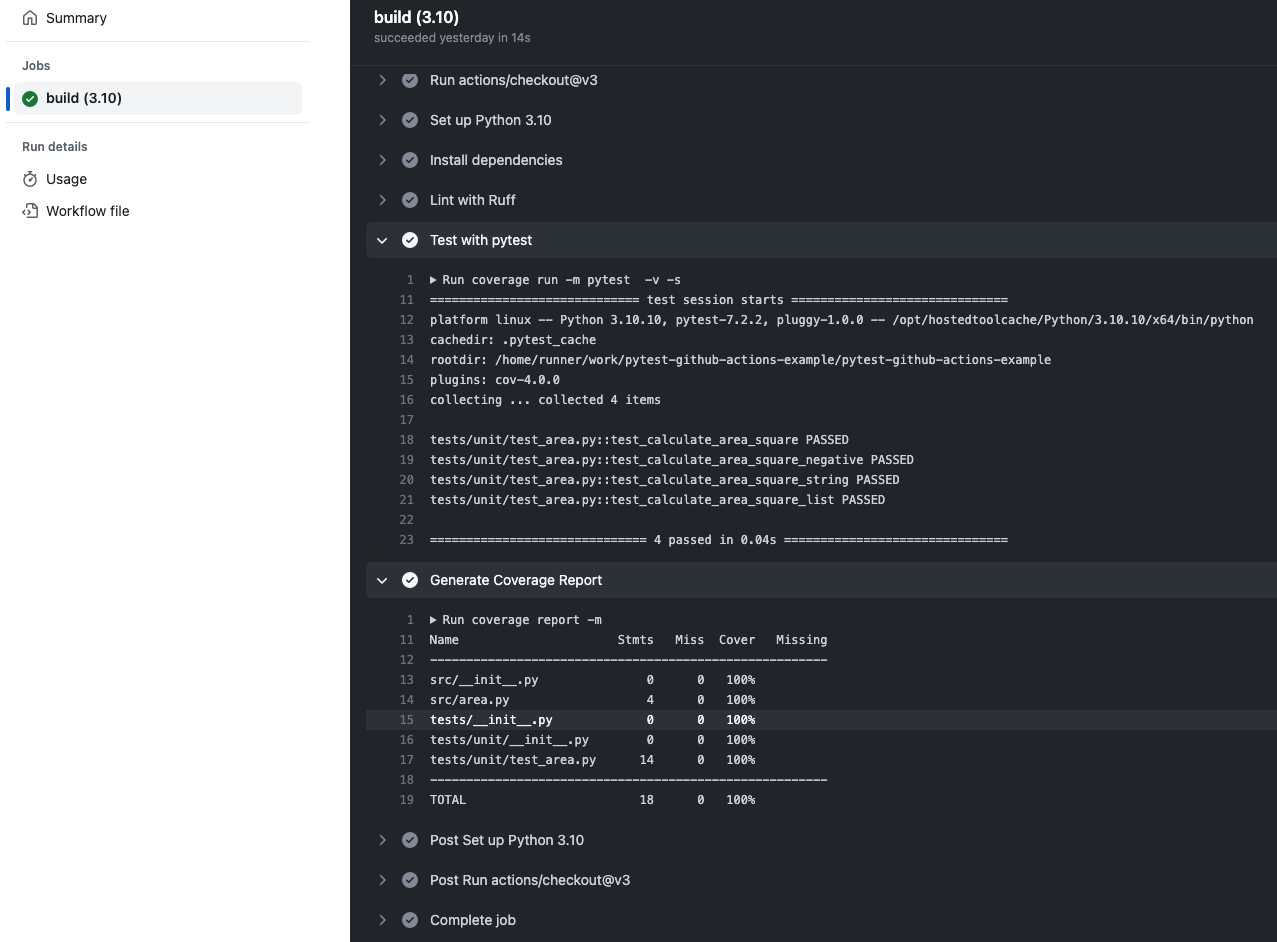
A Complete Workflow Example
For a deeper dive into a complete, production-ready CI workflow, the following article provides an excellent template. It uses modern tools and separates concerns into logical jobs for testing, quality, and security.
Building Robust CI/CD Pipelines: Best Practices and Automation
The article 'Building Robust CI/CD Pipelines' provides a full YAML file for a modern Python project. It's a great reference for best practices.
Read the first part of the article and study the full YAML example under the 'Enhanced CI/CD workflow for Python projects' section. Pay close attention to: env: block: How it centralizes variables like PYTHON_VERSION. jobs:: The separation into test, quality, and security jobs. needs: test: How the quality and security jobs depend on the test job's success. --cov-fail-under=95: An example of enforcing a minimum test coverage percentage.
Seeing it in Action
Reading YAML is one thing, but seeing it execute is another. This video provides a fantastic walkthrough of setting up a workflow, pushing it to GitHub, and watching the results.
Automated Testing in Python with pytest, tox, and GitHub Actions
The video 'Automated Testing in Python with pytest, tox, and GitHub Actions' from the mCoding channel clearly demonstrates the entire CI process, from configuration to execution.
Watch the following two segments: Setting up GitHub Actions (21:23 - 25:16): This section shows how to create the YAML file, explains the matrix strategy, and demonstrates pushing the code and watching the action run on GitHub. It uses tox, but the core concepts of the YAML file are identical. Adding a Status Badge (25:16 - 26:30): This short segment shows you how to add a live status badge to your README.md file—a professional touch for any project.
Exercise: Implement Your CI Pipeline
Now it's time to build your own CI pipeline.
-
Prerequisites:
- Ensure your project is in a GitHub repository.
- You should have a working test suite that can be run with
pytest. - Your linting (
ruff) and type checking (mypy) tools should be configured inpyproject.toml. - Create a
requirements.txtfile with your project's dependencies (e.g.,pytest,ruff,mypy).
-
Task:
- Create a new file at
.github/workflows/ci.yml. - Implement a workflow that performs the following:
- Triggers on
pushandpull_requestevents targeting yourmainbranch. - Includes a
qualityjob that runs onubuntu-latestwith Python 3.12. This job must runruff check .,ruff format --check ., andmypy .. - Includes a
testjob that depends on thequalityjob's success. - The
testjob must use amatrixstrategy to runpytestagainst Python versions3.10,3.11, and3.12. - Implement
pipcaching in all jobs to speed up dependency installation.
- Triggers on
- Create a new file at
-
Verification:
- Commit and push your new
ci.ymlfile to your GitHub repository. - Go to the "Actions" tab on your GitHub repository page to see your workflow run.
- Deliberately introduce a linting error or a failing test in a new branch, create a pull request, and watch the pipeline fail. Fix the issue and push again to see it pass.
- Commit and push your new
Conclusion
You have now successfully configured a professional-grade Continuous Integration pipeline. This automated workflow serves as the ultimate quality gate, ensuring that every change is automatically vetted against your standards for correctness, style, and type safety before it can be merged. This practice is fundamental to building reliable software in a team environment.
Key Takeaways:
- CI is an automated safety net: It runs checks on a neutral server, providing an authoritative source of truth about code quality.
- GitHub Actions workflows are defined in YAML: Key concepts are triggers (
on),jobs,steps, and reusableactions. - A robust pipeline separates concerns: Fast static checks (linting, formatting) should run first in a
qualityjob. Slower, more comprehensivetestjobs can then run in parallel across multiple environments using amatrixstrategy. - Job dependencies (
needs:) control the flow: You can ensure tests only run if the code is already well-formed and passes static analysis. - Caching is critical for performance: Caching dependencies drastically reduces the time your jobs take to run.
What's Next:
Your code is now automatically tested and validated. The final step in this module is to prepare it for others to use. In the next lesson, you will learn how to build a distributable wheel package with python -m build and test its installation in a clean environment. This will complete the journey from raw code to a shippable, professional Python package.