Introduction
In our last lesson, you mastered the fundamentals of pytest. You learned how to write simple tests, use fixtures for managing setup and teardown, and leverage @pytest.mark.parametrize to create scalable, data-driven tests. This foundation is crucial for verifying the "happy path"—the expected behavior of your code.
However, production-ready code must also handle failure gracefully. This lesson builds directly on your testing skills to address the "unhappy paths." We will cover how to write tests that confirm your code fails correctly and how to manage tests that interact with the real world, specifically the filesystem.
This lesson delivers on the learning outcome: Test for expected exceptions with pytest.raises and handle filesystem operations with the tmp_path fixture.
By the end of this lesson, you will be able to:
- Verify that your functions raise the correct exceptions under specific conditions.
- Write tests that create, read, and write files in a safe, isolated manner without cluttering your system.
Asserting Correct Failures with pytest.raises
In a robust application, throwing an exception is often the correct response to invalid input or a problematic state. For example, a function that divides two numbers should raise a ZeroDivisionError if the denominator is zero. Your test suite must verify this behavior.
A common but un-Pythonic way to test this is with a manual try...except block:
# The "bad" way - verbose and can hide other errors
def test_divide_by_zero_manual():
    try:
        1 / 0
    except ZeroDivisionError:
        pass  # The test passes if we get here
    else:
        pytest.fail("Expected ZeroDivisionError but none was raised")
This is clumsy. pytest provides a much cleaner and more expressive context manager for this: pytest.raises.
Unit Testing in Python with pytest | Asserting Expected Exceptions (Part-2)
This video from Indian Pythonista provides a clear, step-by-step demonstration of how to test for expected exceptions.
Watch from 06:30 to 07:25. This segment shows the core usage of pytest.raises as a context manager to assert that a specific exception is raised.
As you saw, the pattern is straightforward:
import pytest

def test_divide_by_zero():
    with pytest.raises(ZeroDivisionError):


        # This code is expected to raise a ZeroDivisionError
        result = 1 / 0
The test will pass if a ZeroDivisionError is raised within the with block. If any other exception is raised, or if no exception is raised, the test will fail.
Inspecting Exception Details
Sometimes, just checking the exception type isn't enough. You might need to verify the error message or other attributes of the exception object. pytest.raises allows you to capture the exception for further inspection.
pytest also offers a more concise match parameter to check the error message directly using a regular expression.
Unit Testing in Python with pytest | Asserting Expected Exceptions (Part-2)
The same video now explains how to inspect the raised exception and use the convenient match parameter.
Watch from 07:47 to 11:09. Pay attention to two key techniques: Using as exc_info to capture the exception and assert its properties (like exc_info.value). Using the match parameter in pytest.raises for a more direct way to assert the error message.
Here’s a summary of the patterns for a function that raises a custom error:
# some_app/validators.py
class ValidationError(Exception):
    def __init__(self, message, field_name):
        super().__init__(message)
        self.field_name = field_name

def validate_email(email):
    if not isinstance(email, str) or "@" not in email:
        raise ValidationError("Invalid email format", field_name="email")


# tests/test_validators.py
import pytest
from some_app.validators import ValidationError, validate_email


# Pattern 1: Just check the type
def test_validate_email_raises_error():
    with pytest.raises(ValidationError):
        validate_email("not-an-email")


# Pattern 2: Inspect the exception object
def test_validate_email_properties():
    with pytest.raises(ValidationError) as exc_info:
        validate_email(123)


    # exc_info.value is the actual exception instance
    assert "Invalid email format" in str(exc_info.value)
    assert exc_info.value.field_name == "email"


# Pattern 3 (Recommended): Use the `match` parameter
def test_validate_email_with_match():
    with pytest.raises(ValidationError, match="Invalid email format"):
        validate_email("not-an-email")
This is far superior to manual try/except blocks and provides clear, intentional tests for your error-handling logic.
Testing Filesystem Operations with tmp_path
Testing functions that read or write files presents a challenge: tests should not permanently alter your filesystem or depend on pre-existing files. Running such tests can leave behind artifacts, and if tests are not isolated, they can interfere with each other.
The solution is to use temporary files and directories that are automatically created before a test runs and destroyed afterward. pytest provides a powerful built-in fixture for this: tmp_path.
Pytest With tmp_path in Plain English
To understand why temporary fixtures are essential, read this section from 'Pytest With tmp_path in Plain English'. It explains the need for test isolation and determinism when dealing with file I/O.
Read the section titled 'Why Do We Need Temporary Fixtures?'.
Using the tmp_path Fixture
The tmp_path fixture provides a pathlib.Path object pointing to a unique temporary directory for each test function. Since it's a fixture, you simply request it as an argument in your test function.
# test_file_io.py
from pathlib import Path

def test_create_file(tmp_path: Path):


    # tmp_path is a Path object to a temporary directory
    # Example: /private/var/folders/.../T/pytest-of-user/pytest-0/test_create_file0
    print(f"\nTemp directory: {tmp_path}")


    # You can create files and subdirectories using pathlib methods
    data_dir = tmp_path / "data"
    data_dir.mkdir()
    my_file = data_dir / "output.txt"
    my_file.write_text("Hello, world!")

    assert my_file.exists()
    assert my_file.read_text() == "Hello, world!"
Because tmp_path is function-scoped, each test gets its own pristine temporary directory. This guarantees test isolation. After the test function completes, pytest automatically and recursively removes the entire directory and its contents.
A Note on tmpdir vs. tmp_path: You might see older code using a fixture named tmpdir. This is the predecessor to tmp_path and returns an object from an older library. Always use tmp_path, as it integrates with Python's modern pathlib module.
Practical Example: Testing a File-Processing Function
Let's combine tmp_path with pytest.raises to test a function that processes a file.
The following resource provides excellent, self-contained examples of testing file operations with pytest.
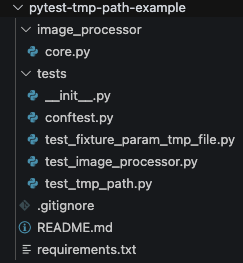
Review the code block under the heading 'Example 6: Testing File Operations'. Notice how it uses a fixture to create a temporary CSV file with tmp_path, and how another test uses pytest.raises(FileNotFoundError).
Here's a distilled version of that pattern:
# some_app/parser.py
import json

def parse_config(config_path):
    """Loads a JSON config file and returns the 'username'."""
    try:
        with open(config_path, 'r') as f:
            data = json.load(f)
        return data['username']
    except FileNotFoundError:
        raise ValueError("Config file not found.")
    except KeyError:
        raise ValueError("'username' key missing from config.")


# tests/test_parser.py
import pytest
from pathlib import Path
from some_app.parser import parse_config

def test_parse_config_success(tmp_path: Path):
    """Test successful parsing of a valid config file."""
    config_file = tmp_path / "config.json"
    config_file.write_text('{"username": "test_user", "api_key": "123"}')

    username = parse_config(config_file)

    assert username == "test_user"

def test_parse_config_file_not_found():
    """Test that a ValueError is raised for a non-existent file."""
    with pytest.raises(ValueError, match="Config file not found"):
        parse_config("non_existent_file.json")

def test_parse_config_missing_key(tmp_path: Path):
    """Test that a ValueError is raised if 'username' key is missing."""
    config_file = tmp_path / "config.json"
    config_file.write_text('{"api_key": "123"}') # No username key

    with pytest.raises(ValueError, match="'username' key missing"):
        parse_config(config_file)
This test suite is robust, clean, and completely self-contained. It doesn't rely on any external files and leaves no trace after execution.
Exercise
Now, let's apply these concepts. Imagine you have a function that reads a user's name from a file and logs a welcome message.
# in a file named `my_app/greeter.py`
def greet_user_from_file(filepath: str) -> str:
    """
    Reads a username from the first line of a file and returns a greeting.
    Raises FileNotFoundError if the file doesn't exist.
    Raises ValueError if the file is empty.
    """
    try:
        with open(filepath, 'r') as f:
            username = f.readline().strip()
            if not username:
                raise ValueError("File is empty")
            return f"Hello, {username}!"
    except FileNotFoundError:


        # Re-raising to keep the original, more specific exception
        raise
Your task is to write tests for this function in tests/test_greeter.py.
- Test the success case: Write a test
test_greet_user_successthat uses thetmp_pathfixture. Inside the test, create a file nameduser.txt, write a name to it, and assert thatgreet_user_from_filereturns the correct greeting string. - Test the file not found case: Write a test
test_greet_user_file_not_found. Usepytest.raisesto assert that calling the function with a path that doesn't exist correctly raisesFileNotFoundError. - Test the empty file case: Write a test
test_greet_user_empty_filethat usestmp_pathto create an empty file. Usepytest.raiseswith thematchparameter to assert that aValueErrorwith the message "File is empty" is raised.
This exercise will confirm your ability to test both successful file interactions and expected error conditions.
Conclusion
You have now added two indispensable tools to your testing arsenal, moving you closer to writing truly professional, production-grade Python code.
Key Takeaways:
- Test for Failure: Use
with pytest.raises(ExceptionType, match="...")to create clean, readable, and robust tests for your error-handling logic. This is the Pythonic replacement for manualtry/exceptblocks in tests. - Isolate Filesystem Tests: Always use the
tmp_pathfixture when testing code that interacts with the filesystem. It provides a clean, temporarypathlib.Pathobject for each test function, ensuring your tests are isolated, reproducible, and leave no mess. - Prefer
tmp_path: When you encounter file-based testing,tmp_pathis the modern standard. Avoid its predecessor,tmpdir.
What's Next:
With the ability to test for correctness and handle failures, the next logical step is to enforce consistency and style automatically. In the next lesson, we will set up a professional workflow to automate code formatting and linting using black, ruff, and isort, managed via pre-commit hooks. This will ensure that every line of code you and your team commit adheres to a high standard of quality before it even enters the main codebase.