Hello! Welcome back to our course on diffusion models.
In the last lesson, we focused on mastering Classifier-Free Guidance (CFG). You learned to tune the guidance scale and diagnose artifacts like oversaturation, which arise when a model follows a prompt too strongly. However, sometimes the problem isn't the strength of the guidance but the model's fundamental understanding of the prompt. What do you do when the model ignores a word, misattributes a color, or blends two concepts together?
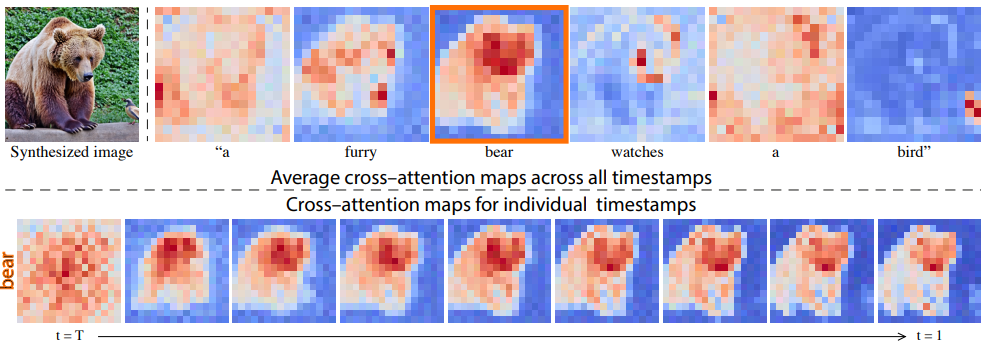
Today, we're going to transition from treating the model as a black box to peering inside its "brain." Our learning outcome is to analyze cross-attention maps to debug prompt alignment failures. Cross-attention is the mechanism that connects your text prompt to the image being generated. By visualizing it, you can gain direct insight into how the model interprets each word and where it "paints" that concept onto the canvas. This is a crucial diagnostic skill for any serious practitioner of diffusion models.
1. The Role of Cross-Attention in Text Conditioning
Before we can analyze the maps, we need a clear understanding of what they represent. In a text-conditioned U-Net, at various layers and for each denoising step, the model needs to incorporate the meaning of your prompt into its spatial representation of the image. This is achieved through cross-attention.
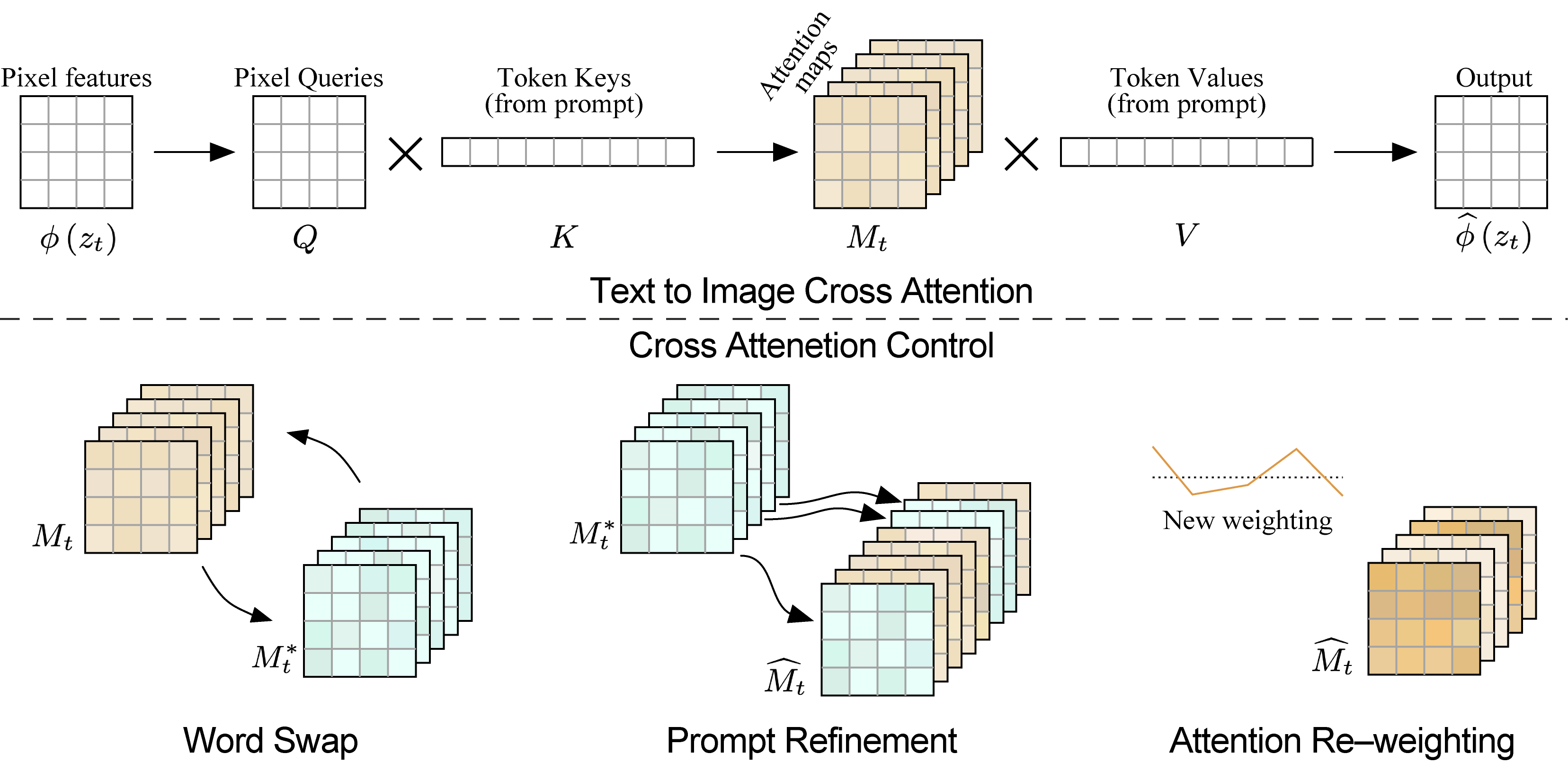
Given your background, you're familiar with attention mechanisms. Cross-attention is a specific variant where the queries come from one source (the image's spatial features) and the keys and values come from another (the text prompt's token embeddings).
In essence, for each pixel (or more accurately, each feature in the latent representation):
- A query is formed, asking: "What textual information is relevant for me right now?"
- This query is compared against the keys of every token in the prompt.
- This comparison produces attention scores—a set of weights indicating how much attention this specific pixel should pay to each word.
- These scores are used to create a weighted sum of the token values, producing a context vector that is then fused back into the image's representation.
The matrix of these attention scores, for all pixels against all tokens, is the cross-attention map. It's a direct, quantifiable measure of the influence of each word on each part of the image.
To solidify this concept, let's review a clear explanation of how cross-attention differs from self-attention and how it's integrated into the U-Net.
Stable Diffusion from Scratch in PyTorch | Conditional Latent Diffusion Models
The video 'Stable Diffusion from Scratch in PyTorch' by ExplainingAI offers an excellent technical breakdown of text conditioning. We'll watch a few key segments to understand the mechanics of cross-attention.
Please watch the following segments: Introduction to Cross-Attention (31:22 - 31:46): The initial setup of the problem. Self-Attention vs. Cross-Attention (34:53 - 35:20): This clearly explains the crucial difference—where the keys and values come from. Cross-Attention Mechanics (35:55 - 38:19): This is the core segment. Pay close attention to how the feature map cells (queries) attend to the text token representations (keys and values) to produce the final context.
2. Visualizing Cross-Attention Maps
Now for the practical part: how do we extract and visualize these maps? The process involves hooking into the U-Net's forward pass, capturing the attention matrices from the CrossAttention layers, and aggregating them into a human-interpretable format.
A well-established method for this is DAAM (Diffusion Attentive Attribution Maps). DAAM formalizes this by aggregating the attention scores across different layers, attention heads, and even denoising timesteps to produce a single, robust heatmap for each word in the prompt.
The video below provides a hands-on demonstration using a Python library built for this purpose. It will show you the entire workflow, from loading a model to generating and interpreting the heatmaps for a given prompt.
Understand Stable Diffusion Interpretation using Cross-Attention by DAAM Heatmaps
The video 'Understand Stable Diffusion Interpretation using Cross-Attention by DAAM Heatmaps' by 1littlecoder gives a great practical walkthrough of this process in a Google Colab notebook.
Watch these two segments to see the code in action and the resulting analysis: Generating and Overlaying Heatmaps (05:03 - 06:40): Focus on the code loop that iterates through the prompt's tokens and generates a heatmap for each. Analyzing the Heatmaps (06:40 - 08:01): Observe how the presenter interprets the generated maps for words like 'angry', 'bald', 'paper', and 'glasses', linking them to specific regions in the image.
This practical approach gives you a powerful debugging tool. When a generated image doesn't match your prompt, your first step can be to generate these heatmaps to see what the model saw.
3. Diagnosing Common Prompt Alignment Failures
Let's explore several common failure modes and see how cross-attention maps can pinpoint the problem.
Scenario 1: Ignored Concepts
The Problem: You ask for "a photograph of a majestic lion wearing a tiny top hat," but the generated image is just a lion. The "tiny top hat" has been ignored.
Diagnosis with Attention Maps:
If you were to generate the attention maps:
- The map for "lion" would show strong activation, concentrated on the lion's body and face.
- The map for "hat" would likely be faint and diffused, with no area of high concentration. This visually confirms that the model failed to allocate a specific region of the image to the concept of "hat."
Scenario 2: Concept "Bleeding" or Entanglement
The Problem: You prompt "a painting of a red car next to a blue house," but the result is a purplish car and a purplish house. The attributes "red" and "blue" have bled into each other. This is a very common failure of compositionality.
Diagnosis with Attention Maps:
- The map for "red" would light up both the car and the house.
- The map for "blue" would also light up both objects.
This demonstrates that the model failed to bind the adjective "red" exclusively to "car" and "blue" exclusively to "house." The concepts are entangled.
The paper that introduced DAAM provides an excellent analysis of this phenomenon, which they call "adjectival entanglement."
What the DAAM: Interpreting Stable Diffusion Using Cross ...
The paper 'What the DAAM: Interpreting Stable Diffusion Using Cross...' gives a formal look at these failure modes. It's worth reading the section on adjectival entanglement to see more examples.
Read Section 5.2, 'Adjectival Entanglement'. Pay attention to the examples in Figure 8 and 9, where changing a single adjective (e.g., from 'rusty' to 'metallic') affects the entire scene, not just the object being described.
Scenario 3: Syntactic Misinterpretation
The Problem: The model struggles with complex spatial or hierarchical relationships. For example, does "a box of apples" mean the same thing to the model as "apples in a box"? How does it handle a "CEO's assistant" vs. an "assistant CEO"?
Diagnosis with Attention Maps:
By analyzing the overlap and dominance between heatmaps of related words, we can uncover how the model interprets syntax. The DAAM paper provides fascinating insights here. For example, they found:
- For a subject-verb pair like
(boy, running), the map for "running" tends to contain the map for "boy," suggesting the action contextualizes the subject. - Counter-intuitively, for an adjective-noun pair like
(rusty, shovel), the map for "rusty" often visually dominates and contains the map for "shovel." We might expect the object to contain its attribute, but the model often does the opposite.
This level of analysis is powerful for understanding the subtle biases and behaviors of a model when it encounters complex prompts.
Test your understanding!
You are trying to generate an image with the prompt: "A close-up photo of a cat with bright green eyes." The model generates a beautiful photo of a cat, but its eyes are a generic yellow-brown. You generate the cross-attention maps. What would you expect to see for the tokens "green" and "eyes" that would confirm the alignment failure?
Show answer
You would expect to see two things:
- The attention map for the token "eyes" would likely show strong, correct activation, concentrated precisely on the cat's eyes in the image. This tells you the model correctly identified where the eyes are.
- The attention map for the token "green" would be faint, or it might be diffused across the whole image, or perhaps incorrectly focused on the background foliage. Crucially, it would not show strong activation specifically on the eye region.
This combination of maps would diagnose the problem as a failure to bind the attribute "green" to the object part "eyes," even though it successfully located the "eyes."
4. From Analysis to Control: A Glimpse Forward
As an engineer, diagnosis is only half the battle. Once you've identified a prompt alignment failure, the next logical question is: "How do I fix it?" This lesson focuses on the analysis, but it's crucial to know that this analysis directly enables methods of control.
The key idea, pioneered in papers like Prompt-to-Prompt, is that if we can read attention maps, we can also edit them. By manipulating the cross-attention maps during the generation process, we can exert fine-grained control over the final image.
For example, to fix the "red car, blue house" problem, you could:
- Generate the attention map for "a red car."
- Generate the attention map for "a blue house."
- During a new generation for "a red car and a blue house," you could manually inject the attention values from the first two steps, forcing the model to associate "red" only with the car's region and "blue" only with the house's region.
This concept of attention control is a cornerstone of modern image editing techniques and directly follows from the analytical methods we've discussed today.
Prompt-to-Prompt Image Editing with Cross-Attention Control
To see how this works, let's look at the foundational paper on this topic, 'Prompt-to-Prompt Image Editing with Cross-Attention Control'. We won't dive into implementation, but focus on the core concept.
Please read the following sections to understand the high-level idea: Introduction (Section 0): Understand the motivation—editing images via prompts is hard because small changes create entirely different images. Method Overview (Section 1): Get the key insight: injecting cross-attention maps from a source image can preserve its structure during an edit. Controlling the Cross-Attention (Section 3): Skim this section to see how this idea is formalized into a general algorithm. This connects the analysis we've done to a concrete intervention.
Conclusion
You've now added a powerful diagnostic tool to your toolkit. By moving beyond prompt engineering and CFG tuning to direct inspection of the model's internal state, you can debug a whole new class of generation failures.
Key Takeaways:
- Cross-attention is the link: It's the mechanism that fuses textual information from the prompt into the spatial layout of the image during generation.
- Visualization is diagnosis: By generating and visualizing cross-attention maps (e.g., with DAAM), you can see which parts of an image are influenced by which words in your prompt.
- Common failures are identifiable: This analysis allows you to pinpoint specific issues like ignored words, concept entanglement, and incorrect attribute binding.
- Analysis enables control: Understanding how to read attention maps is the first step toward learning how to write or edit them, which is the basis for many advanced image editing techniques.
Next Lesson Preview:
We've just spent time diving deep into the U-Net's architecture to analyze its behavior. Training and even running inference with these massive models presents significant engineering challenges, particularly around memory consumption. In our next lesson, we'll switch gears to address a very practical optimization problem: you will learn to apply gradient checkpointing to reduce memory usage during training, a technique that allows you to train larger models or use larger batch sizes on the same hardware.