Hello! Welcome to the next lesson in our course on building complex websites with vibe coding.
In our last lesson, we built breadcrumb navigation, which reveals the hierarchical structure of your site (e.g., Home > Services > Web Design). This is a powerful tool for user orientation. Today, we're going to explore a different kind of content relationship: associative connections. Instead of showing users the path they took, we will suggest other relevant pages they might be interested in.
As an SEO manager with over 15 years of experience, you know that keeping users engaged on your site is paramount. A "Related Posts" or "You Might Also Like" section is a classic and highly effective strategy to increase page views, reduce bounce rates, and signal topical authority to search engines.
Our learning outcome for this lesson is to prompt for a 'related content' section using Hugo's built-in content relationship functions. We'll see how Hugo can automatically find related pages and how we can fine-tune its algorithm to match our specific content strategy.
Step 1: The "Why" - SEO and User Engagement
Before diving into the code, let's start on familiar ground by reinforcing the value of this feature from an SEO perspective. Strong internal linking helps search engines understand the contextual relationships between your pages, distributing link equity and helping to establish your site's authority on a given topic.
To frame this, let's review a short article that connects the dots between related content, user experience, and SEO.
Related Posts in Hugo - DigitalNotions
Please read the first two sections of the article 'Related Posts in Hugo' from DigitalNotions. The author clearly explains what related content is and its significant SEO benefits.
Read the sections titled 'What is related content?' and 'SEO benefits of related content'. Focus on the distinction between categories and tags, and how internal linking helps search engines understand your site structure.
Step 2: How Hugo Discovers Related Content
Hugo has a sophisticated, built-in engine for discovering related content. It doesn't just look for posts with the same tag. Instead, it calculates a "relatedness" score based on a configurable set of factors.
The foundation of this system is taxonomies. In Hugo, taxonomies are classifications for your content, with tags and categories being the most common defaults. You define these in the front matter of your content files, typically as an array.
For example, in content/blog/my-first-post.md:
---
title: "My First Post"
date: 2023-10-27T10:00:00-05:00
tags: ["hugo", "web-dev", "seo"]
categories: ["Tutorials"]
---
This is my first post.
By adding these tags and categories, you provide the raw data for Hugo's related content engine to work with.
Hugo’s primary tool for this is the .Related page method. When you call {{ .Site.RegularPages.Related . }}, Hugo looks at the current page and compares it to all other regular pages on your site. It runs its internal algorithm, which considers shared front matter parameters, and returns a list of pages sorted by their relevance score.
Step 3: Vibe Coding the Related Content Partial
Now, let's use our "vibe coding" workflow to generate the template for this feature. We will create a new partial that we can place on any single page layout. Our prompt needs to be specific about the function to use and the desired HTML structure.
When crafting your prompt, think about the principles we've discussed for effective prompting, such as defining the Role, Task, and Format.
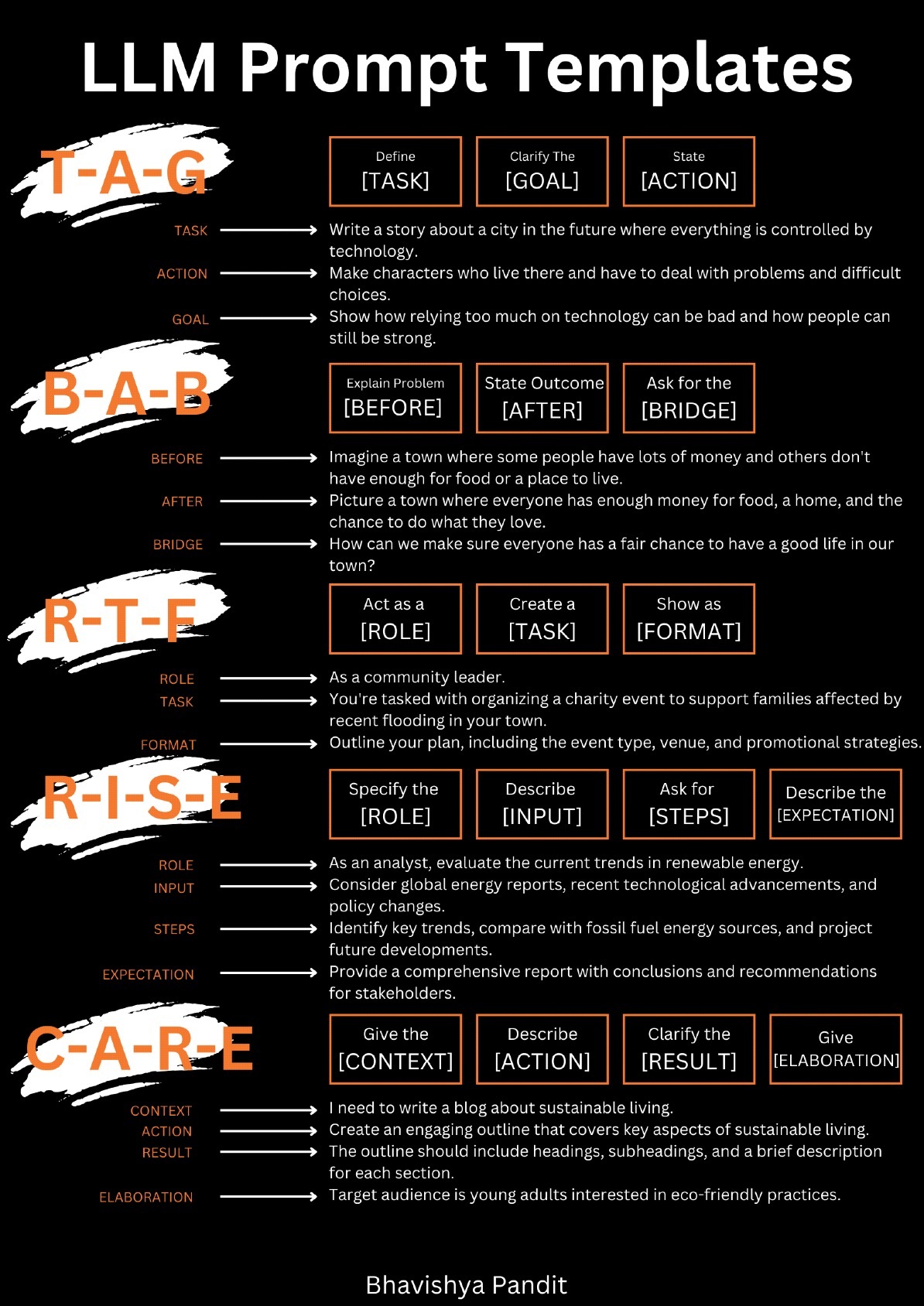
Prompt for AI:
Role: You are an expert Hugo template developer.
Task: Generate the code for a Hugo partial that displays a list of related posts.
File Details & Format:
- The file should be named
related-posts.htmland be placed in thelayouts/partials/directory.- The output should be an HTML section.
Logic and Instructions:
- Add a heading like
<h2>Related Posts</h2>.- Use Hugo's built-in related content feature. The variable holding the related pages should be defined like this:
{{ $related := .Site.RegularPages.Related . | first 5 }}. This gets the 5 most related pages.- Use a
{{ with $related }}block to ensure the section only renders if related content is found.- Inside the
withblock, create an unordered list (<ul>).- Use
{{ range . }}to loop through the related pages.- For each page, create a list item (
<li>) with a link to the page'sPermalinkand display itsTitle.
This prompt should generate a clean and effective partial. To see what a well-structured final output looks like, you can reference the Hugo documentation itself.
The official Hugo documentation provides a concise, canonical example of this partial. Let's study it to confirm our understanding.
In this resource from the Hugo docs, find the first code block under the heading 'List related content'. Compare its structure with the logic we outlined in our prompt. Note the use of site.RegularPages.Related, first 5, with, and range.
After generating and saving your layouts/partials/related-posts.html file, you can include it in your single page template (layouts/_default/single.html) like this:
{{/* In single.html, after the main content */}}
<article>
    <h1>{{ .Title }}</h1>
    <div>{{ .Content }}</div>
</article>

{{ partial "related-posts.html" . }}
Step 4: Fine-Tuning the Algorithm in hugo.toml
The real power of Hugo's related content feature lies in its configurability. You are not stuck with the default algorithm. You can tell Hugo exactly what you consider important when determining relatedness by adding a [related] section to your hugo.toml file.
This is where your expertise in content strategy comes into play. Do you want to prioritize posts with shared tags? Or posts written around the same time? Or posts by the same author? You can define all of this with custom weights.
The following resource provides a fantastic, practical example of this configuration.
Related Posts in Hugo - DigitalNotions
Now for the most important part: customizing the algorithm. Please read the section on configuration from the DigitalNotions article.
Read the section 'Configuring what is considered related'. Pay close attention to the [related] TOML block and the author's explanation for their chosen indices (tags, keywords, date) and their weight. This is the key to tailoring the related content logic to your site's specific needs.
Based on that article, here is a sample configuration for your hugo.toml:
[related]
# A score from 0 to 100. Lower value means more, but less relevant, results.
threshold = 80
# Set to true to include pages published after the current page.
includeNewer = true
# Match keywords in lowercase.
toLower = true

  [[related.indices]]
  # The front matter parameter to use.
  name = "tags"
  # The weight given to this parameter. Higher is more important.
  weight = 100

  [[related.indices]]
  name = "author"
  weight = 50

  [[related.indices]]
  name = "date"
  weight = 10
  # Pattern to use for matching dates.
  # Options: "year", "month", "day"
  pattern = "year"
In this example, two pages sharing a tag will be seen as much more related than two pages sharing an author. Pages published in the same year are only slightly more related. By adjusting these weights, you gain precise control over the recommendations.
Test your understanding!
You have three blog posts with the following front matter:
- Post A:
tags: ["hugo", "performance"],author: "Alice" - Post B:
tags: ["seo", "performance"],author: "Bob" - Post C:
tags: ["javascript"],author: "Alice"
Using the hugo.toml configuration provided above, which post (B or C) is more likely to appear as a related post on Post A's page, and why?
Show answer
Post B is more likely to be related.
Here's why:
- Post A and Post B share a tag ("performance"). The weight for
tagsis 100. - Post A and Post C share an author ("Alice"). The weight for
authoris 50.
Because the weight for shared tags (100) is double the weight for a shared author (50), the algorithm will consider the shared tag a much stronger signal of relatedness.
Conclusion
You've now added another powerful navigation and content discovery tool to your Hugo skillset. By prompting an AI for a basic partial and then using Hugo's configuration file to define the underlying logic, you've perfectly demonstrated the "vibe coding" workflow: generating code quickly, then refining it with precision.
Key Takeaways:
- A "related content" section is crucial for user engagement and signaling topical authority for SEO.
- Hugo's
.Site.RegularPages.Relatedfunction is the primary tool for finding related content. - The system relies on front matter fields, especially taxonomies like
tagsandcategories. - The true power lies in configuring the
[related]section inhugo.toml, where you can assign customweightto different indices (tags,author,date, etc.) to create your own relevance algorithm.
Preview of the next lesson:
We've just seen how taxonomies like tags and categories are the engine behind related content. But what happens when a user clicks on one of those tags? In our next lesson, we'll learn how to create custom taxonomy list templates to build dedicated pages that list all content associated with a specific tag or category, completing the content discovery loop for your users.