Hello! Welcome back to our course on building complex websites with vibe coding.
In our last lesson, we built a multi-level main navigation menu, giving users a way to access the primary sections of your site. This was a crucial step in organizing your site's architecture. Now, we'll address a related and equally important navigation challenge: helping users understand where they are within that architecture.
As an SEO expert, you're deeply familiar with the value of breadcrumb navigation. It's a cornerstone of good user experience and a powerful signal to search engines about a site's structure. This lesson will bridge the gap between that SEO knowledge and the practical implementation in Hugo.
Our learning outcome is to generate a breadcrumb navigation partial that reflects the site's content hierarchy. We'll see how Hugo's understanding of your content folders makes this surprisingly straightforward, and we'll use our AI-assisted workflow to generate both the user-facing navigation and the critical SEO-friendly structured data that goes with it.
What are Breadcrumbs?
Just to be perfectly clear, breadcrumbs are the secondary navigation trail, usually at the top of a page, that shows the path from the homepage to the current page. They are distinct from the main site navigation.
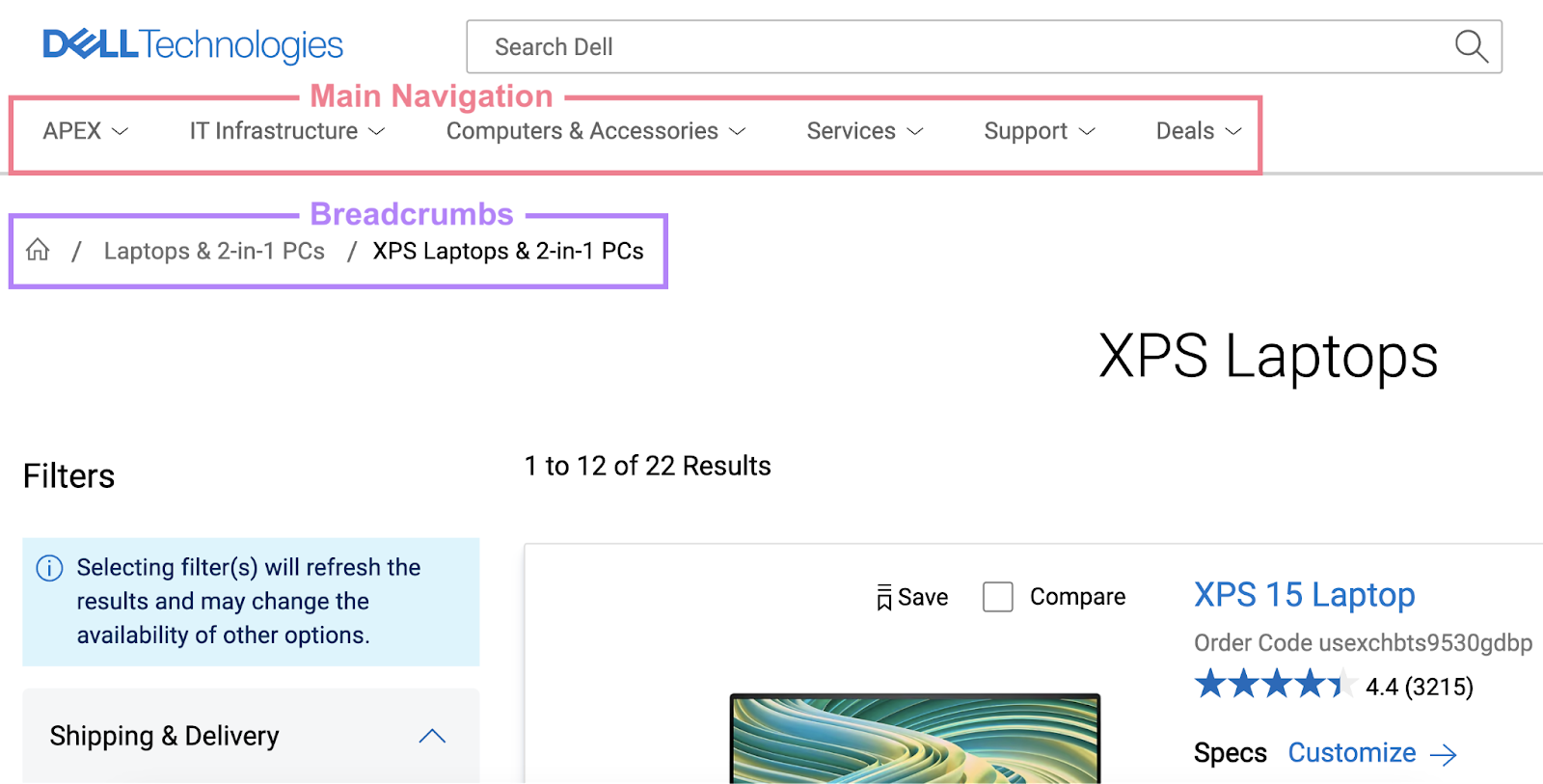
Step 1: Why Breadcrumbs Matter (The SEO Perspective)
Before we write any code, let's reinforce why this is so important from your professional standpoint. Properly implemented breadcrumbs improve user engagement by reducing bounce rates and, crucially, can be displayed directly in Google search results, which can significantly boost click-through rates.
This article provides an excellent overview of the SEO benefits and the underlying schema required.
SEO Breadcrumbs: Schema Markup Implementation Guide
To start, please read the introduction of 'SEO Breadcrumbs: Schema Markup Implementation Guide' from glukhov.org. It perfectly frames the importance of breadcrumbs for both user experience and search visibility.
Read the first two sections, 'Understanding Breadcrumb Navigation and SEO' and the brief introduction to 'Implementing BreadcrumbList JSON-LD Schema'. Focus on the connection between the visual breadcrumb trail and the structured data that powers its appearance in search results.
Step 2: How Hugo Enables Automatic Breadcrumbs
The magic of breadcrumbs in Hugo lies in its content organization. Hugo automatically builds a tree-like structure of your site based on the folders within your content/ directory.
- A page at
content/services/web-design.mdis a child of theservicessection. - The
servicessection page is atcontent/services/_index.md. - The
servicessection is a child of the homepage.
Hugo provides a special page variable called .Ancestors which contains a list of all the parent pages of the current page, all the way up to the homepage. This is the key we will use to build our breadcrumb trail dynamically.
Step 3: Vibe Coding the Visual Breadcrumb Partial
With this understanding, we can now formulate a precise prompt for our AI assistant to generate the HTML partial. We'll ask it to use the .Ancestors variable to construct the path.

Prompt for AI:
I need you to generate a Hugo partial for a breadcrumb navigation bar.
File Details:
- The file should be named
breadcrumbs.html.- It should be located in the
layouts/partials/directory.Logic and Instructions:
- Use a
<nav>element witharia-label="breadcrumb"and an ordered list (<ol>) for the structure. I'll be using Bootstrap CSS, so use classes likebreadcrumbandbreadcrumb-item.- The first item in the list must always be a link to "Home", pointing to the site's root (
.Site.BaseURL).- Next, iterate through the current page's ancestors using
range .Ancestors.Reverse. It's critical to use.Reverseso the path is in the correct order (Home -> Section -> Sub-section).- For each ancestor in the loop, create a breadcrumb item (
<li>) containing a link to that page (<a href="{{ .Permalink }}">{{ .Title }}</a>).- Finally, after the loop, add the current page's title as the last breadcrumb item. This item should be marked as "active" and should not be a link.
Step 4: Analyzing the AI-Generated Code
Executing this prompt should yield a clean, effective partial. The glukhov.org article you reviewed has an excellent implementation that we can use as our reference for analyzing the AI's output.
SEO Breadcrumbs: Schema Markup Implementation Guide
Now, let's examine a high-quality implementation of this logic. Please read the 'Implementing Breadcrumbs in Hugo Static Sites' section of the same glukhov.org article.
Focus on the first code block, which shows the layouts/partials/breadcrumbs.html file. Compare this code to the logic we defined in our prompt. Note the use of .Ancestors.Reverse and how it handles the 'Home' link and the final 'active' item separately.
Let's break down the key lines from a typical AI-generated output based on that reference:
<nav aria-label="breadcrumb">
  <ol class="breadcrumb">
    {{/* 1. Static Home link */}}
    <li class="breadcrumb-item"><a href="{{ .Site.BaseURL }}">Home</a></li>

    {{/* 2. Loop through parent pages in correct order */}}
    {{ range .Ancestors.Reverse }}
      <li class="breadcrumb-item"><a href="{{ .Permalink }}">{{ .Title }}</a></li>
    {{ end }}

    {{/* 3. Current page, not linked */}}
    <li class="breadcrumb-item active" aria-current="page">{{ .Title }}</li>
  </ol>
</nav>
To use this on your site, you simply call the partial from wherever you want it to appear, usually in a site-wide header or directly within your baseof.html file.
{{/* In layouts/_default/baseof.html or layouts/partials/header.html */}}

{{ if not .IsHome }}
  {{ partial "breadcrumbs.html" . }}
{{ end }}
The if not .IsHome check is a common practice to prevent the breadcrumb from showing on the homepage itself.
Step 5: The SEO Power-Up: Generating JSON-LD Schema
Having a visual breadcrumb is great for users, but to get those rich results in SERPs, you need to provide the BreadcrumbList schema in JSON-LD format. This is a perfect task to create a second, separate partial for. Keeping the schema separate from the visual HTML is a clean development practice.
Prompt for AI (Part 2):
Now, create a second Hugo partial that generates the JSON-LD structured data for my breadcrumbs.
File Details:
- The file should be named
breadcrumb-schema.html.- It should be located in
layouts/partials/.Logic and Instructions:
- The output must be a
<script type="application/ld+json">tag.- The JSON object should have
@context: "https://schema.org"and@type: "BreadcrumbList".- The
itemListElementshould be an array.- The first item in the array is always for "Home", with
position: 1anditempointing to.Site.BaseURL.- Use a Go template variable (e.g.,
$position) initialized to 2 to keep track of the position.range .Ancestors.Reverseto add an item for each ancestor, incrementing the$positionvariable for each one.- The final item in the array is for the current page, using the final value of
$position.
The glukhov.org article also provides the perfect code for this, which your AI should be able to replicate. You would then include this partial in the <head> section of your baseof.html file:
{{/* In layouts/_default/baseof.html */}}
<head>
  ...
  {{ if not .IsHome }}
    {{ partial "breadcrumb-schema.html" . }}
  {{ end }}
</head>
Test your understanding!
Imagine you have a page at content/about/team/jane-doe.md. Assuming your content/about/_index.md has the title "About Us" and content/about/team/_index.md has the title "Our Team", what would the visual breadcrumb trail look like on Jane Doe's page? What would be the position of "Our Team" in the corresponding JSON-LD schema?
Show answer
The visual breadcrumb trail would be:
Home / About Us / Our Team / Jane Doe
In the JSON-LD schema:
- "Home" would be at
position: 1. - "About Us" would be at
position: 2. - "Our Team" would be at
position: 3. - "Jane Doe" would be at
position: 4.
Conclusion
Congratulations! You've successfully implemented one of the most functional and SEO-critical navigation patterns. You've seen how Hugo's content hierarchy directly powers the breadcrumb logic and how to use the "vibe coding" workflow to generate both the user-facing HTML and the machine-readable JSON-LD schema.
Key Takeaways:
- Breadcrumbs provide essential hierarchical context for both users and search engines.
- Hugo's
.Ancestorsvariable is the key to dynamically generating a breadcrumb trail based on your/contentfolder structure. - Using
.Ancestors.Reverseis crucial to display the path in the correct, logical order. - For maximum SEO benefit, you must implement
BreadcrumbListschema using JSON-LD, in addition to the visual breadcrumbs. - Separating your visual partial (
breadcrumbs.html) from your data partial (breadcrumb-schema.html) is a clean and maintainable approach.
Preview of the next lesson:
We've now covered two forms of navigation: primary menus and hierarchical breadcrumbs. Next, we will explore another way Hugo understands relationships between pages. We'll learn how to prompt for a 'related content' section using Hugo's built-in content relationship functions, allowing you to automatically suggest other relevant pages to your readers.