Introduction
In our last lesson, we delved into Python's scoping rules and mastered the nonlocal keyword, which allows an inner function to modify variables in its enclosing scope. This ability to create and manage state within closures is the final piece of the puzzle we need to unlock one of Python's most elegant and powerful features: parameterized decorators.
So far, the decorators we've considered have been static. They apply a fixed behavior. But what if you need a decorator that is configurable? For instance, a @retry decorator where you can specify the number of attempts, or a @log decorator where you can set the logging level. This lesson will teach you how to build exactly that. We will construct decorators that accept arguments, turning them from simple wrappers into flexible, reusable tools that are a staple of senior-level Python engineering.
The Challenge and the Solution: A Decorator Factory
Let's start by recalling the syntax of a simple decorator:
@my_decorator
def my_function():
    pass
This is syntactic sugar for my_function = my_decorator(my_function). The key observation is that my_decorator must be a callable that accepts one argument—the function to be decorated—and returns a replacement function (the wrapper).
Now consider what we want to achieve:
@repeat(num_times=3)
def greet(name):
    print(f"Hello {name}")
If we follow the same de-sugaring logic, the expression @repeat(num_times=3) must produce the actual decorator. This means repeat(num_times=3) is called first, and its return value must be a function that behaves like our simple my_decorator from before.
This leads us to a powerful pattern: the decorator factory. This is a function that takes the decorator's arguments and returns the decorator itself. To achieve this, we need to add one more layer of nesting to our function structure.
The structure looks like this:
- The Factory: An outer function that accepts the decorator's arguments (e.g.,
num_times). It defines and returns the decorator. - The Decorator: A nested function that accepts the function to be decorated (e.g.,
func). It defines and returns the wrapper. - The Wrapper: The innermost function that takes the original function's arguments (
*args, **kwargs), executes the decorator's logic, and calls the original function.
This is a direct and practical application of the closure concept we studied. The decorator and wrapper functions form a closure, "remembering" the arguments passed to the factory.
The following video from ArjanCodes provides a great conceptual overview of adding this extra layer to a decorator.
Python Decorators: The Complete Guide
This video explains why an extra layer of nesting is required to pass arguments to a decorator. It uses a very practical with_logging example that you'll find relevant to your backend development experience.
Watch the section from where arguments are passed to the decorator. Notice how he refactors the with_logging decorator by wrapping it in another function that accepts a logger object. This is the core pattern of a decorator factory.
Building a Parameterized Decorator
Let's implement the @repeat decorator. The excellent Real Python article, "Primer on Python Decorators," provides a clear, step-by-step guide.
This resource will walk us through the implementation of a parameterized decorator, solidifying the three-level nested structure.
Please read the section Defining Decorators With Arguments. The article builds a @repeat(num_times) decorator from scratch. Pay close attention to the three nested functions: repeat, decorator_repeat, and wrapper_repeat. The explanation of how num_times is captured by the closure is particularly important.
As you've just read, the structure is as follows:
import functools

def repeat(num_times):  # 1. The Factory: takes decorator arguments
    def decorator_repeat(func):  # 2. The Decorator: takes the function
        @functools.wraps(func)
        def wrapper_repeat(*args, **kwargs):  # 3. The Wrapper: executes the logic
            for _ in range(num_times):
                value = func(*args, **kwargs)
            return value
        return wrapper_repeat
    return decorator_repeat


# How it's used:
@repeat(num_times=4)
def say_whee():
    print("Whee!")

say_whee()


# Output:
# Whee!
# Whee!
# Whee!
# Whee!
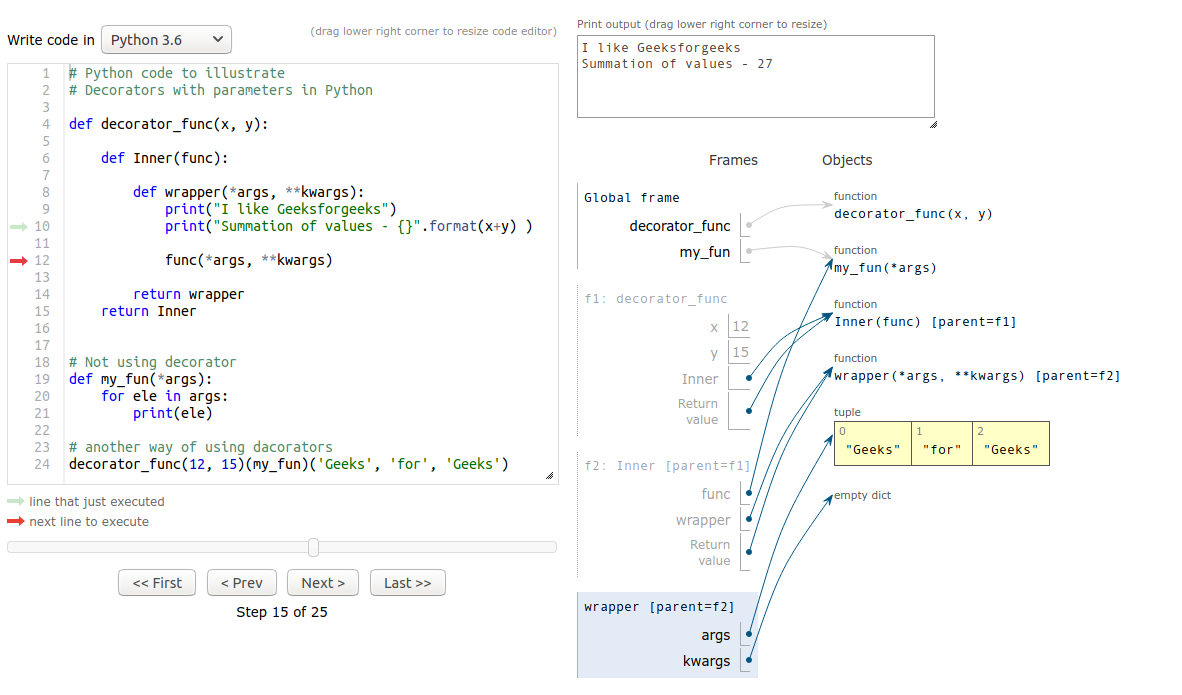
The execution flow can be de-sugared to: say_whee = repeat(num_times=4)(say_whee).
repeat(num_times=4)is called. It capturesnum_times=4in a closure and returns thedecorator_repeatfunction.decorator_repeat(say_whee)is called. It capturessay_wheein its own closure and returns thewrapper_repeatfunction.- The name
say_wheenow points towrapper_repeat. - When
say_whee()is called, it's actuallywrapper_repeat()that executes, running the original function four times.
The following image provides a fantastic low-level visualization of this process, showing how the call frames are nested and how variables from outer scopes are accessed.
Advanced Pattern: Decorators with Optional Arguments
A mark of a robust, production-quality decorator is flexibility. Sometimes you want a decorator to have a sensible default behavior when called without arguments, but also be configurable when needed. For example, lru_cache from functools can be used as @lru_cache or @lru_cache(maxsize=256).
How can we achieve this? The decorator factory needs to be clever enough to determine if it was called with or without arguments. The common pattern is to check if the first argument it receives is a callable (the decorated function) or something else (the first decorator argument).
This video from MathByte Academy provides a very clear, methodical explanation of this pattern.
Python Tips and Tricks: Decorator Factories and Optional Arguments
This video walks through the logic required to make a decorator that works both with and without parentheses. It's a slightly more complex pattern, but understanding it is key to writing truly flexible decorators.
Watch the segment from optional parentheses. The key idea is to inspect the first argument passed to the factory. If it's callable, we assume the decorator was used without parentheses (@timer). If not, we assume it was called with arguments (@timer(category=...)).
The Real Python article you read earlier also covers this exact technique. It's worth reviewing this pattern in a text format as well.
This section presents the code for making @repeat work with and without arguments, reinforcing the pattern shown in the video.
Read the section on creating optional arguments. The key is the _func=None parameter and the if _func is None: check at the end. This logic determines whether to return the decorator for a later call, or to apply it immediately.
A Practical Example: API Input Validation
Let's bring this into a context you're very familiar with from your work with Django REST Framework. A common task in web development is validating incoming request data. This is a perfect use case for a parameterized decorator, as it separates the validation concern from the business logic of your view function.
The validate_json decorator below checks if certain keys are present in a JSON request body.
# A hypothetical Flask example, but the principle applies to any web framework.
from functools import wraps
from flask import request, abort

def validate_json(*expected_args):
    """
    Decorator that checks if expected keys are present in the request's JSON payload.
    """
    def decorator(func):
        @wraps(func)
        def wrapper(*args, **kwargs):
            json_object = request.get_json()
            if not json_object:
                abort(400, description="Missing JSON in request")
            for arg in expected_args:
                if arg not in json_object:
                    abort(400, description=f"Missing key in JSON: {arg}")
            return func(*args, **kwargs)
        return wrapper
    return decorator

@app.route("/grade", methods=["POST"])
@validate_json("student_id", "score")
def update_grade():


    # By the time this function runs, we can be certain
    # 'student_id' and 'score' are in the request JSON.
    data = request.get_json()


    # ... business logic to update the grade ...
    return {"status": "success"}
This @validate_json("student_id", "score") decorator keeps the update_grade function clean and focused on its primary responsibility. You can reuse this decorator across many different API endpoints, each with its own set of required keys. This is a prime example of the DRY (Don't Repeat Yourself) principle in action, enabled by parameterized decorators.
The Real Python article touches upon this exact use case. You can find it under the "Validating JSON" subsection in the "More Real-World Examples" section if you wish to explore it further.
Conclusion
In this lesson, we made the leap from static to dynamic, configurable decorators. This is a significant step toward writing more abstract and reusable code, a core competency for a senior developer.
Here are the key takeaways:
- Decorator Factories: To pass arguments to a decorator, you must create a "factory"—a function that accepts those arguments and returns the actual decorator.
- Triple-Nested Structure: This pattern typically involves three levels of functions: the factory, the decorator, and the wrapper.
- Closures are Key: The wrapper function has access to both the decorator's arguments and the decorated function because of nested closures.
- Optional Arguments: You can design decorators to work both with and without arguments by inspecting the first argument passed to the factory to see if it's the decorated function itself.
- Practicality: This pattern is not just a theoretical exercise; it is used extensively in real-world frameworks and libraries for tasks like validation, logging, caching, and more.
You have now mastered the mechanics of creating closures and all major types of function-based decorators. In our next lesson, we will round out this module by exploring some indispensable tools from Python's functools module, such as lru_cache and partial, which build upon these concepts to solve common problems with remarkable elegance.