Introduction
In our previous lesson, we explored how closures are created when a nested function "remembers" the environment of its enclosing function. We saw that this allows the inner function to read variables from that outer scope, even after the outer function has completed. This powerful feature is central to creating stateful functions without classes.
However, a critical question remains: what if we need to modify that remembered state? A simple assignment won't work, as it creates a new local variable. This lesson directly addresses that challenge. We will dissect Python's fundamental name resolution mechanism, the LEGB rule, to understand how Python finds the variable associated with a name. With that foundation, you'll master the use of the nonlocal keyword to explicitly modify state within closures, a crucial skill for building robust decorators and other advanced patterns.
Understanding Python's Name Resolution: The LEGB Rule
Every time you use a variable name in your code, Python follows a strict, predictable order of scopes to find the object that name refers to. This search order is defined by the LEGB rule:
- Local: The current function's scope.
- Enclosing: The scope of any enclosing functions (from the innermost to the outermost).
- Global: The top-level scope of the module.
- Built-in: The special scope containing Python's built-in functions and exceptions like
len(),dict, orNameError.
Python checks these scopes sequentially. The very first place it finds the name is the one it uses. If it searches all four scopes and doesn't find the name, it raises a NameError.
The following article from Real Python provides a comprehensive and clear explanation of this rule.
Python Scope and the LEGB Rule: Resolving Names in ...
This article will be our primary guide to understanding Python's scope hierarchy. It methodically breaks down each level of scope and how the resolution rule works.
First, read the section Understanding the Concept of Scope to get a formal definition of scope versus namespace. Then, carefully study the main section, The LEGB Rule, which details each of the four scope levels with clear code examples. Pay close attention to the diagram illustrating the search path.
The image below provides a great visual model for the nested structure of these scopes. The Enclosed scope is what we worked with in our last lesson on closures.
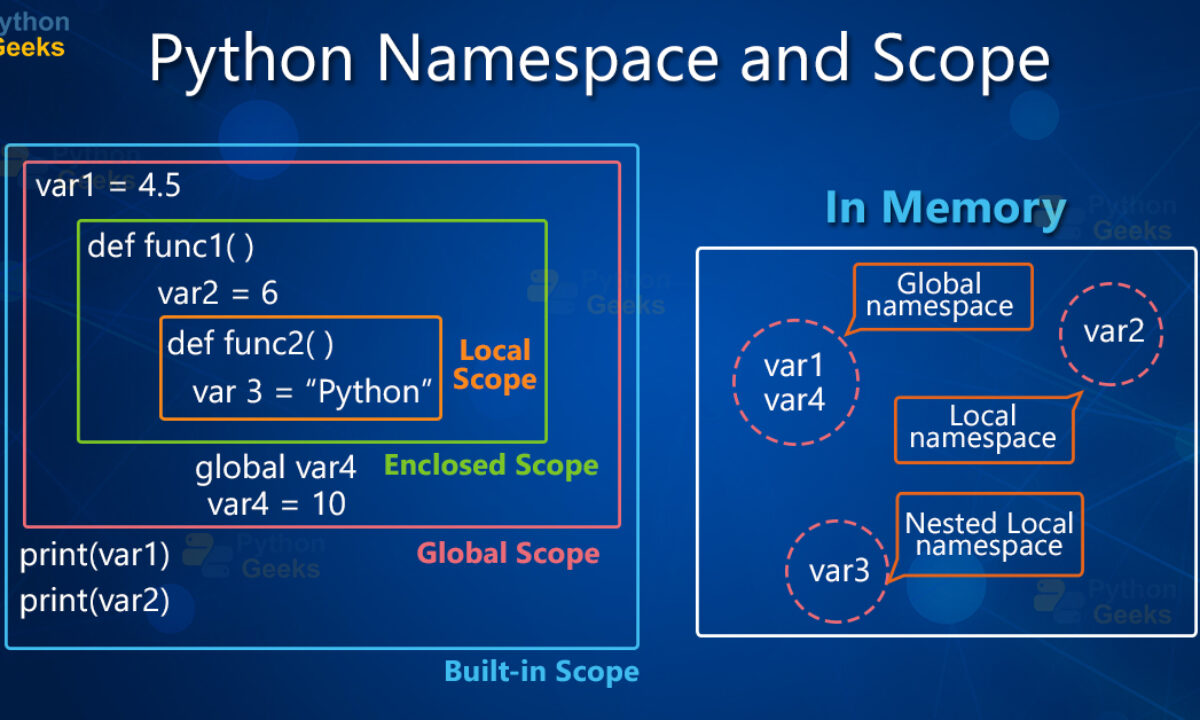
The key takeaway is that Python's name resolution is not arbitrary; it's a deterministic search through a hierarchy of namespaces. This explains why an inner function can access a variable from an outer one—the outer function's scope is part of the search path (the 'E' in LEGB).
The Crux of the Problem: Assignment Creates Local Variables
Here is a critical piece of the puzzle that trips up many developers. When Python compiles a function, if it sees an assignment statement (e.g., x = 10 or count += 1) anywhere inside that function, it assumes that the variable being assigned to is local to that function by default. This decision is made at compile time, before the code ever runs.
This leads to a common error when trying to modify a variable from an enclosing scope:
def outer():
    count = 0
    def inner():


        # We want to modify the outer 'count', but this assignment
        # makes Python treat 'count' as a *new* local variable.
        count += 1
        return count
    return inner

counter = outer()


# This will raise UnboundLocalError: local variable 'count' referenced before assignment
# counter()
The error occurs because Python, having decided count is local to inner(), sees that we are trying to read its value (count += 1 is shorthand for count = count + 1) before it has been assigned a value within the local scope. The count = 0 from the outer function is completely ignored.
The following video provides an excellent deep dive into this compile-time vs. runtime behavior. It's the key to truly understanding why nonlocal is necessary.
Functions within functions, closures, and variable scopes in Python
This mCoding video clearly explains how the compiler's decisions about scope can lead to UnboundLocalError.
Watch the segment from the explanation of UnboundLocalError. The presenter walks through a simple example that perfectly demonstrates how an assignment statement causes the compiler to mark a variable as local, which can prevent access to a global or enclosing variable of the same name.
The Solution: nonlocal and global
To override the default behavior and explicitly tell Python that an assignment should modify a variable in an outer scope, we use the nonlocal and global keywords. These are instructions to the compiler.
The nonlocal Keyword
The nonlocal keyword tells Python that a variable is not local; instead, it should be resolved in the nearest enclosing scope. This is precisely what we need to modify the state of a closure.
Let's fix our counter example:
def make_counter():
    count = 0
    def increment():
        nonlocal count  # Instruction to the compiler: 'count' is from the enclosing scope
        count += 1
        return count
    return increment

counter = make_counter()
print(counter())  # Output: 1
print(counter())  # Output: 2
print(counter())  # Output: 3
By adding nonlocal count, we tell Python that the assignment count += 1 should modify the count variable from the make_counter function's scope, not create a new local one.
The following guide from roadmap.sh focuses specifically on nonlocal and provides excellent, practical examples.
Python Nonlocal Keyword Explained by Our Experts
This resource clarifies the exact problem that nonlocal solves and how it fits into the LEGB model, especially in the context of closures.
Please read the following sections: How nonlocal allows updates: This directly addresses the UnboundLocalError problem. Basic syntax and behavior: This shows a clear before-and-after example. Working with closures: This section uses the make_counter example, which perfectly builds on our previous lesson.
The global Keyword
The global keyword serves a similar purpose but for a different scope. It tells Python that a name refers to the global (module-level) scope. While your work in Django and other frameworks often abstracts this away, it's essential to know for standalone scripts or when managing module-level state.
Generally, modifying global state from within functions is discouraged in large applications as it can make code harder to reason about and test. Passing state explicitly as function arguments is usually a better design. However, global is a necessary tool when you intentionally need to manage a global state.
The RealPython article you read earlier also covers both keywords. It's worth reviewing that section now that you have the full context.
Python Scope and the LEGB Rule: Resolving Names in ...
This section provides a formal look at both keywords with examples and practical advice.
Read the entire section on Modifying Scope Behavior. It covers both the global and nonlocal statements. Pay attention to the UnboundLocalError example with global and the SyntaxError you get when using nonlocal incorrectly.
nonlocal vs. global: A Clear Distinction
It's vital not to confuse these two keywords. nonlocal travels up the chain of enclosing function scopes, while global jumps directly to the module-level scope.
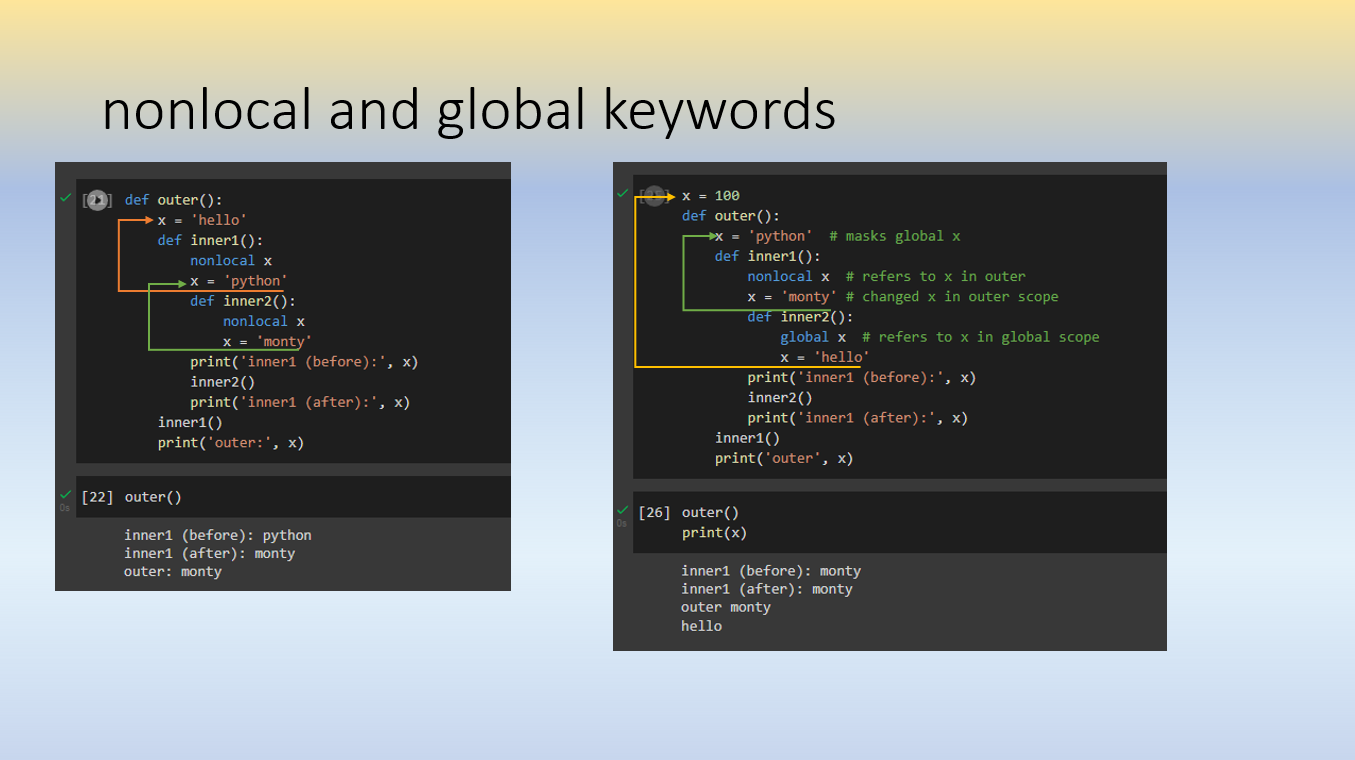
The following table summarizes the key differences:
| Aspect | nonlocal |
global |
|---|---|---|
| Scope Reach | Enclosing function scope (the 'E' in LEGB) | Module-level scope (the 'G' in LEGB) |
| Requires Nesting? | Yes, must be in a nested function. | No, can be used in any function. |
| Primary Use Case | Modifying state in closures and decorators. | Modifying module-level state. |
| Impact on Code | Encapsulates state within a function. | Can create dependencies across the module. |
Conclusion
In this lesson, we have demystified Python's scoping rules and the mechanisms for controlling them. By understanding these concepts, you move from being a user of the language's features to an engineer who understands how they work under the hood.
Here are the key takeaways:
- The LEGB Rule: Python resolves names by searching scopes in a strict order: Local, Enclosing, Global, and Built-in.
- Assignment Creates Locals: By default, any variable assignment within a function marks that variable as local to that function, which can lead to
UnboundLocalErrorwhen you intend to modify a variable from an outer scope. nonlocalfor Enclosing Scopes: Thenonlocalkeyword is the explicit instruction to bind a name to a variable in the nearest enclosing function's scope, making it essential for creating stateful closures that need to be modified.globalfor Module Scope: Theglobalkeyword provides the same capability but targets the top-level module scope. It should be used judiciously to avoid creating hard-to-track dependencies in your code.
With a firm grasp of functions as objects, closures, and scope control, you are now fully equipped to tackle one of Python's most powerful features. In our next lesson, we will synthesize this knowledge to write parameterized decorators that accept arguments, allowing us to create highly configurable and reusable code.