Welcome back. In our previous lesson, we built parameterized decorators, mastering the "decorator factory" pattern that allows us to create flexible and configurable function wrappers. This was a crucial step towards writing truly reusable code. However, writing decorators that are not just functional but also robust and well-behaved requires a few more tools from a senior developer's toolkit.
This lesson focuses on the functools module, Python's standard library for higher-order functions. We will explore three indispensable utilities that will elevate the quality of your decorators and functional code:
functools.wraps: For preserving the identity of your original functions.functools.lru_cache: For adding high-performance memoization (caching) with a single line of code.functools.partial: For creating specialized functions by "freezing" arguments.
By the end of this lesson, you'll be able to use these tools to build decorators that are not only powerful but also professional, performant, and maintainable.
functools.wraps: The Professional Polish for Decorators
When you wrap a function with a decorator, you are technically replacing the original function with the decorator's inner wrapper function. A subtle but critical side effect is that the original function's metadata—its name, docstring, and annotations—is lost and replaced by the wrapper's metadata. This can wreak havoc on debugging, introspection, and documentation tools.
Let's see this problem in action. Consider a simple decorator without @wraps:
def simple_decorator(func):
    def wrapper(*args, **kwargs):
        """This is the wrapper's docstring."""
        print("Something is happening before the function is called.")
        return func(*args, **kwargs)
    return wrapper

@simple_decorator
def say_hello():
    """This is the say_hello function's docstring."""
    print("Hello!")

print(say_hello.__name__)


# Expected: 'say_hello', Actual: 'wrapper'

print(say_hello.__doc__)


# Expected: 'This is the say_hello function's docstring.', Actual: 'This is the wrapper's docstring.'
As you can see, the identity of say_hello has been overwritten. This is where functools.wraps comes in. It's a decorator for your decorators that copies the essential attributes from the original function to the wrapper.
The following resource provides a clear before-and-after example of this exact problem.
Functools - The Power of Higher-Order Functions in Python
This article from martinheinz.dev clearly demonstrates the problem that functools.wraps solves and presents the elegant solution.
Read the section titled "Decorators". Pay close attention to the print(greet.__name__) and print(greet.__doc__) outputs, both before and after applying @wraps(func).
Under the hood, wraps uses another functools utility called update_wrapper. The following video provides a deeper look at the mechanics, explaining how update_wrapper copies specific attributes and how @wraps simplifies its use.
Python Standard Library: Functools
This video by Jake Callahan dives into the mechanics of wraps and its underlying function, update_wrapper.
Watch the segment from wraps and update wrapper. The explanation of which attributes are copied (__name__, __doc__, __module__, etc.) and how you can even update the __dict__ is particularly insightful for a deep understanding.

From now on, consider @functools.wraps(func) an essential, non-negotiable part of any decorator you write. It's the mark of professional, production-ready code.
functools.lru_cache: Caching Made Effortless
One of the most powerful applications of decorators is to optimize performance through memoization. This is a specific form of caching where the return values of a function are stored for a given set of inputs. If the function is called again with the same inputs, the stored result is returned immediately, avoiding expensive re-computation. This is fundamentally similar to the caching strategies you've likely used in web development (e.g., with Redis for database queries or API responses), but applied at the function level.
Before we look at the standard library's solution, let's see how you might build a basic caching decorator yourself. This exercise solidifies the principles.
This article from the "Pydon't" series on mathspp.com provides an excellent, step-by-step evolution of a caching mechanism, from a simple ad-hoc implementation to a general-purpose decorator.
First, read the section A factory of cached functions, which shows how to abstract the caching logic. Then, continue to Implementing general decorators to see how to make the decorator work with functions that take multiple arguments by using *args.
While building your own cache is instructive, Python's standard library provides a highly optimized and robust implementation: functools.lru_cache. The "LRU" stands for "Least Recently Used," which describes its eviction policy: when the cache is full, it discards the least recently used item to make room for a new one.
The following video provides a dramatic demonstration of lru_cache's power using the classic (and inefficiently implemented) Fibonacci sequence function.
Python Standard Library: Functools
This video effectively visualizes the performance gains from using caching decorators.
Watch from the beginning to saved a bit more memory. The benchmark comparing the cached vs. non-cached Fibonacci function is particularly striking. Pay attention to the explanation of the maxsize parameter and the difference between @lru_cache and the simpler @cache.
As you saw, @lru_cache is a parameterized decorator.
@lru_cache(maxsize=128): Sets the cache size. AmaxsizeofNonecreates an unbounded cache, which is what the simpler@cachedecorator does. A power of two is often recommended formaxsizefor performance reasons.@lru_cache(typed=False): If set toTrue, arguments of different types will be cached separately (e.g.,f(3)andf(3.0)will be treated as distinct calls).
The decorator also adds several useful methods to the decorated function for managing and inspecting the cache:
func.cache_info(): Returns a named tuple with statistics likehits,misses,maxsize, andcurrsize.func.cache_clear(): Invalidates the entire cache.func.cache_parameters(): Returns a dict of the parameters used to configure the cache.
lru_cache is an ideal tool for optimizing pure functions where the output depends solely on the input, especially in cases of recursion or repeated computations with the same arguments.
functools.partial: Freezing Arguments for Functions
The last tool in our tour, functools.partial, is not a decorator but a powerful higher-order function that creates new functions from existing ones. It allows you to "freeze" some of a function's arguments, producing a new callable with a simplified signature. This is a core concept in functional programming and is immensely useful for creating specialized, reusable callables.
Functools - The Power of Higher-Order Functions in Python
This article provides several practical examples of partial that demonstrate its utility in real-world scenarios.
Please read the entire section on Partial. The three examples—passing a configured callback to multiprocessing.Pool, creating a print_stderr function, and iterating over fixed-size binary records—perfectly illustrate the power of this tool.
While partial is a general-purpose utility, it also has a specific and elegant use case in the world of decorators: creating parameterized class-based decorators. This is a more advanced pattern but one that demonstrates a deep understanding of Python's object model and functional capabilities.
This section demonstrates an advanced pattern for creating decorators with arguments.
Read the part on Classes as decorators with arguments. Notice how partial(CacheWithSize, maxsize=maxsize) is used to create a factory. The outer function cache(maxsize) returns a partially applied CacheWithSize class, which is then ready to be called on the function to be decorated. This is a very clean alternative to the triple-nested function structure.
Synthesis: Building a Robust, Parameterized Caching Decorator
Let's tie everything together. We've learned about the decorator factory pattern, the importance of wraps, and the logic of caching. We can now combine these to build our own parameterized caching decorator from first principles, just as the functools authors did for lru_cache.
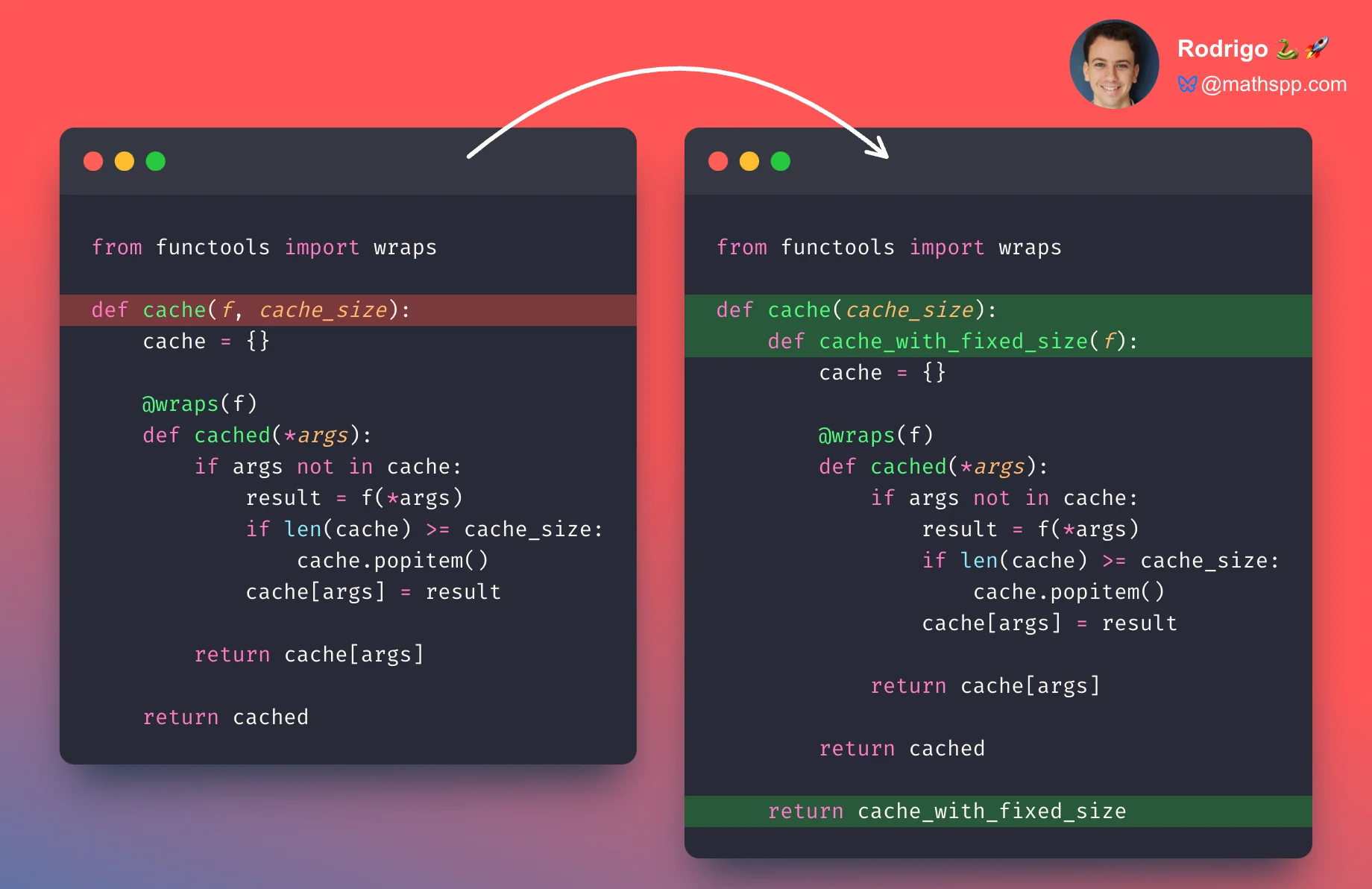
The following reading will guide you through implementing a cache decorator that accepts a cache_size argument, perfectly synthesizing the concepts from this and the previous lesson.
This final reading walks through the full implementation of a parameterized caching decorator, including handling optional arguments.
Read the section Decorators with arguments. This section builds the full, three-level decorator factory. Then, continue through To parens or not to parens? to see how to handle optional parentheses (e.g., @cache vs. @cache()), which is the final touch for a production-quality decorator.
Conclusion
In this lesson, we've explored the functools module and armed ourselves with three powerful utilities for building superior decorators and functions.
Your key takeaways should be:
functools.wrapsis mandatory: Always use it to preserve the metadata of the functions you decorate, ensuring they behave correctly with debuggers and introspection tools.functools.lru_cacheprovides effortless performance: It's the go-to solution for memoizing pure functions and can provide dramatic speed-ups for recursive or computationally intensive tasks.functools.partialcreates specialized functions: It's a versatile tool for "baking in" arguments, simplifying callbacks, and creating clean, reusable callables, including elegant decorator factories.
You have now mastered not just how to build decorators, but how to build them well. In the next lesson, we will examine what happens when multiple decorators are applied to a single function, a practice known as "decorator stacking," and analyze their execution order.