Hello! Welcome back to your Kubernetes crash course.
In our last lesson, you learned how to give a Pod a unique identity using a ServiceAccount. We established that this provides authentication (proving who the Pod is) but grants no permissions by default. When the Pod tried to interact with the API server, it was met with a 403 Forbidden error because it lacked authorization (permission to perform the action).
Today, we'll solve that problem. This lesson directly addresses the learning outcome: Configure namespace-scoped RBAC using Roles and RoleBindings. We will grant specific, limited permissions to the ServiceAccounts we create, allowing them to perform their designated tasks without having excessive access.
Your experience with IAM in AWS, Azure, and GCP provides a perfect foundation for this. Think of a Kubernetes Role as an IAM Policy document that specifies permissions. A RoleBinding is the act of attaching that policy to a specific identity (like an IAM Role or a Service Account), but with a crucial Kubernetes twist: the scope of these permissions is confined to a specific namespace.
1. The Core Components of Namespace-Scoped RBAC
Role-Based Access Control (RBAC) in Kubernetes revolves around four main API objects. For today's focus on namespace-scoped permissions, we'll concentrate on two:
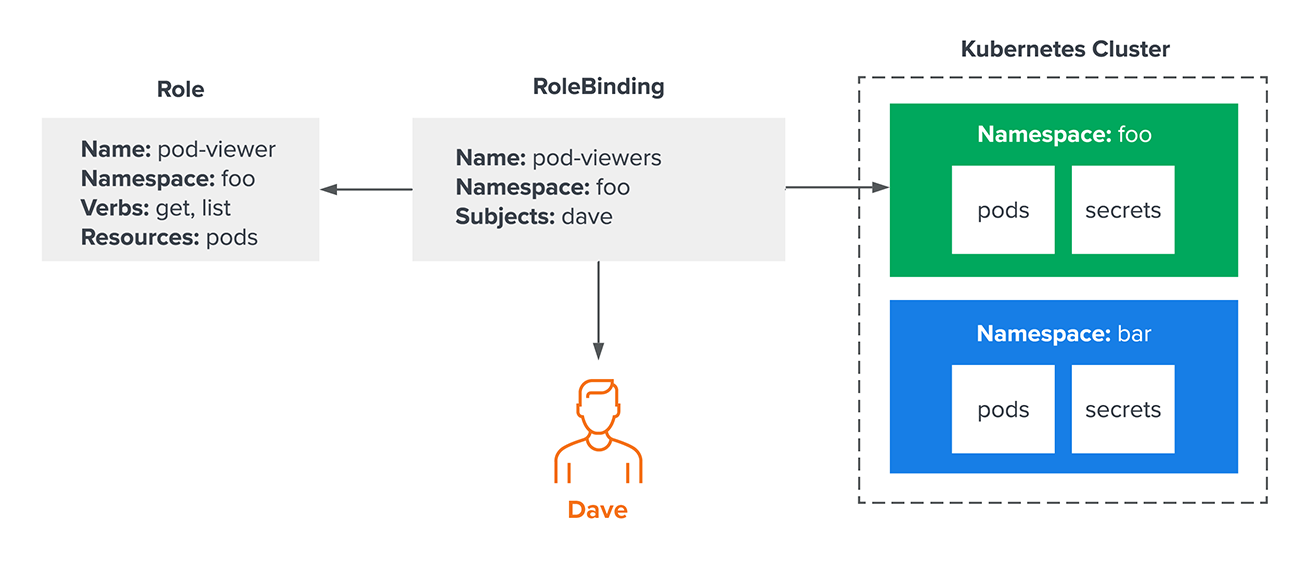
Role: An object that defines a set of permissions. It specifies what actions (verbs) are allowed on a set of APIresources(like Pods, ConfigMaps, etc.). ARoleexists within a specific namespace and can only grant access to resources within that same namespace.RoleBinding: An object that grants the permissions defined in aRoleto a set ofsubjects(like aServiceAccount,User, orGroup). ARoleBindingalso exists within a namespace and connects a subject to a Role in that same namespace.
The diagram below shows this relationship. A RoleBinding connects "Dave" to a pod-viewer Role within the "foo" namespace, granting him permission to see Pods only in that namespace. He has no access to the "bar" namespace.
To start, let's get a clear conceptual overview of authentication vs. authorization and how Roles fit in.
The video 'RBAC in Kubernetes' from Pavan Elthepu begins by clearly distinguishing authentication from authorization and introduces the concept of Roles.
Watch the first 3 minutes (00:00 - 03:07). This will reinforce the 'why' behind RBAC and set the stage for the 'how'.
2. Defining a Role
A Role contains a list of rules. Each rule defines a set of permissions. Let's break down a manifest.
apiVersion: rbac.authorization.k8s.io/v1
kind: Role
metadata:
  namespace: default
  name: pod-reader
rules:
- apiGroups: [""] # "" indicates the core API group
  resources: ["pods"]
  verbs: ["get", "watch", "list"]
apiGroups: This specifies the API group of the resources. The core Kubernetes objects like Pods, Services, and ConfigMaps are in the core group, represented by"". Other resources like Deployments are in theappsgroup, and Jobs are in thebatchgroup.resources: A list of resource types this rule applies to. You can get a full list withkubectl api-resources.verbs: The actions allowed on these resources. Common verbs includeget,list,watch,create,update,delete.
Let's see a practical demonstration of creating a Role manifest.
Continuing with the same video, the next segment shows how to create a Role manifest and apply it to the cluster.
Watch from 09:04 to 10:41. Focus on the structure of the role.yaml file and how the verbs and resources are defined.
3. Creating a RoleBinding
A Role on its own does nothing. You need a RoleBinding to grant the permissions in that Role to an identity. Following on from our last lesson, our identity will be a ServiceAccount.
Here is a RoleBinding manifest:
apiVersion: rbac.authorization.k8s.io/v1
kind: RoleBinding
metadata:
  name: read-pods-binding
  namespace: default
subjects:
- kind: ServiceAccount
  name: my-app-sa # The name of the ServiceAccount we're granting permissions to
  namespace: default # The namespace of the ServiceAccount
roleRef:
  kind: Role # Must be Role or ClusterRole
  name: pod-reader # The name of the Role we created above
  apiGroup: rbac.authorization.k8s.io
subjects: A list of identities receiving the permissions. Here, we target themy-app-saServiceAccountin thedefaultnamespace.roleRef: A reference to theRole(orClusterRole) whose permissions are being granted.
This RoleBinding gives the my-app-sa ServiceAccount the ability to get, watch, and list Pods within the default namespace.
The video now demonstrates creating a RoleBinding to connect a subject to the Role. The example uses a 'User', but the principle is identical for a 'ServiceAccount'.
Watch from 10:41 to 12:03. Notice how the subjects and roleRef sections connect the identity to the permissions. The video then shows that the user can now list Pods but is forbidden from creating them, confirming the permissions took effect.
A crucial point is that these permissions are strictly bound by the namespace.
This final clip demonstrates the most important aspect of namespace-scoped RBAC.
Watch from 12:03 to 13:22. The user, who has permissions in the default namespace, tries to list pods in a different namespace (test) and is denied. This proves that Roles and RoleBindings are confined to their namespace.
4. Reusable Permissions: The RoleBinding + ClusterRole Pattern
As a platform engineer, you'll often need to grant the same set of permissions across many different namespaces. For example, you might want every application's ServiceAccount in every namespace to be able to read its own ConfigMap. Creating an identical Role in dozens of namespaces is inefficient and hard to maintain.
A more effective pattern is to:
- Define the permissions once in a non-namespaced
ClusterRole. - Use a namespaced
RoleBindingin each namespace to grant those permissions to a localServiceAccount.
Even though you are using a ClusterRole, the RoleBinding ensures the permissions are only active within the RoleBinding's namespace. This gives you a reusable template without granting cluster-wide access.
Mixing Kubernetes Roles, RoleBindings ...
The article 'Mixing Kubernetes Roles, RoleBindings...' provides a clear explanation of this powerful pattern.
Read 'Scenario 3: ClusterRole and RoleBinding' and the 'Conclusion'. This will show you how a RoleBinding in the test3 namespace uses a ClusterRole to grant admin permissions, but those permissions are still confined only to the test3 namespace.
Test your understanding!
You are tasked with setting up a new dev-team-a namespace. The application running in this namespace will use a ServiceAccount named app-sa. This application needs to read ConfigMaps and Secrets.
Your team has a pre-existing ClusterRole named config-reader with the following definition:
apiVersion: rbac.authorization.k8s.io/v1
kind: ClusterRole
metadata:
  name: config-reader
rules:
- apiGroups: [""]
  resources: ["configmaps", "secrets"]
  verbs: ["get", "list"]
What single Kubernetes object do you need to create to give app-sa the required permissions, and in which namespace must it be created?
Show answer
You need to create a RoleBinding in the dev-team-a namespace.
This RoleBinding would have:
- A
subjectof kindServiceAccountwith the nameapp-sa. - A
roleRefpointing to theClusterRolenamedconfig-reader.
This efficiently grants the permissions defined in the ClusterRole but scopes them only to the dev-team-a namespace where the RoleBinding exists.
Conclusion
You have now learned how to implement the principle of least privilege for your in-cluster applications. By combining ServiceAccounts, Roles, and RoleBindings, you can grant precise, namespace-scoped permissions, which is a fundamental skill for any platform engineer working with Kubernetes.
Key Takeaways:
- A
Roleis a namespaced object that defines permissions (verbsonresources). - A
RoleBindingis also namespaced and connects subjects (like aServiceAccount) to aRole. - The permissions granted by a
RoleBindingare always limited to the namespace in which theRoleBindingis created. - For efficiency, you can create a reusable
ClusterRoleand bind it within a specific namespace using aRoleBindingto grant namespace-scoped access.
Next Up:
We've controlled what a Pod can do to the Kubernetes API. But what about what the processes inside the Pod's container can do to the underlying host node? In the next lesson, you will learn to configure basic security contexts for Pods and containers, adding another critical layer of security to your deployments.