Hello! Welcome back to your Kubernetes crash course.
In the last lesson, we explored how to mount ConfigMaps and Secrets as volumes. We learned this is a powerful method, especially for multi-line configuration files and for its ability to update configuration dynamically without restarting your application Pods.
Today, we'll cover the second primary method for providing configuration: injecting ConfigMap and Secret data as environment variables. This completes your toolkit for managing application configuration. Many modern, cloud-native applications are designed to be configured via environment variables (following principles like the Twelve-Factor App), making this a crucial and common pattern you'll implement as a Platform Engineer.
This lesson will teach you how to populate a container's environment variables directly from your Kubernetes configuration objects.
1. Methods for Injecting Environment Variables
Before we dive into ConfigMaps and Secrets, it's useful to know that Kubernetes offers a few ways to set environment variables.
[Tutorial] Adding Environment Variables and Changing ...
The article '[Tutorial] Adding Environment Variables...' provides a concise overview of the three main ways to set environment variables in Kubernetes Pods. This will set the stage for our focus on ConfigMaps and Secrets.
Read the section 'Adding Environment Variables to Kubernetes Deployments and Pods' to understand the three primary methods listed: the env field, ConfigMaps, and Secrets.
As you just read, you can set environment variables:
- Directly in the manifest: Using the
envfield with a hardcodednameandvalue. This is simple but inflexible, as it couples configuration directly to the workload definition. - From
ConfigMaps: Decouples non-sensitive configuration, making it reusable and easier to manage. - From
Secrets: The secure, decoupled way to manage sensitive data like passwords and API keys.
In this lesson, we will focus on the latter two, as they are central to scalable and secure platform management.
2. Injecting ConfigMap Data as Environment Variables
You have two main strategies for injecting ConfigMap data: injecting all key-value pairs at once, or picking specific keys.
Injecting All Keys with envFrom
The envFrom field is a convenient way to inject all key-value pairs from a ConfigMap into a container. Each key in the ConfigMap becomes an environment variable name in the container.
[Tutorial] Adding Environment Variables and Changing ...
Let's continue with the same tutorial, which has a clear, practical example of using envFrom.
Read the subsection 'Using ConfigMaps'. Focus on the first example that uses envFrom and configMapRef. Pay attention to the ConfigMap definition and how the Pod manifest references it.
As shown in the article, if you have a ConfigMap named app-config, you can inject its data like this:
apiVersion: v1
kind: Pod
metadata:
  name: demo-configmap
spec:
  containers:
  - name: demo-container
    image: busybox:latest
    command: ["env"] # This command just prints all env vars and exits
    envFrom:
    - configMapRef:
        name: app-config # Reference to your ConfigMap
This is efficient when a container needs access to all the configuration values.
Injecting Specific Keys with valueFrom
Sometimes, you only need one or two values, or you need to rename a key to a different environment variable name for your application. For this, you use the env field combined with valueFrom.
The same article you just read also demonstrates this. Here is a summary of the syntax:
apiVersion: v1
kind: Pod
metadata:
  name: demo-configmap-specific
spec:
  containers:
  - name: demo-container
    image: busybox:latest
    command: ["env"]
    env:
    - name: DEV_MODE # The name of the env var inside the container
      valueFrom:
        configMapKeyRef:
          name: app-config  # The name of the ConfigMap
          key: DEBUG_MODE   # The key to pull the value from
This approach gives you fine-grained control. You can mix and match, pulling specific variables from multiple ConfigMaps if needed.
3. Injecting Secret Data as Environment Variables
The process for Secrets is nearly identical to ConfigMaps, reinforcing the consistency of the Kubernetes API. The key difference is that Kubernetes automatically decodes the Base64 values from the Secret before injecting them as plain-text environment variables into the container.
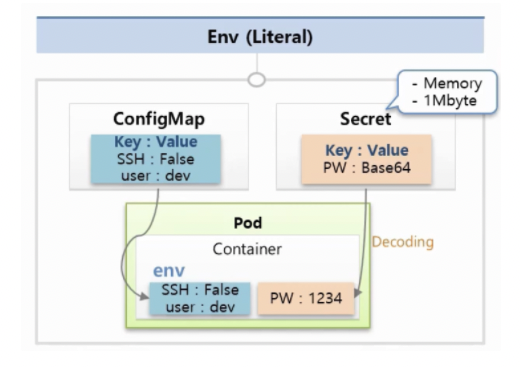
Let's see how this works in a manifest.
[Tutorial] Adding Environment Variables and Changing ...
The article from vcluster.com provides a parallel example for Secrets that mirrors the ConfigMap workflow.
Now, read the subsection 'Using Secrets'. Observe how configMapRef is simply replaced with secretRef. Also, note the stringData field in the Secret definition, which is a convenient way to avoid manual Base64 encoding.
Just like with ConfigMaps, you can use envFrom to inject all data from a Secret:
# ... Pod spec ...
    envFrom:
    - secretRef:
        name: app-secret # Reference to your Secret
And you can use valueFrom to inject a specific key from a Secret:
# ... Pod spec ...
    env:
    - name: DATABASE_PASSWORD # The env var name in the container
      valueFrom:
        secretKeyRef:
          name: app-secret     # The name of the Secret
          key: DB_PASSWORD     # The key within the Secret
Given your experience integrating HashiCorp Vault with Kafka Connect, you can see how this native Kubernetes mechanism provides a similar, albeit simpler, function: abstracting secrets from the application runtime and injecting them at deploy time.
Test your understanding!
You have a Secret named api-credentials with the following data:
api-key:supersecretkeyapi-endpoint:https://api.example.com/v1
You need to create a Pod that injects api-key into an environment variable named SERVICE_API_KEY. Write the env section for the container specification to accomplish this.
Show answer
# ... inside the container definition ...
env:
- name: SERVICE_API_KEY
  valueFrom:
    secretKeyRef:
      name: api-credentials
      key: api-key
4. Important Considerations and Best Practices
Immutability of Environment Variables
This is the most critical difference from the volume mounting method we learned previously. Environment variables are only set when the container starts. If you update a ConfigMap or Secret, any Pods already running will not receive the new values. You must trigger a Pod restart for the changes to take effect.
For a Deployment, this is typically done by triggering a rolling update (e.g., with kubectl rollout restart deployment/<name>). This is a key operational difference to remember when choosing between volumes and environment variables.
Use in Deployments
While we've used Pod manifests for simplicity, in a real-world scenario you'd define this in a Deployment manifest. The syntax is exactly the same, but nested under spec.template.spec.containers.
[Tutorial] Adding Environment Variables and Changing ...
To see how this fits into a more realistic workload, let's look at a quick example of a Deployment.
Briefly review the section 'Using Environment Variables with Deployment Objects' to see how the env block is placed within the Pod template of a Deployment manifest.
Security
Always use Secrets for sensitive data. While the values are plain text inside the container's environment, Kubernetes provides security controls around the Secret object itself (e.g., RBAC, encryption at rest in etcd). Storing a password in a ConfigMap is a significant security risk.
Conclusion
You've now mastered the second major technique for application configuration in Kubernetes. Injecting ConfigMaps and Secrets as environment variables is a straightforward and widely-used pattern that aligns perfectly with modern application design.
Key Takeaways:
- You can inject configuration as environment variables using
envFrom(to import all keys) orenvwithvalueFrom(to import specific keys). - The syntax is nearly identical for
ConfigMapsandSecrets, usingconfigMapKeyRefandsecretKeyRefrespectively. - Kubernetes automatically decodes Base64 values from
Secretsbefore injecting them. - Crucially, environment variables are immutable after a container starts. Changes to the source object require a Pod restart to be applied.
- Always use
Secretsfor sensitive data, neverConfigMaps.
In our next lesson, we will shift gears from configuring individual applications to making them discoverable. We'll start exploring Kubernetes networking by creating a ClusterIP Service to expose an application within the cluster.