Hello! Welcome back to our crash course on Kubernetes.
In our last few lessons, we've focused on creating the fundamental objects for application configuration: ConfigMaps for non-sensitive data and Secrets for sensitive data. Now that we have this information stored within the cluster, we need a way to provide it to our running applications.
Today's lesson directly addresses this by teaching you how to mount ConfigMaps and Secrets as volumes in Pods. This is one of the two primary methods for consuming this data. As a Platform Engineer, understanding how to decouple configuration from container images is crucial for building flexible and manageable systems. The volume mounting technique, in particular, offers significant operational advantages that are key to maintaining robust applications.
1. Why Mount Configuration as a Volume?
Before we dive into the "how," let's discuss the "why." You can provide configuration to a Pod either by mounting it as a volume (files) or by injecting it as environment variables. While both are useful, volume mounting is often the superior approach for several reasons.
Let's explore the key advantages, which are critical from a platform management perspective.
Kubernetes ConfigMaps & Secrets: Why Mounting is Better ...
The article 'Kubernetes ConfigMaps & Secrets: Why Mounting is Better...' clearly explains the two main benefits of using volumes over environment variables. Understanding these reasons is crucial for making sound architectural decisions.
Read the section 'Why Mounting is Better Than Environment Variables'. Pay close attention to the points about dynamic updates and security.
As you just read, the two main advantages are:
-
Dynamic Updates without Pod Restarts: When a
ConfigMaporSecretthat is mounted as a volume is updated, the files inside the Pod's volume are automatically updated by the kubelet. Most applications capable of reading configuration from the filesystem can detect these changes and reload their configuration on the fly. This allows you to change application settings without requiring a Pod restart or a full deployment cycle, a significant benefit for uptime and operational agility. In contrast, environment variables are only injected when a container starts and do not change during its lifetime. -
Enhanced Security for Secrets: When you mount a
Secretas a volume, Kubernetes uses an in-memory filesystem (tmpfs). This means the secret data is never written to the node's persistent disk, reducing the risk of exposure. Environment variables, on the other hand, can be inadvertently leaked through application logs, crash dumps, or even introspection tools (kubectl exec). For this reason, mounting is the recommended practice for sensitive data.
2. Mounting a ConfigMap as a Volume
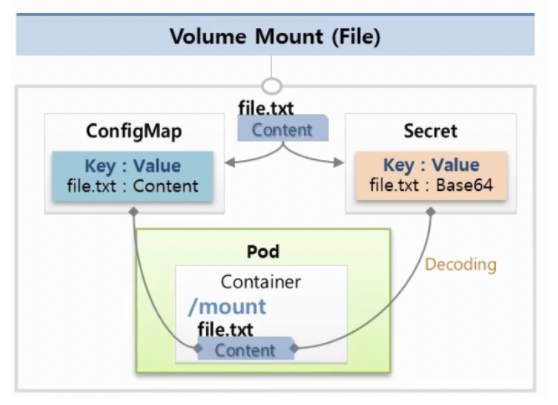
Let's put this into practice. Mounting a ConfigMap involves two main steps within your Pod or Deployment manifest:
- Define a Volume: In the
spec.volumessection of your Pod, you define a new volume and specify that its source is aConfigMapby name. - Mount the Volume: In the
spec.containers[].volumeMountssection for a specific container, you reference the volume by name and provide themountPathwhere the files should appear inside the container.
Let's look at a concrete example.
Kubernetes ConfigMaps & Secrets: Why Mounting is Better ...
We'll continue with the same article, which provides an excellent, complete example of mounting a ConfigMap in a Deployment, including the commands to verify it worked.
Now read the section 'How to Use Mounted ConfigMaps & Secrets in a Deployment'. Examine the volumes and volumeMounts sections in the deployment.yml example. Also, note the kubectl exec commands used to inspect the files inside the running container.
Let's break down the key parts from the example you just reviewed:
First, assume we have a ConfigMap like this:
apiVersion: v1
kind: ConfigMap
metadata:
  name: app-config
data:
  database.host: "mysql.prod.svc.cluster.local"
  feature.flags: "enable-new-dashboard,disable-legacy-api"
Now, here is the relevant part of the Pod manifest to mount it:
apiVersion: v1
kind: Pod
metadata:
  name: my-app-pod
spec:
  containers:
  - name: my-app-container
    image: busybox
    # The application will read its config from /etc/config
    command: [ "/bin/sh", "-c", "sleep 3600" ]
    volumeMounts:
    - name: config-volume   # Step 2: Reference the volume by name
      mountPath: /etc/config # Mount it at this path inside the container

  volumes:
  - name: config-volume      # Step 1: Define a volume with a name
    configMap:
      name: app-config       # Point it to our ConfigMap
After applying this manifest, if you exec into the pod, you'll find the following file structure:
# Exec into the running pod
kubectl exec -it my-app-pod -- /bin/sh

# List the files in the mount path
/ # ls /etc/config
database.host
feature.flags

# View the content of one of the files
/ # cat /etc/config/database.host
mysql.prod.svc.cluster.local
Each key in the ConfigMap's data field becomes a file in the mountPath directory. The filename is the key, and the file's content is the value.
3. Mounting a Secret as a Volume
The process for mounting a Secret is nearly identical, which is part of the power of Kubernetes' design patterns.
The main differences are:
- In the
spec.volumessection, you use asecretblock instead of aconfigMapblock. - It's a best practice to mount secret volumes as
readOnly: trueto prevent the application from accidentally modifying the sensitive files.
In-Depth Guide to Kubernetes ConfigMap & Secret ...
The 'In-Depth Guide to Kubernetes ConfigMap & Secret' blog provides a very clear YAML snippet for mounting a Secret.
Read the subsection titled 'Mounting Secrets as volumes'. Notice how secret.secretName is used in the volumes definition and the addition of readOnly: true in the volumeMounts section.
Following the example, if we have a secret named db-credentials, the manifest would look like this:
apiVersion: v1
kind: Pod
metadata:
  name: my-app-pod-with-secret
spec:
  containers:
  - name: my-app-container
    image: busybox
    command: [ "/bin/sh", "-c", "sleep 3600" ]
    volumeMounts:
    - name: secret-volume
      mountPath: /etc/secret
      readOnly: true # Best practice for secrets

  volumes:
  - name: secret-volume
    secret:
      secretName: db-credentials # Point to our Secret
Just like with the ConfigMap, Kubernetes handles the rest. It fetches the Secret, decodes the Base64 values, and makes them available as files in the /etc/secret directory inside the container.
Test your understanding!
You have a Secret named api-tokens with two keys: google-api-key and aws-access-key. You need to make these available to your application in a directory at /etc/keys.
Write the volumes and volumeMounts sections for your Pod manifest to achieve this.
Show answer
spec:
  # ... other container specs
  containers:
  - name: my-container
    # ...
    volumeMounts:
    - name: token-volume
      mountPath: /etc/keys
      readOnly: true

  volumes:
  - name: token-volume
    secret:
      secretName: api-tokens
4. Advanced: Mounting Specific Keys
Sometimes, you don't need to mount every key from a ConfigMap or Secret. You might also want to control the exact filename for a mounted key. Kubernetes allows this using the items field within the volume definition.
This gives you fine-grained control over the files that appear in your container.
# ...
  volumes:
  - name: config-volume
    configMap:
      name: app-config
      items:
      - key: database.host       # The key from the ConfigMap
        path: db_host.txt        # The filename it will have in the volume
      - key: feature.flags
        path: features.conf
When this volume is mounted, the /etc/config directory will contain db_host.txt and features.conf instead of files named after the original keys. This is useful for integrating with legacy applications that expect configuration files with specific names.
Conclusion
Great work! You now understand how to securely and flexibly provide configuration to your applications by mounting ConfigMaps and Secrets as volumes. This method is fundamental to building robust, manageable services on Kubernetes.
Key Takeaways:
- Mounting configuration as volumes allows for dynamic updates without restarting your Pods.
- For
Secrets, volume mounting is more secure as it uses an in-memory filesystem and avoids exposing credentials as environment variables. - The process involves defining a
volumethat points to theConfigMaporSecret, and avolumeMountthat places it into the container's filesystem. - The syntax for mounting
Secretsis almost identical toConfigMaps, simply replacingconfigMapwithsecretin the volume definition. - You can mount specific keys and control filenames using the
itemsfield for more advanced use cases.
While volume mounting is powerful, especially for multi-line configurations or when dynamic reloads are needed, sometimes all you need is a simple value. In our next lesson, we will cover the second major method: injecting ConfigMap and Secret data as environment variables.