Hello! Let's get started on the next topic in our Kubernetes journey.
In the last lesson, we focused on deploying and managing application updates with zero downtime using Deployments. We saw how to perform rolling updates and rollbacks, which is crucial for maintaining service reliability. However, we left a key question unanswered: how do we manage application configuration? Hardcoding things like database URLs or feature flags directly into a container image is inflexible and a poor practice, as it would require a new image build for every configuration change.
Today, we'll solve this problem by exploring the standard Kubernetes way to handle non-sensitive configuration data. This lesson will introduce you to ConfigMaps, which allow you to decouple your application's configuration from its code. Our goal is to explain the purpose and use cases of ConfigMaps for managing application configuration, a fundamental concept for any platform engineering role.
1. What is a ConfigMap and Why Do We Need It?
At its core, a ConfigMap is a Kubernetes API object designed to store non-confidential data in key-value pairs. Think of it as a dictionary or a properties file that lives inside your cluster and can be easily accessed by your applications.
The primary motivation for using a ConfigMap is to decouple configuration from your container images. This makes your applications portable and easier to manage across different environments (development, staging, production).
The official Kubernetes documentation provides the best starting point for understanding the motivation behind ConfigMaps.
Read the introduction and the 'Motivation' section. Pay attention to the example of using an environment variable like DATABASE_HOST that changes between local and cloud environments. This is the core problem ConfigMaps help solve.
As you've seen in your work with different cloud platforms, the same application needs different settings for different environments. A ConfigMap allows you to define these settings independently of the application pod itself.
ConfigMaps vs. Other Methods
You might be wondering how this compares to other approaches you've used. Let's clarify the differences.
Kubernetes ConfigMaps: Examples, Benefits & How to Use ...
This blog post from Groundcover offers a concise comparison between ConfigMaps, environment variables, and Secrets, which will help solidify your understanding.
Read the sections 'What is a Kubernetes ConfigMap?', 'ConfigMap vs. environment variables', and 'ConfigMap vs. Secrets'. Focus on the table that summarizes the differences.
To summarize the key distinctions:
- Environment Variables (in Pod spec): While you can define environment variables directly in a Pod manifest, managing a large number of them becomes messy. Updating them requires changing the Pod definition and triggering a redeployment. ConfigMaps centralize this configuration.
- Kubernetes Secrets: Secrets are structurally similar to ConfigMaps but are intended exclusively for sensitive data like passwords, tokens, and API keys. Kubernetes treats them differently to provide an extra layer of security (though they are only base64 encoded, not encrypted, by default). We will cover Secrets in our next lesson.
The rule of thumb is simple:
- If the data is a secret, use a Secret.
- For any other non-sensitive configuration, use a ConfigMap.
2. Common Use Cases for ConfigMaps
Now that you know what a ConfigMap is, let's look at what kind of data you would typically store in one. As a platform engineer, you'll encounter these use cases frequently.
Common examples include:
- Database connection details: The host, port, and database name (but not the username and password).
- External service URLs: Endpoints for APIs your application needs to communicate with.
- Feature flags: Simple values like
trueorfalseto enable or disable features in your application at runtime. - Environment-specific settings: Values like
dev,staging, orprodto change application behavior. - Entire configuration files: The full content of a properties file (
application.properties), an XML file, or an NGINX config (nginx.conf).
The ability to store entire files as a value in a key-value pair is particularly powerful, as it allows you to manage complete configuration files within Kubernetes.
3. The Anatomy of a ConfigMap
A ConfigMap manifest is straightforward. Like other Kubernetes objects, it has apiVersion, kind, and metadata. The most important part is the data field, which contains the key-value pairs.
Here is an example that shows two types of data storage: simple key-value pairs and file-like content.
apiVersion: v1
kind: ConfigMap
metadata:
  name: app-config
  namespace: default
data:
  # Simple property-like keys
  LOG_LEVEL: "info"
  API_ENDPOINT: "https://api.example.com/v1"

  # A file-like key containing a simple properties file
  app.properties: |
    feature.new-dashboard.enabled=true
    feature.beta-access.enabled=false
    theme.color.primary=blue
In this example:
- The keys
LOG_LEVELandAPI_ENDPOINThave simple string values. - The key
app.propertieshas a multi-line string as its value. The pipe (|) character in YAML denotes a literal block scalar, preserving the newlines. This effectively embeds the content of a file inside the ConfigMap.
Test your understanding!
You are deploying a web application that connects to a MySQL database. You need to configure the database host, the database name, the database user, and the user's password. Which of these pieces of information should you store in a ConfigMap, and which should you store in a Secret?
Show answer
- ConfigMap: You should store the database host (e.g.,
mysql.database.svc.cluster.local) and the database name (e.g.,webapp_db). This information is not sensitive. - Secret: You should store the database user and the password. This is credential information and must be handled securely.
4. How Pods Consume ConfigMaps (A Preview)
While we will cover the "how-to" of mounting ConfigMaps in Pods in a later lesson, it's useful to understand the ways they can be consumed. This helps clarify their purpose.
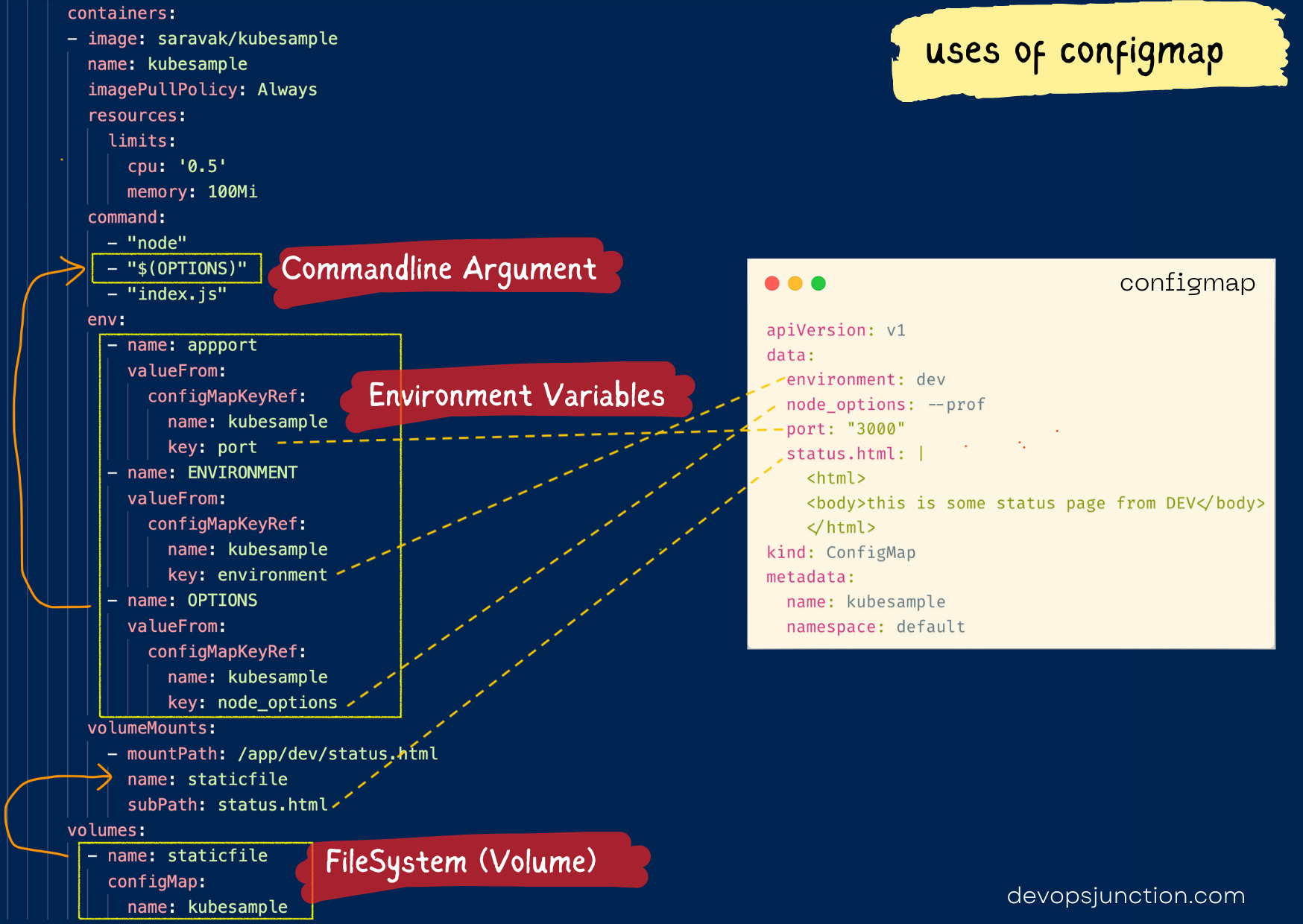
There are four main ways to inject ConfigMap data into a Pod:
- As environment variables in a container.
- As command-line arguments to a container.
- As files in a read-only volume mounted into a container.
- Through code within the Pod that uses the Kubernetes API to read the ConfigMap.
The first three methods are the most common. The image below provides an excellent visual summary of how a single ConfigMap can provide data to a Pod in multiple ways.
5. Benefits and Limitations
Like any tool, ConfigMaps have trade-offs. It's important to be aware of them.
Kubernetes ConfigMaps: Examples, Benefits & How to Use ...
Let's conclude with a balanced summary of the pros and cons of using ConfigMaps from the Groundcover article.
Read the section 'Benefits and challenges of Kubernetes ConfigMaps'. This provides a clear, high-level overview of why you should use them and what to watch out for.
Key Benefits:
- Decouples configuration from applications, improving portability.
- Centralizes configuration, making it easier to manage and review.
- Enables dynamic updates of configuration for running applications (though this has some caveats and is a more advanced topic).
Key Limitations:
- Not for sensitive data. ConfigMap data is stored in plaintext in the cluster's database (etcd).
- Size limit. ConfigMaps are limited to 1MiB in size. They are not designed for large files.
- No built-in version control. You should store your ConfigMap YAML files in a version control system like Git to track changes.
Conclusion
You now have a solid understanding of what ConfigMaps are and why they are a cornerstone of application configuration in Kubernetes. By externalizing configuration, you make your applications more portable, manageable, and aligned with modern DevOps practices.
Key Takeaways:
- ConfigMaps are Kubernetes objects for storing non-sensitive configuration data as key-value pairs.
- Their primary purpose is to decouple configuration from container images, enabling portability across environments.
- Common use cases include storing database hosts, service URLs, feature flags, and entire configuration files.
- They should not be used for secrets like passwords or API keys.
- Data from a ConfigMap can be consumed by Pods as environment variables, command-line arguments, or mounted files.
We've made a clear distinction between sensitive and non-sensitive data. In our next lesson, we will focus on the other half of the configuration puzzle: creating and managing Secrets to handle your application's sensitive information securely.