Hello! Let's dive into the next piece of the Kubernetes networking puzzle.
In our last lesson, we explored how Kubernetes provides DNS-based service discovery, allowing applications to communicate reliably inside the cluster. We saw that services get predictable names like my-service.my-namespace.svc.cluster.local.
However, we also noted a challenge with exposing applications externally. While LoadBalancer services work, creating a separate, costly cloud load balancer for every single microservice isn't scalable or efficient. How can we manage external traffic intelligently, routing requests to different services through a single entry point?
This lesson introduces the solution: Ingress. Our learning outcome is to explain the role of an Ingress Controller in a Kubernetes cluster. For you as a Platform Engineer, understanding Ingress is essential, as it's the standard, powerful mechanism for managing application traffic from outside the cluster. You'll often be the one designing, deploying, and managing this critical component.
1. The Problem with Exposing Many Services
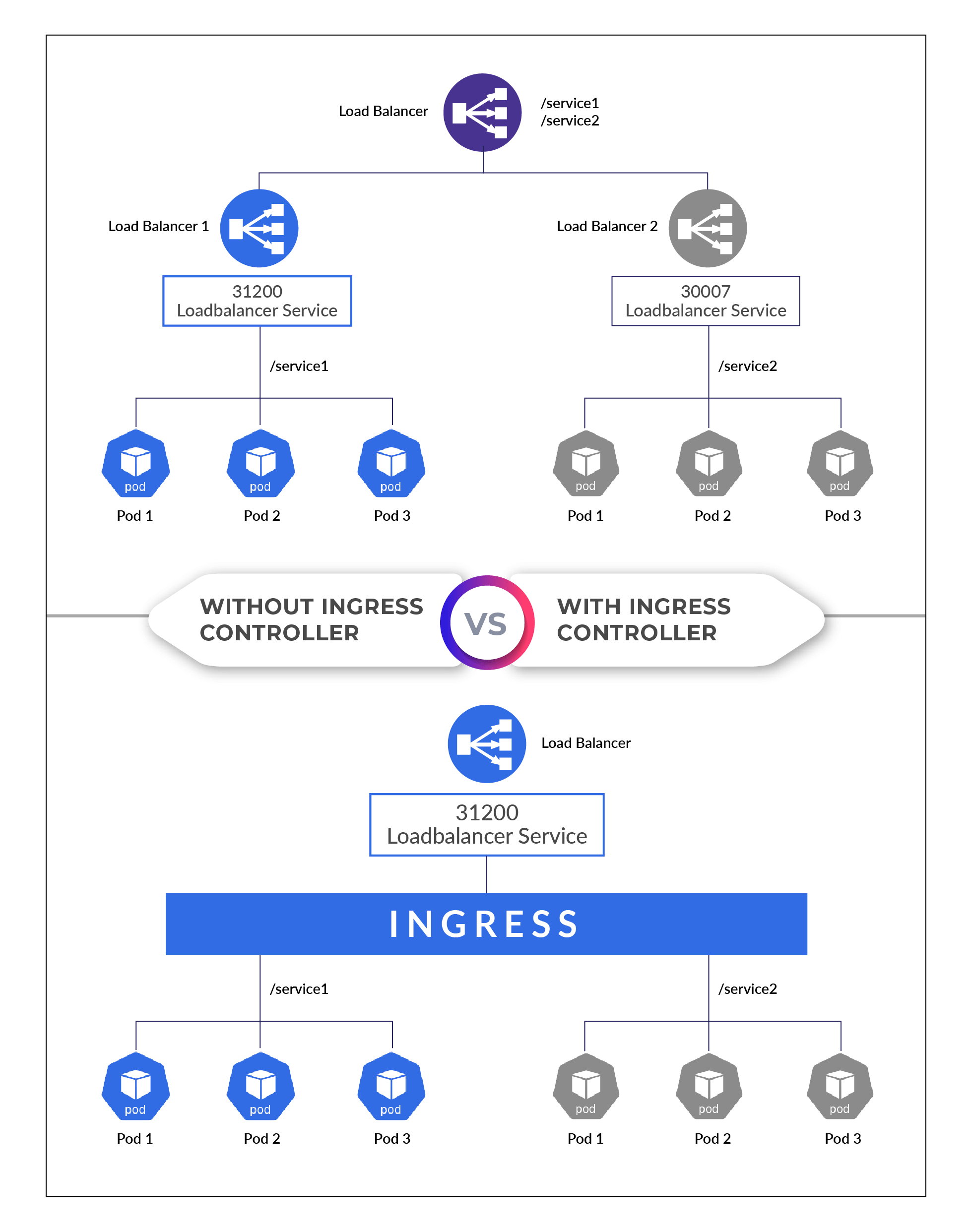
Imagine a microservices application with a web front end, an API gateway, a user service, and a product service. If we were to expose the public-facing components using LoadBalancer services, we'd end up with multiple external IP addresses and potentially high cloud provider bills. Managing DNS and SSL/TLS certificates for each one would also become complex.
This approach lacks a centralized point of control for traffic routing. What if you want to direct users who visit your-app.com/api to the API gateway and users who visit your-app.com/shop to the product service? This kind of Layer 7 (application layer) routing is beyond the capabilities of a simple LoadBalancer service.
Kubernetes Ingress Explained Completely For Beginners - Updated
To start, let's watch a segment from KodeKloud's video 'Kubernetes Ingress Explained' that perfectly frames the challenges of using NodePort and LoadBalancer services in a production environment.
Watch from the beginning to 06:44. The video walks through the evolution of exposing an application, highlighting the cost and complexity that arise when you have multiple services, each requiring its own external access point. This sets the stage for why Ingress is needed.
This is the core problem Ingress is designed to solve. It provides a way to consolidate routing rules into a single resource and manage traffic through a single entry point.
2. The Two Halves of Ingress: Resource and Controller
To understand Ingress, you must grasp its two distinct components: the Ingress Resource and the Ingress Controller. It's a common point of confusion, so let's clarify it upfront.
-
Ingress Resource: This is a Kubernetes object, defined in a YAML manifest just like a Pod or a Service. It contains a set of routing rules. You use it to tell Kubernetes what you want to happen, for example: "When a request comes in for the host
api.example.comwith the path/users, forward it to theuser-serviceon port 8080." Crucially, the Ingress resource itself does nothing. It is simply a declaration of intent, a request. -
Ingress Controller: This is the actual engine that makes the Ingress resource work. It's an application (or set of Pods) running inside your cluster that watches the Kubernetes API server for Ingress resources. When it sees one, it configures an underlying reverse proxy (like NGINX, HAProxy, or Envoy) to implement the routing rules you defined. Without an Ingress Controller, your Ingress resources are ignored.
Kubernetes Ingress Controllers: The Ultimate Guide
The distinction between an Ingress resource and an Ingress Controller is fundamental. Read this short section from the article 'Kubernetes Ingress Controllers: The Ultimate Guide' for a clear definition.
Read the section 'What Are Ingress Controllers?' and the FAQ 'What Is the Difference Between An Ingress Resource and Ingress Controllers?'. This will solidify the concept of the resource being the 'rules' and the controller being the 'engine'.
Think of it this way: the Ingress resource is the blueprint, and the Ingress Controller is the construction crew that builds what the blueprint describes.
3. How the Ingress Controller Works
An Ingress Controller is not some magical, built-in part of the Kubernetes control plane. It's a workload you deploy into your cluster, just like any other application. This is a key insight for a Platform Engineer—you manage it like any other piece of software.
Typically, an Ingress Controller consists of:
- A Deployment or DaemonSet to run the controller pods.
- A Service (usually
LoadBalancerorNodePort) to expose the controller to external traffic. This is the single entry point for your cluster. - A ServiceAccount with RBAC permissions to allow the controller to read Ingress, Service, and Endpoint resources from the Kubernetes API.
- A ConfigMap to hold the configuration for the underlying proxy.
Kubernetes Ingress Explained Completely For Beginners - Updated
Let's demystify the controller. This part of the KodeKloud video explains how an NGINX Ingress Controller is actually deployed as a standard set of Kubernetes resources. This perspective is invaluable for someone in your role.
Watch from 07:12 to 13:00. This segment explains that a cluster doesn't come with a controller by default and then breaks down how you would deploy one using a Deployment, Service, ConfigMap, and ServiceAccount.
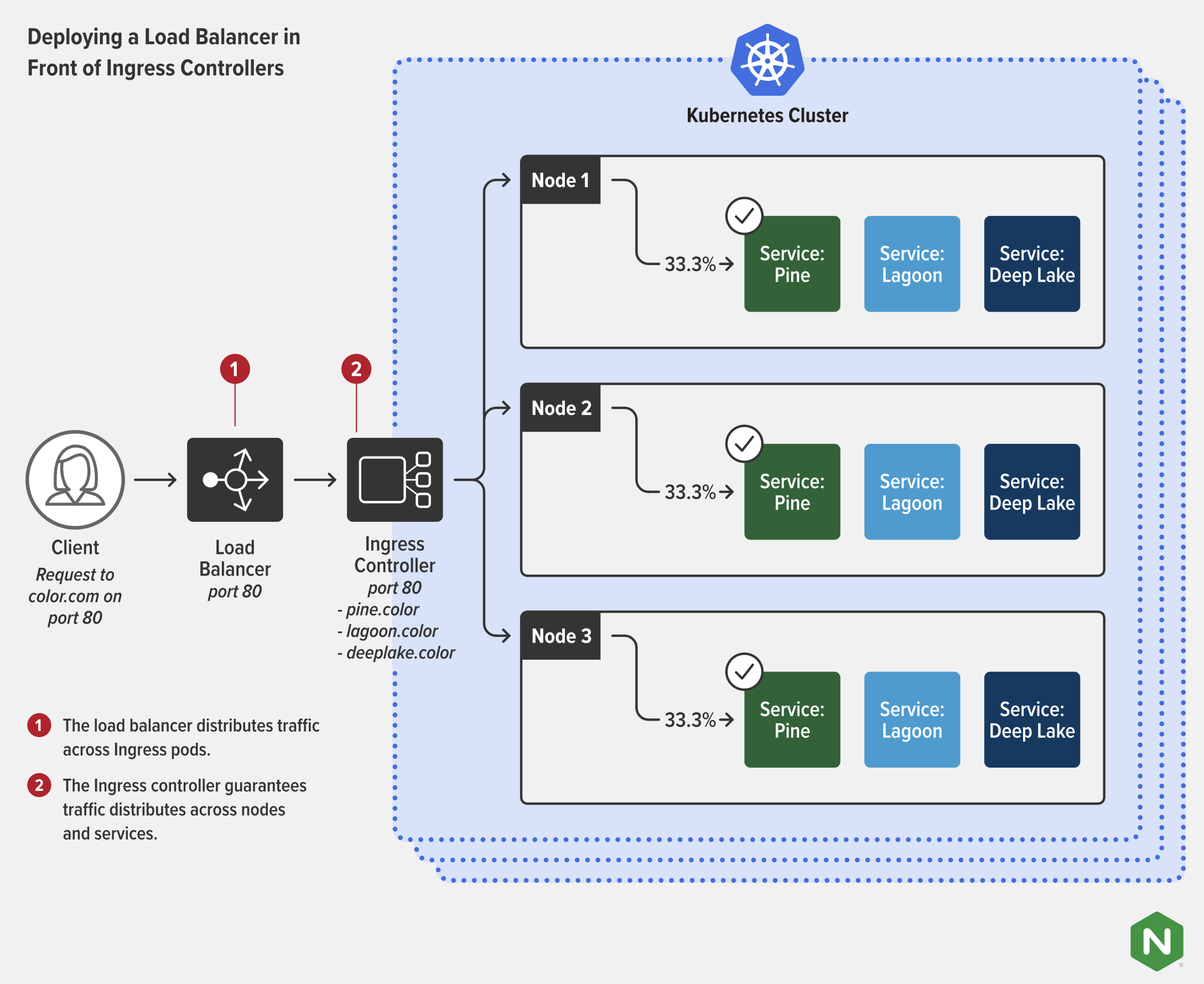
The operational flow looks like this:
- An administrator deploys an Ingress Controller (e.g., NGINX Ingress Controller) into the cluster.
- The controller's Service gets an external IP address from the cloud provider (if it's of type
LoadBalancer). All DNS records (e.g.,*.example.com) are pointed to this single IP. - A developer deploys an application and creates an Ingress resource defining routing rules for it.
- The Ingress Controller, which is constantly watching the API server, detects the new Ingress resource.
- The controller translates the rules from the Ingress resource into the native configuration format of its internal proxy (e.g.,
nginx.conf). - When external traffic hits the controller's external IP, the proxy uses the new configuration to route the request to the correct internal Kubernetes Service and, subsequently, to one of the application's Pods.
Test your understanding!
You have just joined a team and are told that you need to expose your new reporting-app at the URL company.com/reports. You write and apply a perfect Ingress resource manifest that defines this rule. However, when you try to access the URL, you get a "site can't be reached" error. Your colleague confirms your Ingress manifest is correct.
Based on the distinction between an Ingress resource and an Ingress Controller, what is the most likely fundamental component missing from the Kubernetes cluster?
Show answer
The most likely missing component is the Ingress Controller. The Ingress resource is just a declaration of rules; without an Ingress Controller running in the cluster to read those rules and act on them, they have no effect. The cluster has no engine to process your request, so no traffic routing is configured.
4. An Ecosystem of Controllers
"Ingress Controller" is a generic term. Kubernetes standardizes the Ingress resource, but it does not ship with a default controller. This has led to a rich ecosystem of different implementations, each with unique features. As a Platform Engineer, you might be involved in choosing, deploying, and maintaining one.
Kubernetes Ingress Controllers: The Ultimate Guide
Let's explore some of the most popular Ingress Controllers. This article from vcluster.com provides a great comparison.
Read the section 'Comparison of Controllers'. It gives a high-level overview of three popular open-source options: NGINX, Traefik, and HAProxy. Pay attention to their different features and benefits, as these are the kinds of trade-offs you evaluate in a platform role.
A few key categories of controllers include:
- NGINX Ingress Controller: Maintained by the Kubernetes community, it's one of the most mature, popular, and well-documented controllers.
- Cloud-Specific Controllers: Cloud providers like AWS, Google Cloud, and Azure offer their own Ingress Controllers (e.g., AWS Load Balancer Controller, GKE Ingress). These controllers integrate deeply with the cloud platform, often provisioning native L7 load balancers instead of running a proxy on a VM. Given your experience with AWS, Azure, and GCP, you'll almost certainly encounter these.
- Other Open Source Controllers: Projects like Traefik, HAProxy, and Contour (which uses Envoy, a proxy you're familiar with) offer different feature sets, such as automatic SSL certificate management with Let's Encrypt or advanced traffic-shaping capabilities.
Conclusion
You now understand the critical role of the Ingress Controller as the engine that powers external access in Kubernetes. It's the component that bridges the gap between external users and the services running inside your cluster, providing intelligent, application-aware routing.
Key Takeaways:
- Ingress solves the problem of exposing multiple services in a cost-effective and manageable way by using a single entry point.
- It is composed of two parts: the Ingress resource (a manifest defining the routing rules) and the Ingress Controller (the software that implements those rules).
- The Ingress Controller is a workload (e.g., a Deployment) that runs a reverse proxy. It watches for Ingress resources and dynamically updates its proxy configuration.
- There is a wide ecosystem of Ingress Controllers, including open-source options like NGINX and cloud-native solutions from providers like AWS, Azure, and GCP.
Next Up: In our next lesson, we will move from theory to practice. Now that you know what an Ingress Controller does, you will learn how to configure a basic Ingress resource to route HTTP traffic to different services based on the request path.