Hello! Welcome to the final lesson in our module on Kubernetes networking.
In our last session, we established the crucial role of the Ingress Controller. We learned that it's the "engine" running inside the cluster that watches for routing rules and configures a reverse proxy to direct external traffic. Without a controller, an Ingress resource is just a set of ignored instructions.
Now that you understand the why, we'll focus on the how. This lesson is all about writing those instructions. Our goal is to configure basic Ingress resources for HTTP/HTTPS routing to services. As a Platform Engineer, you will write, troubleshoot, and manage these resources constantly to expose applications to the outside world. We'll cover the most common patterns: routing by path, routing by host, and securing endpoints with TLS.
1. Anatomy of an Ingress Resource
An Ingress resource is a standard Kubernetes object defined in a YAML manifest. Its purpose is to declare a set of rules for routing HTTP and HTTPS traffic from outside the cluster to services inside the cluster.
Let's break down the essential components of an Ingress manifest.
Kubernetes Ingress Tutorial for Beginners | simply explained | Kubernetes Tutorial 22
To start, let's watch a brief overview from the 'Kubernetes Ingress Tutorial for Beginners' by TechWorld with Nana. This will give you a clear visual of a basic Ingress YAML file and its core components.
Watch from 02:18 to 04:31. Pay close attention to the spec.rules section, where the host, path, and backend service are defined. This is the heart of the Ingress resource.
As the video explained, the key sections are:
apiVersion:networking.k8s.io/v1for current, stable Ingress resources.kind:Ingressmetadata: Contains the name and namespace of the Ingress resource.spec: This is where the configuration lives. It specifies the routing rules.ingressClassName: (Optional but recommended) Specifies which Ingress Controller should handle this Ingress. For example,nginx,gce, oralb. This allows you to have multiple types of controllers in one cluster.rules: A list of rules that map incoming requests to backend services. Each rule typically contains ahostand anhttpblock withpaths.
When you kubectl apply this manifest, the Ingress Controller detects it, parses the rules, and automatically reconfigures its underlying proxy (e.g., NGINX) to implement them.
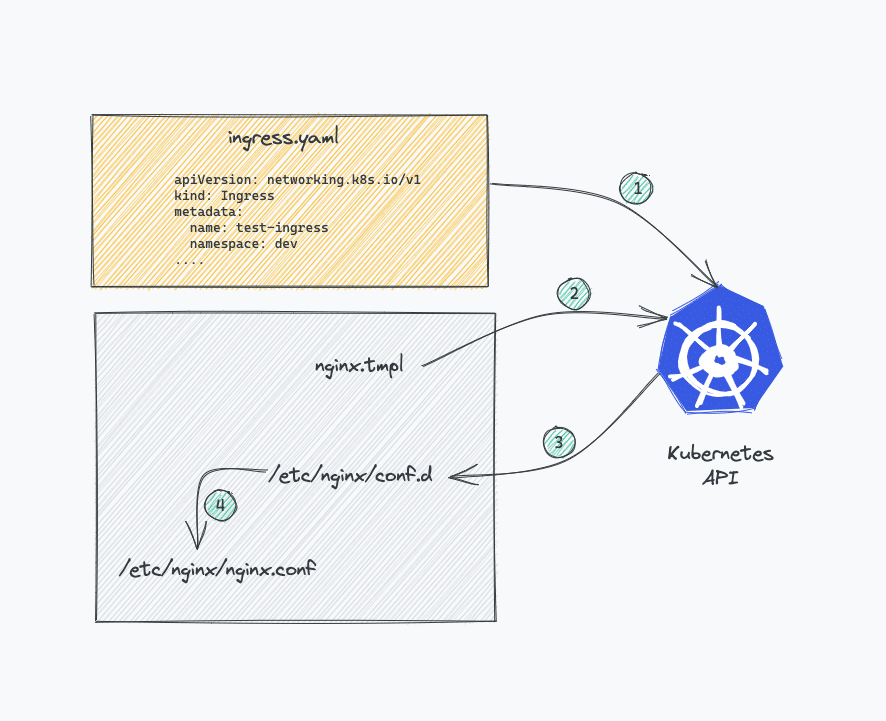
2. Common Routing Patterns
Ingress resources primarily support two powerful routing patterns: path-based routing (fanout) and host-based routing (virtual hosting). Often, you will combine them.
Path-Based Routing (Simple Fanout)
This pattern routes traffic for a single hostname to different services based on the URL path. This is extremely useful for exposing different components of a single application (e.g., API, web UI, assets) through one domain.
For example, you could route:
http://cafe.example.com/coffee->coffee-servicehttp://cafe.example.com/tea->tea-service
apiVersion: networking.k8s.io/v1
kind: Ingress
metadata:
  name: simple-fanout-example
spec:
  rules:
  - host: cafe.example.com
    http:
      paths:
      - path: /coffee
        pathType: Prefix
        backend:
          service:
            name: coffee-svc
            port:
              number: 80
      - path: /tea
        pathType: Prefix
        backend:
          service:
            name: tea-svc
            port:
              number: 80
A critical field here is pathType. It defines how the path matching is performed.
The pathType field is essential for correct routing behavior. Please read the official Kubernetes documentation to understand the different types and see examples.
Read the section 'Path types'. Focus on the definitions of Exact and Prefix and study the table of examples to see how they behave with and without trailing slashes. This detail is often a source of configuration errors.
The three main pathType values are:
Prefix: Matches based on a URL path prefix split by/. For example, a path of/foowill match/foo,/foo/, and/foo/bar.Exact: Matches the URL path exactly and is case-sensitive. A path of/foowill only match/foo; it will not match/foo/.ImplementationSpecific: The matching behavior depends on theIngressClass. For most controllers, like NGINX, this defaults to behaving likePrefix. It's best practice to be explicit and usePrefixorExact.
Host-Based Routing (Name-Based Virtual Hosting)
This pattern routes traffic to different services based on the Host header of the request. This allows you to run completely separate applications on the same IP address. Given your experience managing multiple platform services, this is a pattern you'll see frequently.
For example:
http://api.example.com->api-servicehttp://shop.example.com->shop-service
Kubernetes Ingress Tutorial for Beginners | simply explained | Kubernetes Tutorial 22
Let's see how both path-based and host-based routing are defined in an Ingress resource. This video clip demonstrates both patterns clearly.
Watch from 18:11 to 21:17. The first part covers path-based routing (fan-out), and the second part covers host-based routing (subdomains/virtual hosts).
Here's a YAML example for host-based routing:
apiVersion: networking.k8s.io/v1
kind: Ingress
metadata:
  name: name-virtual-host-ingress
spec:
  rules:
  - host: api.example.com
    http:
      paths:
      - path: /
        pathType: Prefix
        backend:
          service:
            name: api-service
            port:
              number: 8080
  - host: shop.example.com
    http:
      paths:
      - path: /
        pathType: Prefix
        backend:
          service:
            name: shop-service
            port:
              number: 80
Test your understanding!
You need to configure routing for a new application. The requirements are:
- Requests to
metrics.myapplication.comshould go to theprometheus-serviceon port9090. - Requests to
myapplication.com/apishould go to thebackend-api-serviceon port3000. - Requests to
myapplication.com/(the root path) should go to thefrontend-web-serviceon port80.
Sketch out the spec.rules section of the Ingress manifest to achieve this. Don't worry about the full YAML structure, just the rules.
Show answer
spec:
  rules:
  - host: metrics.myapplication.com
    http:
      paths:
      - path: /
        pathType: Prefix
        backend:
          service:
            name: prometheus-service
            port:
              number: 9090
  - host: myapplication.com
    http:
      paths:
      - path: /api
        pathType: Prefix
        backend:
          service:
            name: backend-api-service
            port:
              number: 3000
      - path: /
        pathType: Prefix
        backend:
          service:
            name: frontend-web-service
            port:
              number: 80
Note: The order of paths under the same host can matter. Ingress controllers are supposed to give precedence to the longest matching path, so a request to /api/v1 would correctly match /api before it matches /.
3. Securing Ingress with TLS/HTTPS
Exposing services over unencrypted HTTP is rarely acceptable in production. Ingress provides a straightforward way to terminate TLS, enabling HTTPS for your applications.
The process involves two steps:
- Create a Kubernetes Secret of type
kubernetes.io/tlsthat contains your TLS certificate and private key. - Reference that Secret in your Ingress resource.
The Ingress Controller will then handle the TLS handshake with the client and forward unencrypted traffic to your backend Pods. This offloads the burden of managing certificates from your applications.
Kubernetes Ingress Tutorial for Beginners | simply explained | Kubernetes Tutorial 22
This final clip from TechWorld with Nana demonstrates how to configure TLS termination on an Ingress.
Watch from 21:17 to 22:47. Note how the tls block is added to the Ingress spec and how it references a Secret by name.
First, you'd create the secret. It must contain two keys: tls.crt and tls.key.
apiVersion: v1
kind: Secret
metadata:
  name: cafe-secret
  namespace: default
data:
  tls.crt: <base64-encoded-cert>
  tls.key: <base64-encoded-private-key>
type: kubernetes.io/tls
Then, you reference this secret in your Ingress manifest:
Basic configuration | NGINX Documentation
Now, let's look at a complete example that ties together path-based routing and TLS termination, from the NGINX Ingress Controller documentation.
Review the full cafe-ingress YAML example and the breakdown that follows. This is a perfect template for a common production configuration.
The Ingress manifest would look like this:
apiVersion: networking.k8s.io/v1
kind: Ingress
metadata:
  name: cafe-ingress
spec:
  ingressClassName: nginx
  tls:
  - hosts:
    - cafe.example.com
    secretName: cafe-secret # <-- Reference to the secret
  rules:
  - host: cafe.example.com
    http:
      paths:
      - path: /tea
        pathType: Prefix
        backend:
          service:
            name: tea-svc
            port:
              number: 80
      - path: /coffee
        pathType: Prefix
        backend:
          service:
            name: coffee-svc
            port:
              number: 80
In a real-world platform environment, you would likely automate the creation and renewal of these TLS certificates using a tool like cert-manager, which integrates with Let's Encrypt. While that's beyond the scope of this lesson, it's an essential tool in the MLOps/Platform Engineering space.
Conclusion
Congratulations on completing the module on Kubernetes networking! You now have a solid understanding of how to expose applications, from simple internal services to complex, externally-facing applications routed through a secure Ingress.
Key Takeaways:
- The Ingress resource is a collection of rules for routing external HTTP/S traffic to internal services.
- The two main routing strategies are path-based (fanout) and host-based (virtual hosting), which can be combined.
- The
pathTypefield (Prefix,Exact) is critical for defining precise matching behavior. - You can secure an Ingress with HTTPS by adding a
tlssection that references a Kubernetes Secret of typekubernetes.io/tls.
Next Up:
We've focused entirely on stateless applications so far. But what about applications that need to persist data, like databases or message queues? In our next module, Persistent Storage Fundamentals, we will start exploring how Kubernetes handles stateful workloads by looking at the basic volume types emptyDir and hostPath.