Hello! Welcome to the start of a new module: Persistent Storage Fundamentals.
In all our previous lessons, we've focused on stateless applications. We've learned how to run them in Pods, manage them with Deployments, and expose them with Services and Ingress. But a core assumption has been that the data inside the container doesn't need to survive a restart. When a container crashes, Kubernetes creates a new one with a fresh, clean filesystem. This is great for stateless web servers, but what about databases, message queues, or any application that needs to maintain state?
This lesson marks our first step into the world of stateful applications in Kubernetes. Our goal is to explain the use cases and limitations of emptyDir and hostPath volume types. These are the most basic forms of storage, directly tied to the Pod and the Node. Understanding their behavior is a crucial foundation before we move on to more powerful, abstract storage concepts.
1. The Problem: Ephemeral Container Storage
First, let's solidify why we need volumes at all. A container's filesystem is ephemeral—it exists only as long as the container does. If the container is deleted or crashes and gets recreated, any data written to its filesystem is lost.
Your experience with Docker has likely introduced you to this concept. The solution in Docker is to use volumes to persist data outside the container's lifecycle. Kubernetes uses the same fundamental idea.
Persistent Volumes on Kubernetes for beginners
To see this problem in action, let's watch a quick demonstration from the video 'Persistent Volumes on Kubernetes for beginners' by That DevOps Guy. It uses a PostgreSQL database in Docker to show exactly why container filesystems are not suitable for persistent data.
Watch from 01:57 to 03:57. The key takeaway is observing how creating a table, destroying the container, and then recreating it results in data loss because the container's internal filesystem is reset.
This ephemeral nature is a feature, not a bug, as it ensures containers are lightweight and disposable. However, to run stateful applications, we need to provide them with a volume—a directory that exists outside the container's filesystem but can be mounted inside it.
2. emptyDir: Temporary, Pod-Scoped Storage
The simplest type of volume in Kubernetes is emptyDir. As its name implies, it's a directory that starts empty.
An emptyDir volume's lifecycle is tied directly to the Pod it's defined in.
- It is created when the Pod is assigned to a node.
- It is deleted permanently when that Pod is removed from the node (e.g., the Pod is deleted or rescheduled to another node).
- Crucially, the data in an
emptyDirvolume survives container crashes and restarts within that same Pod.
How volumes and storage work in Kubernetes
For a concise explanation of emptyDir, let's watch this clip from the 'How volumes and storage work in Kubernetes' video by Microsoft Azure.
Watch from 00:15 to 01:34. Pay close attention to the explanation of the volume's lifespan being associated with the Pod itself, and its typical use cases.
Use Cases for emptyDir
Because it's temporary, emptyDir is not for long-term data persistence. It's ideal for:
- Scratch Space: Acting as a temporary workspace for a computationally intensive task, like sorting a large file.
- Caching: Storing data retrieved from a network to speed up future access during the Pod's lifetime.
- Sharing Data Between Containers: This is a very common pattern. If you have a multi-container Pod (which we'll cover later), an
emptyDirvolume can be mounted into each container, allowing them to share files. For example, one container could download data into theemptyDir, and another container could process it.
emptyDir in a Pod Manifest
Let's look at how you configure an emptyDir volume. Notice two key sections in the Pod spec:
spec.volumes: This is where you declare the volume for the Pod. We give it a name (cache-volume) and specify its type (emptyDir: {}).spec.containers.volumeMounts: This tells a container to mount a declared volume at a specific path (/cache).
Difference between EmptyDir and HostPath volume types ...
For a clear definition and a simple YAML example, please review the emptyDir section in the article 'Difference between EmptyDir and HostPath volume types in Kubernetes' by TechWorld with Nana.
Read the section titled 'EmptyDir'. Focus on the use cases listed and examine the example configuration file to see how volumes and volumeMounts are connected by name.
Limitations of emptyDir
The primary limitation is in its name: the data is ephemeral. When the Pod is gone, the data is gone. Furthermore, the storage for an emptyDir comes from the node's local disk. If a Pod writes too much data, it can fill up the node's disk and cause issues for all other Pods running on that node.
3. hostPath: Node-Scoped Storage
The next type of volume, hostPath, mounts a file or directory from the host node's filesystem directly into your Pod. This means your Pod can read from or write to the same files as the node itself.

Use Cases for hostPath
This type of volume is powerful but also dangerous, so it should be used sparingly. Common use cases are specific to system-level Pods, which is highly relevant in your role as a Platform Engineer:
- Monitoring Agents: A monitoring agent Pod (like Fluentd for log collection or Prometheus Node Exporter for metrics) needs to read system files, such as logs from
/var/logor system metrics from/procor/sys. - Accessing Docker Internals: A Pod that needs to interact with the Docker daemon on the host might mount the Docker socket, typically located at
/var/run/docker.sock. - Single-Node Development: When using a single-node cluster like Minikube, you can use
hostPathto quickly test persistence without setting up network storage.
Limitations and Risks of hostPath
While useful for specific scenarios, hostPath is generally not recommended for regular applications due to significant drawbacks.
The most critical limitation is that the data is tied to one specific node.
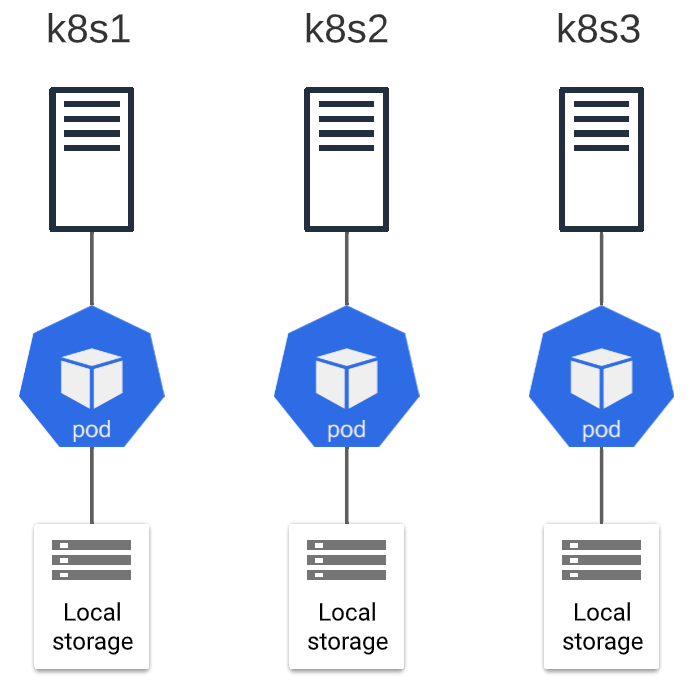
This leads to major issues in a multi-node cluster:
- No Data Portability: If a Pod fails and Kubernetes reschedules it to a different node, its
hostPathdata will not move with it. The new Pod will start with an empty directory (or whatever was on the new host at that path). - Security Risks: Since Pods get access to the host filesystem, a compromised container could potentially read sensitive data or cause damage to the host node. This is a serious security concern.
- No Resource Management: Kubernetes cannot enforce storage limits on a
hostPathvolume. A runaway Pod could fill up the entire node disk, affecting the node's stability and all other workloads on it.
Difference between EmptyDir and HostPath volume types ...
To understand these risks in more detail, please read the descriptions of hostPath from these two resources. They provide clear explanations of its use cases and disadvantages.
First, read the 'HostPath' section in this article. Note the special use cases and the listed disadvantages, particularly regarding security and inconsistent behavior across nodes.
Next, review this short section on hostPath from the IOMETE documentation for a very concise summary of the risks.
Read the 'Host Path' section. The bulleted list of limitations (No storage limits, No automatic cleanup, Security concerns) is an excellent summary.
Test your understanding!
You are tasked with deploying two different applications to your cluster:
- Application A: A log-shipping agent that must collect log files from
/var/log/containerson every node in the cluster and forward them to a central logging service. - Application B: A two-container Pod. The first container is a web server, and the second is a "git-sync" sidecar that needs to periodically pull website content from a Git repository into a directory that the web server can then serve. The content does not need to be preserved if the Pod is deleted.
For each application, which volume type (emptyDir or hostPath) would you choose, and why?
Show answer
-
Application A (Log Shipper): You should use a
hostPathvolume. The application's purpose is to access a specific directory on the host node (/var/log/containers). This is a classic and appropriate use case forhostPath, typically used with a DaemonSet to ensure the agent runs on every node. -
Application B (Web Server with Git-Sync): You should use an
emptyDirvolume. The volume's purpose is to share files between two containers within the same Pod. Thegit-synccontainer writes to it, and the web server container reads from it. Since the data is temporary and its lifecycle is tied to the Pod (if the Pod is gone, you'd want a fresh sync anyway),emptyDiris the perfect fit.
4. Summary: emptyDir vs. hostPath
Let's summarize the key differences in a table.
| Feature | emptyDir |
hostPath |
|---|---|---|
| Storage Location | Node's filesystem (ephemeral storage) | Node's filesystem (specified path) |
| Lifecycle | Tied to the Pod's lifecycle. | Independent of the Pod; tied to the Node's lifecycle. |
| Data Persistence | Lost when Pod is deleted or moved. | Persists on the node even if the Pod is deleted. |
| Primary Use Case | Sharing temporary data between containers in a Pod; scratch space. | Accessing node-level files for system daemons or monitoring agents. |
| Key Limitation | Ephemeral; not for persistent data. | Data is not portable across nodes; significant security risks. |
Conclusion
In this lesson, you've learned about the two most basic Kubernetes volume types and, more importantly, their specific use cases and limitations.
Key Takeaways:
- Container filesystems are ephemeral; volumes are required for any form of data persistence or sharing.
- An
emptyDirvolume provides temporary storage that shares the lifecycle of a Pod, making it ideal for scratch space or sharing files between containers within that Pod. - A
hostPathvolume mounts a directory from the host node into a Pod, which is useful for system-level agents but carries significant risks related to security and data portability. - Neither
emptyDirnorhostPathare suitable for general-purpose persistent storage for applications like databases in a multi-node cluster.
Next Up:
We've now seen why these basic types aren't enough for true stateful applications. In our next lesson, we will introduce the core of Kubernetes storage: the PersistentVolume (PV) and PersistentVolumeClaim (PVC) system. This powerful abstraction decouples storage from both Pods and Nodes, finally allowing us to manage data that can outlive Pods and move freely across the cluster.