Hello! Let's dive into the next part of our SQL journey.
In our last lesson, you learned how to retrieve, filter, and sort individual rows from a single table using SELECT, WHERE, and ORDER BY. This is powerful, but data analysis often requires a higher-level view. Instead of looking at individual records, we frequently need to summarize them to uncover trends and insights.
Today, we'll shift our focus from individual rows to groups of rows. You'll learn how to perform data aggregation using SQL aggregate functions and the GROUP BY clause. This will let you answer questions like "How many employees are in each department?" or "What is the average sales amount per region?". These are fundamental skills for anyone working with data.
From Rows to Summaries: Aggregate Functions
Aggregate functions in SQL operate on a set of rows and return a single, summary value. Imagine you have a list of all sales transactions; an aggregate function could tell you the total value of all sales, or the average sale amount.
The five most common aggregate functions are:
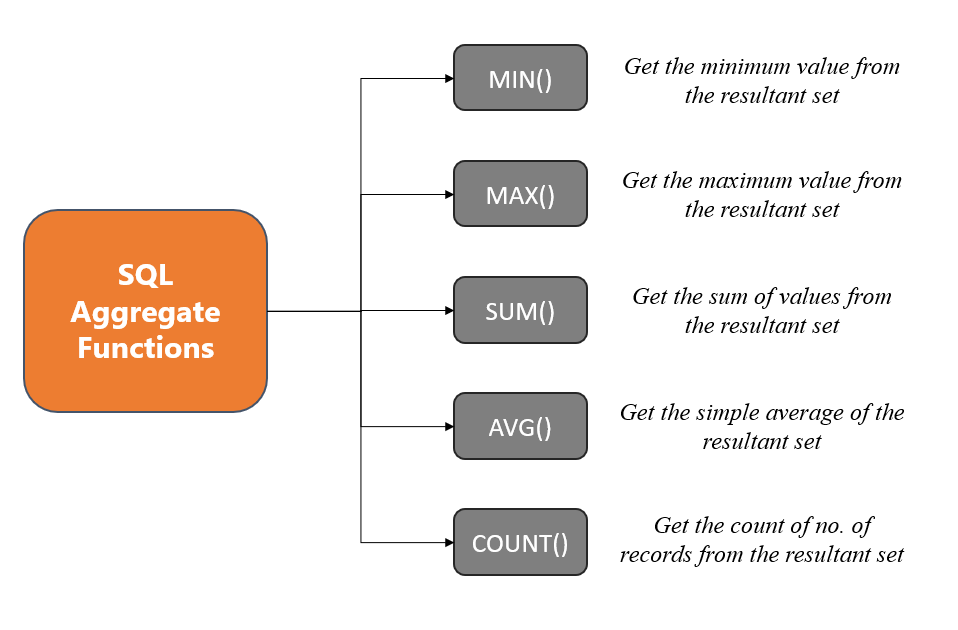
COUNT(): Counts the number of rows.SUM(): Calculates the sum of a numeric column.AVG(): Calculates the average of a numeric column.MIN(): Finds the minimum value in a column.MAX(): Finds the maximum value in a column.
Let's see these functions in action. The following video provides a clear, practical demonstration of how each one is used to analyze an orders table.
SQL Aggregate Functions | COUNT, SUM, AVG, MAX, MIN | #SQL Course 21
This video from 'Data with Baraa' will introduce you to the core aggregate functions. It provides simple, intuitive examples for each one, such as finding the total number of orders or the highest sale.
Watch the video from the beginning until 04:43. Pay attention to the syntax for each function and the kind of question it helps answer.
To summarize, when used without any grouping, these functions give you a single summary for the entire table.
For example, given a table named Employees with columns Department and Salary:
SELECT COUNT(*) FROM Employees;would give you the total number of employees.SELECT AVG(Salary) FROM Employees;would give you the average salary across all employees.SELECT MAX(Salary) FROM Employees;would find the single highest salary in the company.
Test your understanding!
You have a Products table with columns product_name and price. Write a query to find the total number of products and the average price of all products. Your result should have two columns.
Show answer
SELECT COUNT(product_name) AS total_products, AVG(price) AS average_price
FROM Products;
Using aliases like total_products and average_price makes the output much easier to read.
Deeper Insights with GROUP BY
Getting the overall average salary is useful, but what if you want to know the average salary for each department? This requires breaking the data into groups before applying the aggregate function. This is precisely what the GROUP BY clause does.
The GROUP BY clause works through a "Split-Apply-Combine" process:
- Split: It splits the rows of the table into groups based on the unique values in the column(s) you specify. For example, it would create one group for 'Sales', one for 'Engineering', etc.
- Apply: It applies the aggregate function (like
AVG()) independently to each group. - Combine: It combines the results from each group into a final result set, giving you one summary row per group.
The following video tutorial explains this concept very well and also highlights a crucial rule for using GROUP BY.
Group By + Order By in MySQL | Beginner MySQL Series
This video from 'Alex The Analyst' provides a clear walkthrough of the GROUP BY clause. It explains the core concept and demonstrates a critical rule you must follow when constructing your queries.
Watch from the beginning to 03:04. Focus on: How GROUP BY rolls up rows into groups. The important rule: Any column in your SELECT list that is not an aggregate function must also be in your GROUP BY clause. An example of calculating the average age per gender.
This idea of grouping and summarizing is similar to creating a Pivot Table in a spreadsheet program like Excel. The following reading material explains this analogy and also shows how to group by more than one column.
This tutorial from DataLemur provides a great written explanation of GROUP BY, comparing it to Excel's Pivot Tables and showing how to group by multiple columns.
Read the sections 'SQL GROUP BY Tutorial', 'GROUP BY vs. Excel Pivot Table', and 'GROUP BY Two Columns'. This will reinforce the concept and show you how to create more granular groupings.
So, to find the average salary per department, our query would look like this:
SELECT
  Department,
  AVG(Salary) AS AverageSalary
FROM Employees
GROUP BY
  Department;
This would produce a result like:
| Department | AverageSalary |
|---|---|
| Sales | 65000 |
| Engineering | 85000 |
| HR | 58000 |
Filtering Groups with the HAVING Clause
You now know how to filter individual rows with WHERE and how to group them with GROUP BY. But what if you want to filter the groups themselves? For instance, how would you find only those departments where the average salary is greater than $70,000?
You might instinctively try to use WHERE:
-- This query will cause an error!
SELECT
  Department,
  AVG(Salary) AS AverageSalary
FROM Employees
WHERE
  AVG(Salary) > 70000 -- You can't use an aggregate function in WHERE
GROUP BY
  Department;
This fails because of the logical order of query execution. The WHERE clause is processed before the GROUP BY clause, so at the time WHERE is evaluated, the groups and the AVG(Salary) for those groups don't exist yet.
The solution is the HAVING clause. HAVING is designed specifically to filter groups after they have been created and after the aggregate functions have been calculated.
WHERE filters rows before grouping.HAVING filters groups after grouping.
The following reading explains this limitation of WHERE and introduces HAVING as the solution.
How to Use GROUP BY and HAVING in SQL
This article from DataCamp explains why WHERE can't be used to filter on aggregate results and introduces the HAVING clause with clear examples.
Read the sections 'The Limitations of WHERE' and 'Using SQL HAVING'. This will clarify the distinction between the two clauses and show you the correct syntax.
The correct query to find departments with an average salary above $70,000 is:
SELECT
  Department,
  AVG(Salary) AS AverageSalary
FROM Employees
GROUP BY
  Department
HAVING
  AVG(Salary) > 70000;
Test your understanding!
You have a Sales table with columns Region, Salesperson, and SaleAmount. Write a query to find the total sales for each region. Only include regions where the total sales are more than $500,000.
Show answer
SELECT
  Region,
  SUM(SaleAmount) AS TotalSales
FROM Sales
GROUP BY
  Region
HAVING
  SUM(SaleAmount) > 500000;
The Complete Order of Execution
Understanding the logical order in which SQL clauses are processed is key to writing correct and complex queries. Let's update our mental model from the last lesson to include GROUP BY and HAVING.
The actual order of execution is:
FROM: Identifies the source table(s).WHERE: Filters individual rows.GROUP BY: Arranges the filtered rows into groups.HAVING: Filters the groups based on aggregate calculations.SELECT: Selects the final columns and computes expressions.ORDER BY: Sorts the final result set.
This execution order perfectly explains why you can't use an alias from SELECT in a WHERE or HAVING clause (it hasn't been created yet), but you can use it in an ORDER BY clause (it has been created by then).
Conclusion
You've made a significant leap forward today! You've moved beyond simple data retrieval and into the core of data analysis: summarization and aggregation. This is a skill you will use in nearly every data-related task.
Key Takeaways:
- Aggregate Functions (
COUNT,SUM,AVG,MIN,MAX) condense many rows into a single summary value. - The
GROUP BYclause is used to split your data into groups, allowing you to apply aggregate functions to each group separately. - Remember the rule: any non-aggregated column in the
SELECTlist must also be in theGROUP BYlist. - The
HAVINGclause is used to filter these groups based on the results of the aggregate functions. - The logical order of execution (
FROM->WHERE->GROUP BY->HAVING->SELECT->ORDER BY) determines what you can do in each clause.
Preview of the Next Lesson:
So far, all our queries have worked on a single table. However, real-world data is almost always spread across multiple related tables (like Customers, Orders, and Products). In our next lesson, "Write complex SQL queries using JOIN operations and subqueries," you'll learn how to combine data from multiple tables to answer much more complex and interesting questions.