Hello! Welcome to your next lesson on SQL.
In our last session, we focused on analyzing data within a single table using aggregate functions and the GROUP BY clause. This is a fundamental skill, but real-world databases rarely store all their information in one giant table. To maintain data integrity and efficiency, information is split across multiple, related tables.
Today, we'll learn how to bridge that gap. This lesson will teach you how to write complex SQL queries using JOIN operations and subqueries. You'll discover how to combine data from different tables to answer sophisticated questions, like "Which employees are working on which projects, and what are their department names?" or "Find all employees who earn more than the average salary in their respective departments." These are exactly the kinds of complex query-writing skills you'll need for data analysis and the GATE exam.
Part 1: Combining Tables with JOINs
Imagine a database for an office. You'd likely have one table for employees and another for departments. The employees table might contain a dept_id to link to the departments table, but it won't contain the department's name itself. To get a list of employees and their department names, you need to join these two tables. JOIN is the SQL command that lets you combine rows from two or more tables based on a related column between them.
The different types of JOINs can be easily visualized using Venn diagrams, which show how the sets of data from two tables (A and B) are combined.

Let's explore the most common types.
INNER JOIN: The Intersection
An INNER JOIN returns only the rows that have matching values in both tables. It's like finding the intersection of two sets. If an employee is in a department that exists in the departments table, they will be included in the result. An employee without a department, or a department with no employees, will be excluded.
LEFT JOIN: Keep Everything from the Left
A LEFT JOIN (also called a LEFT OUTER JOIN) returns all rows from the left table, and the matched rows from the right table. If there is no match for a row from the left table, the columns from the right table will contain NULL.
This is useful when you want a complete list from one table, regardless of whether there's corresponding data in another. For example: "Show me all employees, and if they have a department, show its name."
RIGHT JOIN: The Mirror Image
A RIGHT JOIN is the opposite of a LEFT JOIN. It returns all rows from the right table and the matched rows from the left table. If there's no match, the columns from the left table will be NULL. This is less common because you can almost always achieve the same result by swapping the table order and using a LEFT JOIN.
A Practical Walkthrough of JOINs
The best way to understand JOINs is to see them in action. The following video provides a very clear and detailed explanation using a sample office database with four tables: Employee, Department, Manager, and Project.
SQL JOINS Tutorial for beginners | Practice SQL Queries using JOINS - Part 1
Watch this video from techTFQ to see how INNER JOIN, LEFT JOIN, and RIGHT JOIN work in practice. The presenter builds queries step-by-step, making the logic easy to follow.
Please watch from 02:34 to 22:36. Focus on: Why we need JOINs (02:34 - 04:22) The concept of a join condition (the ON clause). How INNER JOIN returns only matching records (05:28 - 13:33). How LEFT JOIN returns all records from the left table, with NULLs for non-matches (13:33 - 19:59). How RIGHT JOIN does the opposite (19:59 - 22:36).
Joining Multiple Tables
Real-world queries often require joining more than two tables. For example, to get an employee's name, their department name, and their manager's name, you might need to join the employees, departments, and managers tables.
You can do this by chaining JOIN clauses. The result of the first join effectively becomes a new, temporary table that is then joined with the next table in the chain. The order and type of join (LEFT vs. INNER) become very important here.
The next part of the same video demonstrates this perfectly.
SQL JOINS Tutorial for beginners | Practice SQL Queries using JOINS - Part 1
Let's continue with the techTFQ video to see how to build a complex query that joins four different tables to get a complete employee profile.
Watch from 22:36 to 34:12. Pay close attention to how the choice of LEFT JOIN vs. INNER JOIN at each step affects the final result, ensuring that all employees are included, even if they don't have a project.
Test your understanding!
You have two tables: Students (student_id, name) and Courses (course_id, student_id, course_name). Some students may not have enrolled in any courses yet.
Write a query to list all student names and the name of the course they are enrolled in. If a student is not enrolled in any course, their name should still appear in the list, with the course_name as NULL.
Show answer
SELECT
  s.name,
  c.course_name
FROM
  Students s
LEFT JOIN
  Courses c ON s.student_id = c.student_id;
A LEFT JOIN is required here to ensure that students who haven't enrolled in any courses (and thus have no matching record in the Courses table) are still included in the final output.
Part 2: Nesting Queries with Subqueries
Another powerful tool for writing complex queries is the subquery (also known as an inner or nested query). A subquery is a SELECT statement that is nested inside another SQL statement.
Think of it as breaking a problem down. You use the inner query to find an intermediate piece of information, and then the outer query uses that information to get the final result.
Types of Subqueries
Subqueries can be categorized based on what they return.
SQL Subquery: A Comprehensive Guide
This article from DataCamp provides a great overview of the different types of subqueries. It's a good reference to have as you learn about them.
Read the section 'Types of subqueries'. It provides clear definitions and simple examples for Scalar, Column, Row, and Table subqueries.
The most common scenarios involve:
-
A subquery that returns a single value (Scalar Subquery): Used in a
WHEREclause for comparison.- Question: "Find all employees who earn more than the average salary."
- Logic: The subquery first calculates the single average salary value. The outer query then finds all employees whose salary is greater than this value.
-
A subquery that returns a list of values (Column Subquery): Used with operators like
IN.- Question: "Find all employees who work in the departments 'Admin' or 'IT'."
- Logic: The subquery could return the
department_ids for 'Admin' and 'IT'. The outer query then finds all employeesINthat list of IDs.
-
A subquery that returns a table (Derived Table): Used in the
FROMclause.- Question: "Find the average of the total sales for each store."
- Logic: The subquery first calculates the
total_salesfor each store, creating a temporary table. The outer query then calculates theAVG()of thetotal_salescolumn from that temporary table.
The following video provides an excellent, detailed walkthrough of these different types of subqueries.
Subquery in SQL | Correlated Subquery + Complete SQL Subqueries Tutorial
This techTFQ video is a complete guide to subqueries. We'll watch it in parts to understand the different concepts.
Please watch from 01:32 to 22:14. This covers: What a subquery is and a simple example (01:32 - 07:56). Scalar subqueries used in WHERE and FROM clauses (07:56 - 11:32). Multiple-row subqueries that return multiple rows and/or columns (11:32 - 22:14).
Correlated Subqueries: A Deeper Connection
This is where subqueries become truly powerful and a bit more complex.
- A non-correlated subquery (like the ones we've seen so far) is independent. It can be run on its own. It executes once, and its result is used by the outer query.
- A correlated subquery is dependent on the outer query. It uses values from the outer query's current row. It is executed once for each row processed by the outer query.
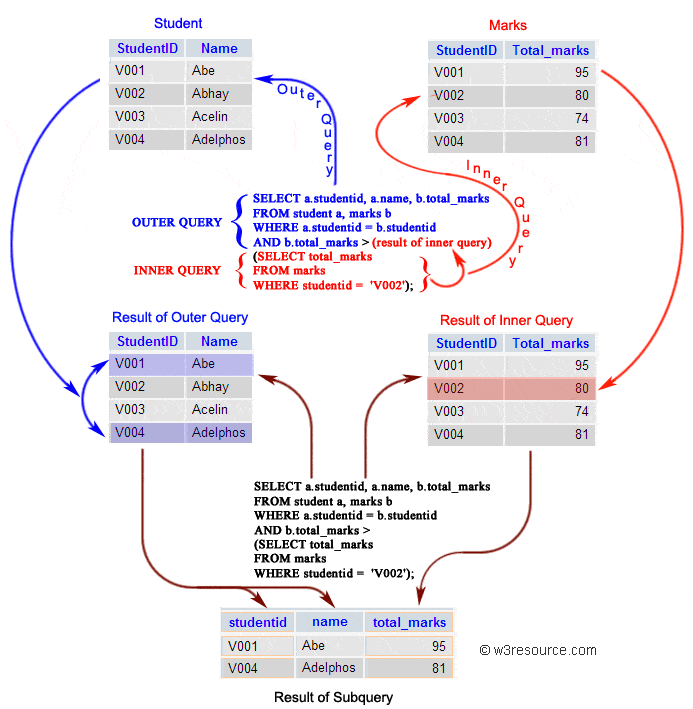
A classic example is: "Find all employees who earn more than the average salary in their own department."
For each employee (each row in the outer query), the inner query must calculate the average salary for that specific employee's department.
This distinction is crucial for both understanding and performance.
Subquery in SQL | Correlated Subquery + Complete SQL Subqueries Tutorial
Let's continue with the techTFQ video to understand the critical concept of correlated subqueries.
Watch from 22:14 to 37:10. Focus on: The definition of a correlated subquery and its dependency on the outer query. The difference in execution flow: the subquery runs for every row of the outer query. The EXISTS and NOT EXISTS operators, which are commonly used with correlated subqueries.
Making Complex Queries Readable with the WITH Clause
When you have multiple levels of nested subqueries, your code can become very hard to read. The WITH clause, which creates something called a Common Table Expression (CTE), is the modern, preferred way to organize complex queries. It allows you to define a temporary, named result set that you can then reference later in your main query.
Subquery in SQL | Correlated Subquery + Complete SQL Subqueries Tutorial
Finally, let's look at a better way to structure complex queries using the WITH clause.
Watch from 37:10 to 46:29. The presenter shows a query with nested subqueries and then refactors it using a WITH clause. Notice how much cleaner and more readable the final query becomes.
Test your understanding!
You have a Products table with columns product_id, product_name, and price. Write a query to find all products that are more expensive than the average price of all products.
Show answer
SELECT
  product_name,
  price
FROM
  Products
WHERE
  price > (SELECT AVG(price) FROM Products);
Here, the scalar subquery (SELECT AVG(price) FROM Products) runs first and returns a single value (the average price). The outer query then uses this value to filter the products.
Conclusion
Congratulations on getting through a very dense but incredibly important topic! You've learned the two primary methods for writing complex queries that draw data from the rich, relational structure of a database. Mastering JOINs and subqueries is a major step toward becoming proficient in SQL.
Key Takeaways:
JOINs are used to combine rows from multiple tables based on a common column.INNER JOINgets the intersection, whileLEFT JOINgets all rows from the left table plus matches from the right.- Subqueries are queries nested inside another query. They are excellent for breaking down a complex problem into logical steps.
- Non-correlated subqueries run once and are independent of the outer query.
- Correlated subqueries depend on the outer query and are executed for each row of the outer query, allowing for powerful row-by-row comparisons.
- The
WITHclause (CTE) is a best practice for organizing and improving the readability of queries that involve multiple or nested subqueries.
Preview of the Next Lesson:
Today, we learned how to query data that has been split across multiple tables. But how do we decide how to split the data in the first place? In the next lesson, "Define functional dependencies and normalize a database to First Normal Form (1NF)," we will explore the principles of good database design. You'll learn about normalization, the process of organizing tables to minimize data redundancy and improve data integrity.