Hello! Welcome to the next step in our database journey.
In our last lesson, we acted as database architects, translating conceptual ER diagrams into a structured relational schema—the very blueprint of our database, with its tables, primary keys, and foreign keys. Today, we put on a different hat. We'll become data detectives, learning how to ask questions and retrieve specific information from these tables.
This lesson marks our entry into SQL (Structured Query Language), the universal language for communicating with relational databases. Your goal is to learn how to write SQL queries to retrieve data using the SELECT, WHERE, and ORDER BY clauses. These three clauses form the foundation of almost every data retrieval task you'll encounter.
From Blueprint to Conversation: What is SQL?
In the last lesson, we meticulously defined the structure of our data. Now, we need a way to interact with that data. SQL is a declarative language, which is an interesting contrast to procedural languages like Python or C that you might be familiar with. Instead of telling the database how to get the data step-by-step, you simply declare what data you want. The database management system (DBMS) then figures out the most efficient way to fetch it for you.
A basic SQL query for retrieving data has a structure that is quite readable, almost like an English sentence. The three core components we will focus on today are:
SELECT: Specifies which columns (or fields) you want to see.FROM: Specifies the table you are getting the data from.WHERE: Filters the rows (or records) to include only those that meet a specific condition.ORDER BY: Sorts the final results.
Let's begin by learning to retrieve data with the most fundamental clauses: SELECT and FROM.
The SELECT Statement: Choosing Your Columns
The SELECT statement is your primary tool for retrieving data. You can either grab all columns from a table or be specific about which ones you need.
To get a hands-on feel for how these queries are written and executed, the following video provides a great walkthrough. While the video uses Microsoft SQL Server, the SQL commands themselves are standard and will work across almost any database system. You can focus on the queries being written rather than the specific software setup.
This segment from a 'SQL Tutorial for Beginners' by Kevin Stratvert will demonstrate how to write your first queries. You'll learn to select all data, choose specific columns, and give those columns custom names (aliases).
Watch the video from 18:32 to 24:15. Pay close attention to: The use of SELECT * to retrieve all columns. How to select specific columns by listing their names. The syntax for creating an alias for a column name using AS.
As a quick summary of what you just saw:
- To select all columns from a table, you use the asterisk
*, which is a wildcard character.SELECT * FROM Customers; - To select specific columns, you list them by name, separated by commas. This is more efficient as it reduces the amount of data the database needs to process and send.
e SELECT CustomerName, City, State FROM Customers;
```
- To rename a column in your result set for better readability, you can use the
ASkeyword to create an alias.SELECT CustomerName AS Name, PhoneNumber AS Contact FROM Customers;
Test your understanding!
Imagine you have a table named Courses with the following columns: course_id, course_name, instructor_name, and credits.
Write an SQL query to retrieve just the name and the number of credits for all courses.
Show answer
SELECT course_name, credits FROM Courses;
The WHERE Clause: Filtering for the Rows You Want
Getting all the rows from a table is often just the first step. More powerful queries are possible when you can filter the data to find specific records. The WHERE clause is used for this purpose. It is placed after the FROM clause and contains a condition that must be true for a row to be included in the results.
This next video segment demonstrates how to apply various filtering conditions.
Continuing with the same tutorial, this part focuses on the WHERE clause. You'll see how to filter data using comparison operators, combine conditions, and search for patterns in text.
Watch from 24:46 to 30:51. Focus on how different operators are used to build conditions: Equality (=) and inequality (<> or !=). Combining conditions with AND and OR. Using IN to check against a list of values. Using LIKE with the % wildcard for pattern matching.
Key WHERE Clause Operators
To solidify your understanding, here's a breakdown of the common operators used in the WHERE clause. This text provides clear examples for each one.
20 Basic SQL Query Examples for Beginners
This article, '20 Basic SQL Query Examples for Beginners', provides very clear, bite-sized examples. We'll look at a few sections that reinforce what you saw in the video and introduce some new operators.
Read through Examples 4, 5, and 9. They cover: Example 4: Filtering with numeric comparison (>). Also notice the other operators listed: <, >=, <=, <>. Example 5: Filtering with an equality condition (=) on a text value. Note that text values must be enclosed in single quotes (e.g., 'Luca'). Example 9: Using the OR logical operator to create a more complex condition.
The most common operators you'll use are:
| Operator | Description | Example |
|---|---|---|
= |
Equal to | WHERE department = 'Sales' |
<>, != |
Not equal to | WHERE country <> 'USA' |
>, < |
Greater than, Less than | WHERE salary > 50000 |
>=, <= |
Greater than or equal to, Less than or equal to | WHERE gpa >= 3.5 |
BETWEEN |
Within a range (inclusive) | WHERE price BETWEEN 100 AND 500 |
IN |
Matches any value in a list | WHERE city IN ('Mumbai', 'Delhi', 'Pune') |
LIKE |
Simple pattern matching on text | WHERE name LIKE 'A%' (starts with A) |
IS NULL |
Checks for an empty or missing value | WHERE middle_name IS NULL |
AND, OR |
Logical operators to combine multiple conditions | WHERE salary > 50000 AND city = 'Delhi' |
The ORDER BY Clause: Sorting Your Results
By default, the database returns rows in whatever order it finds most convenient, which can seem random. The ORDER BY clause gives you control over the presentation of your results, allowing you to sort them based on one or more columns.
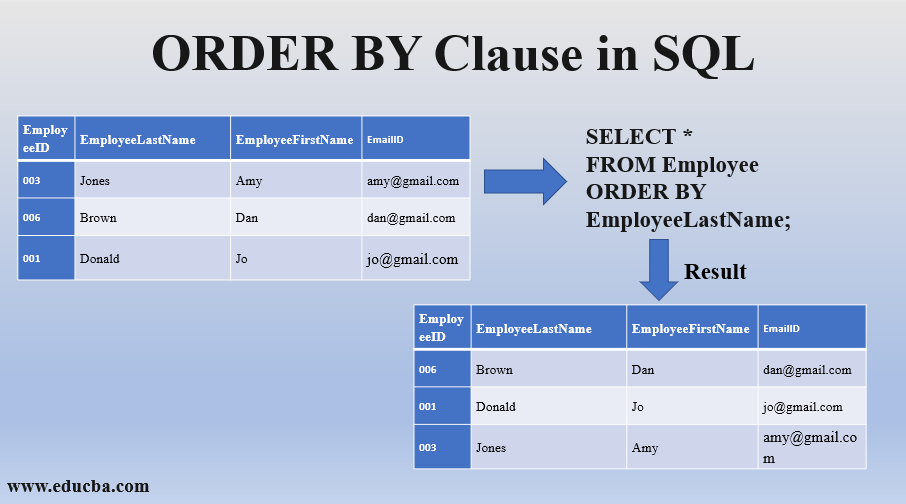
You can sort data in two ways:
ASC: Ascending order (A-Z, 0-9). This is the default.DESC: Descending order (Z-A, 9-0).
You can also sort by multiple columns. The database will sort by the first column listed, and then, for any rows that have the same value in the first column, it will sort them by the second column, and so on.
Let's watch a quick demonstration.
This final clip from the tutorial shows the ORDER BY clause in action.
Watch from 38:23 to 39:03. Notice the syntax for both ascending and descending order.
Here's an example of multi-column sorting. This query would first list all employees by department, and then within each department, it would list the highest-paid employees first.
SELECT employee_name, department, salary
FROM employees
ORDER BY department ASC, salary DESC;
Test your understanding!
Using the same Courses table (course_id, course_name, instructor_name, credits), write a query to find all courses with more than 3 credits, and display the results ordered by instructor name alphabetically.
Show answer
SELECT course_name, instructor_name, credits
FROM Courses
WHERE credits > 3
ORDER BY instructor_name ASC;
(Note: ASC is optional here since it's the default, but it's good practice to be explicit.)
The Logical Order of Query Execution
A common point of confusion for beginners is understanding the order in which the database processes a query. Even though you write SELECT first, it's not the first thing the database executes! Understanding this logical order helps you avoid common errors.
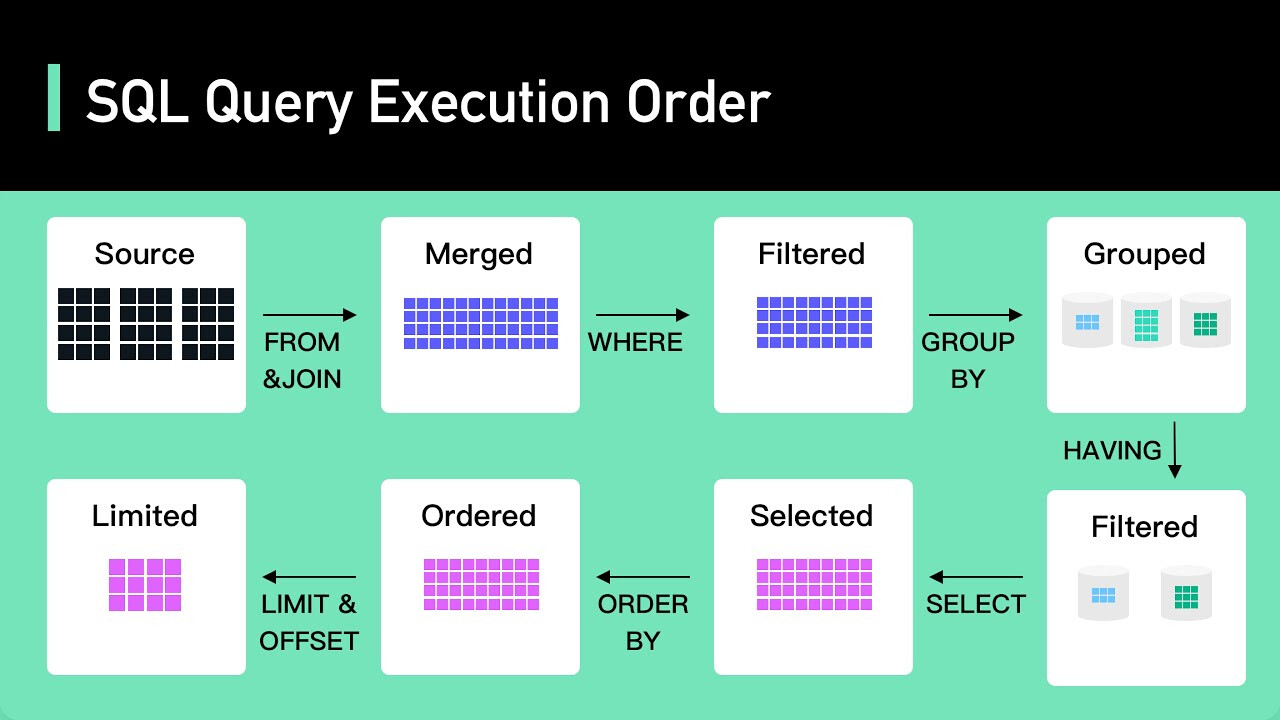
For the clauses we've learned today, the logical order is:
FROM: The database first identifies the table to work with.WHERE: It then filters the rows based on your condition.SELECT: After filtering, it picks out the columns (and computes any expressions or aliases) you requested.ORDER BY: Finally, it sorts the resulting set of rows and columns.
This explains why, for example, you cannot use a column alias defined in your SELECT statement within your WHERE clause. The WHERE clause is processed before the SELECT clause, so the alias doesn't exist yet!
Conclusion
In this lesson, you've learned the fundamental building blocks for retrieving data from a database. This is a skill you will use constantly in data science and AI.
Key Takeaways:
- SQL is a declarative language used to manage and query relational databases.
- The
SELECTclause is used to specify the columns you want to retrieve (SELECT *for all, orSELECT col1, col2for specific ones). - The
FROMclause specifies the source table. - The
WHEREclause filters rows based on one or more conditions using operators like=,>,IN,LIKE, andAND/OR. - The
ORDER BYclause sorts the final result set in ascending (ASC) or descending (DESC) order. - The logical order of execution is
FROM->WHERE->SELECT->ORDER BY, which is important for writing correct queries.
Preview of the Next Lesson:
Now that you can select, filter, and sort individual rows, the next logical step is to learn how to summarize data. In our next lesson, "Perform data aggregation using SQL aggregate functions and GROUP BY," we will explore how to calculate counts, sums, averages, and more across groups of rows, which is a cornerstone of data analysis.