Hello! Welcome back to our journey into Database Systems.
In our last lesson, we learned how to be database architects by designing Entity-Relationship (ER) diagrams—the blueprints for our data. Today, we transition from architect to engineer. Our goal is to take that conceptual blueprint and turn it into a solid structure.
The learning outcome for this lesson is to translate an ER diagram into a relational schema with primary and foreign keys. A relational schema is the formal description of a database's structure, consisting of tables, columns, and the connections between them. We will learn a set of systematic rules for converting every symbol from our ER diagram into a corresponding element in a relational database.
Recap: The Blueprint
Just to recap, in the previous lesson, we created an ER diagram using:
- Entities (like
Student,Course) represented by rectangles. - Attributes (like
student_id,name) represented by ovals. - Relationships (like "enrolls in") represented by diamonds, with cardinality (1:1, 1:N, M:N) and participation constraints defining the rules.
Now, let's learn how to build the database from this plan.
The Building Blocks: Primary and Foreign Keys
The magic that connects everything in a relational database relies on two types of keys:
-
Primary Key (PK): This is one or more columns that uniquely identify every single row in a table. Think of it as the Aadhar number or Student ID for a record. A primary key cannot have
NULL(empty) values. In ER diagrams, we identified this as the key attribute (usually underlined). -
Foreign Key (FK): This is a column (or set of columns) in one table that refers to the primary key of another table. It's the "glue" that creates a relationship between tables. For example, if a
Blogtable has anauthor_idcolumn that refers to theuser_idin theUsertable,author_idis a foreign key.
With these two concepts, we can now establish a set of rules for the translation.
A Systematic Approach to Translation
The process of converting an ERD to a relational schema is not random; it follows a clear, step-by-step algorithm. We will map entities, relationships, and special attribute types one by one.
Rule 1: Mapping Strong Entities
This is the most straightforward rule.
- For every strong entity in the ERD, create a new table.
- The simple attributes of the entity become the columns of the table.
- The key attribute of the entity becomes the primary key of the table.

Rule 2: Mapping Relationships
How we map a relationship depends entirely on its cardinality.
a) One-to-Many (1:N) Relationship
This is one of the most common scenarios.
- Rule: We do not create a new table for the relationship. Instead, we place a foreign key in one of the existing tables.
- How: Take the primary key from the table on the '1' side of the relationship and add it as a foreign key column to the table on the 'N' (many) side.
Look at the User and Blog relationship in the image above. A User can have many Blogs (1:N).
- The
Usertable has a primary keyID. - The
Blogentity is on the 'N' side. - Therefore, we add a
user_IDcolumn to theBlogtable, which acts as a foreign key referencing theIDin theUsertable.
Why does this work? Each blog post has exactly one author, so we can store that single user_ID. We couldn't do it the other way around, as a user can have many blogs, and we can't store a list of values in a single column.
b) Many-to-Many (M:N) Relationship
- Rule: For every M:N relationship, you must create a new table to represent the relationship. This is often called a junction table or a linking table.
- How:
- Create a new table.
- This new table's primary key is a composite key formed by taking the primary keys from both entities involved in the M:N relationship.
- Each of these columns in the new table is also a foreign key that points back to its original table.
- If the relationship itself has attributes (e.g., a "date_enrolled" attribute on an "enrolls" relationship), they also become columns in this new junction table.
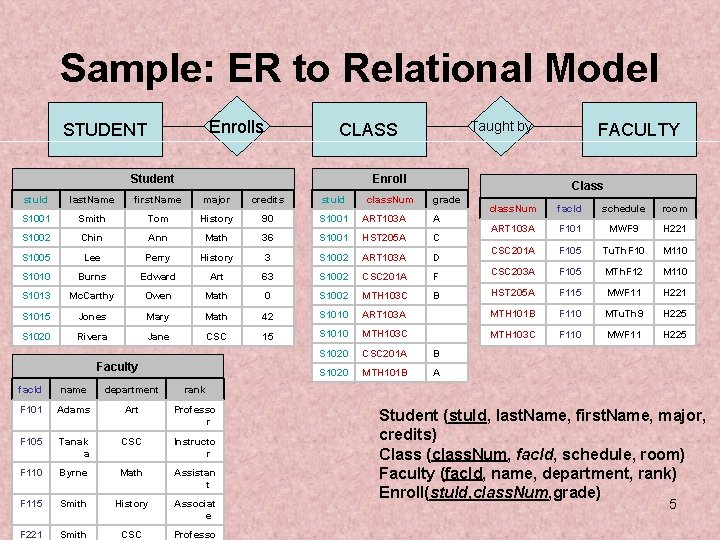
c) One-to-One (1:1) Relationship
- Rule: Similar to 1:N, you do not create a new table. You add a foreign key to one of the entity tables.
- How: You have a choice. You can take the primary key from Entity A and put it in Table B, or take the primary key from Entity B and put it in Table A.
- Best Practice: Look at the participation constraints. It's often best to add the foreign key to the table corresponding to the entity with total participation. This avoids storing unnecessary
NULLvalues. For example, if aPassportmust belong to aPerson(total participation), but aPersonmay or may not have aPassport(partial participation), you would add theperson_idas a foreign key in thePassporttable.
Rule 3: Mapping Other ERD Components
-
Weak Entities: A weak entity also gets its own table. The primary key of this table is a composite key made up of:
- The primary key of the strong (owner) entity (acting as a foreign key).
- The weak entity's own partial key (discriminator).
-
Multivalued Attributes: If an entity has an attribute that can hold multiple values (like multiple phone numbers for one employee), you create a new table for that attribute. This table will contain the primary key of the entity (as a foreign key) and a column for the multivalued attribute itself.
A Comprehensive Walkthrough
Now that we have the rules, let's see them applied in a complete example. The following video systematically walks through the conversion of a company ER diagram into a full relational schema, covering each of the cases we've discussed.
ER to Relational mapping- ER diagram conversion into Tables(Relations)-Logical Database Design
This video provides a very clear, step-by-step tutorial on converting an ER diagram to tables. It follows a 7-step process that covers all the key components we need to translate.
Please watch the video from the beginning until 16:10. The narrator breaks the process down into seven distinct steps. As you watch, try to match each step to the rules we've just discussed: Step 1 (Regular Entities): 01:26 Step 2 (Weak Entities): 04:02 Step 3 (1:1 Relationships): 05:55 Step 4 (1:N Relationships): 08:03 Step 5 (M:N Relationships): 10:27 Step 6 (Multivalued Attributes): 11:46 Step 7 (N-ary Relationships): 13:03 (A more advanced case, good to be aware of) The final summary from 14:13 provides an excellent recap.
Reading for Reinforcement
Videos are great for a walkthrough, but text resources are excellent for reviewing the rules at your own pace. This article provides a detailed explanation with clear examples and well-structured tables.
Converting ERD to a relational model
To solidify your understanding, let's read through a detailed guide from Runestone Academy. It covers the same rules but with different examples and explanations, which will help reinforce the concepts.
Read the sections '2.3.1. Entities' and '2.3.2. Relationships'. Pay close attention to the table definitions provided for each case (Regular Entity, Weak Entity, M:N, 1:N, 1:1). Notice how primary and foreign keys are explicitly defined.
Test your understanding!
Let's revisit the library system from the last lesson. Here's a simplified ERD description:
- Entity
Bookwith attributesISBN(PK) andtitle. - Entity
Memberwith attributesmember_id(PK) andname. - A many-to-many (M:N) relationship
BorrowsconnectsBookandMember. The relationship has an attributeborrow_date.
Based on the rules, describe the relational schema you would create. List the tables, their columns, and identify the primary and foreign keys.
Show answer
You would create three tables:
-
Book Table
ISBN(Primary Key)title
-
Member Table
member_id(Primary Key)name
-
Borrows Table (This is the new junction table for the M:N relationship)
book_ISBN(Part of composite PK, Foreign Key referencingBook.ISBN)member_id(Part of composite PK, Foreign Key referencingMember.member_id)borrow_date
The primary key of the Borrows table is (book_ISBN, member_id).
Conclusion
Congratulations! You have now bridged the gap between conceptual design and physical implementation. You have learned the essential skill of translating an ER diagram into a robust relational schema.
Key Takeaways:
- A relational schema is made of tables, columns, and keys. Primary Keys (PK) uniquely identify rows, and Foreign Keys (FK) link tables together.
- Strong Entities map directly to tables with their attributes as columns and key attribute as the PK.
- M:N Relationships require a new junction table whose PK is a composite of the PKs from the related entities.
- 1:N Relationships are handled by adding the PK of the '1' side as an FK to the 'N' side table.
- 1:1 Relationships are similar, with the FK placed in one table, preferably the one with total participation.
- Weak Entities and Multivalued Attributes also result in the creation of new, separate tables.
Preview of the Next Lesson:
We have designed our blueprint and built the structure of our database with tables and columns. What's next? Filling it with data and, more importantly, retrieving that data to find insights. In our next lesson, "Write SQL queries to retrieve data using SELECT, WHERE, and ORDER BY," you will learn the fundamentals of SQL (Structured Query Language), the language used to communicate with databases. We will start with the most fundamental command: SELECT.