Hello! Welcome to the fourth lesson in our module on Core Data Structures.
In our last lesson, we delved into the stack and its "Last-In, First-Out" (LIFO) principle. We implemented a stack in Python and used it to solve the balanced parentheses problem, seeing how its structure is perfect for handling nested data.
Today, we'll explore the stack's natural counterpart: the queue. This lesson directly addresses the learning outcome: Implement a queue and use it to simulate a first-in-first-out process. We will cover:
- The concept of a queue and its "First-In, First-Out" (FIFO) behavior.
- The core queue operations:
enqueueanddequeue. - How to efficiently implement a queue in Python.
- Applying the queue to simulate a real-world process, like a printer queue.
Where a stack resembles a pile of plates, a queue is just like a line at a checkout counter. The first person to get in line is the first person to be served. This is the FIFO principle.
1. What is a Queue?
A queue is a linear data structure that restricts insertions to one end, called the rear (or tail), and deletions to the other end, called the front (or head). This ensures that the first item added to the queue will be the first item removed.
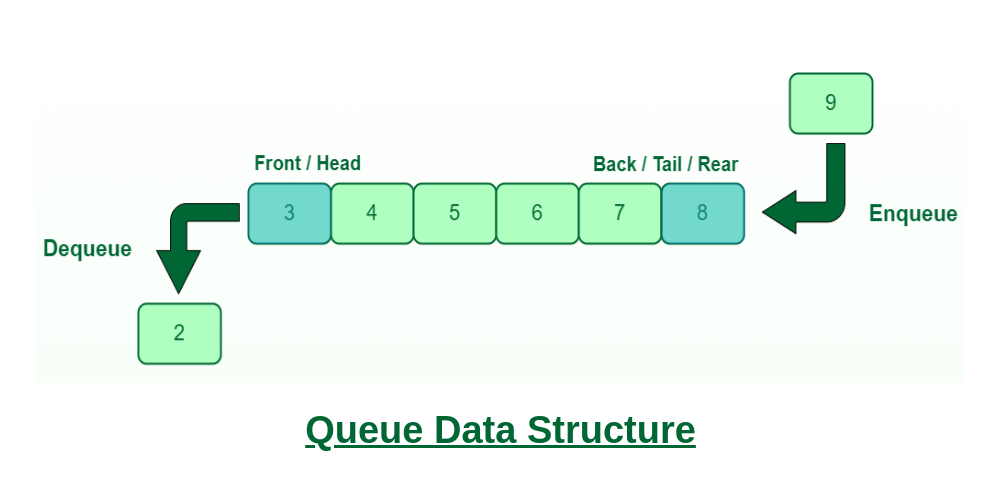
The concept of a queue is fundamental in computer science, especially for managing resources and tasks. To see a powerful, modern application of this, let's watch a short video.
Queue - Data Structures & Algorithms Tutorials In Python #8
This video from codebasics explains the core idea of a queue using a great real-world example from financial technology: managing streaming stock prices.
Watch the first 5 minutes and 30 seconds of the video. Focus on understanding: The 'First-In, First-Out' (FIFO) principle. The producer-consumer problem and how a queue helps create a 'loosely coupled' system. The key difference between a queue (FIFO) and a stack (LIFO).
Core Queue Operations
As the video and diagram illustrate, queues are defined by a few key operations:
enqueue(item): Adds an item to the rear of the queue.dequeue(): Removes and returns the item from the front of the queue.peek()orfront(): Returns the front item without removing it.isEmpty(): Checks if the queue is empty.isFull(): Checks if the queue is full (relevant for fixed-size implementations).
Like with stacks, these operations are expected to be highly efficient, ideally running in constant time, .
2. Implementing a Queue in Python
Now let's think about how to build this in Python. We have a couple of options.
A Naive Approach: Using a List
Your first instinct might be to use a Python list. You could append() items to add them to the rear and use pop(0) to remove them from the front.
# A simple, but inefficient, queue using a list
naive_queue = []

# Enqueue
naive_queue.append('A') # queue is ['A']
naive_queue.append('B') # queue is ['A', 'B']

# Dequeue
first_item = naive_queue.pop(0) # returns 'A', queue is now ['B']
However, there's a significant performance problem with this approach. While append() is fast (), pop(0) is slow. When you remove the first element of a list, every other element has to be shifted one position to the left. This makes the operation , where is the number of items in the list. For a large queue, this is very inefficient.
The Efficient Approach: collections.deque
Python's standard library provides a data structure specifically designed for fast appends and pops from both ends: the deque (pronounced "deck"), which stands for "double-ended queue".
A deque object is implemented internally as a doubly-linked list, which ensures that adding or removing elements from either the front (left) or the back (right) is an operation. This makes it the perfect tool for building an efficient queue.
Queue - Data Structures & Algorithms Tutorials In Python #8
The same codebasics video explains the problem with using a list and introduces deque as the correct solution.
Watch from 05:30 to 09:43. Pay close attention to: The performance problem of using list.insert(0, ...) or list.pop(0). How collections.deque provides efficient methods for adding and removing from both ends.
Building a Queue Class
To create a clean and reusable queue, we can wrap the deque object in our own Queue class. This gives us a clear interface with our desired method names (enqueue, dequeue).
Here's how you can implement a Queue class in Python:
from collections import deque

class Queue:
    def __init__(self):
        """Initializes an empty queue."""
        self.buffer = deque()

    def enqueue(self, item):
        """Adds an item to the rear of the queue. O(1)"""
        self.buffer.append(item)

    def dequeue(self):
        """Removes and returns the item from the front. Returns None if empty. O(1)"""
        if not self.isEmpty():
            return self.buffer.popleft()
        return None

    def peek(self):
        """Returns the front item without removing it. Returns None if empty. O(1)"""
        if not self.isEmpty():
            return self.buffer[0]
        return None

    def isEmpty(self):
        """Checks if the queue is empty."""
        return len(self.buffer) == 0

    def size(self):
        """Returns the number of items in the queue."""
        return len(self.buffer)

# Let's try it out
q = Queue()
print(f"Is queue empty? {q.isEmpty()}") # True

q.enqueue("Job 1")
q.enqueue("Job 2")
q.enqueue("Job 3")

print(f"Queue size: {q.size()}") # 3
print(f"Front item: {q.peek()}") # Job 1

removed_item = q.dequeue()
print(f"Dequeued: {removed_item}") # Job 1
print(f"New front item: {q.peek()}") # Job 2
Notice we use append() to add to the right (rear) and popleft() to remove from the left (front). This correctly implements the FIFO behavior with time complexity for both operations.
3. Application: Simulating a Printer Queue
Now let's use our Queue class to model a simple, real-world FIFO process: a printer queue. When multiple users send documents to a printer, the printer processes them in the order they were received.
The logic is straightforward:
- As new print jobs arrive, they are enqueued.
- The printer continuously checks the queue. If it's not empty, it dequeues the next job and "prints" it.
How to Create a Queue in C (With Code Examples)
The concept of using queues for simulations and task scheduling is universal. This article discusses several applications, including scheduling, which is very similar to our printer queue example. Although the code is in C, the concepts are what matter.
Skim the section 'Use in Simulations, Scheduling, and Task Management'. You don't need to understand the C code. Just read the descriptions for 'Simulations' (bank customers) and 'Scheduling' (OS processes) to see how queues model these FIFO systems.
Let's implement the printer simulation in Python using our Queue class.
import time
import random

# We'll use the Queue class we defined above
# from collections import deque
# class Queue: ...

def printer_simulation():
    """Simulates a printer processing jobs from a queue."""
    printer_queue = Queue()
    job_id = 0

    # Simulate new jobs arriving for 10 seconds
    print("--- Printer is ON. Receiving jobs... ---")
    end_time = time.time() + 10
    while time.time() < end_time:
        job_id += 1
        new_job = f"Document_{job_id}.pdf"
        printer_queue.enqueue(new_job)
        print(f"Received new job: {new_job}")
        time.sleep(random.uniform(0.5, 1.5)) # Jobs arrive at random intervals

    # Now, process all the jobs in the queue
    print("\n--- No new jobs. Processing the queue... ---")
    while not printer_queue.isEmpty():
        job_to_print = printer_queue.dequeue()
        print(f"Printing: {job_to_print}")
        time.sleep(1) # It takes 1 second to print a job

    print("\n--- All jobs printed. Printer is idle. ---")

# Run the simulation
printer_simulation()
Run this code. You will see jobs arriving in a certain order and then being printed in that exact same order, perfectly demonstrating the FIFO principle.
Test your understanding!
Imagine a scenario with two printers, Printer A and Printer B. You have a single queue of print jobs. How would you modify the processing part of the simulation so that jobs are assigned to printers in an alternating fashion? (Job 1 to Printer A, Job 2 to Printer B, Job 3 to A, etc.)
Show answer
You could use a counter or a boolean flag to keep track of whose turn it is.
def process_jobs_on_two_printers(queue):
    turn_for_A = True # Start with Printer A
    while not queue.isEmpty():
        job = queue.dequeue()
        if turn_for_A:
            print(f"[Printer A] Printing: {job}")
        else:
            print(f"[Printer B] Printing: {job}")

        # Switch turns for the next job
        turn_for_A = not turn_for_A
This simple logic ensures that the printers take turns pulling jobs from the front of the single queue.
Conclusion
You've now mastered the queue, a fundamental data structure for managing data and tasks in an orderly fashion.
Key Takeaways:
- A queue is a First-In, First-Out (FIFO) data structure, where elements are added to the rear and removed from the front.
- The primary operations,
enqueueanddequeue, should ideally have a time complexity of . - In Python, using a
listfor a queue is inefficient due to slow removals from the front (). The correct and efficient tool iscollections.deque. - Queues are essential for building simulations, schedulers (for CPUs, disks, networks), and handling asynchronous data flow.
Preview of the Next Lesson:
So far, we have studied linear data structures: linked lists, stacks, and queues. In the next lesson, we will make a big leap into the world of non-linear data structures by exploring the Binary Search Tree. You will learn how its hierarchical organization allows for dramatically faster searching, sorting, and data retrieval compared to linear structures.