Hello! Welcome to the fifth lesson in the "Core Data Structures" module.
In our previous lessons, we explored linear data structures like linked lists, stacks, and queues. We saw how they organize data in a sequential line. While useful, searching for an element in a large linear structure can be slow, often requiring us to check items one by one.
Today, we'll shift from a straight line to a branching structure. We will introduce the Binary Search Tree (BST), a non-linear data structure that is foundational to computer science and databases because it allows for significantly faster data operations.
This lesson directly addresses the learning outcome: Implement a binary search tree with insertion and search operations. By the end, you will be able to:
- Define a Binary Search Tree and its core properties.
- Understand the logic behind searching for and inserting data efficiently.
- Implement a BST in Python, creating methods for insertion and searching.
1. What is a Binary Search Tree?
A Binary Search Tree is a special type of tree data structure that makes searching for data highly efficient. It's called "binary" because each node can have at most two children, and it's a "search tree" because its structure is optimized for searching.
A BST must satisfy three key properties for every node in the tree:
- All values in the node's left subtree are less than the node's own value.
- All values in the node's right subtree are greater than the node's own value.
- Both the left and right subtrees must also be binary search trees, meaning they follow these same rules.
As a convention, BSTs typically do not allow duplicate values.
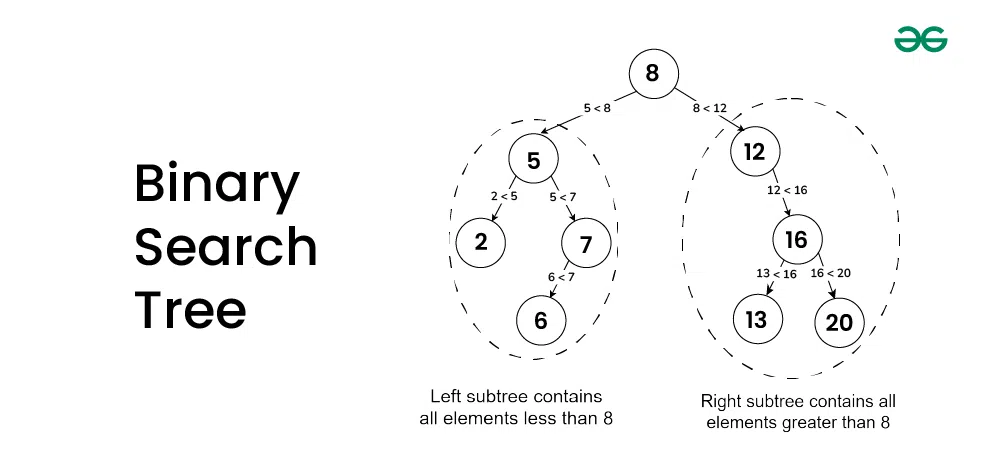
To get a dynamic overview of what a BST is and why its ordering is so important, let's watch a short video.
Binary Tree Part 1 | BST | Binary Search Tree - Data Structures & Algorithms Tutorials In Python #10
The following video from codebasics provides a clear, animated introduction to the concept of a Binary Search Tree (BST) and its properties.
Watch from 01:26 to 03:15. Focus on understanding the three rules that define a BST and how it differs from a regular binary tree.
2. Searching for a Value in a BST
The strict ordering of a BST makes searching incredibly fast. The process is similar to the binary search algorithm you might use on a sorted array. You start at the root and at each node, you make a simple decision:
- Is the target value equal to the current node's value? If yes, you've found it!
- Is the target value less than the current node's value? If yes, you only need to search in the left subtree.
- Is the target value greater than the current node's value? If yes, you only need to search in the right subtree.
You repeat this process, effectively eliminating half of the remaining tree at each step. This is what gives the BST its power. While searching a list could take time in the worst case (checking every element), searching a reasonably balanced BST takes time, which is exponentially faster for large datasets.
Binary Tree Part 1 | BST | Binary Search Tree - Data Structures & Algorithms Tutorials In Python #10
Let's watch the next segment of the same video, which explains the search logic and its efficiency.
Watch from 03:15 to 05:43. Pay close attention to how the search space is reduced at each step and why this leads to a search complexity of O(log n).
3. Inserting a Value into a BST
The process for inserting a new value is very similar to searching. You follow the same logic to find where the new value should be.
- Start at the root.
- Compare the new value with the current node's value.
- If the new value is less, move to the left child. If it's greater, move to the right child.
- Continue this until you reach a spot where the child node is
None. This empty spot is where you insert the new node, ensuring the BST properties are maintained.

The following short video segment will visualize this insertion process for you.
Binary Tree Part 1 | BST | Binary Search Tree - Data Structures & Algorithms Tutorials In Python #10
This clip from the codebasics video explains the logic for inserting a new element.
Watch from 05:43 to 06:38 to see how the search-like traversal finds the correct position for a new node.
4. Python Implementation
Now, let's put this theory into practice by building a Binary Search Tree in Python. We will create a class to represent the nodes and their connections.
The implementation will be recursive. Recursion is a natural fit for tree structures because a tree is a recursive data structure itself (a tree is a root node with two smaller trees as children).
Before we code, take a quick look at this page from Programiz. It provides clear, concise pseudocode for the search and insert operations, which will help solidify your understanding of the recursive logic.
Read the sections 'Search Operation' and 'Insert Operation'. Focus on the one-line algorithms/pseudocode provided for each. Don't worry about the C-like syntax in the diagrams; the logic is what's important.
Step-by-Step Code
We'll follow the class-based approach demonstrated in the videos. First, we define a BinarySearchTreeNode class. This class will hold the data and have pointers to its left and right children. The insert and search logic will be methods within this class.
Binary Tree Part 1 | BST | Binary Search Tree - Data Structures & Algorithms Tutorials In Python #10
The following video segments from codebasics walk through the Python implementation of the add_child (insert) and search methods. Watching this will prepare you for the complete code block below.
Watch from 09:47 to 13:34 for the insertion implementation, and from 19:10 to 22:03 for the search implementation. Follow how the recursive calls delegate the task to the left or right subtree.
Here is the complete Python code for our BinarySearchTreeNode class, including methods for inserting and searching. I've also added a helper method in_order_traversal that returns the elements of the tree in sorted order, which is useful for verifying our tree is built correctly.
class BinarySearchTreeNode:
    def __init__(self, data):
        self.data = data
        self.left = None
        self.right = None

    def insert(self, data):
        """Inserts a new node with the given data. Duplicates are ignored."""
        if self.data == data:
            return # Ignore duplicates

        if data < self.data:
            # Add data in the left subtree
            if self.left:
                self.left.insert(data) # Recursively call insert on the left child
            else:
                self.left = BinarySearchTreeNode(data) # If no left child, create a new node
        else:
            # Add data in the right subtree
            if self.right:
                self.right.insert(data) # Recursively call insert on the right child
            else:
                self.right = BinarySearchTreeNode(data) # If no right child, create a new node

    def search(self, val):
        """Searches for a value in the tree. Returns True if found, False otherwise."""
        if self.data == val:
            return True # Value is found at the current node

        if val < self.data:
            # Value might be in the left subtree
            if self.left:
                return self.left.search(val) # Recursively search the left subtree
            else:
                return False # No left subtree, so value is not here
        else:
            # Value might be in the right subtree
            if self.right:
                return self.right.search(val) # Recursively search the right subtree
            else:
                return False # No right subtree, so value is not here

    def in_order_traversal(self):
        """Returns a list of elements in sorted order."""
        elements = []
        # Visit left subtree
        if self.left:
            elements += self.left.in_order_traversal()

        # Visit base node
        elements.append(self.data)

        # Visit right subtree
        if self.right:
            elements += self.right.in_order_traversal()

        return elements

# Helper function to build a tree from a list of numbers
def build_tree(elements):
    if not elements:
        return None

    root = BinarySearchTreeNode(elements[0])
    for i in range(1, len(elements)):
        root.insert(elements[i])

    return root

# --- Let's test it out! ---
numbers = [15, 12, 7, 14, 27, 20, 88, 23]
number_tree = build_tree(numbers)

print("Tree elements in sorted order:", number_tree.in_order_traversal())

# Test the search method
print("Is 20 in the tree?", number_tree.search(20)) # Expected: True
print("Is 99 in the tree?", number_tree.search(99)) # Expected: False
Test your understanding!
Consider the tree we built with the numbers list: [15, 12, 7, 14, 27, 20, 88, 23].
- Trace the path the
search(23)method would take. List the nodes it visits in order. - What would the
in_order_traversalresult look like if you inserted the number13into thenumber_tree?
Show answer
-
The path for
search(23)would be:- Start at 15.
23 > 15, so go right. - Visit 27.
23 < 27, so go left. - Visit 20.
23 > 20, so go right. - Visit 23.
23 == 23, so returnTrue.
The nodes visited are: 15, 27, 20, 23.
- Start at 15.
-
Inserting
13would place it as the left child of14. Thein_order_traversalvisits the left subtree, then the node, then the right subtree. This process naturally produces a sorted list. The new sorted list would be:[7, 12, 13, 14, 15, 20, 23, 27, 88]
Conclusion
Congratulations! You have now learned about the Binary Search Tree and implemented its most fundamental operations. This is a significant step into the world of non-linear data structures.
Key Takeaways:
- A Binary Search Tree (BST) organizes data hierarchically, with every node's left subtree containing smaller values and its right subtree containing larger values.
- This structure allows for efficient search and insertion operations, typically with a time complexity of for a balanced tree.
- The logic for both search and insertion involves starting at the root and recursively traversing down the tree based on comparisons.
- In Python, a BST is commonly implemented with a
Nodeclass that contains the data and references toleftandrightchild nodes.
Preview of the Next Lesson:
We've seen how to build and search a tree. But what if we want to visit every single node in a systematic way? In the next lesson, we will explore tree traversal algorithms. You will learn about inorder, preorder, and postorder traversals, which are essential for tasks like printing all tree elements, saving a tree to a file, or creating a copy of a tree.