Hello! Welcome to your sixth lesson in the "Python for Data Science: Foundations" module.
In our last lesson, you learned how to make your programs interact with the real world by reading from and writing to files. You also learned how to make your code more robust by handling runtime errors with try...except blocks. These are essential skills for building reliable software.
Today, we'll explore how to leverage the work of countless other programmers. Instead of writing every single function from scratch, you can use pre-built packages of code called modules. This lesson focuses on the learning outcome: Import and use standard library modules like math and random. We'll see how to bring powerful, ready-to-use functionality into your programs with a single line of code.
1. What are Modules and Why Do We Use Them?
As your programs grow, you'll want to organize your code into logical, reusable parts. In Python, a module is simply a file containing Python code—functions, classes, and variables—that you can use in other programs.
Python comes with a huge collection of these modules, known as the Python Standard Library. It provides tools for a vast range of common tasks, from mathematical calculations to working with dates and times, so you don't have to "reinvent the wheel."
To understand the core purpose and benefits of using modules, let's start with a foundational reading.
How To Import Modules in Python 3
This article from DigitalOcean, titled 'How To Import Modules in Python 3', clearly defines what a module is and explains the key reasons for using them, such as reusability and organization.
Please read the section titled 'What are Python Modules?'. Focus on understanding the five primary purposes listed: code reusability, maintainability, organization, namespace isolation, and collaboration.
2. The import Statement: Your Gateway to Modules
To use the code from a module, you first need to bring it into your program's scope. This is done with the import statement. Let's see what happens when we try to use a function without importing its module first.
Imagine you want to find the square root of a number. You might guess there's a function called sqrt().
# This will cause an error!
result = sqrt(25)
print(result)
If you run this, Python will stop with a NameError: name 'sqrt' is not defined. Python doesn't know what sqrt is by default. The sqrt() function lives inside the math module.
To fix this, we must first import the math module. The most basic way to do this is:
import math

# Now, we can use functions from the module using 'module_name.function_name()'
result = math.sqrt(25)
print(result)
This will now correctly output 5.0. The math. prefix tells Python exactly where to find the sqrt function.
For a dynamic look at this process, the following video is very helpful.
#15 Python Tutorial for Beginners | Import Math Functions in Python
This video from Telusko, titled '#15 Python Tutorial for Beginners | Import Math Functions in Python', does an excellent job of demonstrating why the import statement is necessary by first showing the error and then showing the solution.
Watch the beginning of the video from 00:00 to 01:33. Notice the error that occurs when sqrt() is called directly and how import math solves the problem.
3. Exploring the math Module
The math module is your go-to for common mathematical operations beyond basic arithmetic. It contains a wide range of functions and a few useful constants.
Key math Functions and Constants
- Functions:
math.sqrt(),math.pow(x, y)(for ),math.ceil()(rounds up),math.floor()(rounds down),math.factorial(), and trigonometric functions likemath.sin(),math.cos(). - Constants:
math.pi(the number ) andmath.e(Euler's number).
To get a comprehensive overview of what this module offers, the following guide is an excellent resource.
Python Math Module Guide (22 Examples and 18 Functions)
The 'Python Math Module Guide' from Dataquest provides a clear, example-driven tour of the most important constants and functions in the math module.
Please read through the sections 'The math Module Constants' and 'The math Module Functions'. You don't need to memorize every function. Instead, focus on understanding the types of operations available (number functions, power/log, trigonometric) and how to use them with the math. prefix.
This table also serves as a great quick reference for some of the most common math functions.
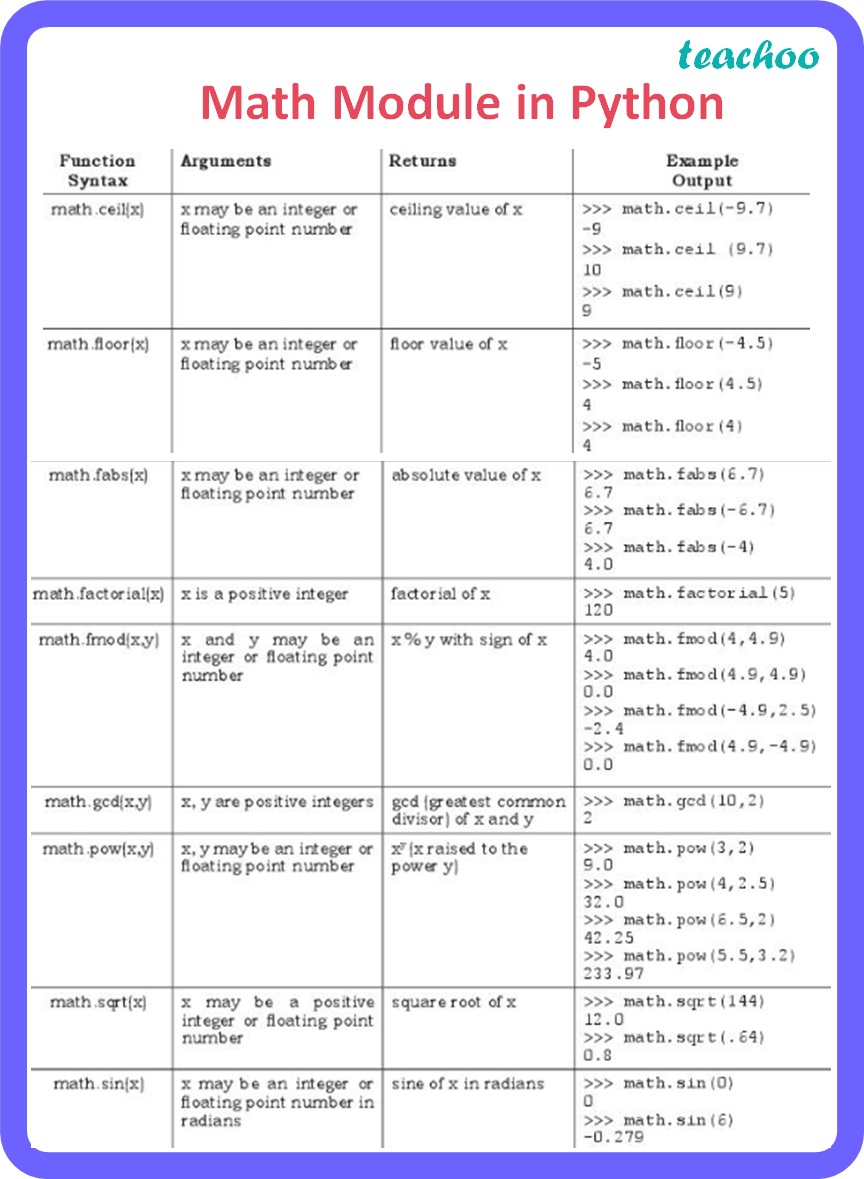
4. Exploring the random Module
Another incredibly useful standard library module is random. As you get deeper into data science, you will use it for everything from shuffling datasets for model training to simulating random processes.
Key random Functions
random.random(): Returns a random float between 0.0 and 1.0.random.randint(a, b): Returns a random integer betweenaandb(inclusive).random.choice(sequence): Returns a random element from a list, tuple, or string.
Let's see a practical demonstration.
Python Tutorial for Beginners 9: Import Modules and Exploring The Standard Library
Corey Schafer's tutorial provides a very clear and concise demonstration of importing and using several standard library modules, including random.
Please watch the segment from 14:31 to 15:21. It shows a simple, practical example of using random.choice() to pick a random item from a list.
Here's a quick reference table for the random module.

5. Different Ways to Import
Besides the basic import module_name syntax, Python offers a few other ways to import code, giving you more flexibility.
Importing Specific Functions: from ... import
If you only need a few specific items from a module, you can import them directly. This lets you use them without the module. prefix.
from math import sqrt, pi

# We can now use sqrt and pi directly
area = pi * (10**2)
hypotenuse = sqrt(3**2 + 4**2)

print(f"Area: {area}")
print(f"Hypotenuse: {hypotenuse}")
Advantage: More concise code.
Disadvantage: Can lead to confusion if you import functions with the same name from different modules.
Creating an Alias: import ... as
Sometimes module names are long, or you want to use a standard abbreviation. The as keyword lets you create a shorter alias.
import math as m

# 'm' is now an alias for 'math'
print(m.sqrt(81))
print(m.pi)
This is extremely common in data science. You will almost always see libraries like NumPy and Pandas imported with standard aliases: import numpy as np and import pandas as pd.
To solidify your understanding of these different import styles, let's return to the DigitalOcean article.
How To Import Modules in Python 3
This article explains the different import syntaxes clearly.
Please read the sections under 'Basic Importing Syntax': 'How to Use import module_name' (as a review). 'How to Use from module_name import function_name'. 'How to Use import module_name as alias'. Pay close attention to the section 'How to Import All Items with from module_name import *' and understand why it is strongly discouraged.
Test your understanding!
Write a short Python program that does the following:
- Imports the
randintfunction from therandommodule and thepowfunction from themathmodule. - Generates a random integer
basebetween 2 and 5. - Generates a random integer
exponentbetween 2 and 4. - Calculates
baseraised to the power ofexponentusing the importedpowfunction. - Prints the base, the exponent, and the result in a formatted string.
Show answer
# 1. Import the specific functions
from random import randint
from math import pow

# 2. Generate a random base
base = randint(2, 5)

# 3. Generate a random exponent
exponent = randint(2, 4)

# 4. Calculate the result
result = pow(base, exponent)

# 5. Print the output
print(f"Base: {base}, Exponent: {exponent}, Result: {result}")

# Example output could be: "Base: 3, Exponent: 4, Result: 81.0"
This solution correctly uses the from ... import ... syntax to bring only the necessary functions into the program's namespace, allowing them to be called directly.
Conclusion
Great job! You've taken a significant step from writing self-contained scripts to building programs that leverage the vast ecosystem of code available in Python.
Key Takeaways:
- A module is a file of Python code that can be brought into other programs.
- The Python Standard Library is a collection of built-in modules for common tasks.
- The
import module_namestatement makes a module's contents available, accessed viamodule_name.function_name(). - The
mathmodule provides functions and constants for mathematical calculations. - The
randommodule is used for generating random numbers and making random choices. - You can import specific functions using
from module import funcor create aliases withimport module as alias.
In our next lesson, we will build directly on this foundation. We will learn how to perform array and matrix operations using the NumPy library. NumPy is not part of the standard library; it's a third-party library that is the absolute cornerstone of numerical and scientific computing in Python. The import aliasing you learned today (import numpy as np) will be put to immediate use.