Hello! Welcome to your fifth lesson in the "Python for Data Science: Foundations" module.
In our last lesson, you learned about Python's core data structures: lists, tuples, sets, and dictionaries. You now have the tools to organize data within your program. But in data science, data rarely starts inside your code. It lives in external files—like CSVs, text files, or logs. To analyze it, you first need to bring it into your program.
This lesson directly addresses that need and covers the learning outcome: Read from and write to text files, and handle runtime errors using try-except blocks. We'll explore how to interact with the file system using Python and, just as importantly, how to write robust code that anticipates and gracefully handles problems like a missing file.
1. Interacting with Files in Python
The fundamental process of working with files involves three steps:
- Opening the file, specifying what you intend to do (read, write, etc.).
- Performing the read or write operations.
- Closing the file to release it and save your changes.
Python provides built-in tools that make this process straightforward and safe.
1.1. Opening Files and Understanding Modes
The open() function is your entry point to file handling. It takes the file's path and an optional mode string that tells Python how you want to interact with the file.
To get a clear understanding of these modes and the basic functions for reading and writing, let's turn to a comprehensive article.
This article from Codecademy provides an excellent foundation for file handling. We'll read through several sections to understand the core mechanics.
Please read the following sections: 'Understanding file modes in Python': Focus on the purpose of 'r', 'w', and 'a'. 'How to open a text file in Python': This introduces the open() function. 'How to read from a text file in Python': Note the difference between read() and readline(). 'How to write to a text file in Python': Understand how write() works. 'Difference between ‘w’ and ‘a’': This is a crucial distinction to avoid accidentally deleting data.
As you've just read, the mode you choose is critical:
'r'(Read): To read data from an existing file. This is the default.'w'(Write): To write data to a file. Warning: This will completely erase any existing content in the file.'a'(Append): To add new data to the end of a file without erasing its current content.
1.2. The Best Practice: The with Statement
Manually calling file.close() works, but it has a flaw: if an error occurs while the file is open, the close() line might never be reached, leaving the file open. The modern, and strongly recommended, way to handle files is with the with statement.
The with statement creates a temporary context, and it automatically closes the file for you when you are done, even if errors occur.
Let's see an example of reading a file line-by-line, which is a very common task:
# Assume we have a file 'data.txt' with the following content:
# Line 1
# Line 2
# Line 3

lines_from_file = [] # An empty list to store the lines

with open('data.txt', 'r') as f:
    for line in f:
        # line includes the newline character '\n', we can remove it with .strip()
        lines_from_file.append(line.strip())

print(lines_from_file)
# Expected Output: ['Line 1', 'Line 2', 'Line 3']
Notice how we don't need f.close(). The with block handles it.
Now, let's see how to write data from a list to a file:
student_names = ['Rohan', 'Priya', 'Amit']

with open('students.txt', 'w') as f:
    for name in student_names:
        # We must add the newline character '\n' manually if we want each name on a new line
        f.write(name + '\n')

# After running this, 'students.txt' will contain:
# Rohan
# Priya
# Amit
2. Handling Runtime Errors
What happens if you try to read a file that doesn’t exist? Your program crashes with a FileNotFoundError. For a user, this is a poor experience. We need a way to catch these errors and handle them gracefully. This is called exception handling.
Python uses a try...except block for this.
- The code that might cause an error goes inside the
tryblock. - If an error (an "exception") occurs, Python jumps to the
exceptblock and runs that code, instead of crashing.
To get a solid grasp of this crucial concept, let's watch a tutorial from an expert.
Python Tutorial: Using Try/Except Blocks for Error Handling
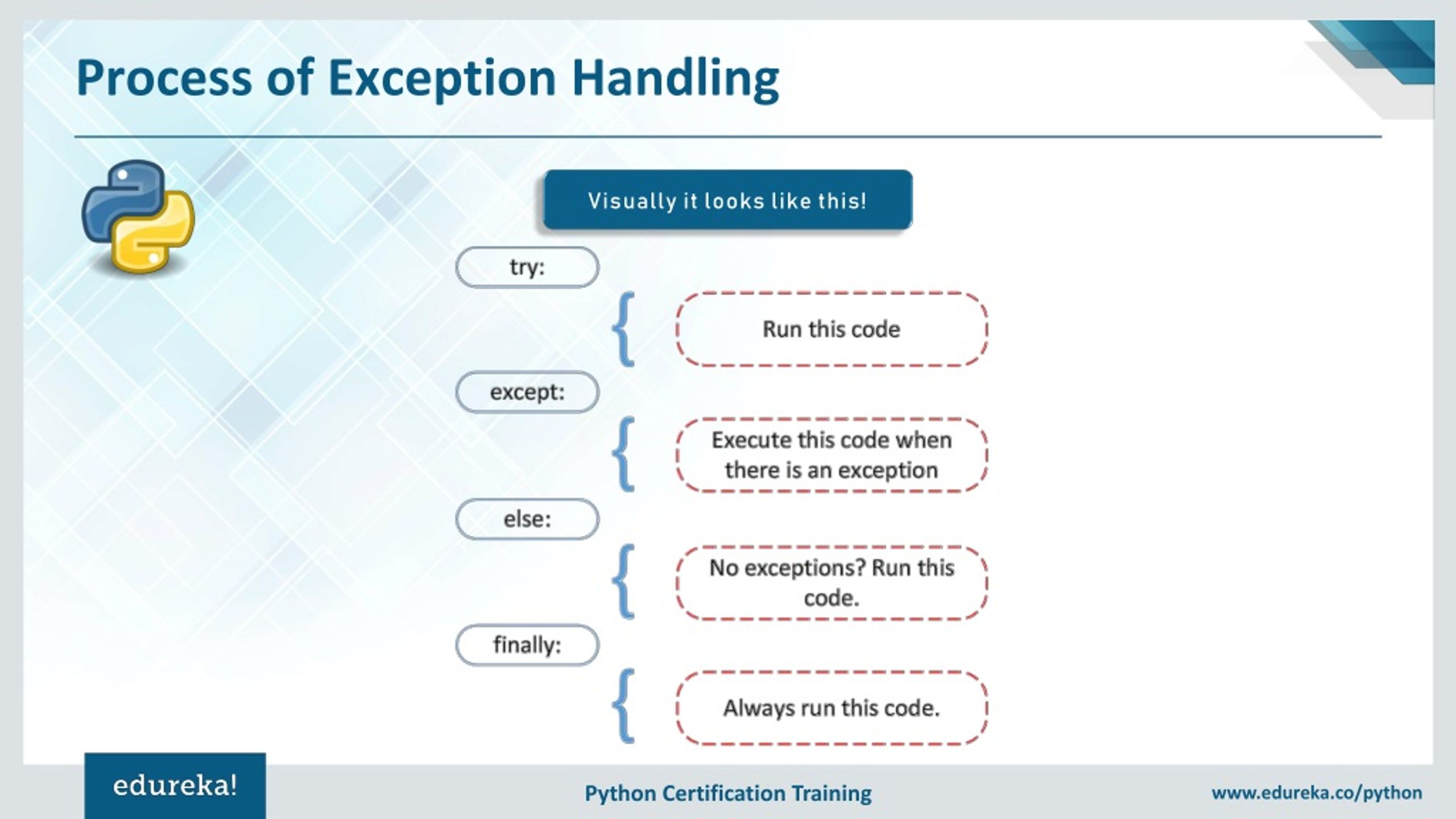
Corey Schafer's tutorials are famous for their clarity. This video will walk you through the logic of try-except and introduce two more useful clauses: else and finally.
Please watch the following segments: Basic try-except (01:30 - 02:18): See how it prevents a crash. Specific Exceptions (02:18 - 04:53): Understand why it's better to catch specific errors like FileNotFoundError instead of a general Exception. The else Block (05:39 - 07:09): Learn about code that runs only when no error occurs. The finally Block (07:09 - 08:35): See how to run 'cleanup' code that always executes.
This diagram provides a great visual summary of the entire flow:
3. Combining File Handling and Error Handling
Now, let's put everything together. The most robust way to read a file is to wrap your with statement in a try...except block.
file_path = 'user_data.txt'

try:
    with open(file_path, 'r') as f:
        content = f.read()
    # The 'else' block is a great place for code that should only run on success
    print("File read successfully!")
    print("--- File Content ---")
    print(content)
    print("--------------------")

except FileNotFoundError:
    # Handle the specific case where the file does not exist
    print(f"Error: The file at '{file_path}' was not found.")
    print("Please make sure the file exists and the path is correct.")

except PermissionError:
    # Handle the case where we don't have permission to read the file
    print(f"Error: You do not have permission to read the file at '{file_path}'.")

except Exception as e:
    # Catch any other unexpected errors
    print(f"An unexpected error occurred: {e}")

finally:
    # This code runs whether the file was read successfully or an error occurred
    print("\nFile reading process finished.")
This pattern is extremely powerful. It attempts the primary task (reading the file), provides specific, helpful messages for common problems (FileNotFoundError), and has a fallback for any other issue, all while ensuring the program continues to run.
Test your understanding!
You are writing a function log_message(message) that should append a given message to a file named app.log. The function must not crash if the file cannot be written to (e.g., due to permissions).
What would the code for this function look like? Use with and try...except.
Show answer
Here is a robust implementation:
def log_message(message):
    """Appends a message to 'app.log' and handles potential errors."""
    try:
        # Open the file in append mode ('a')
        with open('app.log', 'a') as log_file:
            log_file.write(message + '\n')
            print("Message logged successfully.")

    except PermissionError:
        print("Error: Could not write to log file due to a permission issue.")

    except Exception as e:
        print(f"An unexpected error occurred while logging: {e}")

# Example usage:
log_message("Application started.")
# This will try to append "Application started." to app.log
Key points in this solution:
- It uses
'a'for append mode, so it adds to the log without deleting old entries. - It uses the
withstatement for safe file handling. - The
try...exceptblock specifically catchesPermissionErrorand prints a helpful message instead of crashing.
Conclusion
Excellent work! Today you've gained two of the most practical skills in programming: reading and writing data to files, and making your code resilient to errors. These abilities bridge the gap between your Python program and the outside world of data.
Key Takeaways:
- Always use the
with open(...) as ...:syntax for file handling as it guarantees files are closed properly. - Be deliberate about your file mode:
'r'for reading,'w'for overwriting, and'a'for appending. - Wrap code that might fail (like file operations or user input processing) in a
try...exceptblock to prevent your program from crashing. - Handle specific exceptions (e.g.,
FileNotFoundError) whenever possible to provide more precise error feedback. - The
elseblock runs on success, and thefinallyblock runs no matter what.
In our next lesson, we will explore another way to expand your program's capabilities by learning how to import and use standard library modules like math and random. This will allow you to leverage powerful, pre-written code without having to write it all yourself.