Hello! Welcome to your fourth lesson in the "Python for Data Science: Foundations" module.
In our last lesson, you learned how to create modular code using functions, which accept information through parameters and can return results. This is a fundamental skill for writing clean and reusable code. Now, we need to explore what kind of information we can work with. So far, we've mainly dealt with single values like numbers and strings. Data science, however, is all about working with collections of data.
Today's lesson addresses the learning outcome: Work with Python's core data structures: lists, tuples, sets, and dictionaries. These are the essential containers you'll use to store and organize data in almost every Python program you write. Understanding their unique characteristics is crucial for writing efficient and effective code.
1. Introduction to Data Structures
A data structure is a way of organizing and storing data in a computer so that it can be accessed and modified efficiently. Python provides several powerful, built-in data structures. We will focus on the four most important ones:
- Lists: Ordered, changeable collections. Perfect for keeping items in a sequence.
- Tuples: Ordered, unchangeable collections. Used for data that should not be modified.
- Sets: Unordered collections of unique items. Great for membership testing and removing duplicates.
- Dictionaries: Unordered collections of key-value pairs. Ideal for lookups.
Let's dive into each one.
2. Sequence Types: Lists and Tuples
Lists and tuples are both sequence types, meaning their items are stored in a specific order, and you can access them using an index (e.g., the first item is at index 0, the second at index 1, and so on).
2.1. Lists: The All-Rounder
Lists are arguably the most common data structure in Python. They are defined using square brackets [] and their contents can be changed after creation, making them mutable.
🐍 Python for AI: Week 3 — Lists, Tuples, Sets, and ...
To start, let's get a solid overview of what you can do with lists. This article, 'Python for AI: Week 3', provides a clear and concise guide to creating, accessing, modifying, and working with lists.
Read 'Section 1. Lists in Python' from '1-1. Creating Lists' through '1-5. List Comprehension'. Pay close attention to the syntax for each operation (indexing, slicing, and methods like append() and remove()).
Here is a quick summary of the key list operations:
# Creating a list of numbers for a data sample
sample_data = [10.2, 11.5, 9.8, 11.1, 10.5]

# Accessing an element by index
first_reading = sample_data[0] # Result: 10.2

# Slicing to get a sub-list
middle_readings = sample_data[1:4] # Result: [11.5, 9.8, 11.1]

# Modifying an element (because lists are mutable)
sample_data[2] = 9.9
# sample_data is now [10.2, 11.5, 9.9, 11.1, 10.5]

# Adding an element to the end
sample_data.append(10.8)
# sample_data is now [10.2, 11.5, 9.9, 11.1, 10.5, 10.8]

print(f"Final data sample: {sample_data}")
2.2. Tuples: The Immutable Sibling
Tuples are very similar to lists, but with one critical difference: they are immutable. Once a tuple is created, its contents cannot be changed. They are defined using parentheses ().
This immutability might seem like a limitation, but it's a powerful feature. It guarantees that the data within the tuple remains constant, which is useful for things like coordinates, configuration settings, or as keys in a dictionary (which we'll see later).
To understand the core difference between mutable lists and immutable tuples, let's watch a video that explains this concept visually.
Understanding Objects - Lists, Tuples, Sets, Dictionaries | Understanding Python Core Concepts
This video from Cododev does an excellent job explaining the concept of mutability vs. immutability. It demonstrates what happens in memory when you try to 'change' a tuple versus changing a list.
Watch from 00:21:37 to 00:26:50. Focus on the distinction between changing a list's data in-place versus creating a new tuple when you perform an operation like concatenation.
As the video explained, attempting to change an element in a tuple will result in a TypeError.
# A tuple of RGB color values
red_color = (255, 0, 0)

# You can access elements just like a list
print(f"The green value is: {red_color[1]}") # Output: The green value is: 0

# But you CANNOT change an element
# The following line will cause a TypeError:
# red_color[1] = 100
Test your understanding!
Consider the following code snippet:
my_list = [1, 2, 3]
my_tuple = (1, 2, 3)

# Operation 1
my_list.append(4)

# Operation 2
my_tuple = my_tuple + (4,)

# Operation 3
my_list[0] = 100
Which of these operations will cause an error? Why or why not? What are the final values of my_list and my_tuple?
Show answer
None of the operations will cause an error.
- Operation 1 is valid because lists are mutable, so we can append items to them.
- Operation 2 is valid because it doesn't change the original tuple. Instead, it creates a new tuple by concatenating the old one with
(4,)and reassigns themy_tuplevariable to point to this new tuple. - Operation 3 is valid because lists are mutable, so we can change elements at a specific index.
The final values will be:
my_list:[100, 2, 3, 4]my_tuple:(1, 2, 3, 4)
3. Hash-Based Types: Sets and Dictionaries
Next, we'll look at sets and dictionaries. Unlike lists and tuples, these data structures are generally unordered. Their real power comes from how they store and retrieve data using a technique called hashing, which makes certain operations, like checking if an item exists, incredibly fast.
3.1. Sets: For Uniqueness and Math
A set is an unordered collection of unique items. This makes them perfect for two main jobs:
- Removing duplicate entries from a collection.
- Performing mathematical set operations (union, intersection, difference).
Sets are created with curly braces {} or the set() function.
# Create a set from a list with duplicates
raw_tags = ['python', 'data', 'ai', 'python', 'ml', 'ai']
unique_tags = set(raw_tags)
print(f"Unique tags: {unique_tags}") # Output: {'data', 'ml', 'python', 'ai'} (order may vary)

# Set operations
set_a = {1, 2, 3, 4}
set_b = {3, 4, 5, 6}

# Union: items in either set
print(f"Union: {set_a | set_b}") # Output: {1, 2, 3, 4, 5, 6}

# Intersection: items in both sets
print(f"Intersection: {set_a & set_b}") # Output: {3, 4}
To be included in a set, an item must be hashable, which essentially means it must be immutable. This is why you can put a tuple in a set, but you cannot put a list in a set. Let's explore this concept.
Understanding Objects - Lists, Tuples, Sets, Dictionaries | Understanding Python Core Concepts
This next segment from the same Cododev video explains sets and the crucial concept of hashability. It clearly demonstrates why some data types can be put into a set while others can't.
Watch from 00:52:13 to 01:02:45. Focus on what hashability means and the requirement that set elements must be immutable.
3.2. Dictionaries: For Key-Value Lookups
Dictionaries are the workhorse for structured data in Python. They store data in key-value pairs. Like a real-world dictionary, you look up a "word" (the key) to find its "definition" (the value).
- Keys must be unique and immutable (i.e., hashable), like strings, numbers, or tuples.
- Values can be anything: numbers, strings, lists, or even other dictionaries.
Dictionaries are created with curly braces {} in the form {key: value}.
Understanding Objects - Lists, Tuples, Sets, Dictionaries | Understanding Python Core Concepts
Building directly on the concept of hashable keys, this final video clip explains how dictionaries work. It covers their structure, how to access data, and how to iterate through them.
Watch from 01:07:26 to 01:14:40. Pay attention to how dictionaries use hashable keys for fast lookups and the different ways to access keys, values, and items.
Here's a practical example of a dictionary:
# A dictionary representing a data record for a student
student_record = {
    "id": 101,
    "name": "Rohan",
    "courses": ["Physics", "Math", "Programming"],
    "is_active": True
}

# Accessing a value by its key
print(f"Student Name: {student_record['name']}") # Output: Student Name: Rohan

# Adding a new key-value pair
student_record['gpa'] = 8.5
print(f"Record with GPA: {student_record}")

# Iterating through keys and values
print("\nStudent Details:")
for key, value in student_record.items():
    print(f"- {key}: {value}")
4. Summary: Choosing the Right Data Structure
You now have four powerful tools. The key is knowing which one to use for a given task. This table provides a quick visual summary.
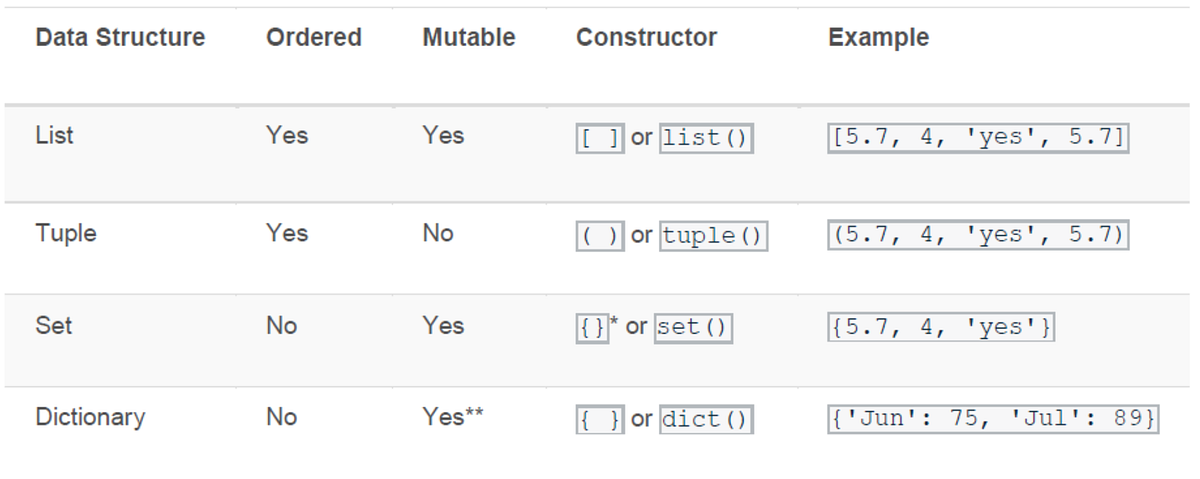
Here’s a simple guide:
- Need an ordered collection that you can modify? Use a List.
- Need an ordered collection that should never change? Use a Tuple.
- Need to store unique items and/or perform membership tests? Use a Set.
- Need to store structured data as key-value pairs for fast lookups? Use a Dictionary.
Conclusion
Great job! You've just learned about the four fundamental data structures in Python. Mastering lists, tuples, sets, and dictionaries is a huge step forward in your journey. You'll find yourself using them constantly to organize the data you'll be analyzing and the models you'll be building.
Key Takeaways:
- Lists are ordered and mutable collections, defined with
[]. - Tuples are ordered and immutable collections, defined with
(). - Sets are unordered and mutable collections of unique, hashable items, defined with
{}orset(). - Dictionaries store data in key-value pairs, where keys must be unique and hashable. They are defined with
{key: value}. - The choice of data structure depends on whether you need order, mutability, uniqueness, or key-value lookups.
In our next lesson, we will focus on how to read from and write to text files. You'll see how we can take data from an external file and load it into one of these data structures (like a list of lines or a list of dictionaries) to start working with it.