Welcome to our fourth lesson in the Python Programming Fundamentals module. In our previous session, you became adept at using loops to automate repetitive tasks, such as screening a series of patient temperatures or searching through clinical notes. We used lists as the sequences for our loops, but we haven't yet explored how to fully manage these collections of data.
Today, we will dive into two of Python's most essential data structures: lists and dictionaries. These are the primary tools you'll use to store, organize, and manage the structured data that is central to data science. For instance, you might use a list to track a patient's daily blood sugar readings over a month, and a dictionary to hold all the demographic and clinical details for a single patient record.
By the end of this lesson, you will be able to create and manipulate both lists and dictionaries, giving you the power to handle collections of data effectively in your Python programs.
1. Lists: The All-Purpose Ordered Collection
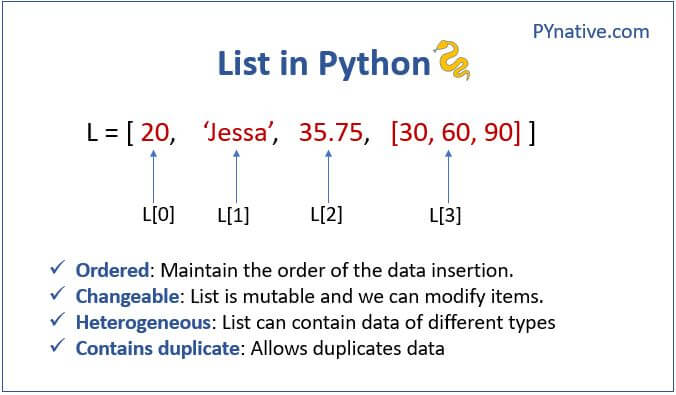
A list in Python is an ordered, changeable collection of items. This means the items have a defined order that does not change, and you can add, remove, or change items after the list has been created. They are incredibly versatile and are defined using square brackets [].
The image below gives a quick overview of a list's key characteristics.
A common use case in a clinical setting is recording a series of measurements, such as a patient's hourly heart rate.
# Create a new file in PyCharm called 'lesson4.py'
# A list of hourly heart rate measurements (in bpm)
heart_rates = [72, 75, 71, 78, 80, 79, 74]
Creating, Accessing, and Slicing Lists
Once you have a list, you'll need to know how to retrieve data from it. You can access a single item using its index (its position in the list) or a range of items using slicing.
The following video from Corey Schafer's YouTube channel provides a clear introduction to creating lists, accessing elements by their index, and getting the length of a list.
Python Tutorial for Beginners 4: Lists, Tuples, and Sets
This video covers the basics of creating and interacting with lists.
Please watch the segment from creating a list. Pay close attention to how zero-based indexing works (the first item is at index 0) and how negative indexing can be used to access items from the end of the list.
As the video showed, you can grab the first heart rate with heart_rates[0] or the last one with heart_rates[-1].
Often, you'll need a subset of your data, not just a single value. For example, you might want the first three readings of the day. This is done with slicing. Let's return to the same video to see how it works.
Python Tutorial for Beginners 4: Lists, Tuples, and Sets
This next segment explains how to extract a portion, or "slice," of a list.
Watch from this section on slicing. Note the start:stop syntax and that the stop index is not included in the result.
So, to get the first three heart rate measurements, you would write: heart_rates[0:3].
Modifying Lists
Because lists are mutable (changeable), you'll often need to modify them. You might add a new measurement, remove an erroneous one, or update a value. Python provides several built-in functions, called methods, to do this.
Imagine you're managing a patient's medication list:
medications = ['Lisinopril', 'Metformin']
How would you add a new prescription like 'Atorvastatin'? Or remove 'Metformin' if it's discontinued? The next video segment demonstrates the most common methods for these tasks.
Python Tutorial for Beginners 4: Lists, Tuples, and Sets
This part of the video covers the essential methods for changing a list's contents.
Watch the segment on modifying lists. Focus on the difference between: .append(): Adds an item to the end. .insert(): Adds an item at a specific index. .remove(): Removes the first occurrence of a specific value. .pop(): Removes an item at a specific index (or the last item by default) and returns it.
Let's practice this. Add the following to your lesson4.py file and observe the output.
# Add this code to your 'lesson4.py' file
medications = ['Lisinopril', 'Metformin']
print(f"Initial list: {medications}")


# Add 'Atorvastatin' to the end of the list
medications.append('Atorvastatin')
print(f"After append: {medications}")


# The patient is taken off Metformin
medications.remove('Metformin')
print(f"After remove: {medications}")
Sorting and Other Useful Functions
For numerical lists like our heart_rates example, you'll often want to perform calculations or sort the data. Python makes this straightforward.
Python Tutorial for Beginners 4: Lists, Tuples, and Sets
These final segments on lists show how to reorder them and perform simple calculations.
First, watch the section on sorting. Notice the difference between .sort(), which modifies the list in-place, and sorted(), which returns a new, sorted list. Then, watch the overview of built-in functions like min(), max(), and sum().
Let's apply this to our heart_rates list to find the minimum, maximum, and average heart rate.
# Add this code to your 'lesson4.py' file
heart_rates = [72, 75, 71, 78, 80, 79, 74]


# Find the highest and lowest readings
min_hr = min(heart_rates)
max_hr = max(heart_rates)
print(f"Heart rate ranged from {min_hr} to {max_hr} bpm.")


# Calculate the average heart rate
# sum() adds up all items, len() gets the number of items
average_hr = sum(heart_rates) / len(heart_rates)
print(f"Average heart rate: {average_hr:.1f} bpm.")
2. Dictionaries: Labeled Data in Key-Value Pairs
While lists are ordered sequences, dictionaries are collections of key-value pairs. Think of a medical chart: you don't just have a list of values; you have labeled data like "Name: John Doe," "Age: 58," "Blood Type: O+." Dictionaries allow you to store data in this exact format. They are defined with curly braces {}.
The article "Python Data Types: A Deep Dive" provides an excellent healthcare-related example.
Python Data Types: A Deep Dive
This article introduces Python's collection types with a healthcare focus.
Read the section from Working with Python Collections. Pay close attention to the patient_record dictionary example, as it perfectly illustrates how dictionaries map labels (keys) to data (values).
Creating and Modifying Dictionaries
Dictionaries follow a similar pattern of creation and modification as lists, but instead of using numerical indices, you use the keys you've defined.
The following video provides a comprehensive guide to creating, reading, updating, and deleting dictionary entries. The presenter uses the acronym CRUD (Create, Read, Update, Delete), which is a helpful mental framework for learning to work with any new data structure.
Python for Data Science - Variables, Lists and Dictionaries
This video by Nicholas Renotte walks through the complete lifecycle of managing a dictionary.
Watch the segment on dictionaries. Focus on the syntax for: Creating a dictionary. Reading a value using its key (e.g., my_dict['key']). Updating an existing value. Adding a new key-value pair. Deleting a pair using del.
Let's put this into practice with a patient record.
# Add this code to your 'lesson4.py' file


# Create: A dictionary representing a patient's lab results
lab_results = {
    'patient_id': 'P-12345',
    'test_type': 'CBC',
    'hemoglobin': 14.5, # g/dL
    'wbc_count': 7.8,   # x10^9/L
}
print(f"Original results: {lab_results}")


# Read: Get the hemoglobin value
hemo_val = lab_results['hemoglobin']
print(f"Hemoglobin value: {hemo_val} g/dL")


# Update: Correct an existing value
lab_results['wbc_count'] = 8.1
print(f"Updated results: {lab_results}")


# Add: Add a new result to the record
lab_results['platelet_count'] = 250 # x10^9/L
print(f"After adding platelets: {lab_results}")


# Delete: Remove an unnecessary key-value pair
del lab_results['test_type']
print(f"Final results: {lab_results}")
3. Lists vs. Dictionaries: When to Use Which?
Choosing the right data structure is a key programming skill. This summary table provides a clear comparison.
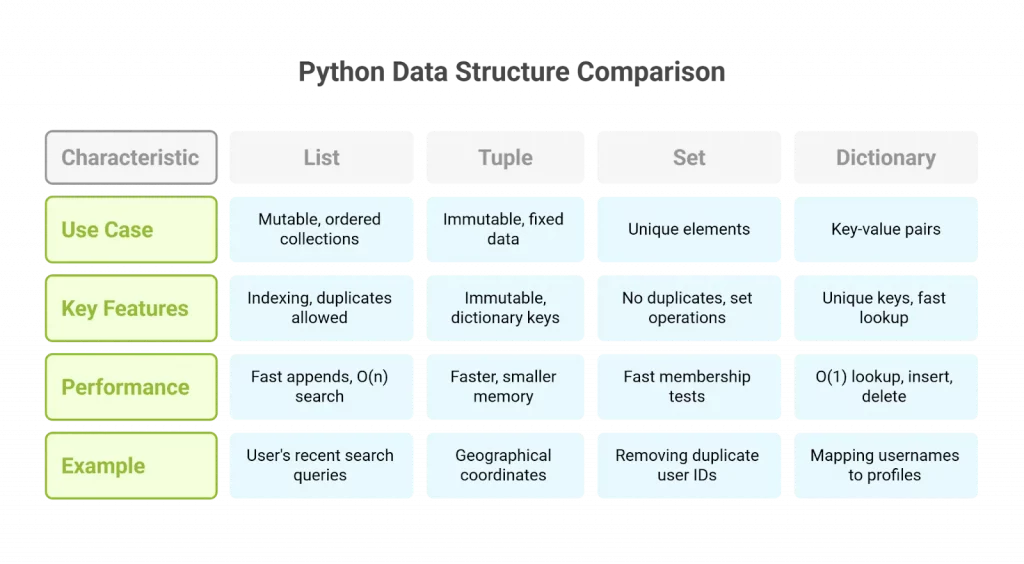
To summarize:
- Use a List when the order of items is important and you want to access them by their position (e.g., a time-series of vital signs, a sequence of patient visit dates).
- Use a Dictionary when you need to store structured information where each value has a unique label or identifier (e.g., a single patient's demographic data, a mapping of drug names to their prescribed dosages).
4. Practical Exercise: Managing a Patient Cohort
A very common pattern in data analysis is a list of dictionaries. This structure is ideal for representing a cohort of patients, where each patient is a dictionary of their own data, and the cohort is a list of these dictionaries.
Your task is to perform a few simple management operations on the patient_cohort list below. Copy this code into your lesson4.py file and fill in the missing parts.
# --- Exercise Start ---
patient_cohort = [
    {'id': 'A101', 'age': 65, 'diagnosis': 'Hypertension'},
    {'id': 'B202', 'age': 48, 'diagnosis': 'Diabetes'},
    {'id': 'C303', 'age': 72, 'diagnosis': 'Hypertension'}
]


# Task 1: A new patient is admitted. Add their record to the cohort.
new_patient = {'id': 'D404', 'age': 55, 'diagnosis': 'Asthma'}


# YOUR CODE HERE: Use the .append() method to add new_patient to the patient_cohort list.


# Task 2: Use a loop to find the diagnosis for patient 'C303' and print it.
target_id = 'C303'


# YOUR CODE HERE: Write a 'for' loop that iterates through each 'patient' in 'patient_cohort'.
# Inside the loop, use an 'if' statement to check if patient['id'] matches target_id.
# If it matches, print the patient's diagnosis.


# Task 3: Use a loop to create a new list containing the IDs of all patients with 'Hypertension'.
hypertensive_patients_ids = []


# YOUR CODE HERE: Write a 'for' loop to iterate through patient_cohort.
# If a patient's diagnosis is 'Hypertension', append their 'id' to the hypertensive_patients_ids list.


# --- Verification (don't modify) ---
print("\n--- Verification ---")
print(f"Cohort after adding new patient: {patient_cohort}")


# Expected: ... 'id': 'D404' ... should be at the end.
print(f"IDs of patients with Hypertension: {hypertensive_patients_ids}")


# Expected: ['A101', 'C303']
# --- Exercise End ---
Once you've written your code, run the file to see if your output matches the expected results. You can find the solution below to check your work.
Click to see the solution
# --- Solution ---
patient_cohort = [
    {'id': 'A101', 'age': 65, 'diagnosis': 'Hypertension'},
    {'id': 'B202', 'age': 48, 'diagnosis': 'Diabetes'},
    {'id': 'C303', 'age': 72, 'diagnosis': 'Hypertension'}
]


# Task 1: A new patient is admitted. Add their record to the cohort.
new_patient = {'id': 'D404', 'age': 55, 'diagnosis': 'Asthma'}
patient_cohort.append(new_patient)


# Task 2: Use a loop to find the diagnosis for patient 'C303' and print it.
target_id = 'C303'
for patient in patient_cohort:
    if patient['id'] == target_id:
        print(f"Diagnosis for patient {target_id}: {patient['diagnosis']}")


# Task 3: Use a loop to create a new list containing the IDs of all patients with 'Hypertension'.
hypertensive_patients_ids = []
for patient in patient_cohort:
    if patient['diagnosis'] == 'Hypertension':
        hypertensive_patients_ids.append(patient['id'])


# --- Verification ---
print("\n--- Verification ---")
print(f"Cohort after adding new patient: {patient_cohort}")
print(f"IDs of patients with Hypertension: {hypertensive_patients_ids}")
Conclusion
You have now mastered two fundamental data structures in Python that are essential for any data-related work.
Here are the key takeaways from today's lesson:
- Lists are ordered, mutable collections accessed by a numerical index. They are perfect for sequences of data like time-series measurements.
- Dictionaries are collections of key-value pairs, accessed by a custom key. They are ideal for storing structured records with named fields, like a patient chart.
- You can create, read, update, and delete items in both lists and dictionaries using a straightforward set of commands and methods.
- Combining these structures, such as a list of dictionaries, allows you to represent complex, real-world datasets like a patient cohort.
In our next lesson, we will learn how to define and use functions. Functions will allow us to bundle our code—like the logic you wrote to find hypertensive patients—into reusable, named blocks. This is a critical step toward writing clean, efficient, and scalable programs.