Hello! In our last lesson, we worked with lists and dictionaries, culminating in an exercise where you wrote code to filter a patient cohort. You probably noticed that if you needed to find hypertensive patients multiple times in a program, you would have to copy and paste that for loop and if statement. This can become repetitive and error-prone.
Today, we'll address this by learning about functions. A function is a reusable, named block of code that performs a specific task. By packaging logic into functions, we can make our code more organized, readable, and efficient. Think of it like establishing a clinical protocol: you define the steps once, give it a name, and then anyone can "call" that protocol to perform the task consistently.
Our goal for this lesson is to learn how to define and call functions with parameters and return values. You'll learn to pass data into your functions and get results back, turning them into powerful tools for your data analysis work.
1. Why Write Functions?
Before diving into the syntax, it's important to understand the motivation. Functions allow you to write a piece of logic once and reuse it as many times as you need. This not only saves typing but also makes your code easier to debug and maintain. If you find a bug or need to update the logic, you only have to change it in one place—the function definition.
The article "Writing Functions in Python" by Jessica Miles provides a great overview of these benefits.
Writing Functions in Python— A Beginner's Guide
This article explains the core advantages of using functions in your code and introduces a practical mindset for developing them.
Please read the first two sections, Why Functions Matter and Start Simple, Scale Up. As you read, think about the patient cohort filtering code from our last lesson and how packaging it into a function would help avoid errors and make it easier to reuse.
2. Defining and Calling Your First Function
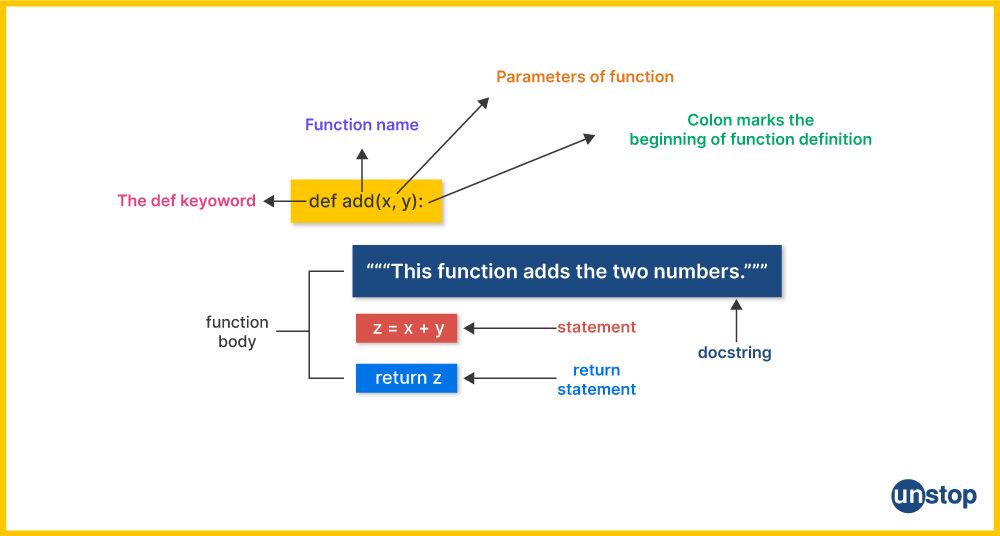
Defining a function in Python has a specific structure. You use the def keyword, followed by a name for your function, a set of parentheses (), and a colon :. The code that belongs to the function is indented underneath this line.
This image breaks down the components of a basic function definition.
Let's see this in action. The following video by Programming with Mosh provides a very clear walkthrough of defining and calling a simple function.
Python Functions | Python Tutorial for Absolute Beginners #1
This video introduces the basic syntax for creating and using functions.
Please watch from the beginning until the end of the first example. This will cover the def keyword, naming conventions, and how to execute, or "call," the function you've created.
Let's try this ourselves. Create a new file in PyCharm called lesson5.py and add the following code:
# Create a new file in PyCharm called 'lesson5.py'


# 1. Define the function
def print_welcome_message():
    """Prints a standard welcome message for a clinical data app."""
    print("Welcome to the Clinical Data Assistant.")
    print("Please select an option to continue.")


# 2. Call the function
print("--- Program Start ---")
print_welcome_message()
print("--- Program End ---")
When you run this file, you'll see the welcome message printed between the "start" and "end" lines. We've created a reusable block of code and called it by its name.
3. Passing Information with Parameters
Our first function is useful, but limited. It does the same thing every time. To make functions truly powerful, we need to pass information into them. We do this using parameters.
- Parameters are the variables you list inside the parentheses in the function definition. They act as placeholders for the data the function needs.
- Arguments are the actual values you provide for those parameters when you call the function.
This distinction is important but can be tricky at first. Mosh explains it very clearly.
Python Functions | Python Tutorial for Absolute Beginners #1
This segment explains the difference between parameters and arguments.
Watch the section from Parameters vs. Arguments. Pay close attention to how the values passed in the function call (arguments) are assigned to the placeholder variables in the function definition (parameters).
Let's apply this to a healthcare context. A common calculation is the Body Mass Index (BMI). A function to calculate BMI would need two inputs: weight and height.
# Add this code to your lesson5.py file

def calculate_bmi_and_print(weight_kg, height_m):
    """Calculates BMI and prints the result."""
    if height_m <= 0:
        print("Error: Height must be greater than zero.")
        return # This exits the function early

    bmi = weight_kg / (height_m ** 2)
    print(f"Patient's BMI is: {bmi:.2f}")


# Call the function for two different patients (passing arguments)
print("\n--- BMI Calculations ---")
calculate_bmi_and_print(75, 1.8)    # Patient 1: 75kg, 1.8m
calculate_bmi_and_print(90, 1.75)   # Patient 2: 90kg, 1.75m
Here, weight_kg and height_m are the parameters. When we call the function, 75 and 1.8 are the arguments we pass for the first patient.
4. Getting Results with the return Statement
Our calculate_bmi_and_print function performs an action (it prints to the console), but what if we want to use the calculated BMI value later in our program—for example, to save it to a patient record or use it in another calculation? For this, we need the function to return a value.
Functions that return a value are generally more flexible and reusable. The return keyword is used to send a result back to wherever the function was called.
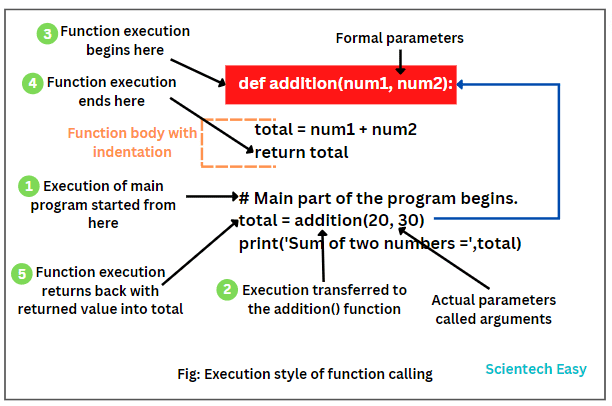
The following video visually traces the entire process of calling a function, passing arguments, and returning a value. It's a great way to build a mental model of how this works.
Python Functions: Visually Explained
This video from Visually Explained traces the execution flow of a function call.
Watch the segments on function execution and, most importantly, the section explaining the return statement. Notice how the calculated value is sent back and captured in a variable.
The image below also illustrates this flow clearly.
Returning vs. Printing
A very common point of confusion for beginners is the difference between printing a value and returning it.
print()displays a value on the screen for a human to see. The program cannot do anything further with that printed value.returnsends a value back to the program itself, so it can be stored in a variable and used in subsequent code.
The article from Real Python has an excellent section explaining this distinction.
The Python return Statement: Usage and Best Practices
This article provides a deep dive into how the return statement works.
Please read the following three sections: The return Statement gives a formal definition. Explicit return Statements shows the syntax and provides examples. The most important part: read the section Returning vs Printing carefully. It highlights the critical difference between these two actions, especially when moving from an interactive session to writing a script.
Let's refactor our BMI function to return the value instead of printing it.
# Add this code to your lesson5.py file

def calculate_bmi(weight_kg, height_m):
    """Calculates and returns the BMI."""
    if height_m <= 0:
        return None # Return a special value indicating an error

    bmi = weight_kg / (height_m ** 2)
    return bmi


# Call the function and capture the returned value in a variable
patient_1_bmi = calculate_bmi(75, 1.8)
patient_2_bmi = calculate_bmi(90, 1.75)


# Now we can use the returned values however we want
print("\n--- Using Returned BMI Values ---")
print(f"Patient 1's calculated BMI is: {patient_1_bmi:.2f}")

if patient_2_bmi > 25:
    print(f"Patient 2's BMI ({patient_2_bmi:.2f}) is in the overweight range.")
Notice the added flexibility. We captured the result in a variable (patient_2_bmi) and then used it in an if statement—something we couldn't do with the print-based version. Also, note that a function exits as soon as it hits a return statement. We used this to handle the invalid height case. If a function doesn't explicitly return anything, it implicitly returns None.
5. Advanced Parameters and Return Values
Python's functions have a few more features that make them even more useful.
Optional Parameters with Default Values
Sometimes, a parameter will have a common or default value. You can specify this in the function definition, making the argument optional when you call the function.
A function to calculate a patient's risk score might include an optional adjustment factor.
# Add this to lesson5.py
def calculate_risk_score(age, has_comorbidity, adjustment_factor=1.0):
    """Calculates a simplified risk score with an optional adjustment."""
    base_score = age / 10
    if has_comorbidity:
        base_score += 5

    final_score = base_score * adjustment_factor
    return final_score


# Call without the optional argument (uses default adjustment_factor=1.0)
score1 = calculate_risk_score(65, True)
print(f"\nScore with default adjustment: {score1:.1f}")


# Call with a specific value for the optional argument
score2 = calculate_risk_score(65, True, adjustment_factor=1.2)
print(f"Score with custom adjustment: {score2:.1f}")
Returning Multiple Values
A function can also return more than one value. You simply list them after the return keyword, separated by commas. Python automatically packs them into a tuple. You can then unpack them into multiple variables.
For instance, a function could take systolic and diastolic blood pressure and return both Mean Arterial Pressure (MAP) and Pulse Pressure (PP).
The Python return Statement: Usage and Best Practices
This section of the Real Python article shows how to return multiple values.
Read the section Returning Multiple Values. Pay attention to how the multiple return values are assigned to multiple variables in a single line (this is called "unpacking").
Let's implement this:
# Add this to lesson5.py
def calculate_bp_metrics(systolic, diastolic):
    """Calculates and returns Mean Arterial Pressure and Pulse Pressure."""
    pulse_pressure = systolic - diastolic
    mean_arterial_pressure = diastolic + (pulse_pressure / 3)
    return mean_arterial_pressure, pulse_pressure


# Call the function and unpack the results into two variables
map_val, pp_val = calculate_bp_metrics(120, 80)

print("\n--- Blood Pressure Metrics ---")
print(f"Mean Arterial Pressure: {map_val:.1f}")
print(f"Pulse Pressure: {pp_val}")
6. Practical Exercise: Creating a Patient Screener
Now it's time to put all these concepts together. In the last lesson's exercise, you wrote code to find patients with Hypertension. Let's turn that logic into a reusable function.
Your Task:
Copy the code below into your lesson5.py file. Complete the two functions as described in the comments.
find_patients_by_diagnosis: This function will take a list of patient dictionaries and a diagnosis string, and it should return a new list containing only the IDs of the patients with that diagnosis. This refactors our logic from last lesson.is_high_risk: This function will take a single patient dictionary and determine if they are high-risk. It should returnTrueif the patient is over 60 and has a diagnosis of 'Hypertension', andFalseotherwise.
# --- Exercise Start ---
patient_cohort = [
    {'id': 'A101', 'age': 65, 'diagnosis': 'Hypertension'},
    {'id': 'B202', 'age': 48, 'diagnosis': 'Diabetes'},
    {'id': 'C303', 'age': 72, 'diagnosis': 'Hypertension'},
    {'id': 'D404', 'age': 55, 'diagnosis': 'Asthma'},
    {'id': 'E505', 'age': 68, 'diagnosis': 'Diabetes'},
]

def find_patients_by_diagnosis(patients, diagnosis_to_find):
    """
    Finds all patients with a specific diagnosis.
    Args:
        patients: A list of patient dictionaries.
        diagnosis_to_find: The diagnosis string to search for.
    Returns:
        A list of patient IDs matching the diagnosis.
    """
    matching_ids = []


    # YOUR CODE HERE: Loop through the 'patients' list.
    # For each 'patient' dictionary, check if their 'diagnosis'
    # matches 'diagnosis_to_find'. If it does, append their
    # 'id' to the 'matching_ids' list.

    return matching_ids

def is_high_risk(patient):
    """
    Determines if a single patient is high-risk.
    Args:
        patient: A single patient dictionary.
    Returns:
        True if age > 60 AND diagnosis is 'Hypertension', False otherwise.
    """


    # YOUR CODE HERE: Write an if statement to check if the patient's 'age'
    # is greater than 60 AND their 'diagnosis' is 'Hypertension'.
    # Return True if both conditions are met, otherwise return False.
    pass # You can remove this 'pass' statement


# --- Verification (don't modify) ---
print("\n--- Exercise Verification ---")


# Use the first function to find all hypertensive patients
hypertensive_ids = find_patients_by_diagnosis(patient_cohort, 'Hypertension')
print(f"Hypertensive patient IDs: {hypertensive_ids}")


# Expected: ['A101', 'C303']


# Use the second function to create a list of all high-risk patients
high_risk_patients = []
for p in patient_cohort:
    if is_high_risk(p):
        high_risk_patients.append(p['id'])

print(f"High-risk patient IDs: {high_risk_patients}")


# Expected: ['A101', 'C303']
# --- Exercise End ---
Run your code and check if the output matches the expected results. If you get stuck, you can view the solution below.
Click to see the solution
# --- Solution ---
patient_cohort = [
    {'id': 'A101', 'age': 65, 'diagnosis': 'Hypertension'},
    {'id': 'B202', 'age': 48, 'diagnosis': 'Diabetes'},
    {'id': 'C303', 'age': 72, 'diagnosis': 'Hypertension'},
    {'id': 'D404', 'age': 55, 'diagnosis': 'Asthma'},
    {'id': 'E505', 'age': 68, 'diagnosis': 'Diabetes'},
]

def find_patients_by_diagnosis(patients, diagnosis_to_find):
    """
    Finds all patients with a specific diagnosis.
    Args:
        patients: A list of patient dictionaries.
        diagnosis_to_find: The diagnosis string to search for.
    Returns:
        A list of patient IDs matching the diagnosis.
    """
    matching_ids = []
    for patient in patients:
        if patient['diagnosis'] == diagnosis_to_find:
            matching_ids.append(patient['id'])

    return matching_ids

def is_high_risk(patient):
    """
    Determines if a single patient is high-risk.
    Args:
        patient: A single patient dictionary.
    Returns:
        True if age > 60 AND diagnosis is 'Hypertension', False otherwise.
    """
    if patient['age'] > 60 and patient['diagnosis'] == 'Hypertension':
        return True
    else:
        return False


# --- Verification (don't modify) ---
print("\n--- Exercise Verification ---")


# Use the first function to find all hypertensive patients
hypertensive_ids = find_patients_by_diagnosis(patient_cohort, 'Hypertension')
print(f"Hypertensive patient IDs: {hypertensive_ids}")


# Use the second function to create a list of all high-risk patients
high_risk_patients = []
for p in patient_cohort:
    if is_high_risk(p):
        high_risk_patients.append(p['id'])

print(f"High-risk patient IDs: {high_risk_patients}")


# --- Exercise End ---
Conclusion
Congratulations! You have just learned one of the most important concepts in programming. Functions are the building blocks of any complex application.
Here are the key takeaways from today's lesson:
- Functions are named, reusable blocks of code defined with the
defkeyword. They help keep your code organized and maintainable (Don't Repeat Yourself). - Parameters are the placeholder variables in a function's definition that receive input.
- Arguments are the actual values passed to the function when it is called.
- The
returnstatement sends a value back from the function to be used by the rest of the program. This is different fromprint, which just displays output for humans. - Functions can have optional parameters with default values and can return multiple values.
In our next lesson, we will explore modules and packages. This will allow us to import and use functions that other developers have already written, saving us even more time and giving us access to powerful tools for data science.